
Can My Employer See My Zoom Chats? Meeting Chat vs Team Chat
It depends which Zoom chat. In a meeting, the host cannot read private messages between two other people, even in a saved chat. Zoom Team Chat on a work account is different: the company owns it, and admins can archive and search it. What hosts, admins and your manager can each see, and what stays private.
It depends on which Zoom chat you mean. In-meeting chat: the host can save the chat, but a saved chat holds only messages sent to everyone and messages sent to or from the person who saved it. A private message between you and another participant never reaches the host's copy. Zoom Team Chat, the persistent chat outside meetings, is company data on a work account: admins can turn on archiving, search and export messages, including one-to-one chats, and connect third-party archivers. So your employer can read Team Chat messages if it sets that up, and cannot read private meeting messages between two other people.
Zoom and Slack follow the same rule for work accounts: the company owns the workspace. Slack Green keeps your Slack status green from a server during the hours you set; it does not read or store your messages.
Meeting chat vs Team Chat
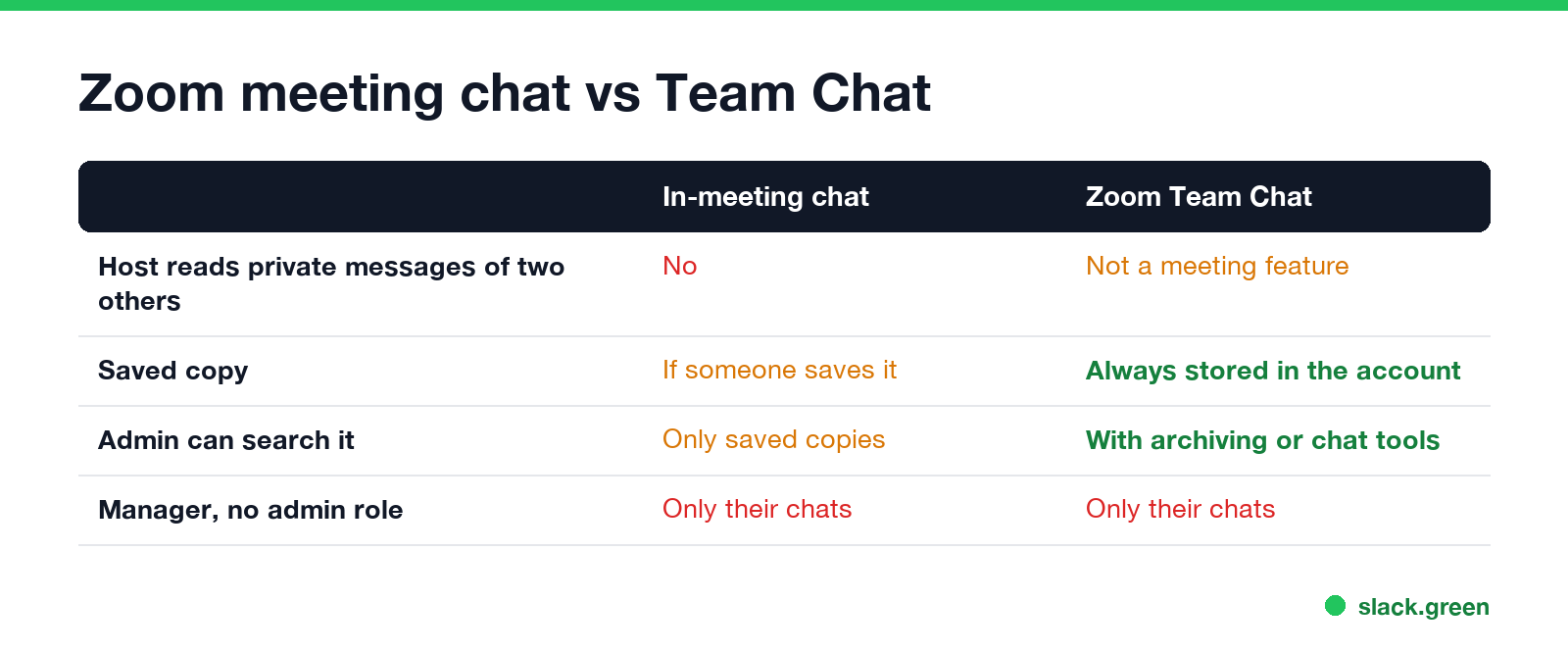
| In-meeting chat | Zoom Team Chat | |
|---|---|---|
| Where it lives | The meeting, then any saved copy | Your company's Zoom account, kept until retention deletes it |
| Host reads private messages between two others | No | Not a thing in Team Chat |
| Saved by | Host or participants, if saving is allowed, or with a cloud recording | Always stored in the account |
| Admin can search it | Only saved copies and cloud recordings | Yes, with archiving or admin chat tools on business accounts |
| Your manager, without admin rights | Only chats they are in | Only chats they are in |
What a Zoom meeting host can see
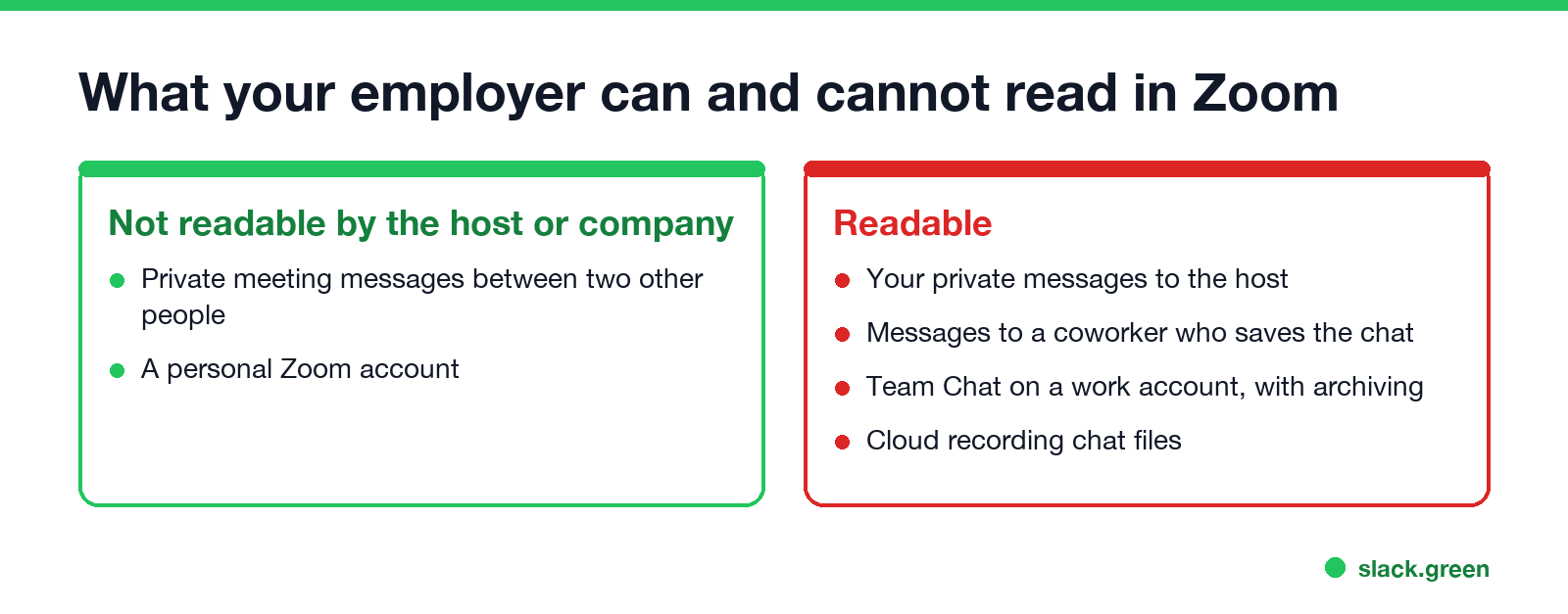
During a meeting the host sees messages sent to everyone and private messages sent to the host. Zoom does not show the host private messages between two other participants.
After the meeting, chat survives in two ways:
- Saved chat. The host, or a participant if the host allows it, can save the chat, and some accounts save it automatically. The file holds messages to everyone and private messages to or from the person who saved it. If you send a private message to a coworker and that coworker saves the chat, your message is in their file.
- Cloud recording. A cloud recording can include a chat file. Per Zoom, it holds messages to everyone and private messages to or from the host.
The host also controls who you can message. In the chat settings they pick No one, Host and co-hosts, or Everyone, so private messages may be off in some meetings. More on what a host sees, including attendance and join times, is in does Zoom track your activity.
What a Zoom admin can see in Team Chat
Never appear "away" on Slack again
Cloud-based. No downloads. Works 24/7 even when your laptop is off.
On a work account, Team Chat is company data, much like email. Depending on the plan and settings, an admin can:
Zoom also offers advanced chat encryption for Team Chat, which keeps the keys on users' devices. If your company turns it on, some admin access changes; check your account's settings before you assume either way.
What stays private, and what does not
Zoom vs Slack vs Teams on reading your chats
| Zoom Team Chat | Slack (paid) | Microsoft Teams | |
|---|---|---|---|
| Who can read private chats | Admins, with archiving or chat search | Owners, with exports or Discovery API | Compliance admins, with eDiscovery |
| Manager in the app | Only their chats | Only their chats | Only their chats |
| Meeting chat private messages | Not shown to the host | Huddle threads stay in the channel or DM | Stored like group chat |
The details for the others are in can Slack admins see your DMs and can my employer read my Teams chats.
FAQ
Never appear "away" on Slack again
Cloud-based. No downloads. Works 24/7 even when your laptop is off.
Can the host see private messages in Zoom? Only messages sent to the host. Private messages between two other participants are not shown to the host or saved in the host's copy.
Can Zoom admins see private chats? In Team Chat on a work account, yes, if archiving or admin chat tools are on. For meetings, only chats someone saved or a cloud recording kept.
Are Zoom chats private? Private from other participants, mostly. Not from your employer when you use Team Chat on a work account.
Stop Jiggling Your Mouse.
Join hundreds of remote workers who never worry about their Slack status. Set it up once, stay green forever.
Related Articles
KeepingYouAwake vs Amphetamine: Which Mac Keep-Awake App to Use
KeepingYouAwake is a free, open-source menu bar switch that runs Apple's caffeinate for you. Amphetamine is a free App Store app with triggers, schedules and a closed-lid mode. Pick KeepingYouAwake for one click and Homebrew, Amphetamine for automation. Neither keeps Slack or Teams active.
Computer Locks After 15 Minutes? How to Tell If Group Policy Set It
A work laptop that locks after exactly 15 minutes, with screen settings greyed out, is almost always following a policy from IT: the Windows machine inactivity limit, a forced screen saver, or an Intune device lock. Security baselines and PCI DSS ask for 15 minutes. How to see which policy it is, and what you can and cannot change.
How to Keep a Citrix Session Active: Find Which Timeout Logs You Out
A Citrix session can end from four different timers: Windows locking inside the virtual desktop, the Citrix session idle timer, the Citrix Gateway session time-out, and the StoreFront web page timeout. Only input from your own device into the Citrix window resets them. How to tell which one hit you and what keeps each one quiet.