
How to Tell If You Are Being Monitored at Work: 8 Checks
To tell if you are being monitored at work, read the IT policy, check whether the laptop is managed, look for monitoring agents, open your browser's management page and check who issued the certificate behind the padlock. Eight checks with commands for Windows and Mac, and what each one can and cannot prove.
To tell if you are being monitored at work, check five places on the work laptop. First read the IT policy, which often names the tool. Then check whether the laptop is managed and look for a monitoring agent in the running processes. Next open chrome://management or edge://management to see if the browser reports to the company. Last, click the padlock on any site and check who issued the certificate. A company name there, or Zscaler or Netskope, means the company decrypts your web traffic. None of these checks proves there is no monitoring, because stealth agents can hide. Assume a company laptop is watched, and ask IT in writing when it matters.
We build Slack Green, which keeps your Slack status green from a server and installs nothing on the work laptop. We track what employers can see on work computers. The overview of every monitoring layer is in how do employers monitor remote workers.
Eight signs you are being monitored at work
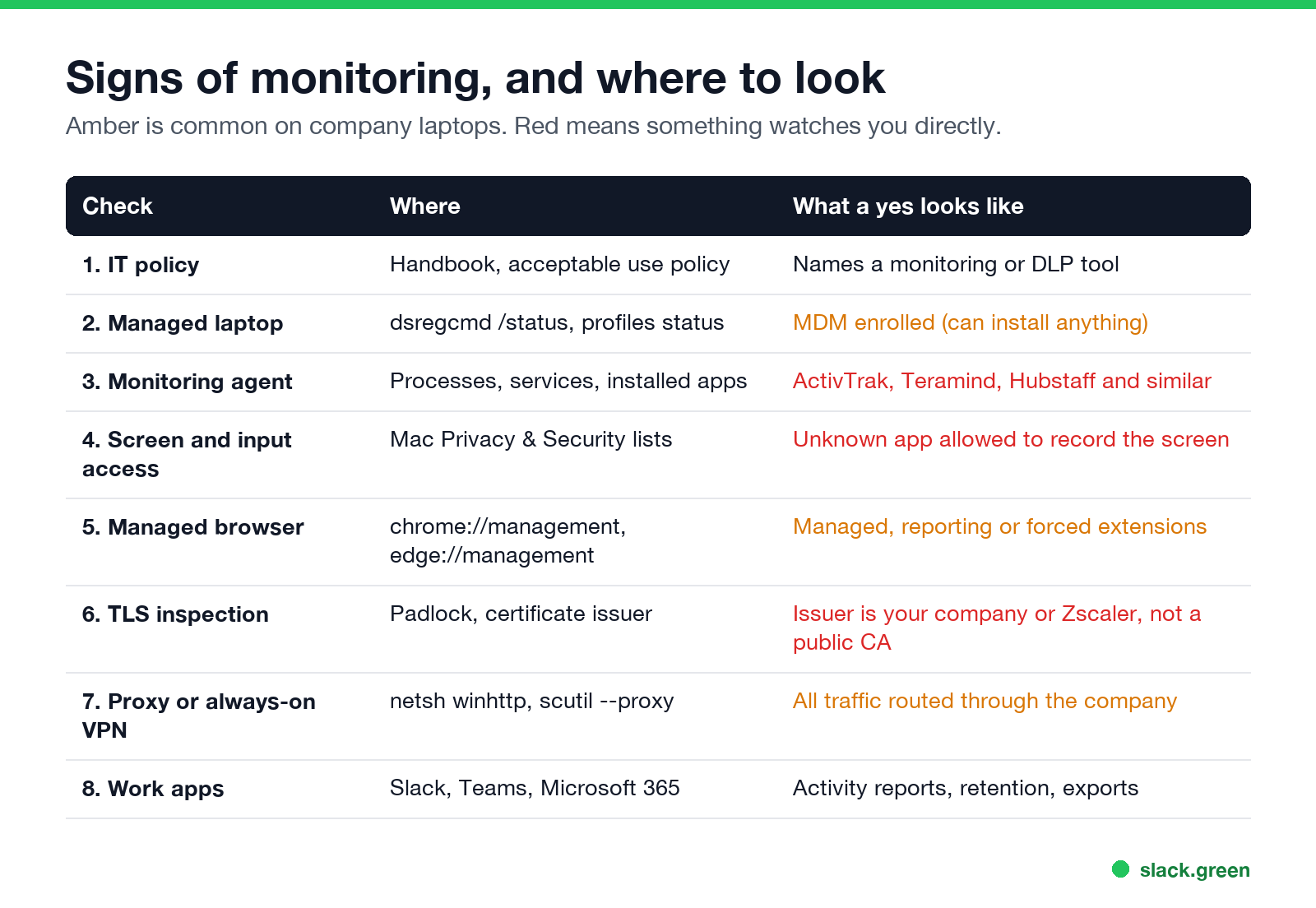
| Check | Where to look | What a yes means |
|---|---|---|
| 1. IT policy | Handbook, acceptable use policy, onboarding email | The company tells you which tool it runs |
| 2. Managed laptop | dsregcmd /status on Windows, profiles status on Mac | IT can install software, including monitoring |
| 3. Monitoring agent | Processes, services, installed apps | Apps, sites, idle time and often screenshots are recorded |
| 4. Screen and input access | Mac Privacy & Security lists | An app is allowed to record the screen or read input |
| 5. Managed browser | chrome://management, edge://management | Browser history or extensions can report to the company |
| 6. TLS inspection | Padlock, certificate issuer | The company can read HTTPS traffic, not only site names |
| 7. Proxy or always-on VPN | netsh winhttp show proxy, scutil --proxy | Every site you visit passes through a company server |
| 8. Work app logs | Slack, Teams, Microsoft 365 | Messages, files and activity counts are kept and exportable |
Checks 1, 2 and 8 come back yes on almost every company laptop. They mean monitoring is possible. Checks 3, 4 and 6 are the ones that show active watching.
Check 1: read the IT policy
The acceptable use policy or the employee handbook often names the monitoring or data loss prevention tool, because disclosure protects the employer. In New York, Connecticut and Delaware, employers must give written notice of electronic monitoring. In the EU and UK, monitoring has to be disclosed under data protection law. If the policy says "all activity on company devices may be monitored", treat that as a yes.
Check 2: is the laptop managed?
Never appear "away" on Slack again
Cloud-based. No downloads. Works 24/7 even when your laptop is off.
On Windows, open Command Prompt and run:
dsregcmd /statusAzureAdJoined : YES and an MdmUrl line mean the laptop is joined to your company's Microsoft Entra ID and enrolled in device management such as Intune. On a Mac, open Terminal and run:
profiles status -type enrollmentMDM enrollment: Yes means the company manages the Mac. Management alone does not watch you. It lets IT push any software, including a monitoring agent, without asking you.
Check 3: look for a monitoring agent
On Windows, open PowerShell and search running processes and installed apps for the common names:
# no output means none of these names are running or installed
$names = 'activtrak|teramind|hubstaff|timedoctor|insightful|veriato|controlio|currentware|kickidler|interguard'
Get-Process | Where-Object { $_.ProcessName -match $names } | Select-Object ProcessName, Path
Get-ItemProperty 'HKLM:\Software\Microsoft\Windows\CurrentVersion\Uninstall\*', 'HKLM:\Software\WOW6432Node\Microsoft\Windows\CurrentVersion\Uninstall\*' |
  Where-Object { $_.DisplayName -match $names } | Select-Object DisplayName, Publisher
On a Mac, list background items and system extensions:
# look for names you do not recognize, not only the ones in the grep
launchctl list | grep -iE 'activtrak|teramind|hubstaff|timedoctor|insightful|veriato'
systemextensionsctl list
Security tools such as CrowdStrike, SentinelOne or Microsoft Defender will show up too. They watch for malware and can log processes and connections, but they do not take screenshots of your work. Look them up before you worry.
Check 4: which apps can see your screen and input
On a Mac, open System Settings, then Privacy & Security. Check three lists: Screen & System Audio Recording, Accessibility and Input Monitoring. A monitoring agent needs at least one of them to capture the screen or keystrokes, so it appears there by name. Company software can grant these through MDM, and then you cannot turn them off.
Windows has no single list like this. Check 3 is the Windows equivalent. A camera light that turns on when no call is running is a separate sign, covered in can my employer see me through my laptop camera.
Check 5: is your browser managed?
Never appear "away" on Slack again
Cloud-based. No downloads. Works 24/7 even when your laptop is off.
Type chrome://management in Chrome or edge://management in Edge. If it says "Your browser is managed by your organization", the page lists what the company controls. Look for extensions installed by policy and for reporting of browsing data. A managed browser with reporting sends your history even when the laptop has no monitoring agent. What the company sees in history is in can my employer see my browsing history.
Checks 6 and 7: the network
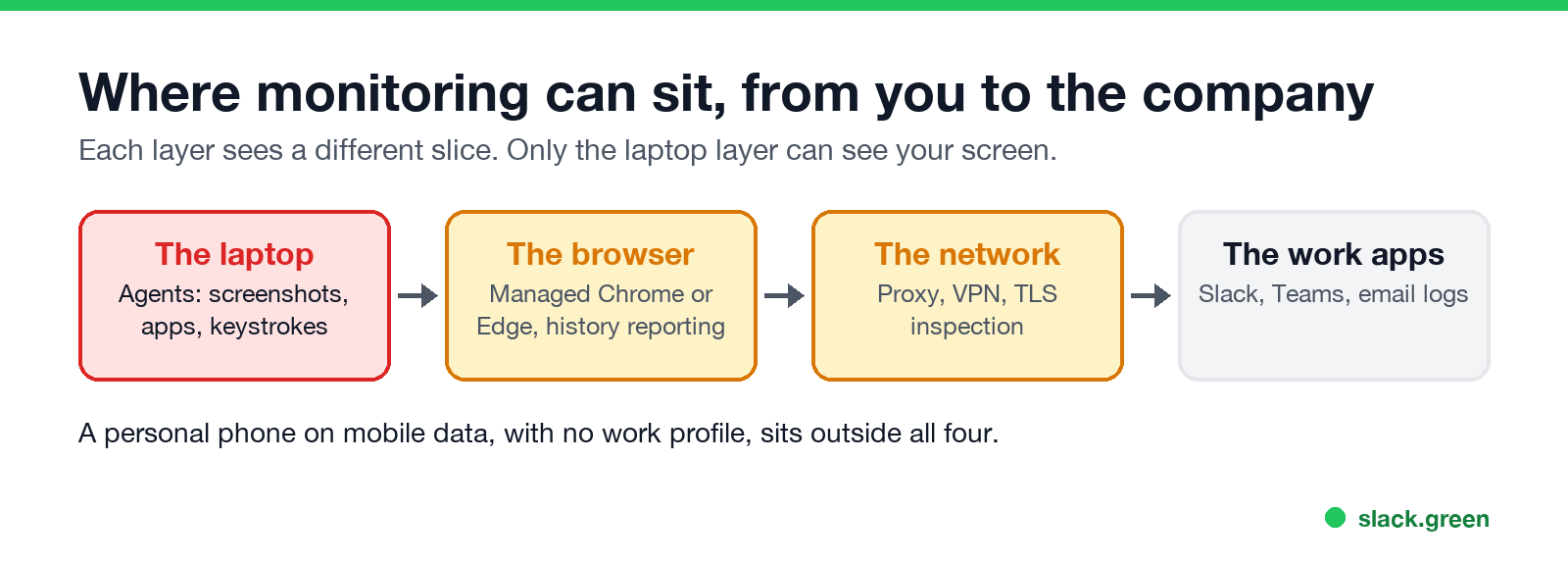
Click the padlock on any HTTPS site, open the certificate, and read the issuer. A public authority such as DigiCert, Let's Encrypt, Sectigo or Google Trust Services is normal. Your company's name, or a product such as Zscaler, Netskope or Palo Alto Networks, means the company opens and inspects encrypted traffic. It can then see full page addresses and form contents, not only site names. That includes personal webmail read in the work browser; see can my employer see my personal email on my work computer.
To see whether traffic goes through a company proxy, run this on Windows:
netsh winhttp show proxyAnd this on a Mac:
scutil --proxyA proxy server address, or a VPN that reconnects by itself and cannot be turned off, means every site you visit passes through a company server.
Check 8: the work apps log by design
Slack, Teams, Google Workspace and Microsoft 365 keep your messages and files, and admins can export them on some plans. They do not see your screen or other apps. Slack shows only an active or away dot built from input inside Slack. The Slack details are in can Slack be used to monitor employees. Teams also reports activity counts, as in does Teams track your activity.
What these checks cannot tell you
Never appear "away" on Slack again
Cloud-based. No downloads. Works 24/7 even when your laptop is off.
- • Stealth agents. Several monitoring products offer a hidden mode with harmless process names. An empty search is not proof.
- • Server-side logs. Email, file shares and cloud apps are logged on the company's servers, where no check on your laptop can see them.
- • Your phone. A personal phone without a work profile is outside all of this. A work profile or a company phone is not, as in can my employer see what I do on my phone.
The safe rule: keep personal browsing, banking and chats on a personal device. Tools that fake activity are visible too. A mouse jiggler shows up in agents that log input, as in can a mouse jiggler be detected.
FAQ
Can employees tell if they are being monitored?
Sometimes. A tray icon, an agent in the process list or a policy notice gives it away. Stealth monitoring is built to leave no visible sign, so the policy and a direct question to IT are more reliable than any check.
Is there a bossware detection tool?
No tool catches every product. Antivirus scanners flag some monitoring agents as potentially unwanted, but on a company laptop the company controls the antivirus too. The manual checks above cover the common products.
Can my employer see my screen?
Only if monitoring software takes screenshots or records, or during a screen share or remote support session. The full answer is in can my employer see my screen.
Is my employer monitoring my personal computer?
Not unless company software is on it. Signing in to Slack or Outlook on a personal computer lets those apps see only their own activity.
What is bossware?
A common name for employee monitoring software that records apps, sites, idle time and often screenshots. Examples and what each records are in what is bossware.
Stop Jiggling Your Mouse.
Join hundreds of remote workers who never worry about their Slack status. Set it up once, stay green forever.
Related Articles
How to Keep Skype Status Active: Skype for Business Idle Timers
To keep your Skype for Business status active, open Options, Status, and raise both idle timers, Inactive and then Away, from 5 minutes to as much as 360 minutes each. Consumer Skype shut down on May 5, 2025 and Skype for Business Online in 2021, so for most people the real question is now Teams. What still works, status icons, Outlook, and status not updating.
Is It Legal for My Employer to Monitor Me? US, EU and UK Rules
In the US it is mostly legal for an employer to monitor company devices, accounts and premises, often without asking. The limits are state notice laws in New York, Connecticut and Delaware, consent rules for audio recording and biometrics, bans on cameras in restrooms, and your personal devices. The EU, UK and parts of Canada and Australia add notice and proportionality rules.
Can My Employer See My Personal Email on My Work Computer?
Your employer cannot sign in to your Gmail, and doing so without permission can break the Stored Communications Act. But on a work computer, screenshot and keystroke monitoring, browser history, HTTPS inspection and Outlook's local cache can all expose personal email. Work email is fully visible, deleted messages included. Case by case, with what to do.