
What Is Bossware? Employee Monitoring Software, Explained
Bossware is employee monitoring software that records what workers do on their computers: apps and websites, active and idle time, and often screenshots, keystrokes or webcam photos. What it records, the common products, how it differs from security software, what the law says, and how to check for it.
Bossware is employee monitoring software that an employer installs on work computers to record what workers do. Typical products log which apps and websites you use and for how long, count active and idle minutes, and turn that into a productivity score. Many also take screenshots on a timer, and some record the screen, log keystrokes or take webcam photos. ActivTrak, Teramind, Hubstaff, Time Doctor, Insightful and Veriato are common examples. Vendors call it employee monitoring software. The Electronic Frontier Foundation popularized the word bossware in 2020, when remote work pushed many employers to buy these tools.
We build Slack Green, which keeps a Slack status green from a server and installs nothing on the work laptop. We write about what employers can see because our users ask. For the full picture of every layer, not only bossware, see how do employers monitor remote workers.
What bossware records
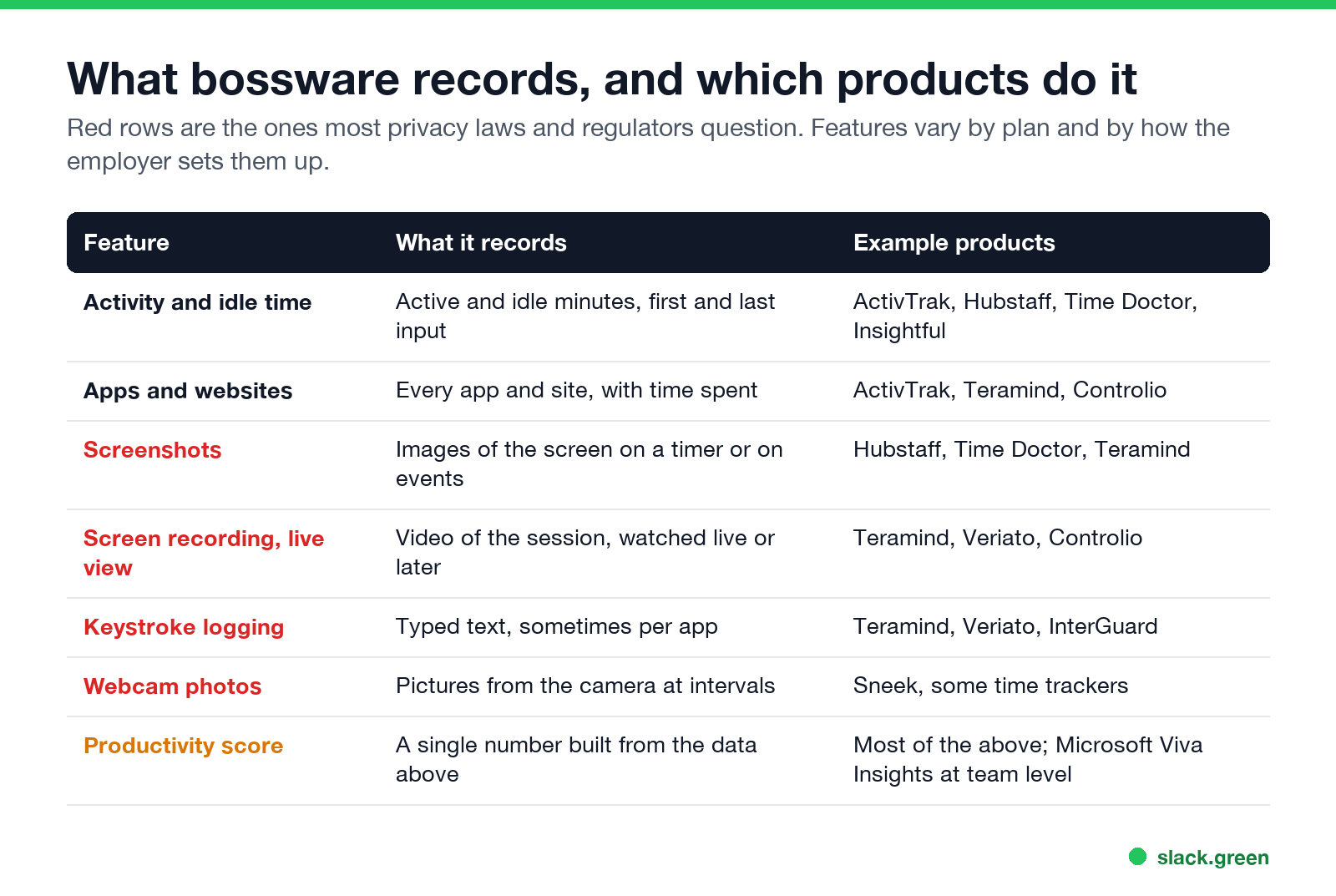
| Feature | What it records | Example products |
|---|---|---|
| Activity and idle time | Active and idle minutes, first and last input of the day | ActivTrak, Hubstaff, Time Doctor, Insightful |
| Apps and websites | Every app and site, with time spent, often labeled productive or not | ActivTrak, Teramind, Controlio |
| Screenshots | Images of the screen on a timer or when a rule fires | Hubstaff, Time Doctor, Teramind |
| Screen recording and live view | Video of the session, watched live or later | Teramind, Veriato, Controlio |
| Keystroke logging | Typed text, sometimes per app | Teramind, Veriato, InterGuard |
| Webcam photos | Pictures from the camera at intervals | Sneek, some time trackers |
| Productivity score | A single number built from the data above | Most of the above |
What a given employer sees depends on the plan it bought and the settings it turned on. Screenshots and keystroke logging are usually options, not defaults. Some products show a tray icon, and several offer a hidden mode the employer can turn on.
Bossware examples by type
- • Time trackers with screenshots. Hubstaff and Time Doctor. Often used for contractors paid by the hour. The worker usually starts and stops the timer, and screenshots are taken while it runs.
- • Activity analytics. ActivTrak and Insightful. They focus on app and site use, idle time and team dashboards. Screenshots are optional on some plans.
- • Insider-threat and full recording tools. Teramind, Veriato and InterGuard. Screen recording, keystrokes, file and email rules. Sold to security teams as well as managers.
- • Platform analytics. Microsoft Viva Insights and Productivity Score use data from Microsoft 365. Microsoft removed individual user names from Productivity Score in December 2020 after criticism, so it reports at team or organization level.
Work chat apps are not bossware on their own. Slack shows only an active or away dot built from input inside Slack, and does not see other apps or your screen. The details are in can Slack be used to monitor employees and, for Teams, does Teams track your activity.
Bossware vs security software
Never appear "away" on Slack again
Cloud-based. No downloads. Works 24/7 even when your laptop is off.
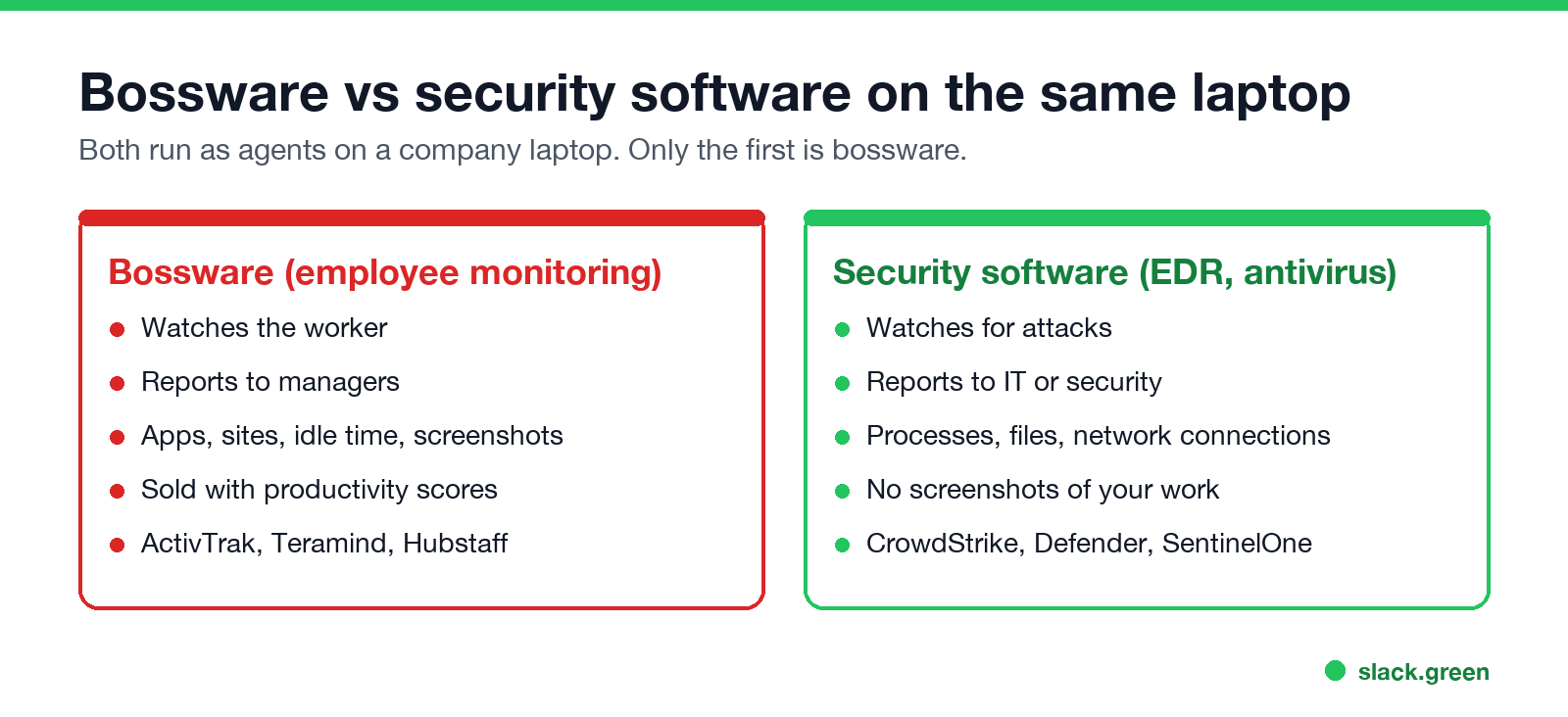
Most company laptops run security software such as CrowdStrike Falcon, Microsoft Defender for Endpoint or SentinelOne. These tools watch for malware and attacks. They log processes, files and network connections and report to IT or security. They do not take screenshots of your work or score your productivity. Finding one of them on your laptop does not mean you run bossware. Data loss prevention tools sit in between: they watch files and messages for sensitive data, and some can capture screenshots when a rule fires.
Is bossware legal?
In the US, monitoring a company-owned computer is broadly legal. New York, Connecticut and Delaware require employers to give written notice of electronic monitoring. In the EU and UK, monitoring falls under data protection law. It has to be necessary and proportionate, and workers must be told. Constant screen recording, keystroke logging and webcam capture are hard to justify there. In 2022 a Dutch court ruled that the US company Chetu could not fire a remote worker for refusing to keep his camera on all day. Your contract and the company's IT policy set the details for your job.
How to tell if bossware is on your computer
Start with the IT policy, which often names the tool. Then look for the agent. On Windows, a quick search of running processes:
# no output means none of these common bossware agents are running
Get-Process | Where-Object { $_.ProcessName -match 'activtrak|teramind|hubstaff|timedoctor|insightful|veriato|controlio|interguard' } |
  Select-Object ProcessName, Path
On a Mac, open System Settings, Privacy & Security, then Screen & System Audio Recording and Accessibility. Bossware needs one of these to capture the screen or input, so it appears there by name. An empty result is not proof, because hidden agents can use harmless names. All eight checks, including the browser and the network, are in how to tell if you are being monitored at work.
What bossware cannot see
Never appear "away" on Slack again
Cloud-based. No downloads. Works 24/7 even when your laptop is off.
Tools that fake input to beat bossware, such as mouse jigglers, are detectable by agents that log input. See can a mouse jiggler be detected before you try one on a monitored laptop.
FAQ
What does bossware mean?
It is a critics' name for employee monitoring software that tracks what workers do on their computers.
What are examples of bossware?
ActivTrak, Teramind, Hubstaff, Time Doctor, Insightful, Veriato, Controlio and InterGuard.
Can bossware see my screen?
Only if the employer turned on screenshots or screen recording. Activity-only setups log apps, sites and idle time, not the screen.
Can bossware read my messages?
Keystroke logging and screen recording can capture what you type and see, including in personal chats opened on the work laptop. Keep personal chats on a personal device.
Is Slack bossware?
No. Slack records messages and shows a presence dot. It does not track other apps, take screenshots or score productivity.
Stop Jiggling Your Mouse.
Join hundreds of remote workers who never worry about their Slack status. Set it up once, stay green forever.
Related Articles
How to Keep Skype Status Active: Skype for Business Idle Timers
To keep your Skype for Business status active, open Options, Status, and raise both idle timers, Inactive and then Away, from 5 minutes to as much as 360 minutes each. Consumer Skype shut down on May 5, 2025 and Skype for Business Online in 2021, so for most people the real question is now Teams. What still works, status icons, Outlook, and status not updating.
Is It Legal for My Employer to Monitor Me? US, EU and UK Rules
In the US it is mostly legal for an employer to monitor company devices, accounts and premises, often without asking. The limits are state notice laws in New York, Connecticut and Delaware, consent rules for audio recording and biometrics, bans on cameras in restrooms, and your personal devices. The EU, UK and parts of Canada and Australia add notice and proportionality rules.
Can My Employer See My Personal Email on My Work Computer?
Your employer cannot sign in to your Gmail, and doing so without permission can break the Stored Communications Act. But on a work computer, screenshot and keystroke monitoring, browser history, HTTPS inspection and Outlook's local cache can all expose personal email. Work email is fully visible, deleted messages included. Case by case, with what to do.