
Can My Employer See My Screen? The Four Ways, and How to Check
Your employer can see your screen in four situations: when you share it, when monitoring software takes screenshots or recordings, during a remote support session, or in a recorded virtual desktop. How to check a work laptop for each.
Your employer can see your screen in four situations: when you share it in a call, when monitoring software on the laptop takes screenshots or records the screen, during a remote support session, and when you work inside a virtual desktop that the company records. Outside those, no. Slack, Teams, Zoom and email do not see your screen unless you share it, and a company cannot see the screen of a personal computer that has no company software on it.
On a company laptop the second case is the one to check, because some monitoring tools run without an icon. The checks take about five minutes and are below.
We build Slack Green, which keeps your Slack status green from a server without installing anything on the laptop, so we track what employers can see on work computers. The wider picture is in how do employers monitor remote workers.
Four ways an employer can see your screen
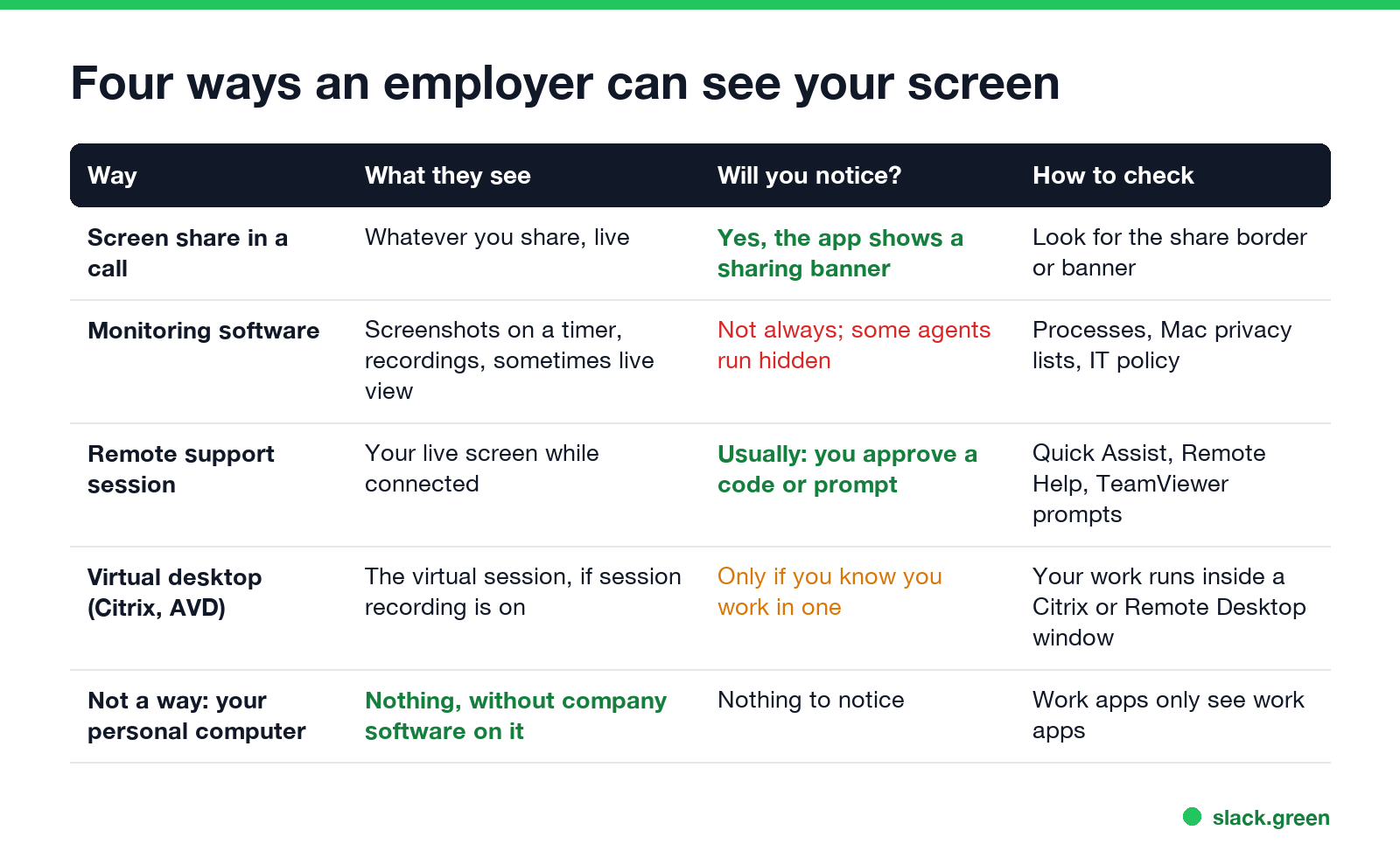
| Way | What they see | Will you notice? | How to check |
|---|---|---|---|
| Screen share in a call | Whatever you share, live | Yes, the app shows a sharing border or banner | Look for the border |
| Monitoring software | Screenshots on a timer, recordings, sometimes a live view | Not always, some agents run hidden | Processes, Mac privacy lists, IT policy |
| Remote support session | Your live screen while connected | Usually, you approve a code or a prompt | Quick Assist, Remote Help and TeamViewer prompts |
| Virtual desktop (Citrix, Azure Virtual Desktop) | The virtual session, if session recording is on | Only if you know you work in one | Your work runs inside a Citrix or Remote Desktop window |
Screen share
Teams, Zoom, Slack huddles and Google Meet show a colored border or a "you are sharing" banner while you share. When it stops, they stop seeing your screen. If you share your entire screen instead of one window, notifications that pop up during the share are visible too.
Monitoring software
This is what people mean by "bossware", covered product by product in what is bossware. An agent installed on the laptop records apps and websites, and many tools take screenshots on a timer. Hubstaff and Time Doctor are known for timed screenshots. Teramind and Veriato sell screen recording and live view. ActivTrak offers screenshots on some plans. Some agents show a tray icon, and some run in a stealth mode the employer can turn on.
Screenshots show whatever is on the screen at that moment, including personal tabs, chats and bank pages if you open them on the work laptop. Some tools can blur screenshots, and the employer chooses the setting.
Remote support session
When IT fixes your laptop remotely, they see your screen live. Windows Quick Assist needs you to enter a code and allow the session. Microsoft Intune Remote Help asks you to allow the helper. TeamViewer and AnyDesk usually show a connection window. Unattended access, which some companies set up for shared machines, can skip the prompt, so ask IT whether a remote tool is installed.
Virtual desktop
If you work inside Citrix, Azure Virtual Desktop or VMware Horizon, the desktop runs on company servers. Admins can record sessions with tools such as Citrix Session Recording. That covers only the virtual session, not the rest of your own computer.
Can my employer see everything I do on my work laptop?
Without monitoring software: no, but they can see a lot. Laptop management (Intune, Jamf) shows installed apps and device state. The VPN and web filters log sites you visit. Work apps log their own activity: Slack and Teams record messages and sign-ins, and Microsoft Purview can search Teams messages, as in can my employer see deleted Teams messages. The network side is in how do employers monitor remote workers.
With monitoring software: close to everything on screen, for the hours it runs.
Check a work laptop in five minutes
Never appear "away" on Slack again
Cloud-based. No downloads. Works 24/7 even when your laptop is off.
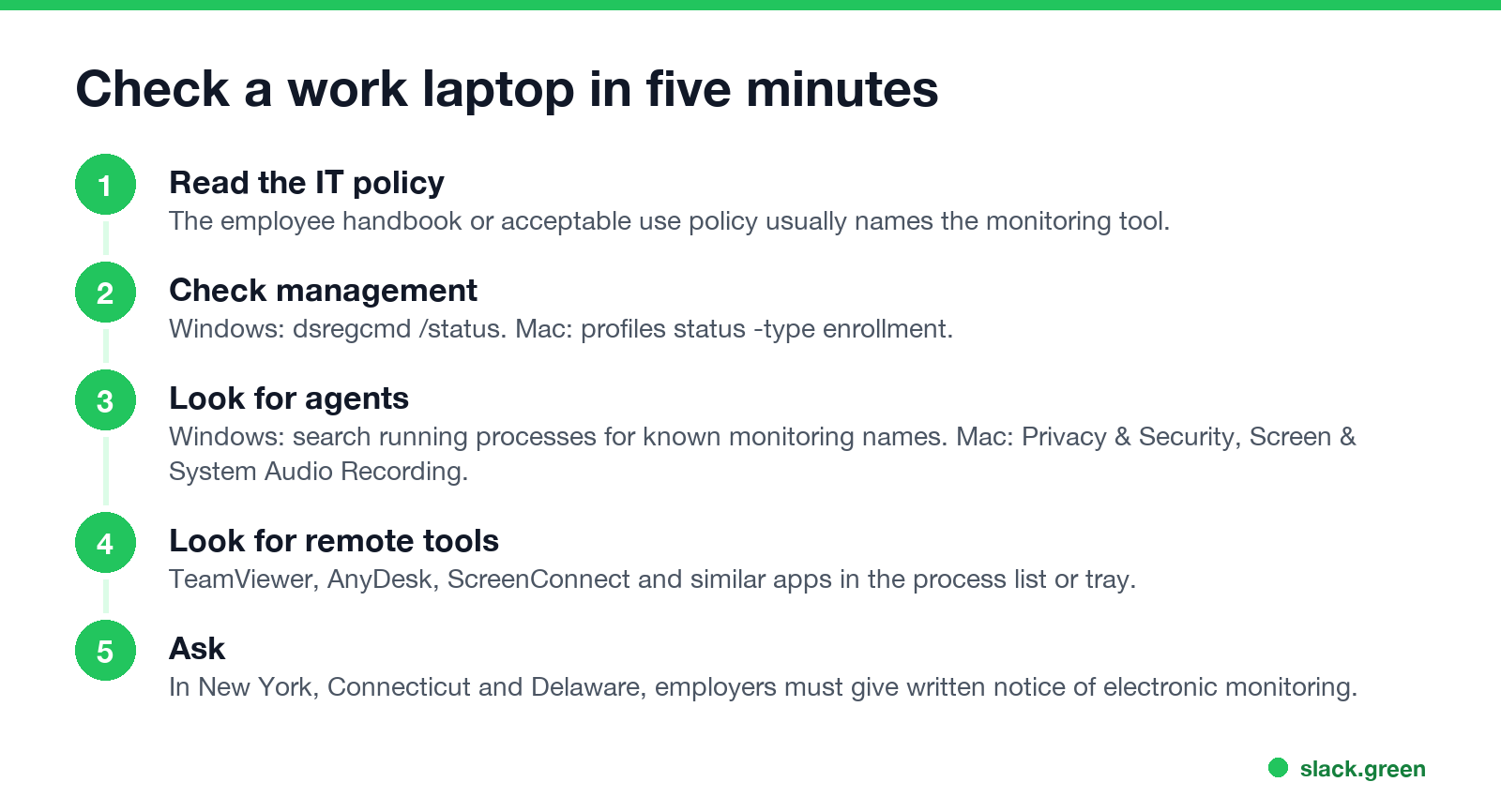
1. Read the IT policy. The employee handbook or acceptable use policy often names the monitoring tool. In New York, Connecticut and Delaware, the employer has to tell you about electronic monitoring in writing.
2. Check whether the laptop is managed. On Windows, in Command Prompt:
dsregcmd /statusAzureAdJoined : YES and an MdmUrl line mean the laptop is joined to your company's Microsoft Entra ID and enrolled in device management. On a Mac, in Terminal:
profiles status -type enrollmentMDM enrollment: Yes means the company manages the Mac. Management alone does not see your screen, but it can install software that does.
3. Look for a monitoring agent or remote tool. On Windows, in PowerShell:
# known monitoring and remote-access names; no output means none of these are running
Get-Process | Where-Object { $_.ProcessName -match 'activtrak|teramind|hubstaff|timedoctor|insightful|veriato|controlio|teamviewer|anydesk|screenconnect' } |
  Select-Object ProcessName, Path
On a Mac, open System Settings, then Privacy & Security, then Screen & System Audio Recording. Every app allowed to capture the screen is listed there. Check Accessibility too. A monitoring agent needs one or both, so it appears by name.
4. Know the limits. The full list of eight checks, including the browser and the network, is in how to tell if you are being monitored at work. An empty result does not prove there is no agent. Stealth agents can use harmless names. The policy and a direct question to IT are more reliable than any command.
Can my boss see my screen on Teams or Slack?
Only while you share it. Teams and Slack do not take screenshots and have no remote view. What they record is your messages, your status and activity counts. Teams builds your status from the whole computer's idle time, as in what does inactive mean on Teams. Slack builds it from input inside Slack only, as in how Slack active status works. What else Teams records is in does Teams track your activity, and the Slack side is in can Slack be used to monitor employees.
Is it legal for my employer to watch my screen?
In the US, monitoring a company-owned computer is broadly legal, and New York, Connecticut and Delaware require written notice. In the EU and UK, monitoring has to be necessary, proportionate and disclosed under data protection law, and constant screen recording is hard to justify. Your contract and the company's IT policy set the details. The camera version of this question is in can my employer see me through my laptop camera, and the phone version in can my employer see what I do on my phone.
Keep personal things off the work screen
Never appear "away" on Slack again
Cloud-based. No downloads. Works 24/7 even when your laptop is off.
- • Use a personal device for personal browsing, banking and chats.
- • Share one window in calls, not the whole screen.
- • Turn on Do Not Disturb or Focus before you share, so private notifications do not appear.
FAQ
Can my employer see my screen without me knowing? Yes, if monitoring software with screenshots or recording runs in stealth mode on the work laptop. Screen shares and most remote support sessions show a banner or a prompt.
Can my employer see my screen when I am on the company VPN? The VPN shows which sites and servers you connect to, not your screen.
Can my employer see my personal computer screen? No, unless company software is installed on it. Work apps you sign in to on it see only their own activity.
Can Teams or Slack see my screen? Only during a screen share. Neither takes screenshots.
How often do monitoring tools take screenshots? The employer sets it. Many tools take one every few minutes while you are active.
Stop Jiggling Your Mouse.
Join hundreds of remote workers who never worry about their Slack status. Set it up once, stay green forever.
Related Articles
How to Keep Skype Status Active: Skype for Business Idle Timers
To keep your Skype for Business status active, open Options, Status, and raise both idle timers, Inactive and then Away, from 5 minutes to as much as 360 minutes each. Consumer Skype shut down on May 5, 2025 and Skype for Business Online in 2021, so for most people the real question is now Teams. What still works, status icons, Outlook, and status not updating.
Is It Legal for My Employer to Monitor Me? US, EU and UK Rules
In the US it is mostly legal for an employer to monitor company devices, accounts and premises, often without asking. The limits are state notice laws in New York, Connecticut and Delaware, consent rules for audio recording and biometrics, bans on cameras in restrooms, and your personal devices. The EU, UK and parts of Canada and Australia add notice and proportionality rules.
Can My Employer See My Personal Email on My Work Computer?
Your employer cannot sign in to your Gmail, and doing so without permission can break the Stored Communications Act. But on a work computer, screenshot and keystroke monitoring, browser history, HTTPS inspection and Outlook's local cache can all expose personal email. Work email is fully visible, deleted messages included. Case by case, with what to do.