
Can My Employer See When I Log Into My Computer?
On a work computer, yes. Windows and macOS record every sign-in, sign-out, lock and unlock, and a managed laptop can pass those records to IT along with app sign-ins, VPN times and monitoring data. What each record holds, who reads it, and how to see your own.
Yes. On a work computer, your employer can see when you log in, and usually when you lock, unlock and log out. Windows writes each sign-in to its Security log (event 4624) and each lock and unlock to events 4800 and 4801 when that auditing is on. A company account also leaves a sign-in record on the domain controller or in Microsoft Entra ID, and security software such as Microsoft Defender for Endpoint forwards device logons to an IT console. Whether anyone looks is a different question: most IT teams read these logs for security, not attendance, unless the company also runs time-tracking or monitoring software.
The time you appear online in Slack is a separate record. Slack shows you active only while you use Slack, and away after 10 minutes with no input in its window. Slack Green keeps your Slack status green during the hours you set, without touching the work laptop.
What records your login time
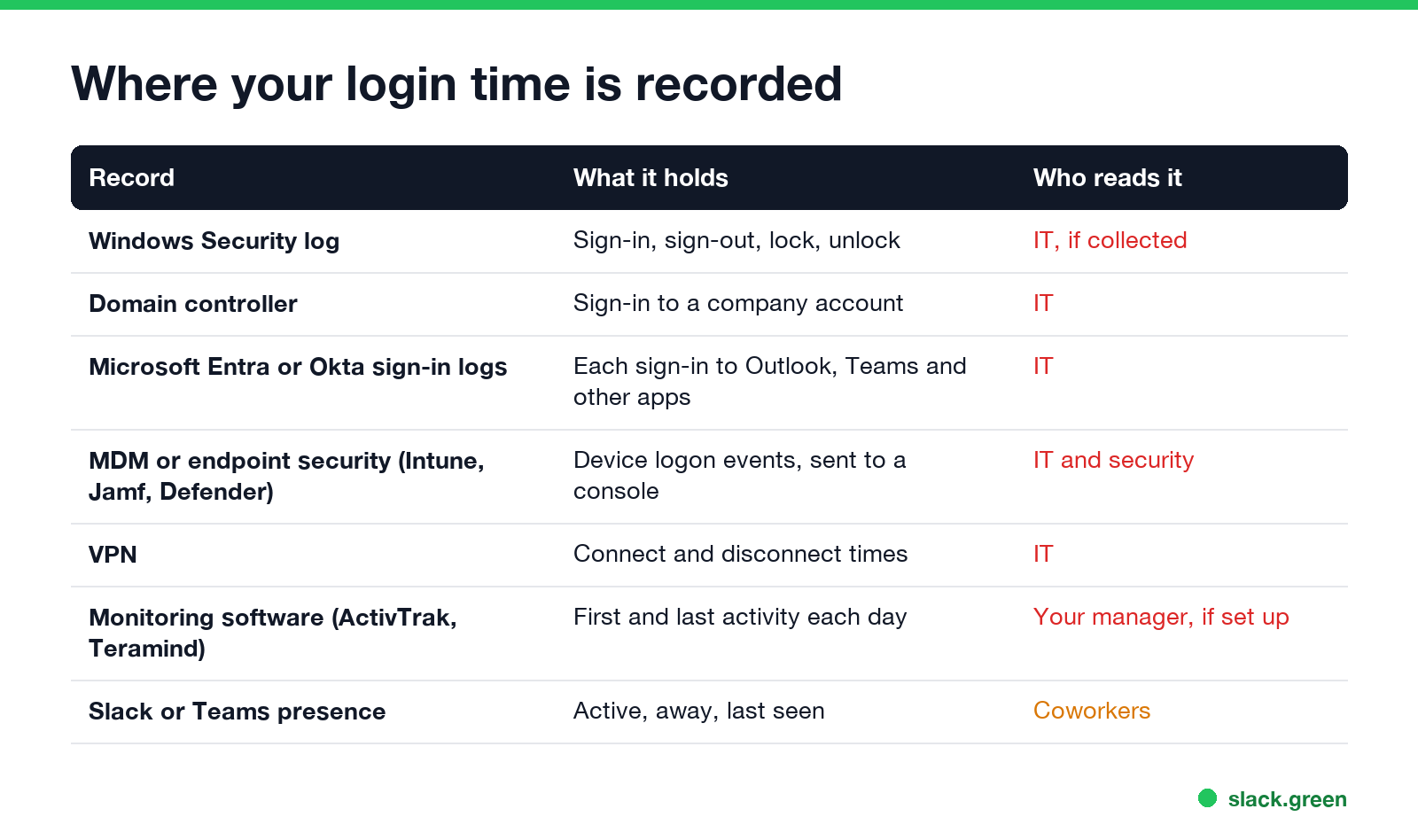
| Record | What it holds | Who can read it |
|---|---|---|
| Windows Security log | Sign-in (4624), sign-out (4634, 4647), lock (4800), unlock (4801), failed sign-in (4625) | Admins on the PC, IT if it is collected |
| Domain controller | Each sign-in with a company account, via Kerberos or NTLM | IT |
| Microsoft Entra ID or Okta | Each sign-in to Outlook, Teams and other cloud apps, with time, IP and device | IT |
| Endpoint security or MDM | Device logon events, for example the DeviceLogonEvents table in Microsoft Defender for Endpoint | IT and security |
| VPN | Connect and disconnect times | IT |
| Monitoring software | First and last activity each day, idle time, apps used | Your manager, if the company set it up |
| Slack or Teams presence | Active, away, last seen | Coworkers |
The Windows log sits on the computer itself. It becomes visible to your employer when something ships it off the machine: a security agent, a log collector (a SIEM), or an admin who opens Event Viewer remotely. On a company-managed laptop, assume at least one of those is running.
How a login reaches your employer
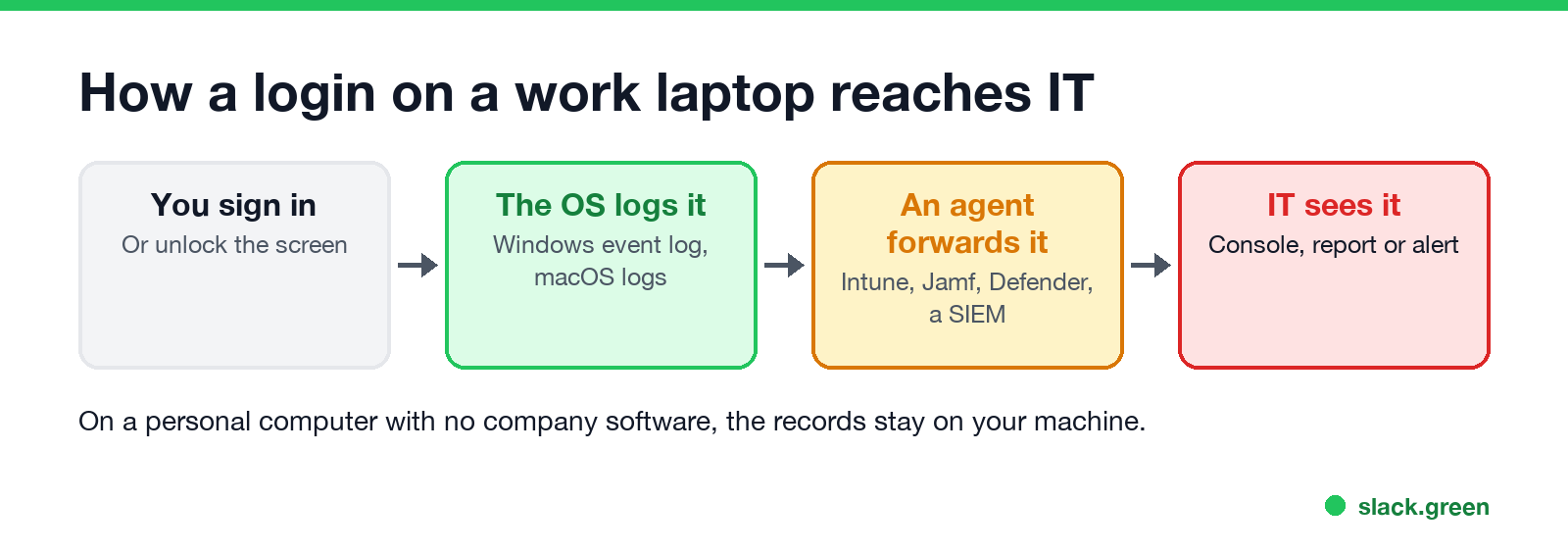
A sign-in to Windows with a company account does two things. The laptop logs the event locally, and it asks the company's directory (Active Directory or Entra ID) to check your password, which the directory also logs. So even a laptop with no monitoring software leaves a record of when your company account signed in. Unlocking with Windows Hello counts as a sign-in too.
A Mac managed with Jamf, Kandji or Intune reports device data to the company. Sign-in times are in macOS logs and can be collected, but most Mac management tools do not report them by default. Monitoring software is different: tools such as ActivTrak, Teramind and Hubstaff are sold to report when each person started and stopped working. How they work, and how to spot one, is in how to tell if you are being monitored at work and what is bossware.
Can my boss see when I log in?
Never appear "away" on Slack again
Cloud-based. No downloads. Works 24/7 even when your laptop is off.
Your manager usually cannot open these logs. IT and security teams can. A manager sees login times when:
- • the company uses time-tracking or monitoring software that puts first and last activity in a dashboard,
- • HR asks IT for a report, which happens in investigations and disputes,
- • your own apps show it, such as Slack or Teams presence turning green at 9:40 instead of 9:00.
The last one is the one people notice. Teams sets you Available when you use your computer and Away after about 5 minutes without input; Slack goes away after 10 minutes without input in the Slack window. Both are covered in does Teams track activity and can Slack be used to monitor employees.
See your own login history
On Windows, the System log keeps user logon and logoff notices you can read without admin rights. In PowerShell:
# last 20 logons and logoffs on this PC (no admin needed)
Get-WinEvent -FilterHashtable @{ LogName = 'System'; ProviderName = 'Microsoft-Windows-Winlogon'; Id = 7001, 7002 } -MaxEvents 20 |
    Select-Object TimeCreated, @{ n = 'Event'; e = { if ($_.Id -eq 7001) { 'Logon' } else { 'Logoff' } } }
The Security log with events 4624, 4634, 4800 and 4801 needs an admin account: open Event Viewer > Windows Logs > Security and use Filter Current Log with those IDs. If 4800 and 4801 never appear, the lock and unlock audit policy is off on your PC.
On a Mac, two built-in commands show when the Mac was used:
# console logins since the last log rotation
last console | head

# recent sleep and wake times
pmset -g log | grep -E ' (Sleep|Wake)  ' | tail -20
We ran both on macOS 26. last console listed each login session with its start and end, and the pmset line listed every sleep and wake with a timestamp and the reason.
Is it legal for my employer to track login times?
In the US, an employer can generally record sign-ins on computers and accounts it owns. New York, Connecticut and Delaware require employers to give written notice of electronic monitoring. In the EU and UK, the tracking must be proportionate and you must be told. Details by place are in is it legal for my employer to monitor me. On a personal computer with no company software, sign-in times stay on your machine, though your sign-ins to company email or Slack are still logged by those services; see can my employer monitor my personal computer.
FAQ
Never appear "away" on Slack again
Cloud-based. No downloads. Works 24/7 even when your laptop is off.
Can my employer see when I log into my work computer? Yes. Windows and macOS log each sign-in, and IT can collect those logs from a managed laptop.
Can my employer see when I lock and unlock my computer? Yes, if lock and unlock auditing is on. Windows records them as events 4800 and 4801.
Can my boss see what time I log in and log out? Only through IT or monitoring software. Your manager does not see Windows logs directly.
Does logging into Outlook or Teams record the time? Yes. Microsoft Entra ID keeps a sign-in log with time, IP address and device for each app sign-in.
Can my employer see when I log into my personal computer? No, not the computer itself. Your sign-ins to company apps from it are still logged.
Stop Jiggling Your Mouse.
Join hundreds of remote workers who never worry about their Slack status. Set it up once, stay green forever.
Related Articles
How to Check if Your Work Mac Is Being Monitored
Six read-only checks on a work Mac, no admin password needed: MDM enrollment, the Privacy & Security lists, permissions IT pre-approved, background items, running agents and the browser. Plus a script that runs them all and what counts as normal.
How to Stop the Screen Turning Off During a Presentation
PowerPoint and Keynote hold the screen on in slide show mode. A PDF, a browser deck or a window shared in Teams or Zoom does not, so the screen dims mid-talk. How to keep it on for the length of the talk on Windows and Mac, without changing your settings for good.
How to Keep Your Computer Awake While Downloading
A download stops when the computer sleeps, not when the screen turns off. Block sleep for the length of the download on Windows or Mac, let the display go dark, and the file finishes. Settings, commands and a script that stops by itself.