
How Do Employers Monitor Remote Workers? What Each Tool Sees
Employers monitor remote workers through five layers: work apps like Slack and Teams, laptop management, monitoring software, the network, and your output. What each one sees, how to check your own laptop, and what the law says.
Employers monitor remote workers in five layers. The work apps, such as Slack, Microsoft Teams and Microsoft 365, log sign-ins, messages and presence on every device you use. Laptop management tools such as Intune or Jamf report the apps, processes and USB devices on a company laptop. Monitoring software such as ActivTrak, Teramind or Hubstaff, where installed, records apps used, active and idle time, and often screenshots. The VPN and network log where you connect and which sites you visit. And your output, in Jira, GitHub or a CRM, shows what you ship. Most of this is legal on a company device, and in some US states the employer must tell you in writing.
This guide is written for the person being monitored, not the manager buying software. Most pages that rank for this question are written by monitoring vendors. Below is what each layer can see, how to check what runs on your own laptop, and what no layer can see.
A lot of the worry is about one small signal: the green dot in Slack. We build Slack Green, which keeps your Slack dot green during the hours you set from a cloud server, with nothing on your laptop. How the dot turns into a record for your employer is below.
The five layers of remote work monitoring
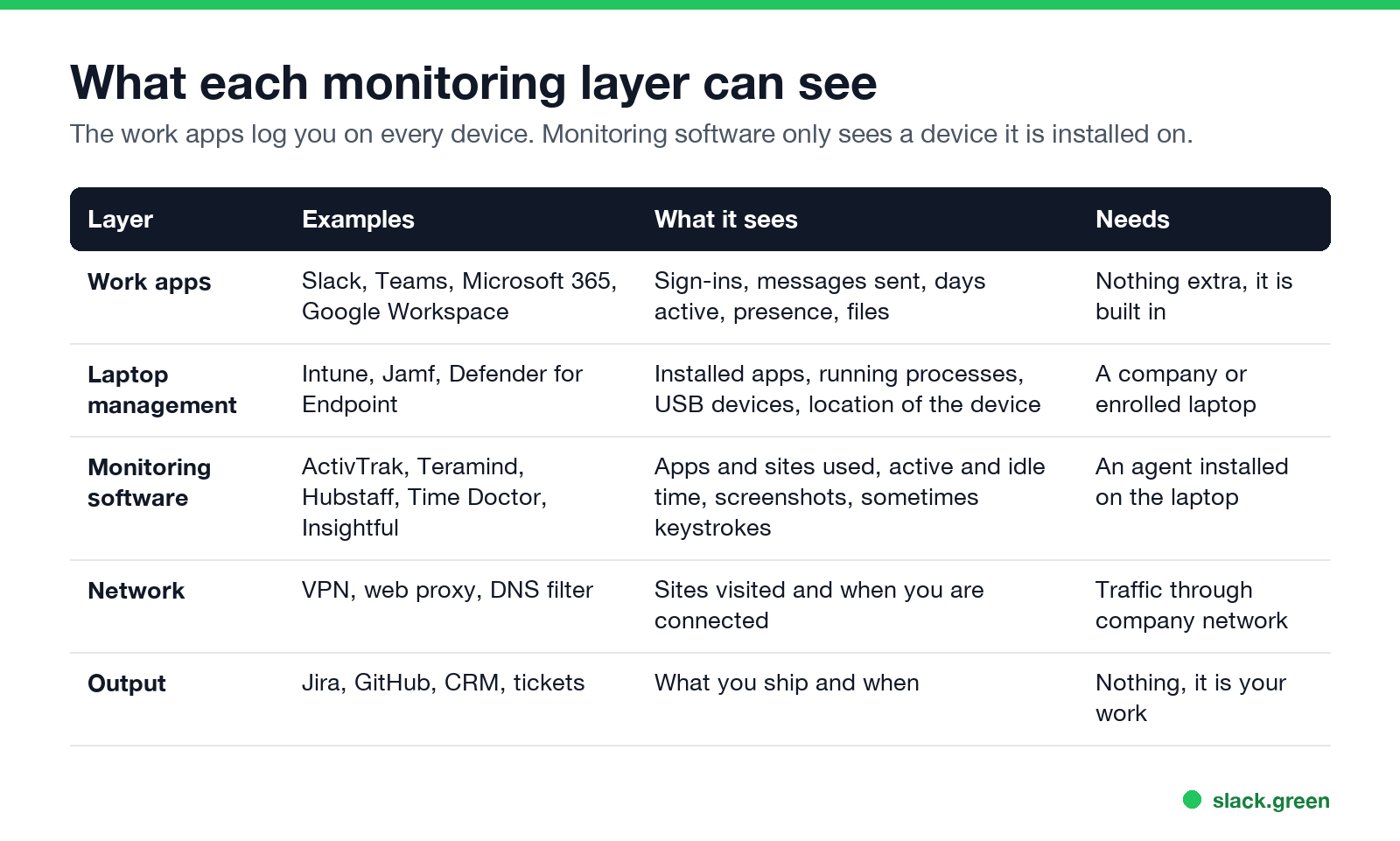
| Layer | Examples | What it sees | What it needs |
|---|---|---|---|
| Work apps | Slack, Teams, Microsoft 365, Google Workspace, Zoom | Sign-ins, messages sent, days active, presence, files | Nothing extra; it is built in |
| Laptop management | Microsoft Intune, Jamf, Defender for Endpoint | Installed apps, running processes, USB devices, device location | A company or enrolled laptop |
| Monitoring software | ActivTrak, Teramind, Hubstaff, Time Doctor, Insightful | Apps and sites used, active and idle time, screenshots, sometimes keystrokes | An agent installed on the laptop |
| Network | VPN, web proxy, DNS filter | Sites visited, when you connect, how much traffic | Your traffic going through the company network |
| Output | Jira, GitHub, a CRM, the ticket queue | What you finish and when | Nothing; it is your work |
The first layer follows you to any device, including your own phone. The next two only see a device they are installed on. That difference answers most "can my employer see..." questions.
Layer 1: the work apps, Slack and Teams included
Every workspace tool keeps logs for its admins. In Slack, owners and admins see analytics per member: days active, messages posted and more. They see access logs with the time, IP address and device of each sign-in. On some plans they can export messages, including DMs, under their data policy. The full list is in can Slack be used to monitor employees, and the DM question is in can Slack admins see your DMs.
Microsoft 365 admins get usage reports for Teams, Outlook and OneDrive per user: messages, calls, meetings and files. Teams presence also shows your manager when you go away, usually after 5 minutes without input on the computer. See does Teams track activity and how long before Teams shows away.
What these apps do not see: your screen, your keystrokes outside the app, and what you do in other programs. Slack does not track your mouse outside its own window and does not notify anyone of screenshots.
The dot as a timesheet. Slack's presence is public to your coworkers, and a manager can check it any time. Some teams also run apps that poll presence through Slack's API and log it all day. Slack sets you away 10 minutes after your last input in its window, so reading, calls and thinking all show as away. That is the gap that how to keep Slack active is about, and why Slack Green keeps the dot on your working-hours schedule.
Layer 2: laptop management on a company laptop
Never appear "away" on Slack again
Cloud-based. No downloads. Works 24/7 even when your laptop is off.
A company laptop is almost always enrolled in a device management tool. On Windows that is often Microsoft Intune with Defender for Endpoint. On a Mac it is often Jamf or Intune. These tools report the installed apps, the running processes, the USB devices you plug in, the OS version and often the device's location. They exist for security, but the same data answers "was a mouse jiggler plugged in?" in one query. The details are in can a mouse jiggler be detected.
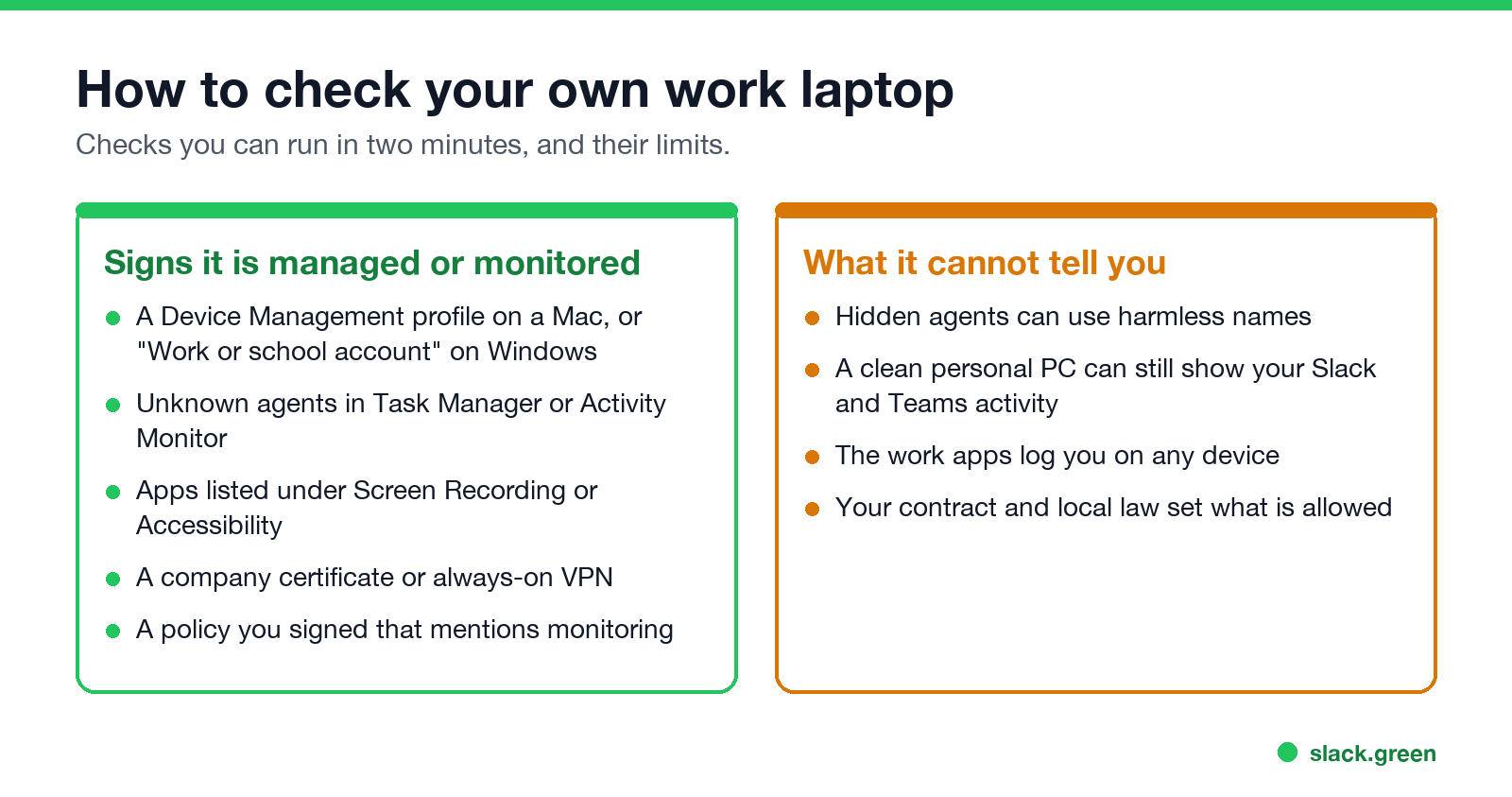
You can check whether your own laptop is managed.
On Windows, in Command Prompt or PowerShell:
dsregcmd /statusLook for AzureAdJoined : YES and an MdmUrl line. Both mean the laptop is joined to your company's Microsoft tenant and managed.
On a Mac, in Terminal:
profiles status -type enrollmentMDM enrollment: Yes means the Mac is managed. System Settings, then Privacy & Security, then Profiles lists what the profile controls.
Layer 3: employee monitoring software
This is the layer people mean by "bossware". An agent runs on the laptop and records the apps and sites you use, how long you use each, and how long the keyboard and mouse sit idle. Many tools take screenshots on a timer. Some record the screen, log keystrokes, or score your day as "productive" or "unproductive". Some run visibly with a tray icon, and some run in a stealth mode that the employer turns on.
To look for a known agent on Windows:
Get-Process | Where-Object { $_.ProcessName -match 'activtrak|teramind|hubstaff|timedoctor|insightful|controlio|veriato' } |
  Select-Object ProcessName, Path
On a Mac, open System Settings, then Privacy & Security, and check Screen & System Audio Recording and Accessibility. A monitoring agent needs one or both, so it shows up in those lists by name.
An empty result does not prove there is no agent. Stealth agents can use harmless-looking names. Your employee handbook or IT policy is often the fastest honest answer, and in New York, Connecticut and Delaware the employer has to tell you about electronic monitoring in writing.
Layer 4: the VPN and the network
When you connect to the company VPN, or your laptop sends traffic through a company proxy or DNS filter, IT can log which sites you visit and when you are connected. With HTTPS they usually see the site name, not the page content, unless the laptop has a company certificate that lets them inspect traffic. The VPN log also shows the IP address you connect from, which is how some companies notice a worker is abroad.
Working for two companies at once? What to keep apart so neither IT team sees the other job is in how to work two remote jobs.
Layer 5: your output
Never appear "away" on Slack again
Cloud-based. No downloads. Works 24/7 even when your laptop is off.
The oldest method is still the most common one. Managers look at tickets closed, pull requests merged, deals logged and replies sent. Tools such as Jira, GitHub and Salesforce record who did what and when, with no monitoring software at all. A worker who looks active all day but ships little gets noticed here first.
Can my employer see my screen or my camera?
Your screen: only if monitoring software with screenshots or screen recording runs on the laptop, or while you share your screen in a call. Slack and Teams do not see your screen outside a share.
Your camera: only during calls, unless monitoring software records the webcam, which few tools do and many laws limit. In 2022 a Dutch court ruled that the US company Chetu could not fire a remote worker for refusing to keep his camera on all day, and ordered it to pay about 75,000 euros.
What monitoring cannot see
- • A personal device with no company software, except the work apps you sign in to on it.
- • Your screen, keystrokes or files outside the work apps, unless an agent runs on that device.
- • Why your Slack dot is grey. Slack shows away whether you are reading, on a call, or at lunch.
Is it legal for employers to monitor remote workers?
Never appear "away" on Slack again
Cloud-based. No downloads. Works 24/7 even when your laptop is off.
In the US, monitoring a company-owned device and company accounts is broadly legal. New York, Connecticut and Delaware require written notice of electronic monitoring. In the EU and UK, monitoring must be necessary, proportionate and disclosed under data protection law, and constant webcam or keystroke monitoring is hard to justify. Your contract and the company's IT policy set the details. The mouse jiggler side of this is in are mouse jigglers legal, and in 2024 Wells Fargo fired more than a dozen employees for "simulation of keyboard activity".
FAQ
Can my employer monitor me working from home?
Yes, on a company laptop and in company accounts. Work apps log you on any device. Monitoring software only sees a device where it is installed.
Can my boss tell if I'm working remotely from somewhere else?
Often. Sign-in logs in Slack and Microsoft 365, and the VPN, record the IP address you connect from, which gives an approximate location.
What are the signs that you are being monitored at work?
A device management profile, unknown agents in Task Manager or Activity Monitor, apps with Screen Recording or Accessibility access, an always-on VPN, and a signed policy that mentions monitoring.
Can my employer see my Slack activity?
Admins see days active, messages posted and sign-ins, and your coworkers see your presence dot. Details in can Slack be used to monitor employees.
How do employers know if remote employees are working?
Mostly through output and the work apps: tickets, commits, messages, meeting attendance and presence. Some add monitoring software that scores active and idle time.
Can monitoring software see a mouse jiggler?
Usually. A software jiggler shows as a process and as injected input, and a USB jiggler as a new device. See can a mouse jiggler be detected.
Stop Jiggling Your Mouse.
Join hundreds of remote workers who never worry about their Slack status. Set it up once, stay green forever.
Related Articles
Slack Lists Tutorial: Create, Organize and Share a List
Slack lists are tables of tasks inside Slack, with fields, assignees, due dates, a board view and a comment thread on every item. How to create a list from scratch or a template, set up fields, turn it into a kanban board, add messages to it, share it, and what the plan limits are.
Slack Jira Integration: Setup, /jira Commands and Notifications
Install the Jira Cloud for Slack app, type /jira connect in a channel to send a Jira space's updates there, /jira notify for personal notifications as DMs, and create work items from any message with More actions. Every /jira command, Jira automation to Slack, and fixes when previews or notifications stop.
How to Create a Slack Workspace, on Desktop or Phone
Go to slack.com/get-started, enter your email, type the confirmation code, and click Create a Workspace. It is free to start, you become the Primary Owner, and it takes about five minutes. Steps for desktop, iPhone and Android, and what to set up next.