
How Do Employers Monitor Remote Workers? What Each Tool Sees
Employers monitor remote workers through five layers: work apps like Slack and Teams, laptop management, monitoring software, the network, and your output. What each one sees, how to check your own laptop, and what the law says.
Employers monitor remote workers in five layers. The work apps, such as Slack, Microsoft Teams and Microsoft 365, log sign-ins, messages and presence on every device you use. Laptop management tools such as Intune or Jamf report the apps, processes and USB devices on a company laptop. Monitoring software such as ActivTrak, Teramind or Hubstaff, where installed, records apps used, active and idle time, and often screenshots. The VPN and network log where you connect and which sites you visit. And your output, in Jira, GitHub or a CRM, shows what you ship. Most of this is legal on a company device, and in some US states the employer must tell you in writing.
This guide is written for the person being monitored, not the manager buying software. Most pages that rank for this question are written by monitoring vendors. Below is what each layer can see, how to check what runs on your own laptop, and what no layer can see.
A lot of the worry is about one small signal: the green dot in Slack. How the dot turns into a record for your employer is below.
The five layers of remote work monitoring
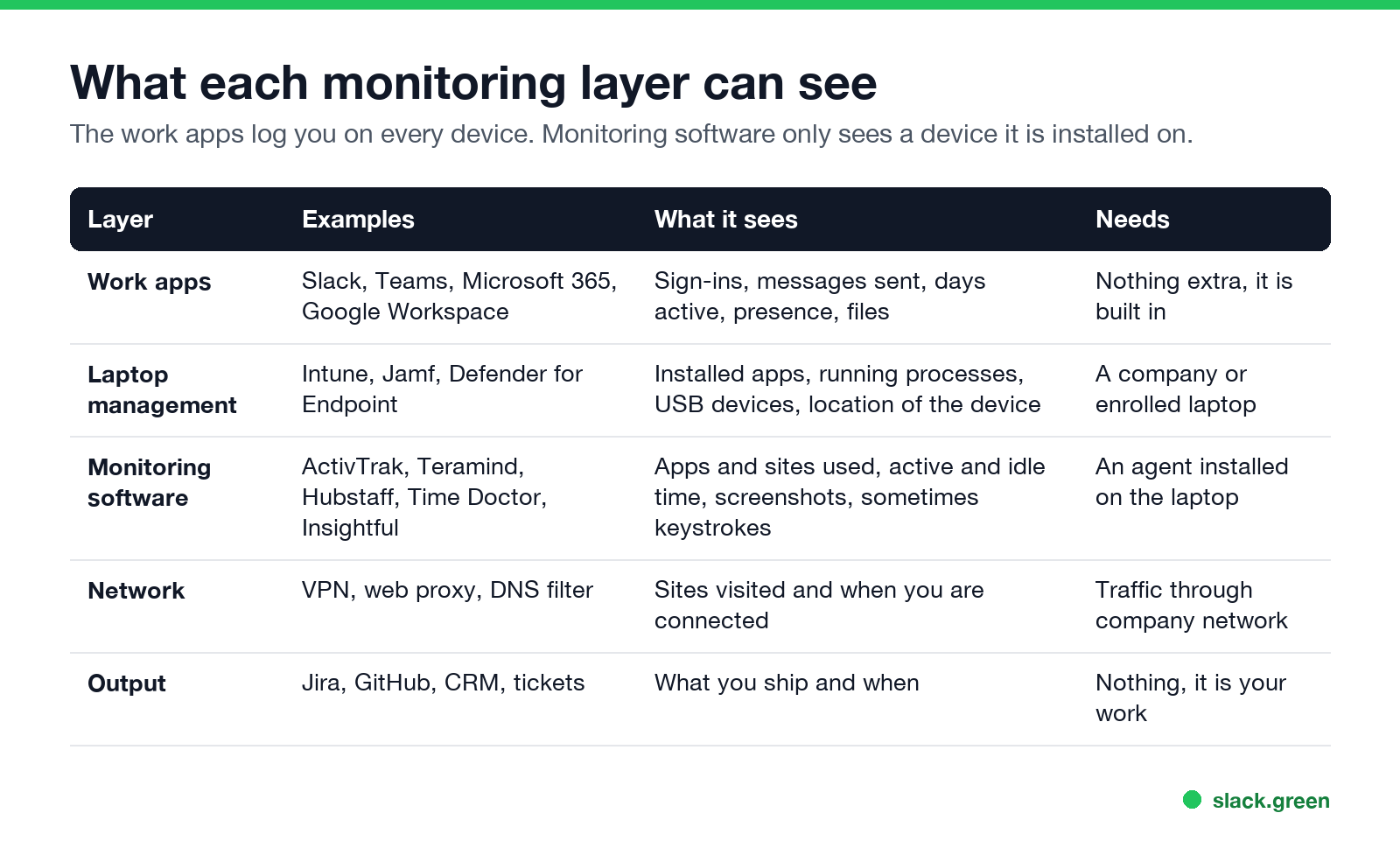
| Layer | Examples | What it sees | What it needs |
|---|---|---|---|
| Work apps | Slack, Teams, Microsoft 365, Google Workspace, Zoom | Sign-ins, messages sent, days active, presence, files | Nothing extra; it is built in |
| Laptop management | Microsoft Intune, Jamf, Defender for Endpoint | Installed apps, running processes, USB devices, device location | A company or enrolled laptop |
| Monitoring software | ActivTrak, Teramind, Hubstaff, Time Doctor, Insightful | Apps and sites used, active and idle time, screenshots, sometimes keystrokes | An agent installed on the laptop |
| Network | VPN, web proxy, DNS filter | Sites visited, when you connect, how much traffic | Your traffic going through the company network |
| Output | Jira, GitHub, a CRM, the ticket queue | What you finish and when | Nothing; it is your work |
The first layer follows you to any device, including your own phone. The next two only see a device they are installed on. That difference answers most "can my employer see..." questions. For phones in particular, what a company phone, a work profile and work Wi-Fi each show is in the phone section below.
Layer 1: the work apps, Slack and Teams included
Every workspace tool keeps logs for its admins. In Slack, owners and admins see analytics per member: days active, messages posted and more. They see access logs with the time, IP address and device of each sign-in. On some plans they can export messages, including DMs, under their data policy. The full list is in can Slack be used to monitor employees, and the DM question is in can Slack admins see your DMs.
Microsoft 365 admins get usage reports for Teams, Outlook and OneDrive per user: messages, calls, meetings and files. Teams presence also shows your manager when you go away, usually after 5 minutes without input on the computer. See does Teams track activity and how long before Teams shows away.
What these apps do not see: your screen, your keystrokes outside the app, and what you do in other programs. Zoom is the same: hosts and admins see join and leave times, device and IP address, not your other apps; see does Zoom track your activity. Slack does not track your mouse outside its own window and does not notify anyone of screenshots.
The dot as a timesheet. Slack's presence is public to your coworkers, and a manager can check it any time. Some teams also run apps that poll presence through Slack's API and log it all day. Slack sets you away 10 minutes after your last input in its window, so reading, calls and thinking all show as away. That is the gap that how to keep Slack active is about.
Layer 2: laptop management on a company laptop
A company laptop is almost always enrolled in a device management tool. On Windows that is often Microsoft Intune with Defender for Endpoint. On a Mac it is often Jamf or Intune. These tools report the installed apps, the running processes, the USB devices you plug in, the OS version and often the device's location. They exist for security, but the same data answers "was a mouse jiggler plugged in?" in one query. The details are in can a mouse jiggler be detected.
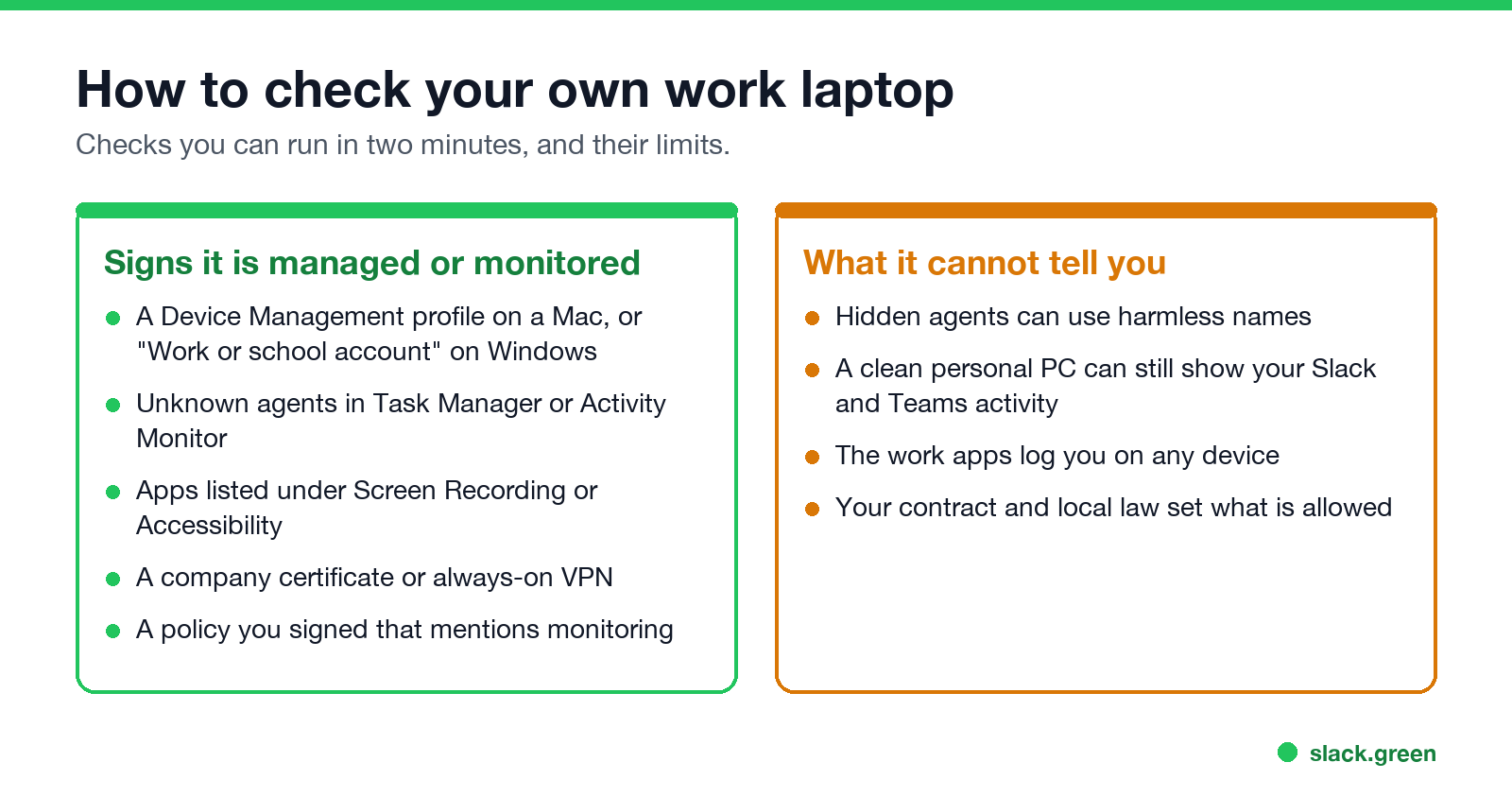
You can check whether your own laptop is managed.
On Windows, in Command Prompt or PowerShell:
dsregcmd /statusLook for AzureAdJoined : YES and an MdmUrl line. Both mean the laptop is joined to your company's Microsoft tenant and managed.
On a Mac, in Terminal:
profiles status -type enrollmentMDM enrollment: Yes means the Mac is managed. System Settings, then Privacy & Security, then Profiles lists what the profile controls.
Layer 3: employee monitoring software
This is the layer people mean by "bossware". An agent runs on the laptop and records the apps and sites you use, how long you use each, and how long the keyboard and mouse sit idle. Many tools take screenshots on a timer. Some record the screen, log keystrokes, or score your day as "productive" or "unproductive". Some run visibly with a tray icon, and some run in a stealth mode that the employer turns on.
To look for a known agent on Windows:
Get-Process | Where-Object { $_.ProcessName -match 'activtrak|teramind|hubstaff|timedoctor|insightful|controlio|veriato' } |
  Select-Object ProcessName, Path
On a Mac, open System Settings, then Privacy & Security, and check Screen & System Audio Recording and Accessibility. A monitoring agent needs one or both, so it shows up in those lists by name.
An empty result does not prove there is no agent. Stealth agents can use harmless-looking names. Your employee handbook or IT policy is often the fastest honest answer, and in New York, Connecticut and Delaware the employer has to tell you about electronic monitoring in writing.
Layer 4: the VPN and the network
When you connect to the company VPN, or your laptop sends traffic through a company proxy or DNS filter, IT can log which sites you visit and when you are connected. With HTTPS they usually see the site name, not the page content, unless the laptop has a company certificate that lets them inspect traffic. How to check for that certificate, and what Incognito does not hide, is in can my employer see my browsing history. The VPN log also shows the IP address you connect from, which is how some companies notice a worker is abroad.
Working for two companies at once? What gives a second job away, from the work laptop to the chat dot, is in can my employer see if I have a second job.
Layer 5: your output
The oldest method is still the most common one. Managers look at tickets closed, pull requests merged, deals logged and replies sent. Tools such as Jira, GitHub and Salesforce record who did what and when, with no monitoring software at all. A worker who looks active all day but ships little gets noticed here first, which is also how most quiet vacations come to light.
Never appear "away" on Slack again
Cloud-based. No downloads. Works 24/7 even when your laptop is off.
Can my employer see what I do on my phone?
Less than on a laptop. It depends on who owns the phone and how it is enrolled. Find your setup in the table:
| Your phone setup | Installed apps | Location | Texts, photos, calls | Websites |
|---|---|---|---|---|
| Company phone, fully managed | All apps | Can locate it if lost | Not through device management | If traffic goes through a company VPN or filter |
| Company phone with a work profile | Work profile apps only | Can locate it if lost | No | Work profile traffic, if sent through a VPN |
| Personal phone, enrolled (BYOD) | Work apps only | No | No | No, unless you use a work VPN |
| Personal phone, work apps only | No | No | No | No |
| Any phone on work Wi-Fi | No | Roughly, by which access point | No | Site names, not page content |
A personal phone enrolled for work. This is the setup you get when you install the Intune Company Portal, or a similar app, for work email and Teams; Android puts a briefcase icon on the work apps. Microsoft's Intune documentation lists what the organization can never see on an enrolled phone: call and web history, email and texts, contacts, calendar, passwords, photos, and your documents. What IT sees about the phone itself depends on how it was enrolled. With Company Portal device enrollment, IT sees the model, serial number, OS version, the last four digits of your number and the list of work apps. With Apple User Enrollment, the iPhone mode made for personal phones, the company does not get the serial number, IMEI, phone number, UDID or Wi-Fi MAC address at all, and the app list it gets holds only the apps it installed. A remote wipe removes only the work apps and their data. The full Intune list is in what can my employer see with Intune.
We checked the iPhone part in Apple's own files rather than a vendor's summary. Apple publishes the schema that defines every question a management server can ask an iPhone (apple/device-management on GitHub, release branch), and each question is marked allowed or forbidden for User Enrollment. This script reads it:
import urllib.request, yaml, json

BASE = "https://raw.githubusercontent.com/apple/device-management/release/mdm/commands/"
load = lambda name: yaml.safe_load(urllib.request.urlopen(BASE + name, timeout=30).read())

queries = load("information.device.yaml")["payloadkeys"][0]["subkeys"][0]["subkeys"]
allowed, blocked = [], []
for q in queries:
    ios = (q.get("supportedOS") or {}).get("iOS", {})
    if ios.get("introduced") == "n/a":
        continue  # not an iPhone query
    mode = (ios.get("userenrollment") or {}).get("mode", "allowed")
    (blocked if mode == "forbidden" else allowed).append(q["key"])

print("iPhone queries:", len(allowed) + len(blocked))
print("allowed on a personal phone (User Enrollment):", len(allowed))
print("blocked on a personal phone:", len(blocked))
for key in ("SerialNumber", "IMEI", "PhoneNumber", "UDID", "WiFiMAC", "ModelName", "OSVersion", "BatteryLevel"):
    print(f"  {key:13} {'blocked' if key in blocked else 'allowed'}")
The output on 22 October 2026:
iPhone queries: 68
allowed on a personal phone (User Enrollment): 24
blocked on a personal phone: 44
  SerialNumber  blocked
  IMEI          blocked
  PhoneNumber   blocked
  UDID          blocked
  WiFiMAC       blocked
  ModelName     allowed
  OSVersion     allowed
  BatteryLevel  allowed
The same schema says that on User Enrollment the installed-app query "only returns managed apps", and none of its 67 management commands is named for messages, photos, Safari, browsing history, contacts, calls or mail.
A company phone. IT sees every installed app and can locate a lost phone. Device management still does not read texts or photos, but a company can add more on its own phone: archiving apps that capture texts on the work number (common at US broker-dealers), or a VPN and web filter that logs the sites you visit. Keep personal life on your own device.
Work Wi-Fi. Joining the office Wi-Fi enrolls nothing. The network sees the names of the sites your phone connects to, when, and how much data, but not page content, because almost all traffic uses HTTPS. Private browsing does not hide site names from the network. Mobile data does.
To check your own phone:
- • iPhone: Settings, General, VPN & Device Management. A profile under Mobile Device Management means the phone is enrolled. "This iPhone is supervised and managed by" at the top of Settings means a company-owned, supervised phone.
- • Android: search Settings for "work profile" or "device admin apps". A Work tab in the app drawer means a work profile.
- • Company Portal: Devices shows whether the phone is Corporate or Personal, which decides the row in the table.
- • A personal device with no company software, except the work apps you sign in to on it.
- • Your screen, keystrokes or files outside the work apps, unless an agent runs on that device.
- • Why your Slack dot is grey. Slack shows away whether you are reading, on a call, or at lunch.
- • Where else you work. No database shows a second job; how employers do find out is in can my employer see if I have a second job.
The work apps are the exception on every phone. Slack, Teams and Outlook report your activity to the company's accounts whichever phone you use; what Slack shows from a phone is in does Slack show when you are on mobile.
Can my employer read my work email?
Yes. Work email lives in the company's Microsoft 365 or Google Workspace account, and admins can search every mailbox by person, words or dates, export the results, and give someone access to open your mailbox. Mail you deleted can still be found if your mailbox is on a hold or under a retention policy. You are not told when a search runs.
| Who | Can they read it? | How |
|---|---|---|
| IT admin, Microsoft 365 (Outlook) | Yes | Microsoft Purview eDiscovery or Content search; or Full Access permission on your mailbox |
| IT admin, Google Workspace (Gmail) | Yes | Google Vault search and export; Gmail log search for sender, recipient and time |
| Legal, compliance or HR | Yes, with a role or an export | eDiscovery or Vault results shared with them |
| Your manager | Only with a grant | Delegate or Full Access set up by IT, often after you leave |
| A coworker | No | Unless you or IT share your mailbox or a folder |
In practice nobody reads your email day to day. Searches happen for a reason: a legal case, an HR complaint, a security alert or someone leaving. The most common check opens nothing at all. Message trace in Exchange and the email log search in Google Workspace show who sent what to whom and when, without the text. Data loss prevention rules also scan outgoing mail for card numbers or files marked confidential, which is why forwarding work mail to a personal address gets flagged.
Access leaves a trace. Microsoft 365 turns on mailbox audit logging "by default in all organizations", covering actions by owners, delegates and admins, and eDiscovery searches and exports land in the audit log. Google records Vault searches and exports in the Vault audit log. Admins can read these logs; you cannot.
The law treats a company mailbox as company records. In the US, the Electronic Communications Privacy Act allows monitoring on systems the employer provides or with your consent. In the EU and UK, monitoring must be necessary, proportionate and disclosed, and in Barbulescu v. Romania (2017) the European Court of Human Rights ruled against an employer who read an employee's messages without telling him in advance. Keep personal accounts, banking, health and job hunting off the work address. What a work laptop exposes about your personal email is in personal email on a work computer.
Can my employer see my screen or my camera?
Your screen: only if monitoring software with screenshots or screen recording runs on the laptop, or while you share your screen in a call. Slack and Teams do not see your screen outside a share. All four ways it can happen, and how to check a work laptop for each, are in can my employer see my screen.
Your camera: only during calls, unless monitoring software records the webcam, which few tools do and many laws limit. In 2022 a Dutch court ruled that the US company Chetu could not fire a remote worker for refusing to keep his camera on all day, and ordered it to pay about 75,000 euros. How to check whether an app used your camera is in can my employer see me through my laptop camera.
AI chats are one more place your employer may read. On company ChatGPT Enterprise, Claude and Microsoft 365 Copilot accounts the owner can export or search your prompts; on a personal account only the laptop and network see them. Details by plan: can my employer see my ChatGPT history and can my employer see my Claude chats.
To check your own laptop, from the IT policy to the certificate behind the padlock, follow how to tell if you are being monitored at work.
What monitoring cannot see
Is it legal for employers to monitor remote workers?
In the US, monitoring a company-owned device and company accounts is broadly legal. New York, Connecticut and Delaware require written notice of electronic monitoring. In the EU and UK, monitoring must be necessary, proportionate and disclosed under data protection law, and constant webcam or keystroke monitoring is hard to justify. Your contract and the company's IT policy set the details; state-by-state rules on notice, cameras, GPS and audio are in is it legal for my employer to monitor me. The mouse jiggler side of this is in are mouse jigglers legal, and in 2024 Wells Fargo fired more than a dozen employees for "simulation of keyboard activity".
FAQ
Can my employer monitor me working from home?
Yes, on a company laptop and in company accounts. Work apps log you on any device. Monitoring software only sees a device where it is installed.
Does monitoring make people more productive?
Often it makes them look busier instead. Slack's 2023 survey found 32% of desk workers' time goes to work done only to appear productive; see productivity theater.
Can my boss tell if I'm working remotely from somewhere else?
Often. Sign-in logs in Slack and Microsoft 365, and the VPN, record the IP address you connect from, which gives an approximate location. Managed Windows laptops can also be put on a map with Intune; see can my employer track my work laptop location.
What are the signs that you are being monitored at work?
A device management profile, unknown agents in Task Manager or Activity Monitor, apps with Screen Recording or Accessibility access, an always-on VPN, and a signed policy that mentions monitoring.
Can my employer see my Slack activity?
Admins see days active, messages posted and sign-ins, and your coworkers see your presence dot. Details in can Slack be used to monitor employees.
How do employers know if remote employees are working?
Mostly through output and the work apps: tickets, commits, messages, meeting attendance and presence. Some add monitoring software that scores active and idle time.
Can monitoring software see a mouse jiggler?
Usually. A software jiggler shows as a process and as injected input, and a USB jiggler as a new device. See can a mouse jiggler be detected. ActivTrak's own three checks are in can ActivTrak detect a mouse jiggler. How ActivTrak turns a pause into Passive and then Inactive time is in ActivTrak idle time.
Stop Jiggling Your Mouse.
Join hundreds of remote workers who never worry about their Slack status. Set it up once, stay green forever.
Related Articles
Can My Work Laptop Hear Me? When Your Employer Can Listen Through the Microphone
During calls and recorded meetings, yes. Outside calls, only if a program on the laptop turns the microphone on. Device management such as Intune or Jamf does not stream audio, and Windows and macOS both show when an app uses the mic. How to check, and where the law draws the line.
Can My Employer Track My Laptop Location? Yes, Usually to a City
Your employer can usually place your work laptop only in a city, from the IP address in sign-in and VPN logs. Two IP lookups we ran on 2 November 2026 put the same Mac 3.7 km apart. Most laptops have no GPS; Intune can locate managed Windows laptops.
Can My Employer Listen to My Teams Calls?
Not live, on ordinary Teams calls and meetings: Teams has no silent listen-in for admins. Your employer can record calls with a notice, record every call under a compliance policy, keep transcripts, and see who you called and for how long. The one live exception is call-queue monitoring.