
Can My Employer See My ChatGPT History?
If you use a company ChatGPT Enterprise, Claude or Microsoft 365 Copilot account, your employer can usually read your chats. On ChatGPT Business they cannot by default. On a personal account they cannot open your history, but a work laptop can still record what you type.
Your employer can see your ChatGPT history if the chats live in a company account on ChatGPT Enterprise or Edu, because the workspace owner can turn on OpenAI's Compliance API and send conversation logs to the company's eDiscovery or security tools. On ChatGPT Business (the plan that used to be called Team), OpenAI says admins and owners cannot see private member chats by default. On your personal ChatGPT account your employer cannot open your history, but if you use it on a work laptop or the office network, monitoring software on that laptop can still record what you type.
The same split holds for Claude and Copilot. The Primary Owner of a Claude Team or Enterprise organization can export its chats, and Microsoft 365 Copilot stores your prompts and answers in your company's Microsoft 365, where admins can search them.
If your question is less about AI and more about how visible you are at work in general, we cover how employers monitor remote workers. And if what you want to control is the green dot in Slack, Slack Green keeps your Slack status active during the hours you choose, without software on the work laptop.
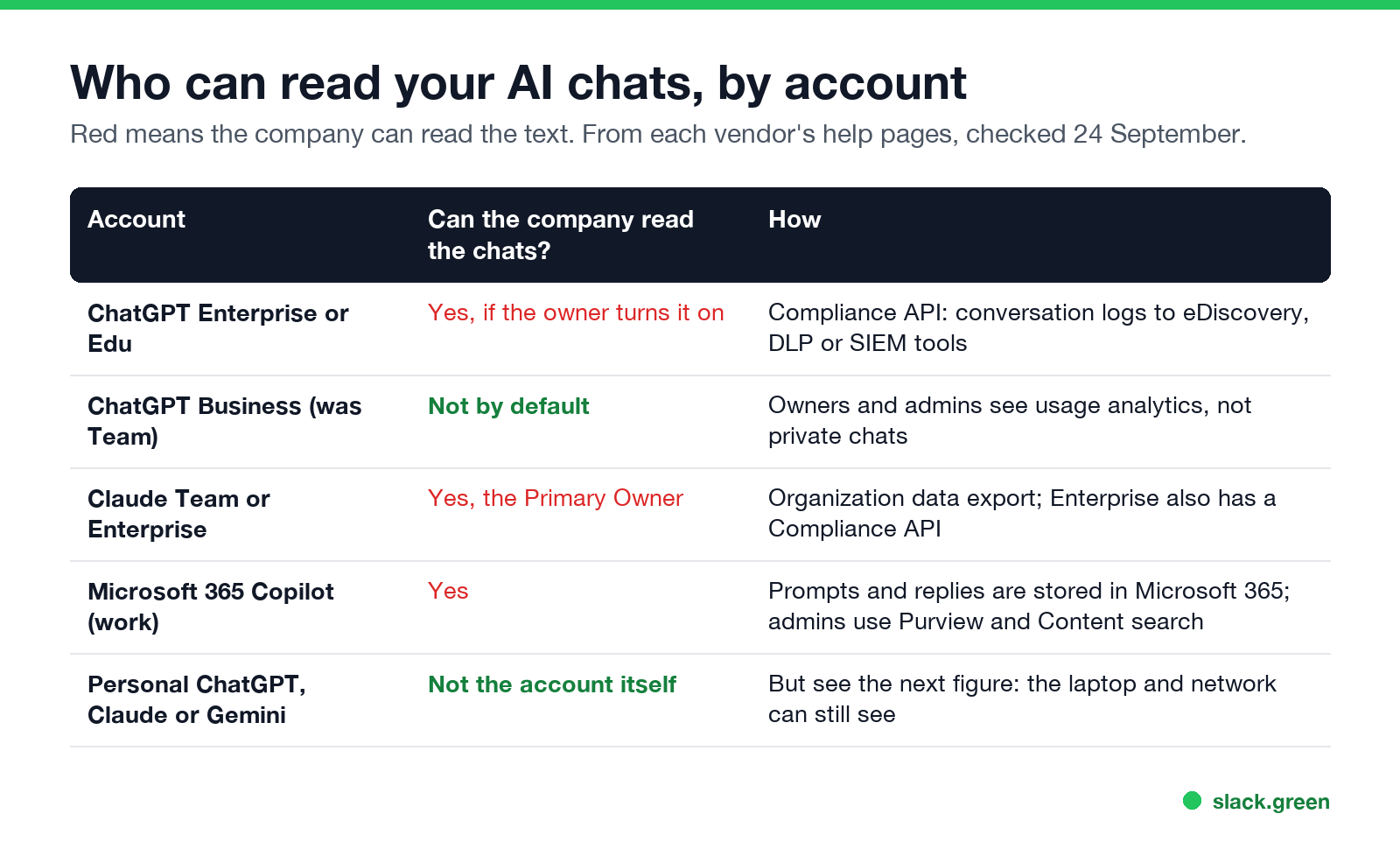
Who can read your AI chats, by account
| Account | Can your company read the chats? | How |
|---|---|---|
| ChatGPT Enterprise or Edu | Yes, once the workspace owner grants access | Compliance API: conversation message logs sent to eDiscovery, DLP or SIEM tools |
| ChatGPT Business (was Team) | Not by default | Owners, admins and analytics viewers see workspace analytics, not private chats |
| Claude Team | Yes, the Primary Owner | Organization data export includes conversations |
| Claude Enterprise | Yes | Data export plus a Compliance API that covers chats, files and projects |
| Microsoft 365 Copilot (work account) | Yes | Prompts and replies are stored with your other Microsoft 365 content; admins use Microsoft Purview and Content search |
| Personal ChatGPT, Claude or Gemini | Not through the account | The laptop, browser and network can still see what you type |
Sources are the vendors' own help pages, read on 24 September: OpenAI's "Compliance Platform for Enterprise and Edu customers" and "ChatGPT Business: General FAQ", Anthropic's "Export your organization's data" and "Access the Compliance API", and Microsoft's "Data, Privacy, and Security for Microsoft Copilot".
ChatGPT Enterprise and Edu: the Compliance API
On Enterprise and Edu workspaces, OpenAI offers a Compliance Platform. A workspace owner creates an Admin key, and only an owner can grant it the Conversation messages permission. With that key, the company pulls your conversation logs into the tools it already uses for legal holds and data-leak checks. OpenAI lists Microsoft Purview, Netskope, Zscaler, CrowdStrike, Palo Alto Networks, Varonis, Smarsh and Global Relay among the partners that read these logs.
Two details matter if you worry about old chats:
- • OpenAI keeps the compliance logs for 30 days. Companies that want longer history download them continuously and keep their own copy.
- • That means deleting a chat in ChatGPT does not delete a copy your company already pulled into its archive.
Whether your company has turned this on is not visible in ChatGPT. Ask IT, or read your company's acceptable use policy for AI tools.
ChatGPT Business: owners do not see private chats by default
Never appear "away" on Slack again
Cloud-based. No downloads. Works 24/7 even when your laptop is off.
OpenAI's Business FAQ answers this directly: each member has their own chat history and chooses what to share, and by default admins and owners cannot see all private member chats. What they can see is who is in the workspace, their seat type, and workspace analytics. Chats you choose to share are visible to the people you share them with.
Business also has no self-service data export, so you cannot take your workspace chats with you when you leave. Copy anything you need before your last day.
Claude Team and Enterprise: the Primary Owner can export chats
Anthropic's help center says the Primary Owner of a Team or Enterprise organization can export the organization's data, and that the export includes conversation data. Members cannot export their own data on these plans. Enterprise organizations can also turn on Anthropic's Compliance API, which gives security tools access to chats, files and projects, plus sessions in Claude Code and Cowork.
One limit works in your favor: chats you deleted, by hand or through the company's retention setting, are not included in exports started after the deletion.
Microsoft 365 Copilot: stored with your email
Microsoft 365 Copilot at work is the most searchable of the group. Microsoft says your prompts, the data Copilot retrieves and its replies are stored with your organization's other Microsoft 365 content. Admins can view that data with Content search or Microsoft Purview and put retention policies on it, the same way they search mailboxes. For Copilot chats inside Teams, admins can also use the Teams Export APIs. The details of what Teams admins see are in does Teams track your activity.
Personal ChatGPT on a work laptop
Never appear "away" on Slack again
Cloud-based. No downloads. Works 24/7 even when your laptop is off.
Your employer has no admin access to a personal ChatGPT, Claude or Gemini account. It cannot log in and read your history. But the chat has to pass through a laptop, a browser and a network that the company controls first:
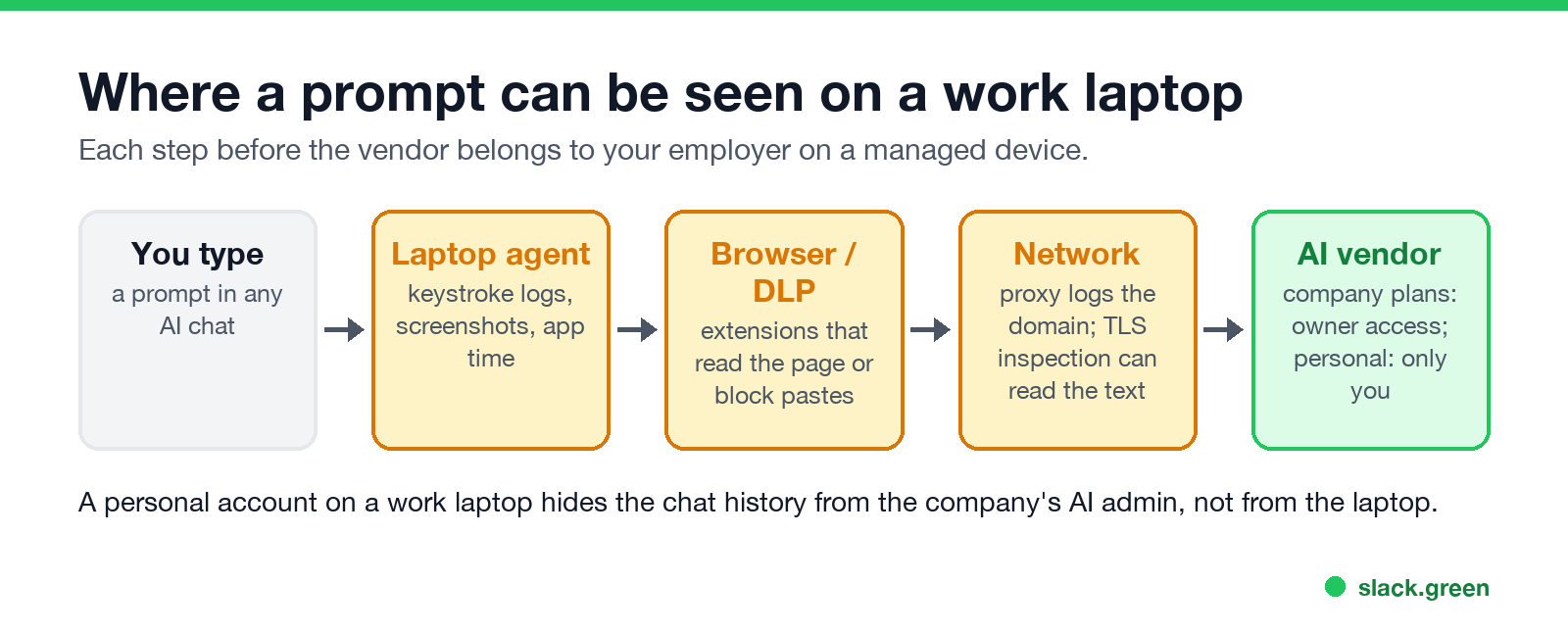
So a personal account keeps your history out of the company's AI admin console. It does not keep it off a managed laptop. The only clean separation is a personal account on a personal device and a personal network.
How to tell what your employer can see
The same rules apply to your work chat: see can Slack admins see your DMs and can Slack admins see what you search.
FAQ
Can my employer see how I use ChatGPT?
On a company Enterprise or Edu workspace, yes, including the text of your chats if the owner enables compliance logs. On a Business workspace, admins see analytics but not private chats by default. On a personal account, they can see only what the laptop and network record.
Can my boss see my Claude prompts?
On Claude Team and Enterprise, the Primary Owner can export the organization's conversations. On a personal Claude account, no, unless monitoring software on the work device captures them.
Can my employer see my Copilot chats?
Yes, for Microsoft 365 Copilot on a work account. The chats are stored in your company's Microsoft 365 and admins can search them with Purview.
If I delete a ChatGPT chat, can my employer still see it?
On Enterprise, it may already be in the company's compliance archive, which keeps its own copy. On Claude Team and Enterprise, deleted chats are left out of later exports. On a personal account, a screenshot or keystroke log on a work laptop is not affected by deleting the chat.
Does using ChatGPT in incognito mode hide it from my employer?
No. Incognito stops the browser from saving local history. The network proxy, DLP tools and laptop monitoring still see the traffic and the screen.
Stop Jiggling Your Mouse.
Join hundreds of remote workers who never worry about their Slack status. Set it up once, stay green forever.
Related Articles
How to Keep Skype Status Active: Skype for Business Idle Timers
To keep your Skype for Business status active, open Options, Status, and raise both idle timers, Inactive and then Away, from 5 minutes to as much as 360 minutes each. Consumer Skype shut down on May 5, 2025 and Skype for Business Online in 2021, so for most people the real question is now Teams. What still works, status icons, Outlook, and status not updating.
Is It Legal for My Employer to Monitor Me? US, EU and UK Rules
In the US it is mostly legal for an employer to monitor company devices, accounts and premises, often without asking. The limits are state notice laws in New York, Connecticut and Delaware, consent rules for audio recording and biometrics, bans on cameras in restrooms, and your personal devices. The EU, UK and parts of Canada and Australia add notice and proportionality rules.
Can My Employer See My Personal Email on My Work Computer?
Your employer cannot sign in to your Gmail, and doing so without permission can break the Stored Communications Act. But on a work computer, screenshot and keystroke monitoring, browser history, HTTPS inspection and Outlook's local cache can all expose personal email. Work email is fully visible, deleted messages included. Case by case, with what to do.