
Can My Employer See If I'm Looking for a Job on LinkedIn?
Not from your job searches, saved jobs or applications: LinkedIn keeps those private. What can give you away is Open to Work set to All LinkedIn members, which adds the public #OpenToWork photo frame, profile edits your network is notified about, and job hunting on a work laptop. Open to Work set to Recruiters only is hidden from recruiters at your company, but LinkedIn says it cannot guarantee it.
Your employer cannot see your job searches, saved jobs, job alerts or applications on LinkedIn. Those are private to you and, for applications, to the company you apply to. What can show your employer that you are looking is something you turn on yourself: Open to Work set to All LinkedIn members adds the green #OpenToWork frame to your photo, visible to everyone including your coworkers. Set it to Recruiters only instead. LinkedIn then hides it from recruiters at your current company, though its help page says "we can't guarantee complete privacy". Two other giveaways are profile edits your network gets notified about, and job hunting on a work laptop that the company monitors.
The settings to change, in order, are below.
If you job hunt at work, the company laptop and your chat status tell their own story. Slack shows coworkers a green or grey dot that turns grey after 10 minutes without input in Slack. Slack Green keeps your Slack status green from a server during the hours you set, with nothing installed on the work laptop.
What your employer can and cannot see on LinkedIn
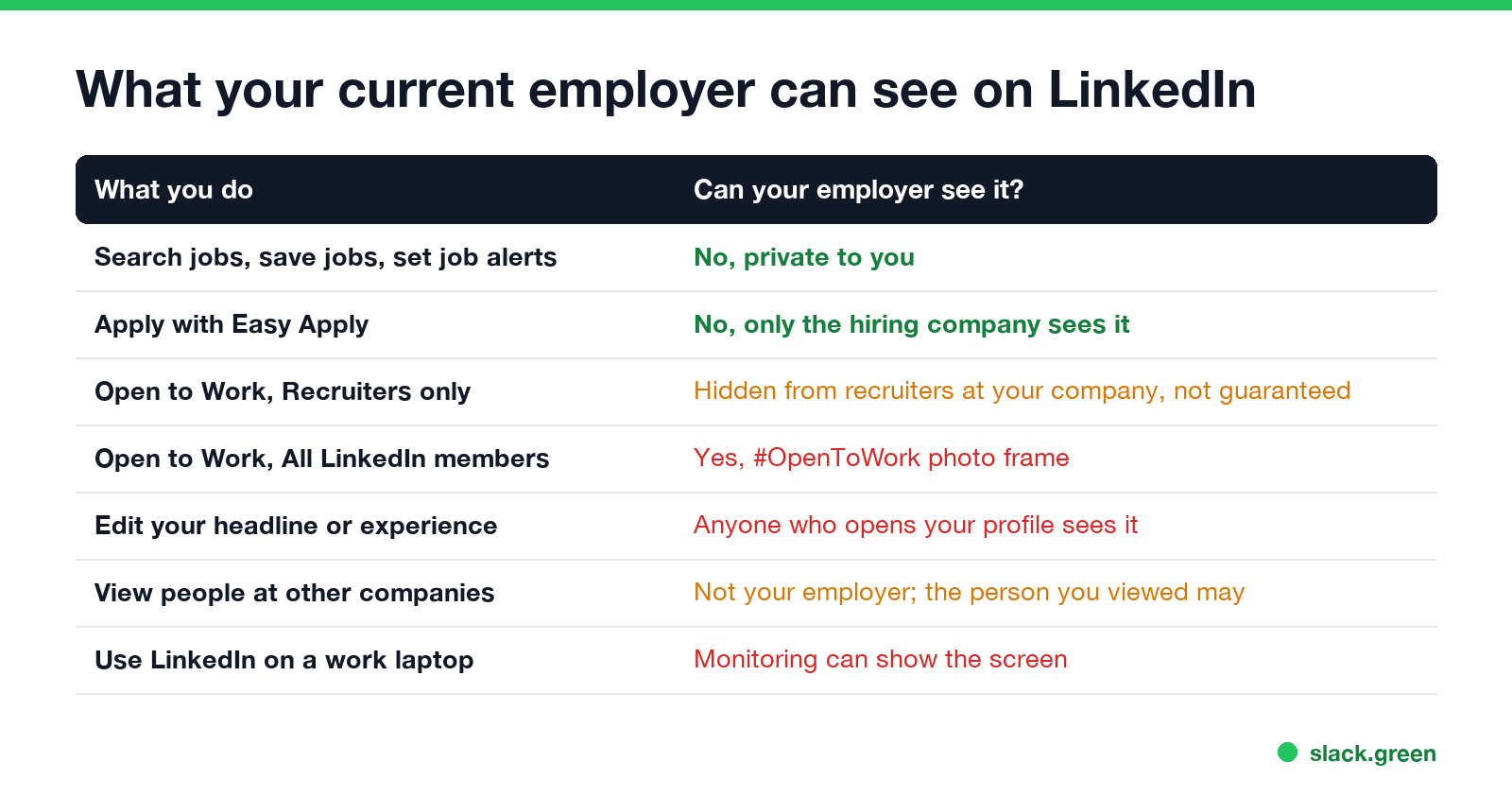
| What you do | Can your current employer see it? |
|---|---|
| Search jobs, save jobs, set job alerts | No. Private to you |
| Apply with Easy Apply or on a company site | No. Only the company you apply to sees the application |
| Open to Work, visible to Recruiters only | Hidden from LinkedIn Recruiter users at your company and related companies, with no guarantee |
| Open to Work, visible to All LinkedIn members | Yes. The #OpenToWork photo frame shows to everyone |
| Edit your headline, summary or experience | Anyone who opens your profile sees the edit as soon as you save it |
| View recruiters' or other companies' profiles | Not your employer, but the people you view may see you, unless you use private mode |
| Use LinkedIn on a work laptop or network | The network sees linkedin.com; monitoring software can see the screen |
Open to Work: Recruiters only vs All LinkedIn members
LinkedIn's help article "Let recruiters know you're Open to Work" (checked 27 September) lists three visibility options:
- • All LinkedIn members. "This also includes recruiters and people at your current company. It also adds the #OpenToWork photo frame." Your manager will see this.
- • Recruiters only. "People using LinkedIn Recruiter only." LinkedIn takes steps to keep Recruiter users at your current company from seeing it.
- • Visible only to you. LinkedIn uses your preferences to tailor job recommendations, and nobody else sees them.
- • Your current job is not marked "I am currently working here". LinkedIn uses that entry to decide whom to hide you from.
- • Your company uses an outside recruiting agency. The agency's recruiters have a different Company ID.
- • Your company has sister companies LinkedIn does not map as related. Their recruiters can see you.
How the Recruiters only protection works, from LinkedIn's "Privacy for shared career interests": LinkedIn compares the Company ID of the current employer on your profile with the Company ID of each recruiter. If they match, or if the recruiter works at a company LinkedIn maps as affiliated, your career interests are hidden. LinkedIn says it cannot guarantee that every company, affiliate or recruiter's Company ID is correct, "so there's a small chance" a recruiter at your employer sees them.
Three cases where that protection is weaker:
Stop LinkedIn announcing your profile changes
Never appear "away" on Slack again
Cloud-based. No downloads. Works 24/7 even when your laptop is off.
Updating your headline to "Seeking new opportunities" or polishing your experience section can notify your whole network, including your manager. LinkedIn's "Share profile updates" setting controls that:
You can also use the Share with network toggle while you edit. LinkedIn notes that "anyone that views your profile will see your edits as soon as you save them", whether or not your network was notified. A headline that says you are looking for work is visible to your manager the next time they open your profile.
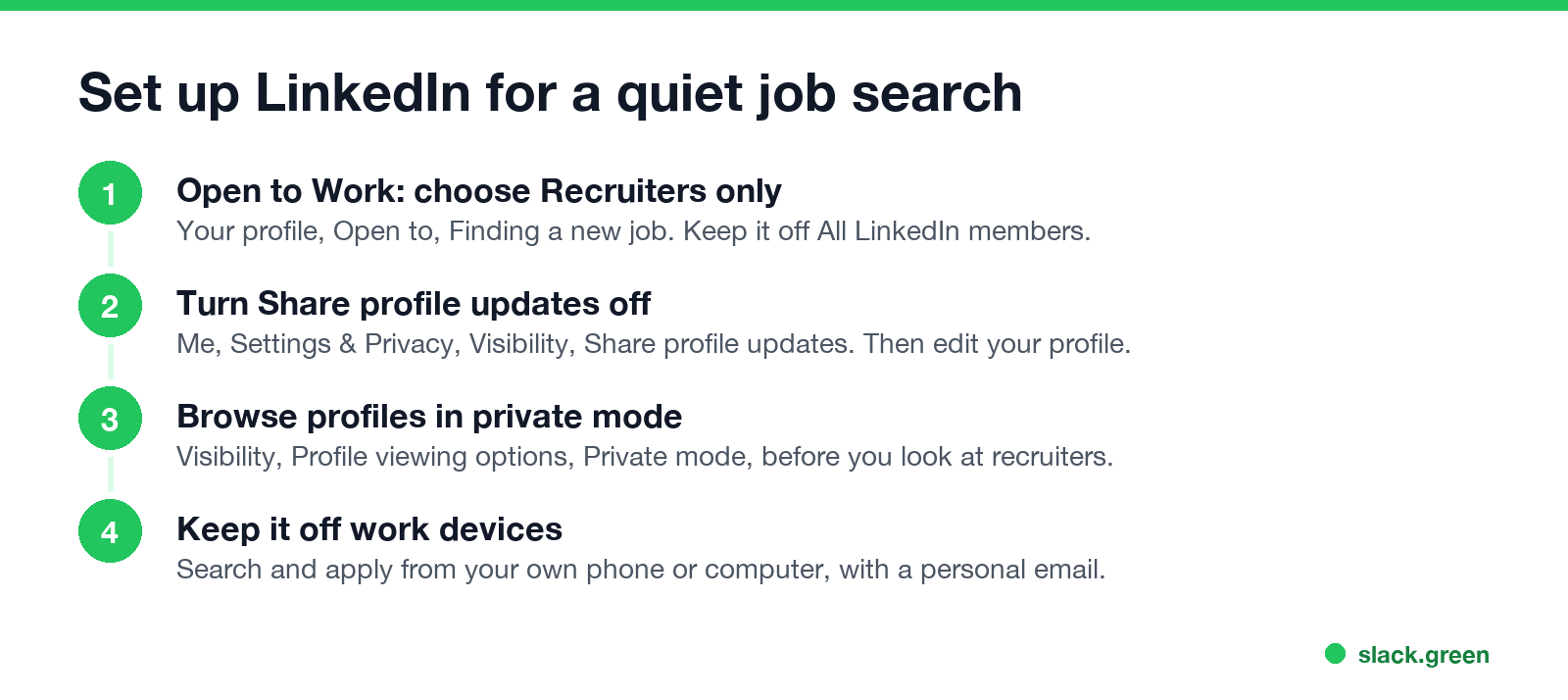
Browse profiles in private mode
When you look at recruiters' profiles or people at companies you want to join, they can see that you viewed them. To view privately, go to Settings & Privacy > Visibility > Profile viewing options and choose Private mode. Your employer is not notified either way, but a recruiter who knows your manager is.
Job hunting on a work laptop
LinkedIn keeps your search private. The company laptop does not. On a work computer or network:
Use your own phone or computer, a personal email address, and your own internet connection. The details of what the laptop can see are in can my employer see my browsing history and can my employer see my screen. If what you are looking for is a second job rather than a new one, see can my employer see if I have a second job.
LinkedIn activity your employer might notice anyway
Never appear "away" on Slack again
Cloud-based. No downloads. Works 24/7 even when your laptop is off.
FAQ
Does LinkedIn tell my employer if I apply for a job? No. Only the company you apply to receives the application.
Can my boss see my Open to Work? Yes if it is set to All LinkedIn members, because of the photo frame. With Recruiters only, LinkedIn hides it from recruiters at your company, but not with a guarantee.
Can my employer see my saved jobs or job alerts? No. They are private to your account.
Will updating my LinkedIn profile alert my employer? It notifies your network if Share profile updates is on. Turn it off first. Anyone who opens your profile still sees the new version.
Stop Jiggling Your Mouse.
Join hundreds of remote workers who never worry about their Slack status. Set it up once, stay green forever.
Related Articles
Can My Boss See My Private Outlook Calendar Events?
Usually not the details. When you mark an Outlook event Private, someone who can read your calendar sees only Private appointment, the time and a lock. The exceptions are delegates you gave Can view private items, the people invited to the event, anyone with full access to your mailbox in new Outlook or the web, and compliance admins. How to check who has which access, and what Private does not hide.
Productivity Theater: Meaning, Numbers and How It Starts
Productivity theater is work done to look busy rather than to get results: extra messages, status updates, meetings to show progress, and keeping a green dot on. Slack's 2023 survey of 18,000 desk workers put it at 32% of the working week. Microsoft ties it to productivity paranoia, where 85% of leaders doubt remote staff are productive.
How to Change Sleep Settings on a Mac (Ventura to Tahoe)
On macOS Ventura and newer, the Mac's sleep timer is its display timer: set it in System Settings > Lock Screen, under Turn display off on battery and on power adapter when inactive. The Mac sleeps about a minute after the display turns off, unless you turn on Prevent automatic sleeping in Battery > Options, or in Energy on a desktop Mac. Every setting, where it lives by macOS version, and the pmset commands.