
Slack xoxc and xoxd Tokens: What They Are and How They Work
xoxc- is the token the Slack web client sends as a Bearer header, one per workspace. xoxd- is the d cookie. Slack rejects either one alone. Where to find both and how to use them.
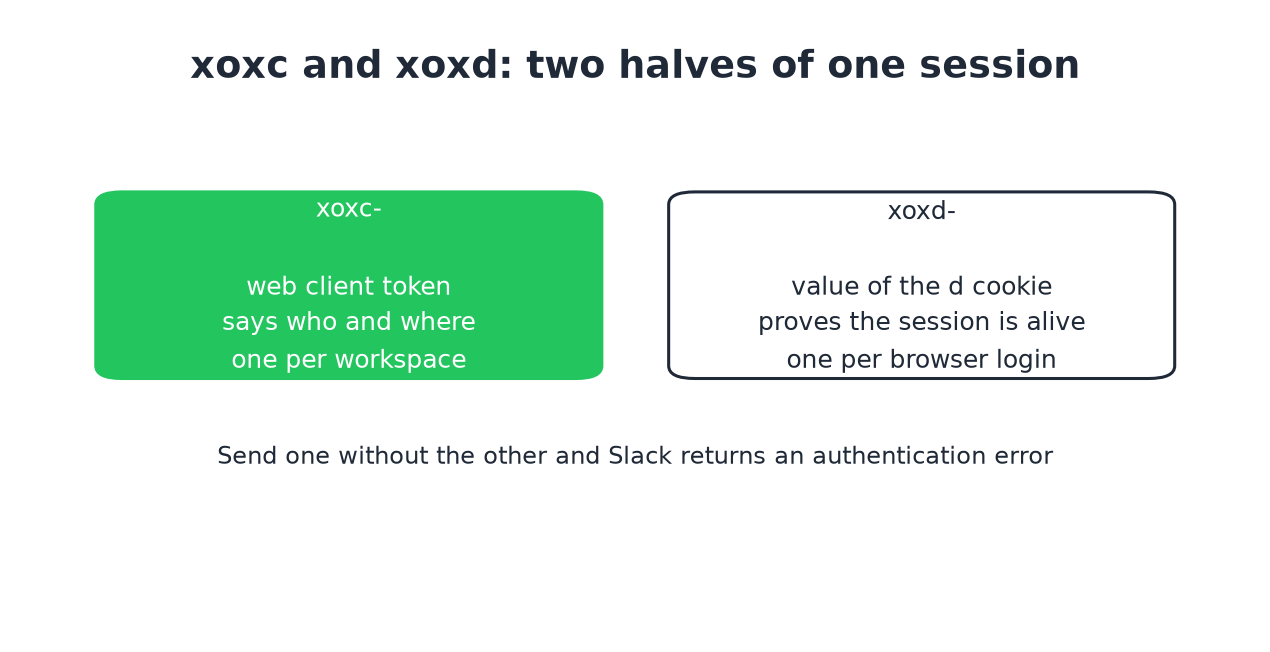
xoxc- is the token Slack's web client uses to call Slack's API. Your
browser stores one per workspace in local storage and sends it as
Authorization: Bearer xoxc-.... xoxd- is the value of the d cookie
Slack sets when you sign in, sent as Cookie: d=xoxd-.... The two are halves
of one browser session: send one without the other and Slack rejects the
request.
Neither appears on Slack's API pages, which is why tools such as Slack MCP
servers and message exporters ask you to copy both out of dev tools. Slack's own official MCP server takes a normal xoxp- user token from an app instead. The steps
are below, with a working curl
request and the meaning of every other Slack token prefix.
The pair matters for presence because a bot token cannot set a person's own presence and this pair can. The test below shows what Slack answers when one half is missing.
What is an xoxc token?
xoxc is the Slack web client token. When you load Slack in a browser, the page
boots with a token embedded in its local storage, and every request the web app
makes carries that token in an Authorization: Bearer header.
It is scoped to one workspace. If you are signed in to four workspaces you have
four different xoxc values, one per workspace.
It is not a bot token and not an OAuth token. Slack never issues it through the app install flow, and there is no permission screen behind it. It represents your browser session, which means it can do what you can do in that workspace.
What is an xoxd token?
xoxd is not really a token in the usual sense. It is the value of a cookie
named d, set on .slack.com when you authenticate. Its job is to prove that
the request comes from a real signed-in session rather than from a stolen string.
You send it as a cookie header, not as a bearer token:
Cookie: d=xoxd-your-value-hereUnlike xoxc, one xoxd covers every workspace you are signed in to in that
browser, because it belongs to your Slack login and not to a single workspace.
Why do xoxc and xoxd only work as a pair?
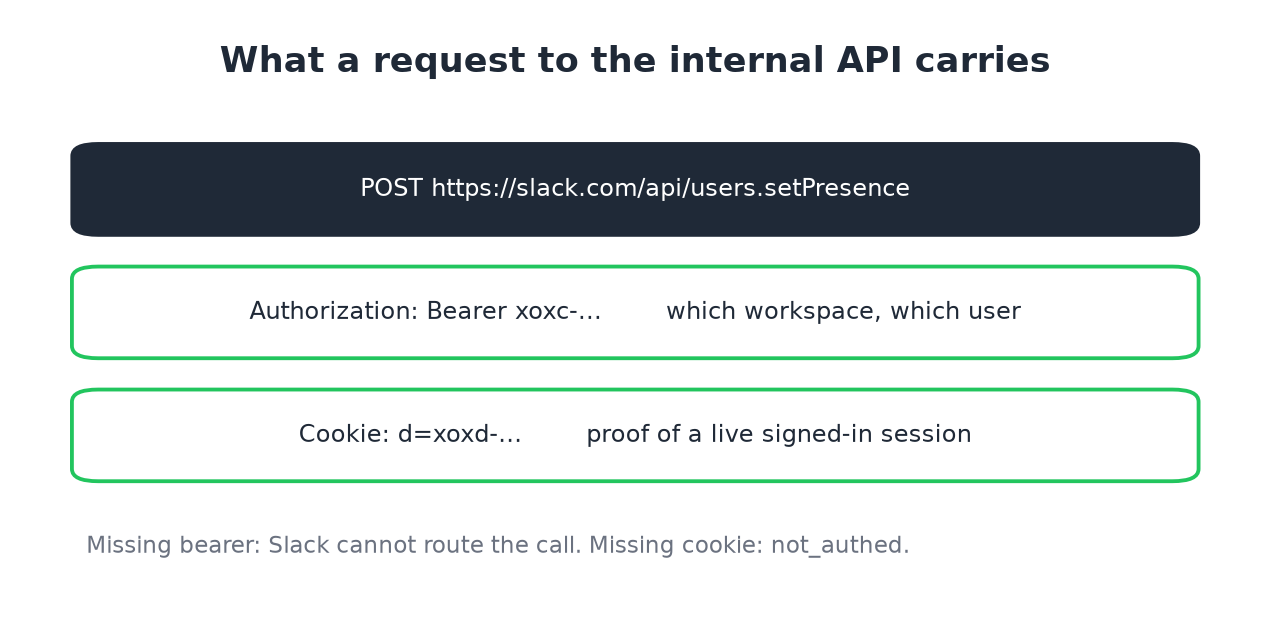
Because Slack checks both. The xoxc token identifies which workspace and user
you are acting as. The d cookie proves the session behind that token is still
alive. Drop either one and the call fails.
A request to Slack's internal API looks like this:
curl 'https://slack.com/api/users.setPresence' \
  -H 'Authorization: Bearer xoxc-...' \
  -H 'Cookie: d=xoxd-...' \
  -H 'Content-Type: application/x-www-form-urlencoded' \
  --data 'presence=auto'
We checked this on 6 October 2026 from a signed-in Slack web tab, calling auth.test with the tab's own xoxc token and turning the cookie on and off:
xoxc as Bearer header + d cookie   -> ok: true, user: sieun
xoxc as Bearer header, no cookie   -> ok: false, error: invalid_auth
xoxc in the form body + d cookie   -> ok: true, user: sieun
xoxc in the form body, no cookie   -> ok: false, error: invalid_auth
d cookie only, no token            -> ok: false, error: not_authed
So a token without its cookie is rejected as invalid_auth, and a cookie without a token as not_authed, because Slack does not know which workspace you mean. The official presence methods, their scopes and the fields they return are in our Slack presence API guide.
The same pairing applies to the WebSocket connection the client opens for
real-time events, which carries the d cookie during the handshake.
What do the other Slack token prefixes mean?
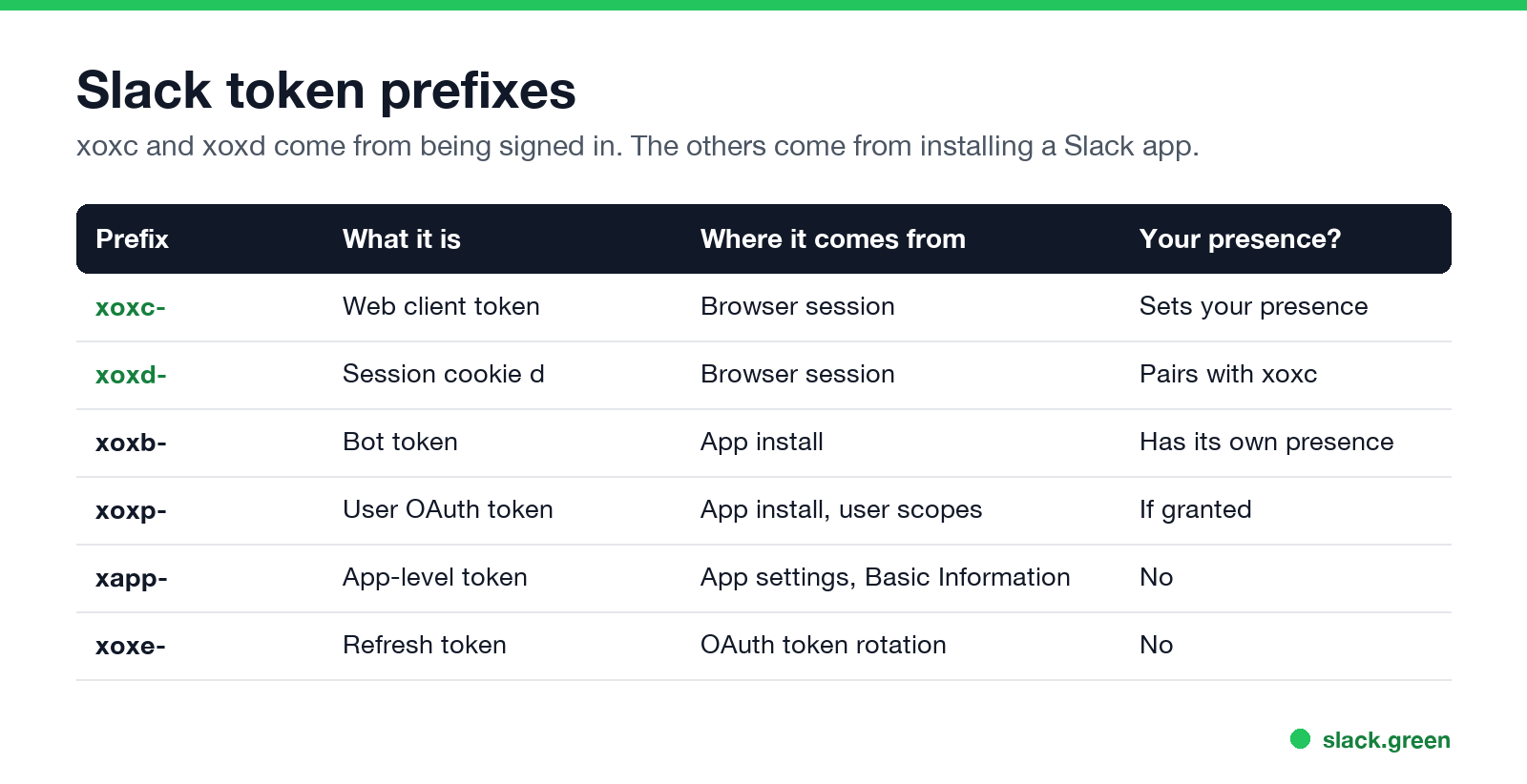
Slack uses the prefix to say what a credential is. The pair in this article sits in a different category from the tokens on Slack's developer docs.
| Prefix | What it is | How you get it | Can it set your presence? |
|---|---|---|---|
xoxc- | Web client token, per workspace | Browser session | Yes |
xoxd- | Session cookie value d | Browser session | Only paired with xoxc |
xoxb- | Bot token | App install | No, a bot has its own presence |
xoxp- | User OAuth token | App install with user scopes | Yes, if granted |
xapp- | App-level token | App settings, Basic Information | No |
xoxe- | Refresh token, rotation enabled | OAuth rotation | No |
How to get a bot token, and how xoxb differs from xoxp, is in Slack bot token.
The practical split is simple. xoxb and xoxp come from installing an app and
carry scopes you approved. xoxc and xoxd come from being signed in, carry no
scope list, and are what the Slack web app itself uses.
How do you find your xoxc and xoxd tokens?
For your own account, in your own browser:
- Open Slack in a browser tab and sign in to the workspace you want.
- Open dev tools, then the Application panel.
- Under Local Storage, find the
localConfig_v2entry. Thetokenfield for
your workspace starts with - Under Cookies, on the
slack.comentry, copy the value of the cookie named
xoxc-.
d. That is your xoxd- value.
Two warnings worth stating plainly. These credentials act as you, with no scope limits, so treat them like your password and never paste them into a site you do not control. And they belong to your own account only. Taking someone else's is account compromise, not an integration.
Never appear "away" on Slack again
Cloud-based. No downloads. Works 24/7 even when your laptop is off.
What do people use them for?
Anything the web client can do that the public API will not let a bot do. The most common cases we see are presence and status automation, exporting your own message history (see how to export Slack messages without admin), and scripting workflows for tools like n8n or an MCP server where a bot token turns out to be the wrong shape for the job.
Presence is the clearest example, and it is the reason this pair matters for us.
Slack flips you to away after about 10 minutes without input, which is covered in
detail in how long does Slack stay active.
A bot token cannot fix that, because a bot has its own presence and not yours.
The xoxc and xoxd pair can, because to Slack it is your own client speaking.
That is the mechanism behind keeping Slack active
without a mouse jiggler, and behind our
self-hosted CLI for people who would
rather hold their own tokens.
How long do xoxc and xoxd tokens last?
They live as long as the browser session behind them. In practice that is months of ordinary use, because Slack keeps you signed in.
They stop working when you sign out of that workspace, when an admin ends your
sessions, or when your workspace enforces a session length that expires. Closing
the tab does not end them. Clearing cookies does, because the d cookie is gone. If your
sessions end more often than you expect, the causes are in
Slack keeps logging me out.
There is no refresh endpoint for this pair. When it expires you sign in again and read the new values. Anything built on these tokens needs to notice the authentication error and ask for fresh ones rather than retrying forever.
Is using your own tokens against Slack's rules?
Slack's API terms cover automated access, and the tokens are yours in the sense that they represent your session. What matters more in practice is your employer's policy, since presence is something managers sometimes watch. We wrote about the realistic version of that question in will I get caught.
The line we hold: your own account, your own session, no scraping of other people's data, and nothing that hides a security event from an admin.
Frequently asked questions
Is xoxc the same as a legacy token?
No. Legacy tokens started with xoxp- and Slack retired them for new
workspaces. xoxc is the current web client token and is unrelated.
Can I use xoxc with n8n, MCP servers, or other integrations?
Technically yes, since it is a bearer token, but you must also pass the d
cookie, and most integrations only have a field for one token. That single field
is usually why an xoxc value alone returns invalid_auth.
Does token rotation apply to xoxc and xoxd?
No. Rotation with xoxe- refresh tokens is an app install feature. Session
credentials are replaced by signing in again.
Why does my xoxc token stop working when I use a VPN? It usually does not. What breaks is the session, when Slack sees a sign-in from somewhere new and ends the old one. Read the tokens again after signing in.
Do I need both for every request? Yes, for Slack's internal API. There is no endpoint that accepts one alone.
The short version
xoxc says who and where. xoxd proves the session is alive. Slack's web
client sends both on every call, so anything imitating that client has to do the
same.
Stop Jiggling Your Mouse.
Join hundreds of remote workers who never worry about their Slack status. Set it up once, stay green forever.
Related Articles
How to See All Your DMs in Slack, Including the Hidden Ones
The DMs tab lists your direct messages with people. App DMs, Slackbot and DMs with deleted accounts sit elsewhere. We compared the tab with the full list the Slack API returned.
Slack Images Not Showing? 5 Causes We Reproduced
We uploaded images to a Slack test channel and then switched each image setting off, ran /collapse, and posted from a bot that was not in the channel. Five causes, each reproduced.
How to Message Yourself on Slack (and What It Notifies)
Your own name under Direct messages opens a private DM with yourself. We sent it a note, a file, a scheduled message and a reminder, and checked which ones raised a badge.