
How to Export Slack Messages Without Admin Access
Slack's built-in export is for workspace owners and admins. Without admin access you can copy a conversation, print it to PDF from a browser, ask an owner for an export, or use Slackdump, an open-source tool that saves channels and DMs you can see with your own login. Steps, formats, and the policy caveat.
Slack's built-in export is only for workspace owners and admins, under Admin, Workspace settings, Import & export data. Without admin access you have four options: copy and paste a conversation, print it to PDF from Slack in a browser, ask an owner to run an export, or use Slackdump, an open-source tool that saves the channels and DMs you can see, using your own login, as JSON, a Slack-style export, or HTML. Before you use a third-party tool on a work account, check your company's policy: Slackdump's own README warns that it may trigger security alerts or notify admins on some plans.
Exporting is about what you said. What others see of you in real time is your presence dot, which turns grey 10 minutes after your last input in Slack. Slack Green keeps it active during the working hours you set, from the cloud.
Ways to save Slack messages, and who can use them
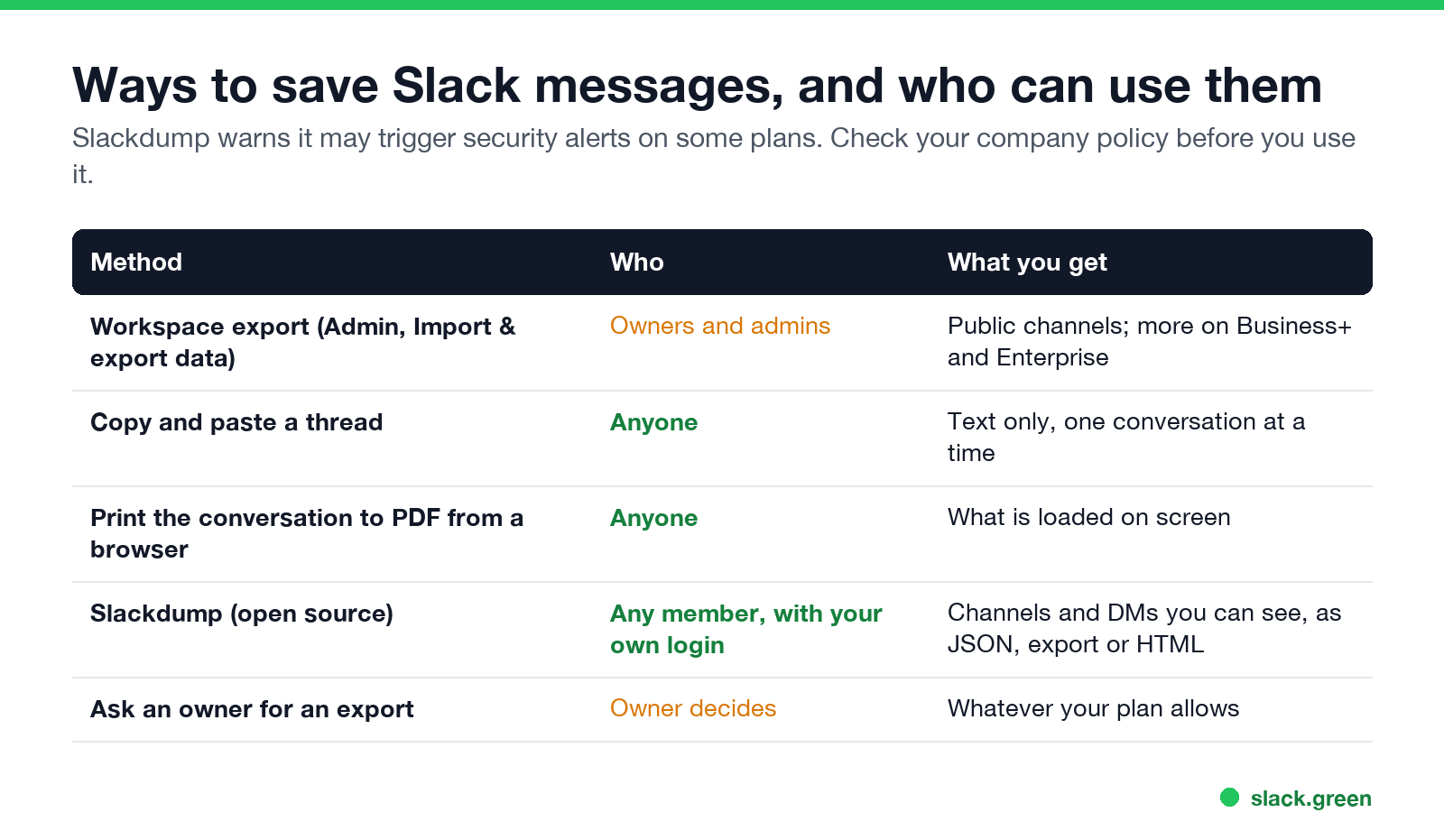
| Method | Who | What you get |
|---|---|---|
| Workspace export | Owners and admins | Public channels; more on Business+ and Enterprise |
| Copy and paste | Anyone | Text, one conversation at a time |
| Print to PDF from a browser | Anyone | What is loaded on screen |
| Slackdump | Any member, own login | Channels and DMs you can see |
| Ask an owner | Owner decides | What your plan allows |
What owners can export on each plan is covered in can Slack admins see DMs: Free and Pro owners can export public channels, and private channels and DMs need an application to Slack or a Business+ or Enterprise plan.
How to export a Slack conversation to PDF
- Open the conversation in Slack in a browser (app.slack.com).
- Scroll up until everything you want is loaded.
- Press Cmd+P (Mac) or Ctrl+P (Windows) and choose Save as PDF.
Long channels load in pieces, so this suits a single thread or a short DM better than a year of history. For a short thread, copying the text into a document works just as well.
How to use Slackdump
Never appear "away" on Slack again
Cloud-based. No downloads. Works 24/7 even when your laptop is off.
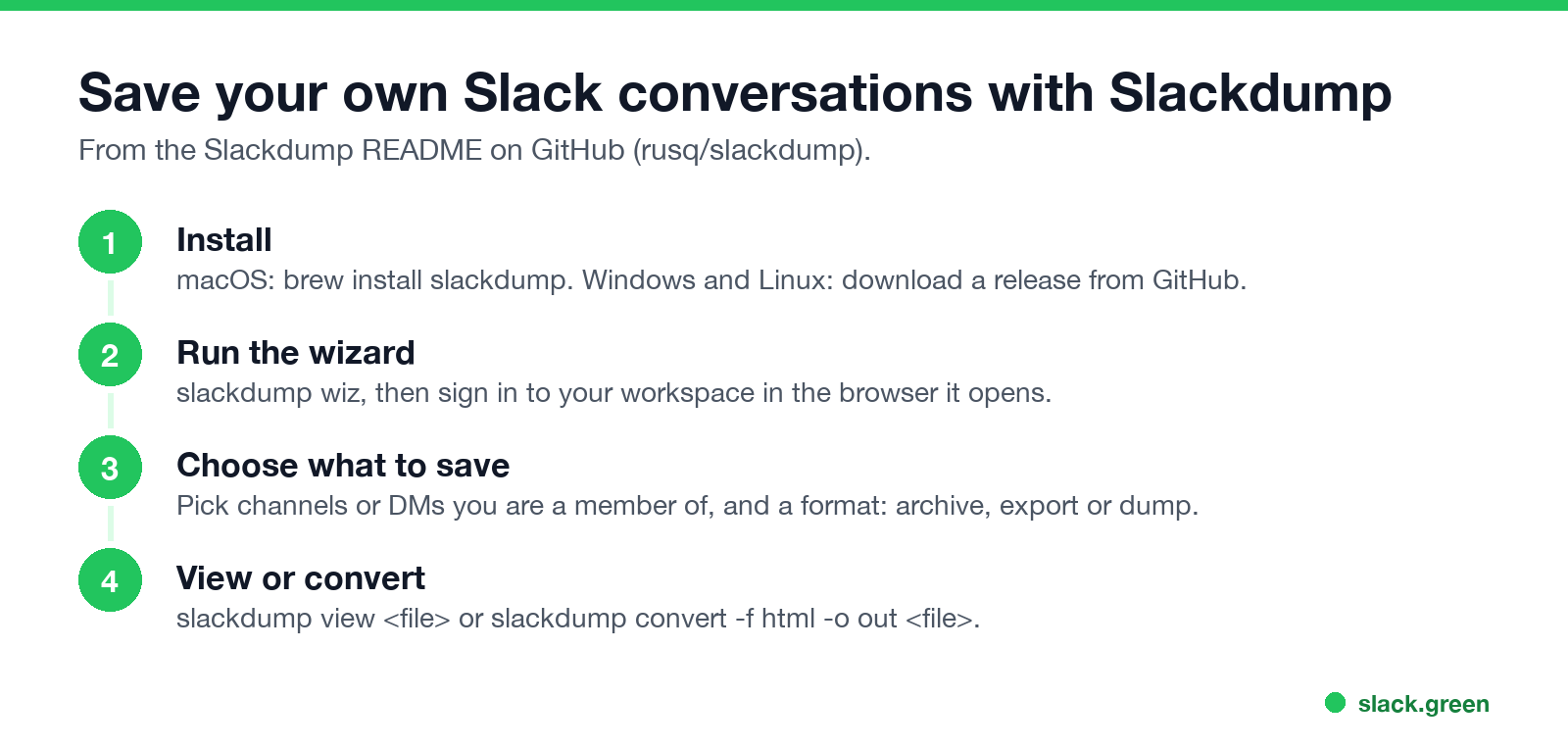
Slackdump is a free, open-source command-line tool on GitHub (rusq/slackdump). Its README lists use cases such as archiving your private conversations when the administrator does not allow you to install apps, and creating a Slack export without admin access.
# macOS
brew install slackdump

# start the interactive wizard, then sign in to your workspace
slackdump wiz

# view what you saved, or turn it into browsable HTML
slackdump view my_archive.zip
slackdump convert -f html -o my_html_archive my_archive.zip
On Windows and Linux, download a release from the project's GitHub page and run the executable. Slackdump signs in as you, so it can only save what you can already see: public channels, private channels you belong to, and your own DMs.
Can I export my Slack DMs?
Yes, your own. Slackdump or print to PDF can save DMs you are part of. You cannot export other people's DMs without owner-level exports, which Slack limits by plan and, on Free and Pro, by an application.
Before you export from a work workspace
Tools like Slackdump use the same kind of session your browser holds; how those session tokens work is explained in Slack xoxc and xoxd tokens.
FAQ
Never appear "away" on Slack again
Cloud-based. No downloads. Works 24/7 even when your laptop is off.
Can I export Slack messages without being an admin?
Not with Slack's built-in export. You can copy, print to PDF, ask an owner, or use Slackdump with your own login.
How do I export a Slack channel?
Owners and admins use Import & export data. Members can use Slackdump for channels they belong to.
How do I export a Slack conversation to PDF?
Open it in a browser, scroll to load it, and print to PDF.
Is Slackdump safe?
It is open source and runs on your computer. It may trigger security alerts on some plans; check your company's policy first.
Does exporting notify anyone?
Slack does not notify coworkers. Tools that sign in as you show in access logs, and some plans alert admins about automated access.
Stop Jiggling Your Mouse.
Join hundreds of remote workers who never worry about their Slack status. Set it up once, stay green forever.
Related Articles
Slack Workflow Builder Examples: 12 Workflows to Copy, With Triggers and Steps
Twelve Slack Workflow Builder examples with the exact trigger and steps for each: daily standups, channel welcomes, time-off approvals, help desk requests, emoji escalations, keyword routing, incidents, list updates and webhooks from other tools. Plus where Workflow Builder lives, what it costs and how branches work.
Slack Timer: How to Set a Countdown, Pomodoro or Focus Timer in Slack
Slack has no built-in timer, but four built-in tools act like one: /remind me to ... in 25 minutes, a status that clears itself, /dnd for a focus block, and Workflow Builder for dated countdowns. For a live countdown in a channel, use a Marketplace app or a 15-line bot script.
Slack Red Dot Won't Go Away? What It Counts and How to Clear It
A red dot on the Slack icon means unread activity somewhere; a red number means DMs, mentions, keywords or followed thread replies. Press Shift+Esc to mark all read, check Threads, Activity, Later and other workspaces, then clear the cache or reset the OS badge.