
Free Slack Alternatives That Keep Your Full Message History
Slack's free plan hides messages after 90 days. Pumble, Discord and Chanty keep unlimited history for free; Mattermost, Element and Rocket.Chat are free if you host them; Google Chat and Teams free cost nothing if you already use Google or Microsoft. What each free plan limits, from each vendor's pricing page.
The best free Slack alternative for most teams is Pumble: its free plan has unlimited users and unlimited message history, which is the main thing Slack's free plan takes away after 90 days. Discord is the best free choice for communities. Chanty is free for up to 5 people. Zulip's free cloud plan keeps 10,000 messages searchable. If you want to own your data, Mattermost, Element and Rocket.Chat are free to run on your own server. If your team already uses Gmail or Microsoft accounts, Google Chat and the free version of Teams cost nothing extra.
Before you switch, check whether the history limit is your only problem. If it is the away status (Slack turns your dot grey 10 minutes after your last input in Slack), Slack Green keeps it green during the working hours you set, on Slack's free plan too.
Free Slack alternatives compared
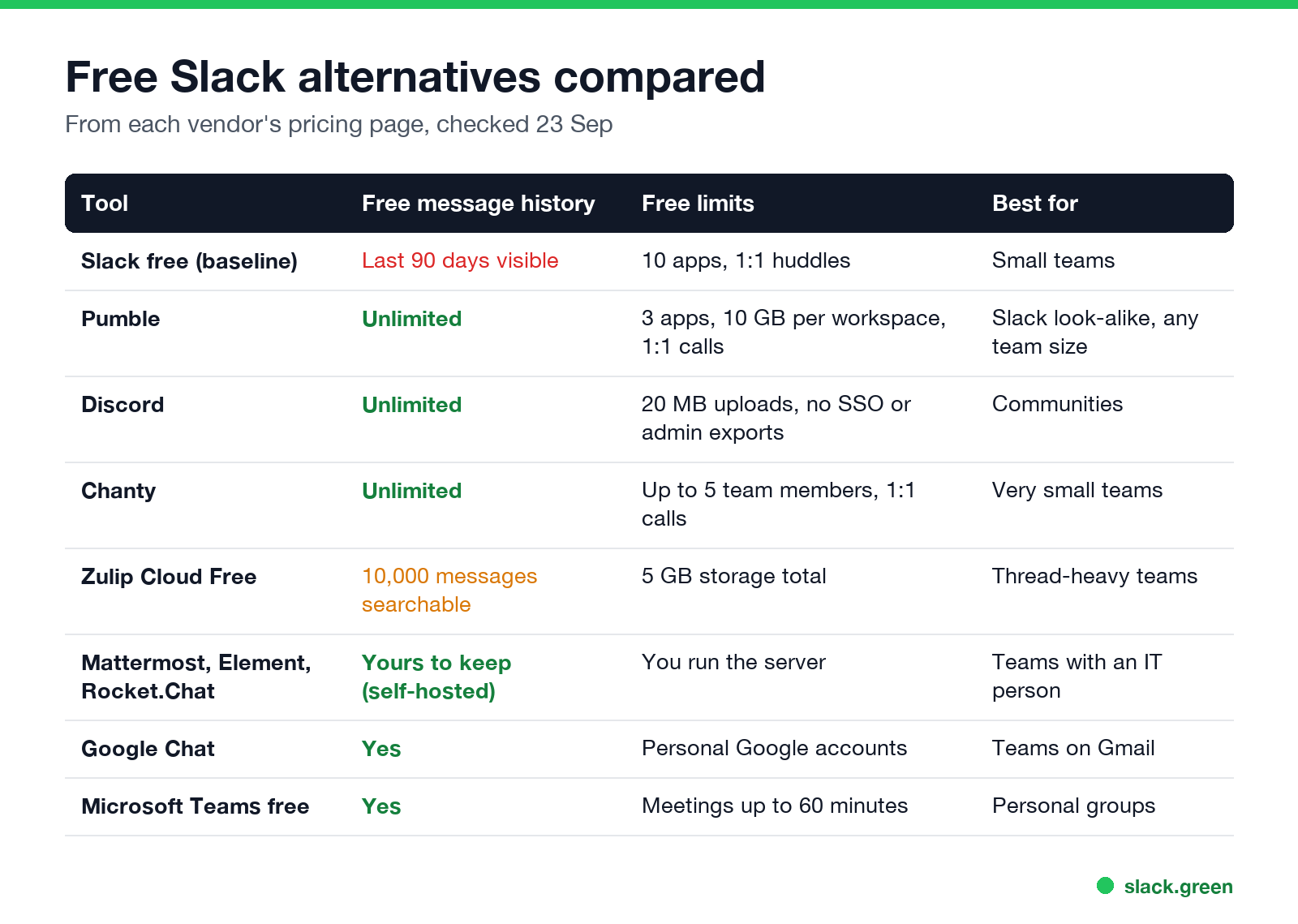
| Tool | Free message history | Main free-plan limits | Best for |
|---|---|---|---|
| Slack free (baseline) | Last 90 days visible, deleted after 1 year | 10 apps, 1:1 huddles | Small teams |
| Pumble | Unlimited | 3 apps, 10 GB per workspace, 1:1 calls | A Slack look-alike for any team size |
| Discord | Not limited | 20 MB uploads, no SSO or admin exports | Communities |
| Chanty | Unlimited searchable history | Up to 5 team members, 1:1 calls | Very small teams |
| Zulip Cloud Free | 10,000 messages of search history | 5 GB storage in total | Teams that live in threads |
| Mattermost, Element, Rocket.Chat | Kept on your own server | You install and run the server | Teams with someone to run IT |
| Google Chat | Kept | Personal Google accounts | Teams already on Gmail |
| Microsoft Teams (free) | Kept | Meetings up to 60 minutes | Personal and community groups |
Figures come from each vendor's pricing or support page, checked on 23 September. Slack's limits are in Slack free plan limits.
Pumble: the closest free copy of Slack
Pumble looks and works like Slack: channels, threads, DMs, mentions, reactions and pins. Its free plan has unlimited users, unlimited message history and search, unlimited channels, 1:1 voice and video meetings, 10 GB of storage per workspace, and up to 3 apps plus its own Clockify and Plaky integrations. It can import your Slack messages. Paid plans start at $2.49 a seat a month.
Pick it if Slack's 90-day limit is the only reason you want to leave.
Discord: free for communities
Never appear "away" on Slack again
Cloud-based. No downloads. Works 24/7 even when your laptop is off.
Discord is free at any size, keeps your history, and gives you voice channels anyone can drop into, with video for up to 25 people. Uploads are capped at 20 MB per file unless a person pays for Nitro. It has no single sign-on, retention settings or admin exports, so it suits communities and informal teams more than companies. The full comparison is in Slack vs Discord.
Chanty: free for up to 5 people
Chanty's free plan covers up to 5 team members with unlimited searchable history, unlimited 1:1 audio and video calls, built-in tasks, 20 GB of storage per team, one guest and up to 10 integrations. Group calls and screen sharing need the Business plan at $3 a user a month, paid yearly.
Zulip: threads first, 10,000 searchable messages
Zulip organizes every conversation into topics inside channels, so busy teams can catch up topic by topic. Zulip Cloud Free gives you 10,000 messages of search history, 5 GB of storage in total, integrations, roles and guest accounts. Zulip sponsors a free Standard plan for open-source projects, academic research and many non-profits, and its self-hosted version is free and 100% open source.
Open-source, self-hosted Slack alternatives
Never appear "away" on Slack again
Cloud-based. No downloads. Works 24/7 even when your laptop is off.
If you want an open-source Slack alternative that you host yourself, three are well established:
- • Mattermost: channel-based chat built for technical teams, self-hosted; paid editions are sold through sales, and a limited free edition is available for evaluation.
- • Element: a chat app on the open Matrix protocol. Element Server Suite Community is free, open source under AGPL, and includes Element Call for video.
- • Rocket.Chat: self-managed team chat with a free Starter plan for small businesses, non-profits and evaluations.
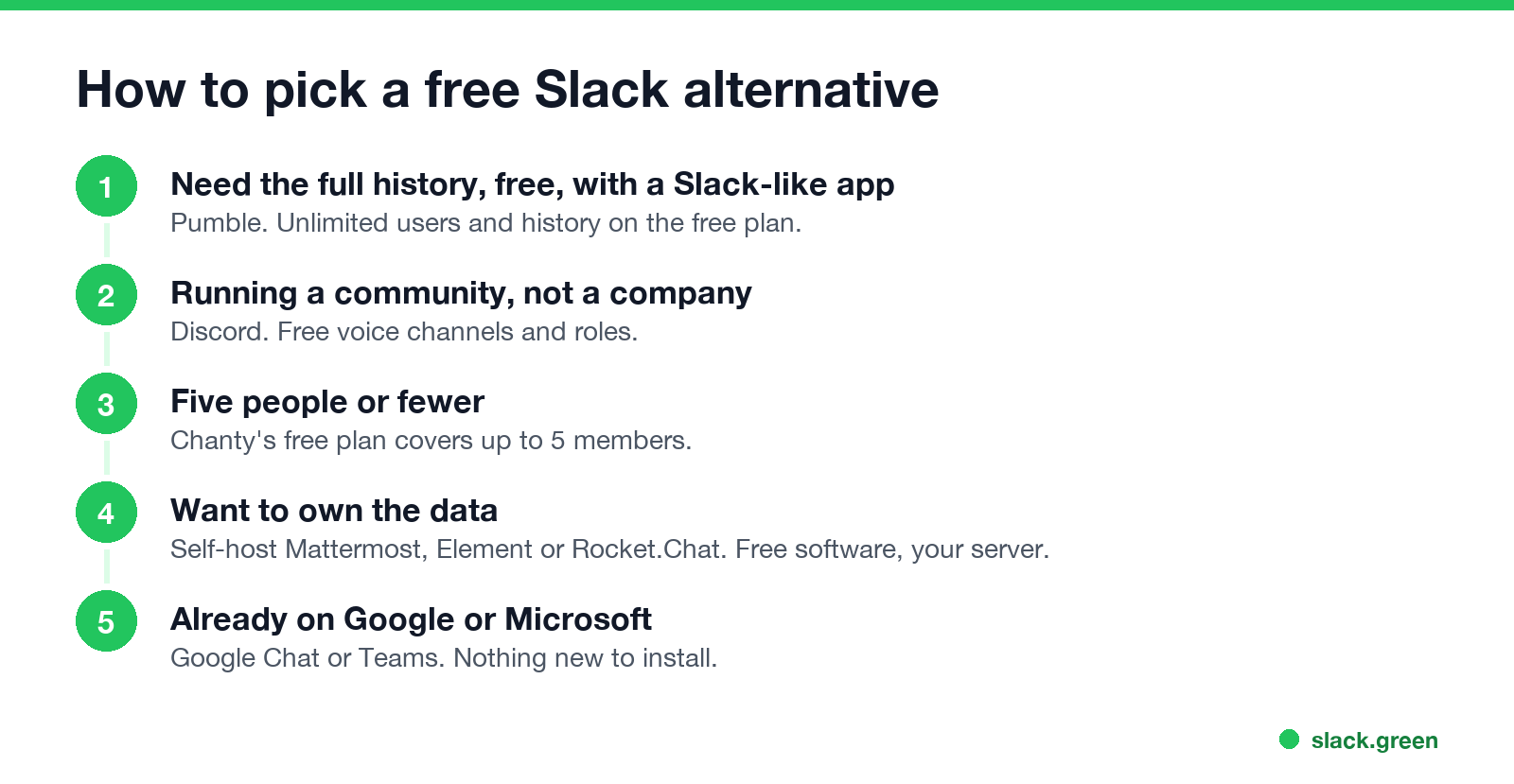
- You need the full history for free, in a Slack-like app: Pumble.
- You run a community, not a company: Discord.
- You are five people or fewer: Chanty.
- You want to own the data and can run a server: Mattermost, Element or Rocket.Chat.
- You already live in Google or Microsoft: Google Chat or Teams.
Self-hosting is free in license cost only. You pay for a server, backups, updates and someone's time. For a team without an IT person, a hosted free plan such as Pumble costs less in practice.
Google Chat and Microsoft Teams free
If everyone already has a Google account, Google Chat is built into Gmail and costs nothing; it is also included in paid Google Workspace plans. The free version of Microsoft Teams covers chat and meetings up to 60 minutes for personal and community use; companies pay for Teams Essentials ($4 a user a month) or Microsoft 365. See Slack vs Teams.
How to pick a free Slack alternative
If none of these trade-offs work, paying for Slack Pro removes the history limit for $7.25 a user a month; see is Slack Pro worth it. To keep your old Slack messages before you move, see how to export Slack messages without admin.
FAQ
Never appear "away" on Slack again
Cloud-based. No downloads. Works 24/7 even when your laptop is off.
What is the best free alternative to Slack?
For most teams, Pumble: unlimited users and message history on the free plan, and it works like Slack. For communities, Discord.
Is there an open-source Slack alternative?
Yes. Mattermost, Element (on the Matrix protocol), Rocket.Chat and Zulip are open source and can be self-hosted.
Which Slack alternative has unlimited free message history?
Pumble, Chanty and Discord keep full history on their free plans. Self-hosted tools keep whatever your server stores.
What is a good Slack alternative for startups?
Pumble or Zulip if cost matters most; Slack Pro if you need its app marketplace and shared channels with clients.
Can I move my Slack messages to another app?
Pumble lists an import from Slack on its free plan. For other tools, check their import options; most start from a Slack export file, which a workspace admin creates.
Stop Jiggling Your Mouse.
Join hundreds of remote workers who never worry about their Slack status. Set it up once, stay green forever.
Related Articles
Slack Lists Tutorial: Create, Organize and Share a List
Slack lists are tables of tasks inside Slack, with fields, assignees, due dates, a board view and a comment thread on every item. How to create a list from scratch or a template, set up fields, turn it into a kanban board, add messages to it, share it, and what the plan limits are.
Slack Jira Integration: Setup, /jira Commands and Notifications
Install the Jira Cloud for Slack app, type /jira connect in a channel to send a Jira space's updates there, /jira notify for personal notifications as DMs, and create work items from any message with More actions. Every /jira command, Jira automation to Slack, and fixes when previews or notifications stop.
How to Create a Slack Workspace, on Desktop or Phone
Go to slack.com/get-started, enter your email, type the confirmation code, and click Create a Workspace. It is free to start, you become the Primary Owner, and it takes about five minutes. Steps for desktop, iPhone and Android, and what to set up next.