
Slack Free Plan Limits: What You Lose Without Paying
The Slack free plan shows only the last 90 days of messages and files, deletes data older than one year, allows 10 apps, and limits huddles and Slack Connect to one-on-one. Every limit from Slack's help center, what happens at day 90, and when upgrading is worth it.
The Slack free plan has five limits that matter. You can see and search only the last 90 days of messages and files. Data older than one year is deleted on a rolling basis. You can install 10 apps. Huddles are one-on-one only. Slack Connect works only in one-on-one DMs with people outside your company. Workflows, canvases, lists, guest accounts, user groups and AI features need a paid plan. Slack's help center lists no cap on the number of members in a free workspace.
Your presence works the same on every plan: the green dot goes grey 10 minutes after your last input in Slack. Slack Green keeps it green during the working hours you set, from the cloud, and it works on free workspaces.
Every Slack free plan limit
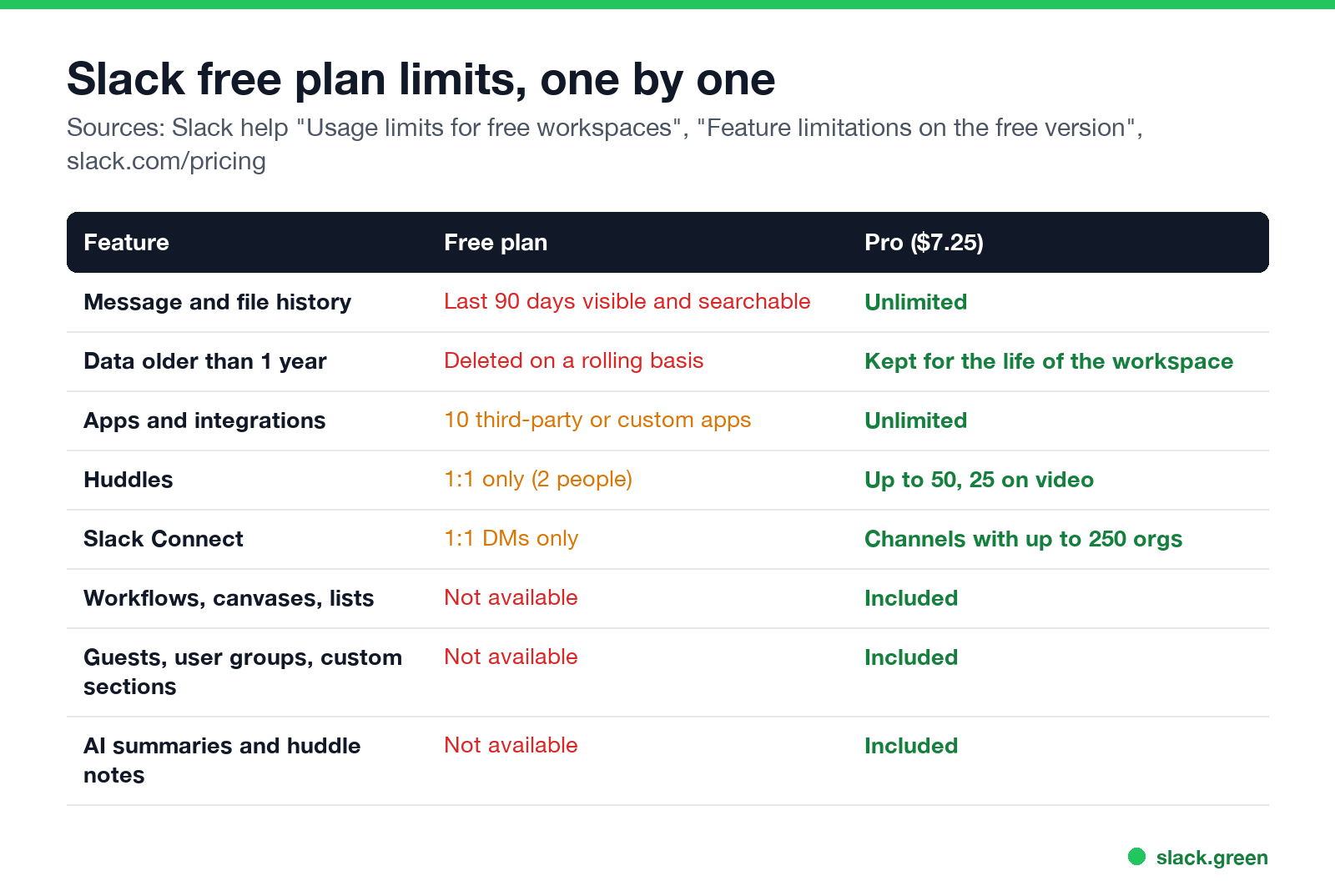
| Feature | Free plan | Pro ($7.25 a user a month, paid yearly) |
|---|---|---|
| Message and file history | Last 90 days visible and searchable | Unlimited |
| Data older than one year | Deleted on a rolling basis | Kept for the life of the workspace |
| Apps and integrations | 10 third-party or custom apps | Unlimited |
| Huddles | 1:1 only | Up to 50 people, 25 on video |
| Slack Connect | 1:1 DMs only | Channels with up to 250 organizations |
| Workflow Builder | Not available | Included |
| Canvases and lists | Not available (read-only after a downgrade) | Included |
| Guest accounts | Not available | Included |
| User groups and custom sidebar sections | Not available | Included |
| AI summaries and huddle notes | Not available | Included |
| Workspaces | 1 | 1 |
Sources: Slack's help center articles "Usage limits for free workspaces" and "Feature limitations on the free version of Slack", and slack.com/pricing, checked on 23 September. Slack also applies a high-volume limit on the free plan: it may stop you sending many messages or files in a short time, to limit spam and storage use.
Does Slack delete messages after 90 days?
No, not by default. After 90 days, messages and files are hidden, not deleted. Slack's help center says free workspaces can view and search the last 90 days only; older messages are hidden to make room for new ones, and messages and files more than one year old are permanently deleted. Slack started those deletions on August 26, 2024.
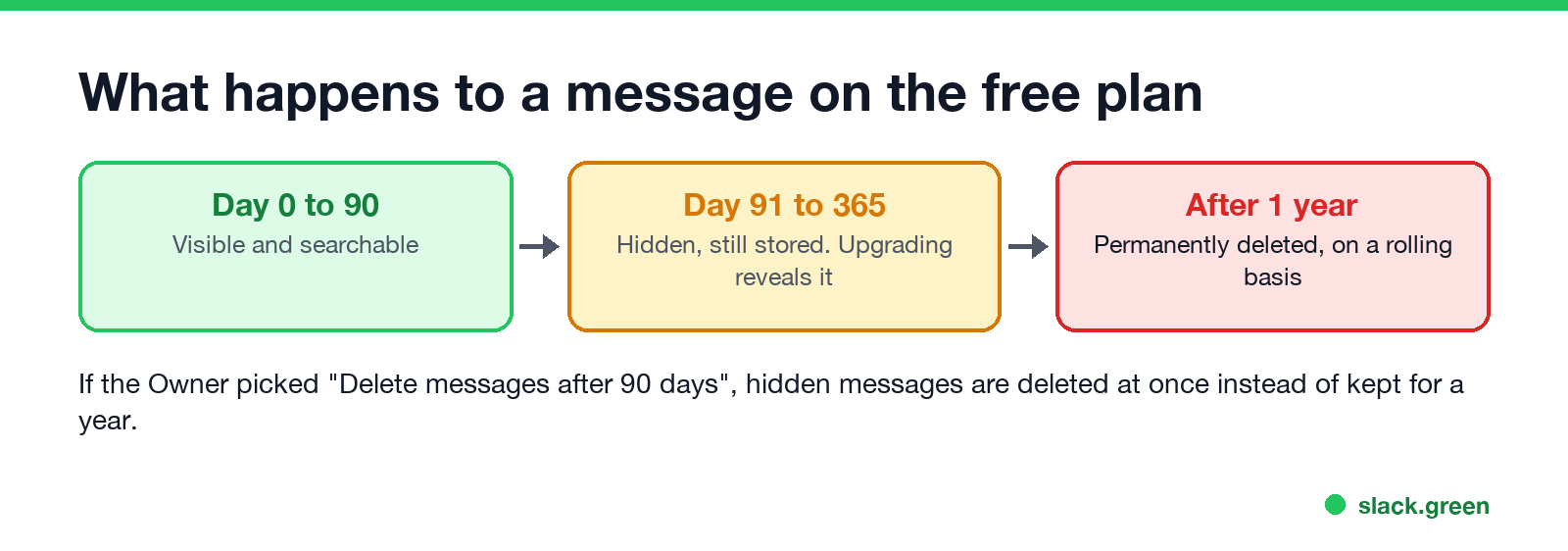
Two exceptions:
- • If the workspace Owner chose Delete messages after 90 days in the data retention settings, hidden messages are deleted right away instead of kept for a year.
- • If the workspace upgrades to a paid plan, the hidden messages that are less than a year old become visible again.
The full retention rules for every plan are in Slack message retention policy. To keep a copy of your own messages before they go, see how to export Slack messages without admin.
Slack free plan user limit
Never appear "away" on Slack again
Cloud-based. No downloads. Works 24/7 even when your laptop is off.
Slack's help center lists no member limit for free workspaces. The limits are on history, apps and features, not on headcount. In practice, large free communities run into the 90-day history limit and the missing guest accounts first. Slack's pricing page bills paid plans per active member: someone who does nothing in Slack for 28 days stops counting.
Huddles on the free plan
Free workspaces can huddle one-on-one in DMs, with audio, video and screen sharing. A huddle in a channel with three or more people needs a paid plan, where huddles hold up to 50 people and 25 on video. Many free teams pair Slack with a free video tool for group calls; the options are in Slack huddles vs Zoom.
Apps, workflows and Slack Connect
Apps: you can install up to 10 third-party or custom apps. When you reach the limit, uninstall one to add another. Built-in features do not count.
Workflows: Workflow Builder is a paid feature. After a downgrade, existing workflows stop and you cannot create new ones. Slash commands like /remind still work on free; see Slack /remind examples.
Slack Connect: on free, you can DM one person at another company. Shared channels with other companies need Pro or above.
Slack free vs paid: when to upgrade
Never appear "away" on Slack again
Cloud-based. No downloads. Works 24/7 even when your laptop is off.
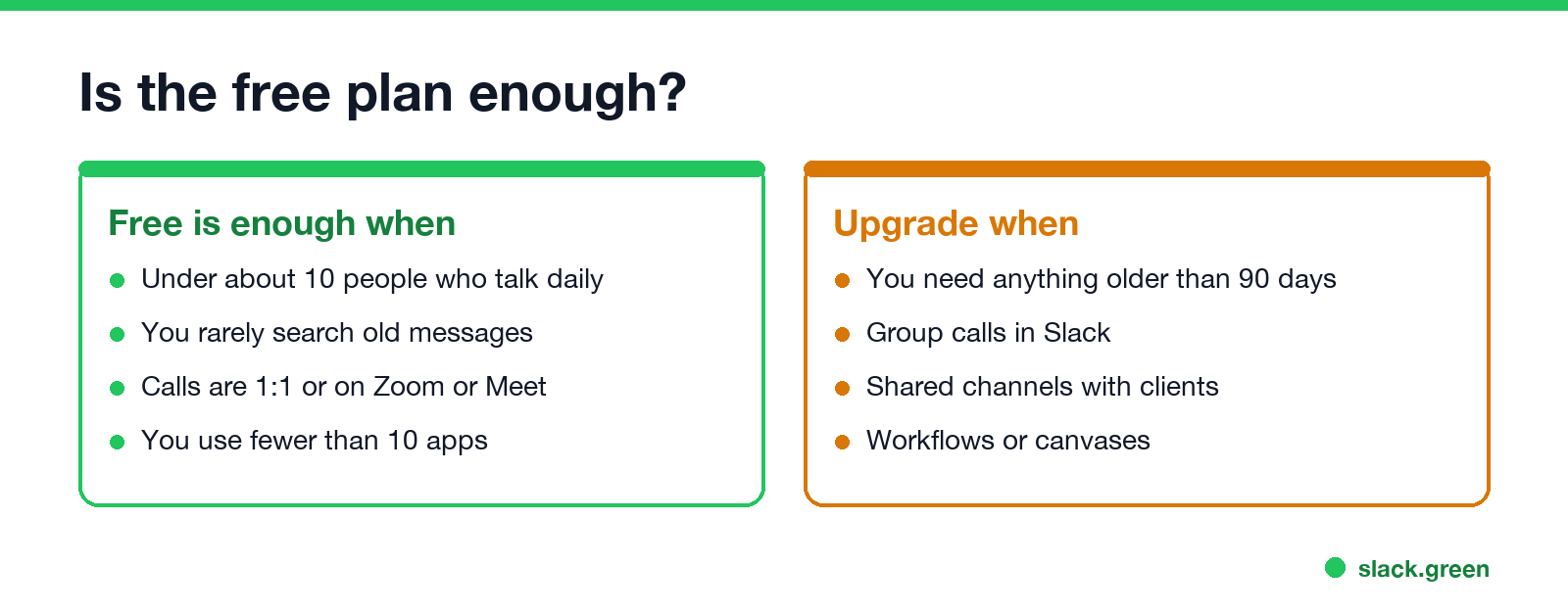
The free plan is enough for a small team that talks every day, rarely looks back further than three months, and holds group calls somewhere else. Upgrade when you need history older than 90 days, group huddles, shared channels with clients, workflows or canvases. Pro costs $7.25 a user a month paid yearly, or $8.75 monthly. Business+ ($15 paid yearly) adds AI search answers, recaps and more; see is Slack Pro worth it and is Slack AI worth it.
If the price is the problem, free Slack alternatives compares tools that keep full history for free.
FAQ
What are the limitations of the Slack free plan?
90 days of visible message and file history, deletion of data older than one year, 10 apps, 1:1 huddles, 1:1 Slack Connect DMs, and no workflows, canvases, lists, guests, user groups or AI features.
Does Slack delete messages after 90 days on the free plan?
No. They are hidden after 90 days and deleted after one year, unless the Owner chose to delete after 90 days.
Can I see old messages if I upgrade?
Yes, if they are less than one year old. Upgrading reveals messages hidden by the 90-day limit that have not been deleted yet.
How many users can a free Slack workspace have?
Slack does not list a member limit for free workspaces.
Can you huddle on Slack for free?
Yes, one-on-one. Group huddles need a paid plan.
Does the free plan change how my status works?
No. The 10-minute away timer and status options are the same on every plan. See how long does Slack stay active.
Stop Jiggling Your Mouse.
Join hundreds of remote workers who never worry about their Slack status. Set it up once, stay green forever.
Related Articles
Slack Lists Tutorial: Create, Organize and Share a List
Slack lists are tables of tasks inside Slack, with fields, assignees, due dates, a board view and a comment thread on every item. How to create a list from scratch or a template, set up fields, turn it into a kanban board, add messages to it, share it, and what the plan limits are.
Slack Jira Integration: Setup, /jira Commands and Notifications
Install the Jira Cloud for Slack app, type /jira connect in a channel to send a Jira space's updates there, /jira notify for personal notifications as DMs, and create work items from any message with More actions. Every /jira command, Jira automation to Slack, and fixes when previews or notifications stop.
How to Create a Slack Workspace, on Desktop or Phone
Go to slack.com/get-started, enter your email, type the confirmation code, and click Create a Workspace. It is free to start, you become the Primary Owner, and it takes about five minutes. Steps for desktop, iPhone and Android, and what to set up next.