
Convert a Unix Timestamp to a Date in Excel
Use =A2/86400+DATE(1970,1,1) and format the cell as a date. For milliseconds, divide by 86400000. Formulas for time zones, Slack message timestamps, the reverse conversion, Google Sheets EPOCHTODATE and Power Query.
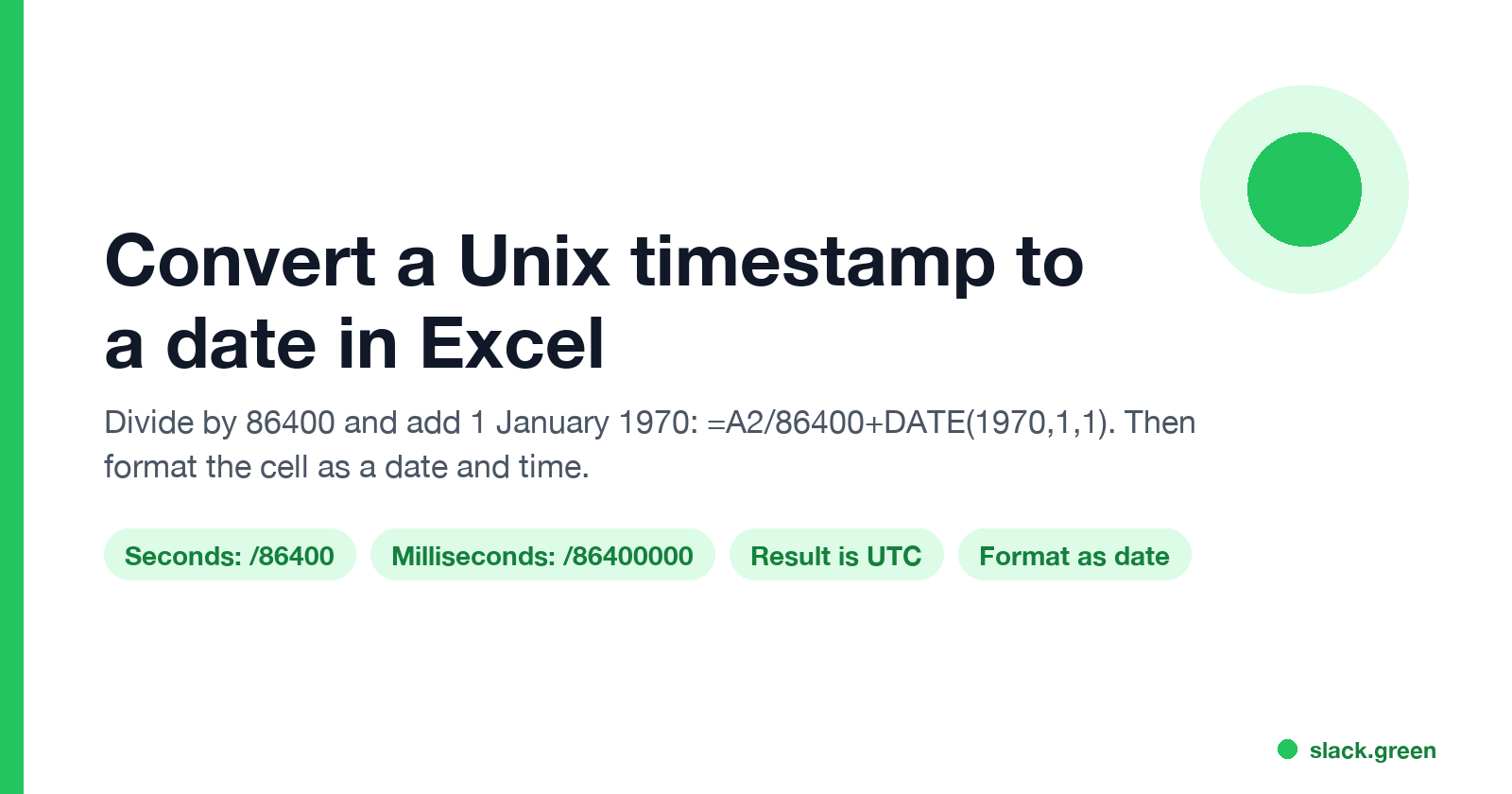
To convert a Unix timestamp to a date in Excel, use =A2/86400+DATE(1970,1,1), then format the cell as a date and time. A Unix timestamp counts seconds since 1 January 1970 in UTC. Dividing by 86,400, the number of seconds in a day, turns it into days, and adding DATE(1970,1,1) moves it onto Excel's own calendar. If your timestamp has 13 digits, it is in milliseconds: divide by 86,400,000 instead.
The result is in UTC. Formulas for your local time zone, the reverse conversion, Google Sheets, Power Query and Slack's message timestamps are below.
We build Slack Green. For a one-off conversion without a spreadsheet, our free Slack timestamp converter turns a Unix timestamp into a date in your browser, and makes Slack date strings that show in each reader's time zone.
The formula for each case
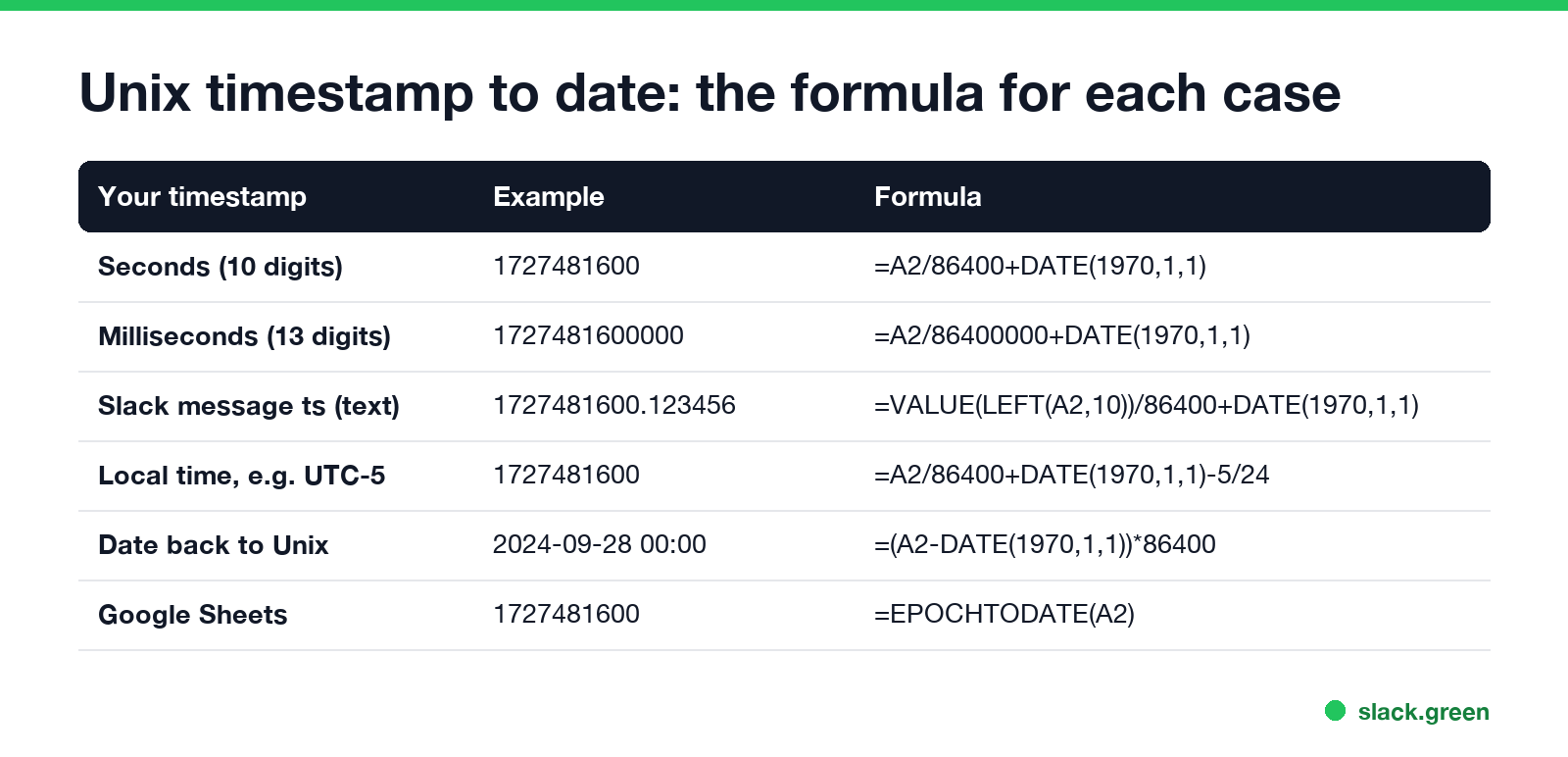
The timestamp is in cell A2 in every example.
Seconds (10 digits):          =A2/86400+DATE(1970,1,1)
Milliseconds (13 digits):     =A2/86400000+DATE(1970,1,1)
Microseconds (16 digits):     =A2/86400000000+DATE(1970,1,1)
Timestamp stored as text:     =VALUE(A2)/86400+DATE(1970,1,1)
Date back to Unix seconds:    =(A2-DATE(1970,1,1))*86400
A quick check: 1727481600 should come out as 2024-09-28 00:00:00. If you get a date in 1970, the timestamp was in milliseconds and needs the bigger divisor. If you get #####, the result is valid and the column is too narrow, or the number came out negative.
How the formula works
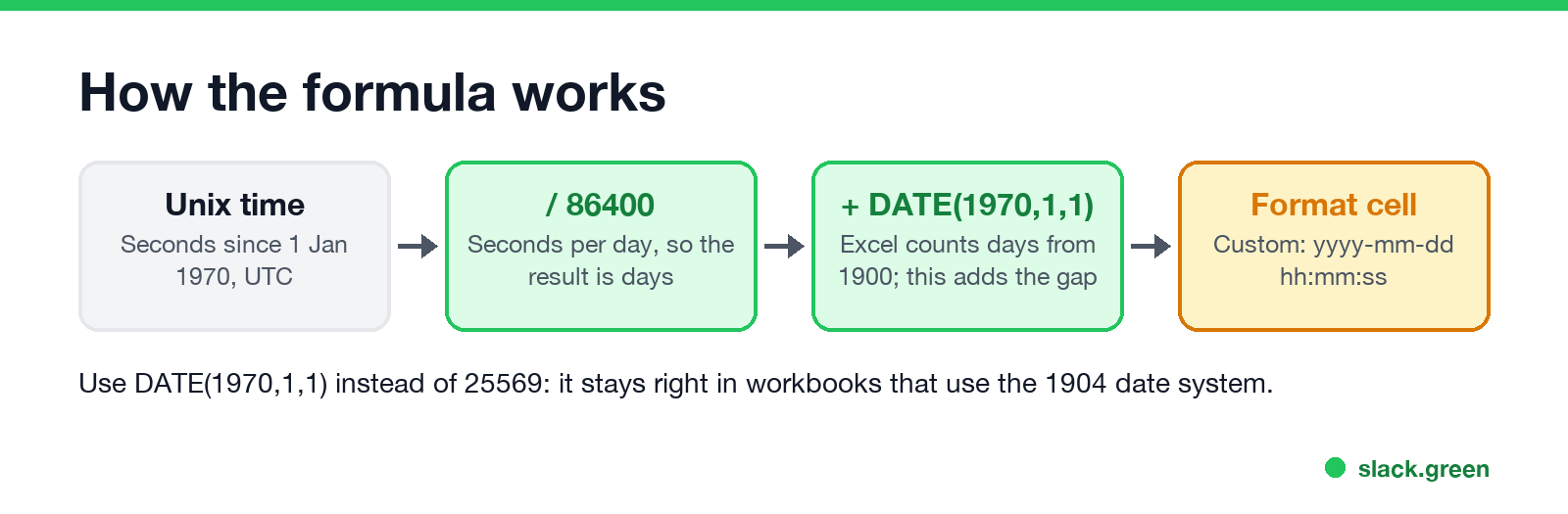
Excel stores a date as the number of days since 1 January 1900, with the time of day as a fraction. 12:00 noon is 0.5. Unix time stores seconds since 1 January 1970. So the conversion is two steps: seconds to days, then add the days between 1900 and 1970.
Many guides write that gap as 25569. That works in most workbooks, but Excel for Mac files can use the 1904 date system, where 25569 gives a date four years off. DATE(1970,1,1) returns the right number in either system, so use it.
Format the result as a date
Never appear "away" on Slack again
Cloud-based. No downloads. Works 24/7 even when your laptop is off.
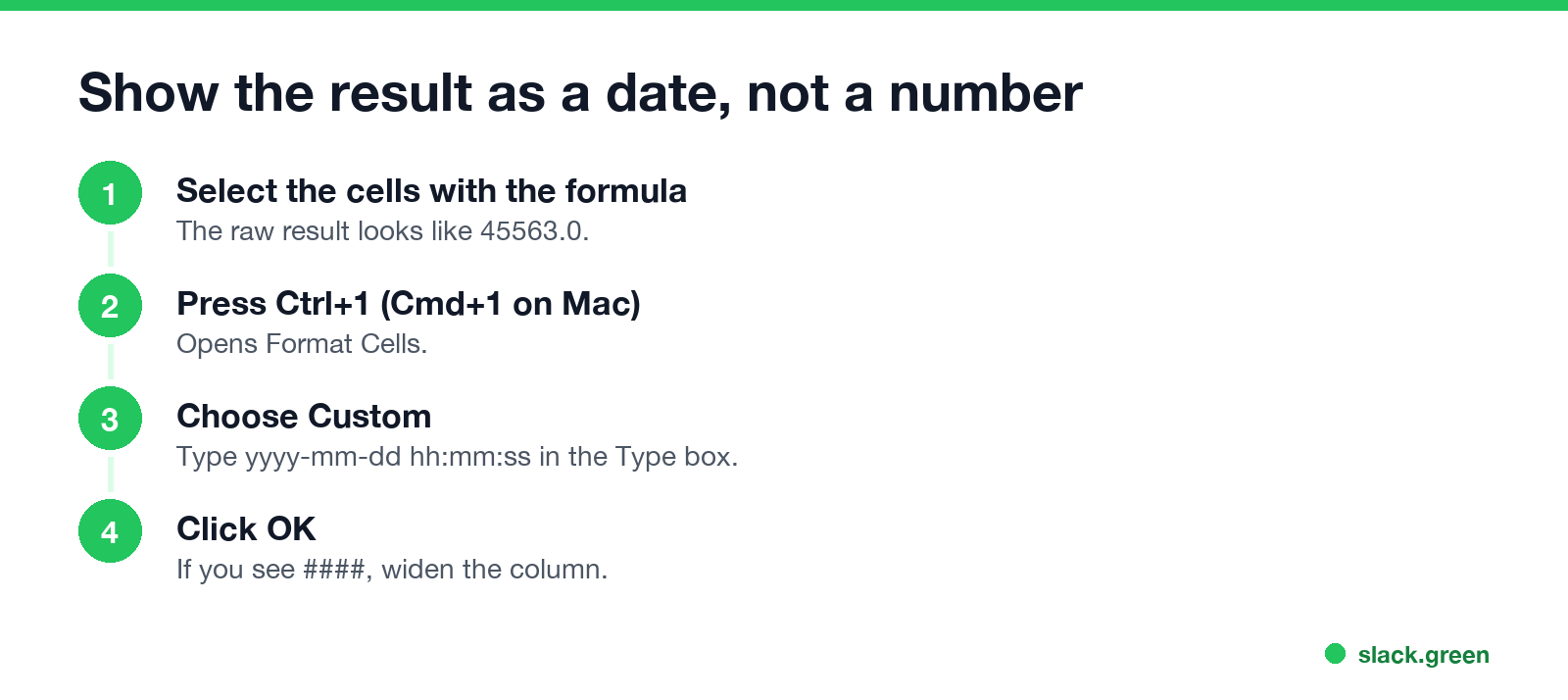
The formula returns a number such as 45563. To see a date:
- Select the cells.
- Press Ctrl+1 (Cmd+1 on Mac) to open Format Cells.
- Choose Custom and type
yyyy-mm-dd hh:mm:ssin the Type box. - Click OK.
To get the date as text in one step, wrap the formula: =TEXT(A2/86400+DATE(1970,1,1),"yyyy-mm-dd hh:mm:ss").
Convert to your time zone
Unix time is always UTC. Add or subtract the offset in hours divided by 24:
New York, summer (UTC-4):   =A2/86400+DATE(1970,1,1)-4/24
London, summer (UTC+1):     =A2/86400+DATE(1970,1,1)+1/24
India (UTC+5:30):           =A2/86400+DATE(1970,1,1)+5.5/24
Tokyo (UTC+9):              =A2/86400+DATE(1970,1,1)+9/24
Excel has no time zone database, so a fixed offset is wrong for half the year in places with daylight saving time. For a column that spans both, add a helper column with the offset for each row, or convert in Power Query. To check an offset for a given date, use our Slack time zone converter.
Google Sheets: EPOCHTODATE
Google Sheets has a built-in function:
=EPOCHTODATE(A2)       seconds
=EPOCHTODATE(A2, 2)    milliseconds
=EPOCHTODATE(A2, 3)    microseconds
It returns UTC. The Excel formula =A2/86400+DATE(1970,1,1) also works in Sheets, so a shared file can use either.
Power Query: Unix timestamp to datetime
Never appear "away" on Slack again
Cloud-based. No downloads. Works 24/7 even when your laptop is off.
In Power Query, add a custom column (Add Column, Custom Column) with:
#datetime(1970, 1, 1, 0, 0, 0) + #duration(0, 0, 0, [Timestamp])For milliseconds, use [Timestamp] / 1000. To get local time with daylight saving handled, build a UTC datetimezone and convert it:
DateTimeZone.ToLocal(#datetimezone(1970, 1, 1, 0, 0, 0, 0, 0) + #duration(0, 0, 0, [Timestamp]))ToLocal uses the time zone of the computer that refreshes the query. In KQL (Azure Data Explorer, Log Analytics), the same job is unixtime_seconds_todatetime(ts) or unixtime_milliseconds_todatetime(ts).
Slack and Discord timestamps in Excel
A Slack export or API response gives each message a ts such as 1727481600.123456. The part before the dot is Unix seconds; the part after keeps messages in the same second apart. Excel often reads it as text, so take the first 10 characters:
=VALUE(LEFT(A2,10))/86400+DATE(1970,1,1)Slack's own date strings, such as <!date^1727481600^{date_short}|Sep 28>, carry the same seconds after the first caret. How Slack shows message times to people is in how to see the exact time a Slack message was sent. Discord's <t:1727481600:F> tags use Unix seconds too, and the same formula converts them.
FAQ
What is the Excel formula to convert a Unix timestamp to a date?
=A2/86400+DATE(1970,1,1), then format the cell as a date.
How do I convert a 13-digit timestamp in Excel?
It is in milliseconds. Use =A2/86400000+DATE(1970,1,1).
How do I convert an Excel date to a Unix timestamp?
=(A2-DATE(1970,1,1))*86400. Subtract your UTC offset first if the date is local time.
Why does my converted date show as 1970? The timestamp is in milliseconds. Divide by 86,400,000 instead of 86,400.
Is a Unix timestamp UTC? Yes. Add your offset in hours divided by 24 to get local time.
Stop Jiggling Your Mouse.
Join hundreds of remote workers who never worry about their Slack status. Set it up once, stay green forever.
Related Articles
Slack Huddle API: What Apps Can Read and Do
Slack has no API to start, join or record a huddle. Apps can read whether a user is in one from huddle_state on the user profile, see which channel from huddle_state_channel_id, and get the user_huddle_changed event when it changes. Code for both, plus audit log events on Enterprise.
How to Show Your Discord Status on Steam Deck
Discord on Steam Deck does not show what you are playing by itself. Install Discord as a Flatpak, add it to Steam, then add the Discord Status plugin through Decky Loader. Keep Discord running and friends see 'Playing [game] on Steam Deck'. Setup, fixes, and the alternatives.
How to Create a Slack Webhook URL in 4 Steps
Create a Slack app at api.slack.com/apps, turn on Incoming Webhooks, click Add New Webhook to Workspace and pick a channel. Slack gives you a hooks.slack.com URL that posts to that channel. Private channels, DMs, several channels, the Workflow Builder alternative, and the errors you may see.