
How to Bulk Delete Slack Messages (Tested Script)
The Slack app deletes one message at a time. We ran a script that deleted 120 of our messages in 108 seconds and handled the rate limits.
To bulk delete Slack messages, run a short script that lists a channel's history and calls chat.delete on each message you posted, because the Slack app itself deletes one message at a time. A regular member can only delete their own messages this way; deleting other people's messages in bulk needs a Workspace Owner or Admin on a paid plan. We ran the script below on 22 November 2026 in a Free test workspace and deleted 120 messages in 108 seconds.
Can you bulk delete messages in the Slack app?
Not in one action. In the app you hover a message, open More actions (the three dots) and choose Delete message, then confirm, once per message. For a few messages that is fine. For a channel full of test posts, bot spam or an old project you want gone, it is the API or nothing.
Who may delete what does not change with the method. Members delete their own messages unless the workspace turned that off, and only owners and admins on paid plans can delete other people's. Our page on deleting someone else's message covers that rule, and when Slack won't let you delete a message covers the errors.
Bulk delete your own messages with a script
You need a user token, which acts as you. Create an app at api.slack.com/apps, add the user scopes chat:write and channels:history (add groups:history for private channels and im:history for DMs), install it to your workspace and copy the User OAuth Token, which starts with xoxp-. In our Free workspace a regular member could install the app; some workspaces send it to an admin for approval first.
This is the script we ran, unchanged. It reads the channel page by page, skips every message that is not yours, and waits when Slack says to slow down:
import os
import sys
import time

import requests

TOKEN = os.environ["SLACK_USER_TOKEN"]  # xoxp- user token with chat:write and channels:history
CHANNEL = sys.argv[1]
DRY_RUN = "--dry-run" in sys.argv
HEADERS = {"Authorization": "Bearer " + TOKEN}


def api(method, **data):
    while True:
        r = requests.post("https://slack.com/api/" + method, headers=HEADERS, data=data, timeout=30)
        if r.status_code == 429:
            wait = int(r.headers.get("Retry-After", "1"))
            print(f"{time.strftime('%H:%M:%S')} rate limited on {method}, waiting {wait}s", flush=True)
            time.sleep(wait)
            continue
        return r.json()


me = api("auth.test")["user_id"]
start = time.time()
deleted = skipped = failed = 0
cursor = ""
while True:
    page = api("conversations.history", channel=CHANNEL, limit=200, cursor=cursor)
    for msg in page["messages"]:
        if msg.get("user") != me or msg.get("subtype") == "channel_join":
            skipped += 1
            continue
        if DRY_RUN:
            deleted += 1
            continue
        res = api("chat.delete", channel=CHANNEL, ts=msg["ts"])
        if res["ok"]:
            deleted += 1
        else:
            failed += 1
            print("could not delete", msg["ts"], res["error"], flush=True)
    cursor = page.get("response_metadata", {}).get("next_cursor", "")
    if not cursor:
        break

took = time.time() - start
verb = "would delete" if DRY_RUN else "deleted"
print(f"{verb} {deleted}, skipped {skipped} (not yours), failed {failed}, {took:.1f}s")
Run it with --dry-run first. That counts what it would delete and deletes nothing:
export SLACK_USER_TOKEN=xoxp-...
python bulk_delete.py C0123CHANNEL --dry-run
python bulk_delete.py C0123CHANNEL
The channel ID is in the channel details, at the bottom of the About tab, or in the channel's link.
Never appear "away" on Slack again
Cloud-based. No downloads. Works 24/7 even when your laptop is off.
What happened when we ran it
We filled a test channel with 120 messages from a member account and 5 from an app:
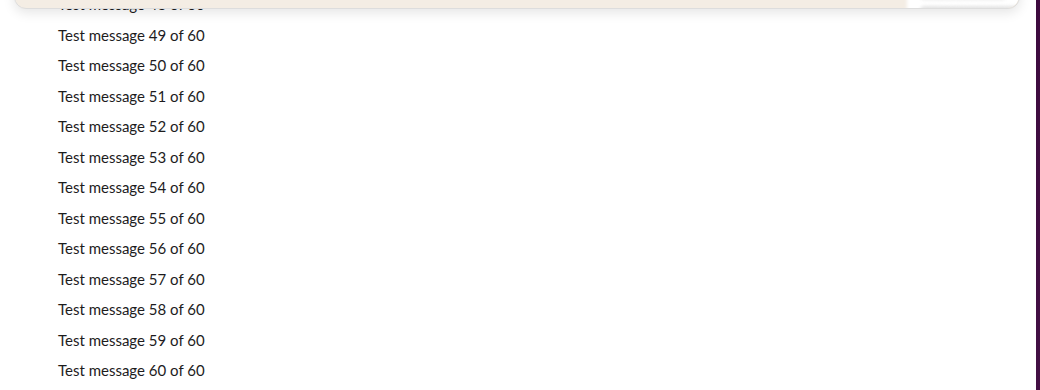
The dry run and the real run printed this:
would delete 120, skipped 7 (not yours), failed 0, 0.3s

14:16:33 rate limited on chat.delete, waiting 10s
14:16:48 rate limited on chat.delete, waiting 10s
14:17:01 rate limited on chat.delete, waiting 10s
14:17:14 rate limited on chat.delete, waiting 10s
14:17:28 rate limited on chat.delete, waiting 10s
14:17:45 rate limited on chat.delete, waiting 10s
deleted 120, skipped 7 (not yours), failed 0, 107.8s
The 7 skipped messages were the app's 5 posts and the two 'joined the channel' notices. Slack rate limited chat.delete six times, each time with Retry-After: 10, so the run averaged about 67 deletions a minute. Without the wait-and-retry loop the script would have failed on its first 429. Afterwards only the app's messages were left:
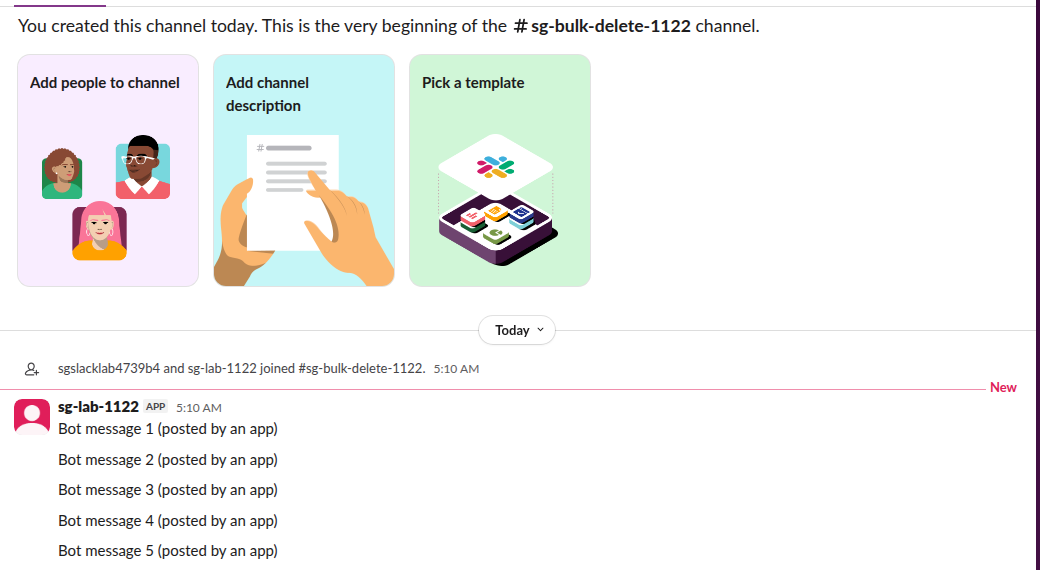
Two limits to know before you point it at a real channel:
- • Thread replies are not in
conversations.history. The script deletes top-level messages and leaves replies in threads. To reach them, callconversations.repliesfor each message that has areply_countand delete from that list too. - • Deleted means gone for everyone. There is no undo and no trash. Workspace exports and legal holds on paid plans may still keep a copy, as our test of whether Slack can see deleted messages explains.
If you just want a copy of your messages before you clear them, export them first.
Other ways to clear a lot of messages
| Method | Who can use it | What it removes |
|---|---|---|
| Script with a user token (above) | Any member, for their own messages | Your messages in the channels you choose |
| Same script with an admin's user token | Owners and admins on paid plans | Anyone's messages |
| Message retention setting | Owners on paid plans | Everything older than the period you set, workspace-wide or per channel |
| Delete the channel | Owners and admins | The whole channel and its history |
| Browser extensions that delete in bulk | Anyone who gives them a token | Depends on the extension; it gets full access to your account |
Retention is the hands-off option if the goal is 'nothing older than 90 days', and Slack's retention policy page shows how it works on each plan.
FAQ
Can I bulk delete Slack DMs?
The same calls work in a DM with the im:history scope and the DM's ID, and you can only delete your own side of the conversation. We ran the script in a channel, not in a DM.
Does the other person get notified when I delete messages? No notification is sent. The messages disappear from the conversation for everyone.
Why does the script pause?
Slack answered HTTP 429 with a 10-second Retry-After six times during our 120 deletions. The script waits that long and retries, so it finishes instead of stopping halfway.
Stop Jiggling Your Mouse.
Join hundreds of remote workers who never worry about their Slack status. Set it up once, stay green forever.
Related Articles
Slack Work Objects: A Working Unfurl, Flexpane and the Errors We Hit
We built a Work Object unfurl for a fake ticket tracker in a free Slack workspace: the manifest setting, the chat.unfurl metadata that rendered the card, the entity_details_requested event behind the flexpane, and every error on the way.
Slack Bolt for Python Example: An HTTP App With Flask, Tested
A Bolt for Python app over HTTP that answers a message, a slash command and a button through the Flask adapter, then the same app as AsyncApp on aiohttp. Console logs from a real run, and the errors a wrong signing secret and an unhandled event gave.
Slack API Pagination: next_cursor, the Last Page and invalid_cursor, Tested
Slack paginates list methods with a cursor: pass response_metadata.next_cursor back as cursor until it is empty. We paged 27 real messages on 2 October 2026 and broke the cursor five ways to see which ones fail.