
Can't Delete a Slack Message? 7 Cases We Tested
Slack lets a member delete only their own messages. Someone else's message, a 'joined the channel' line and workspaces where admins turned deletion off all fail. We ran each case from a member account and recorded the exact error.
If Slack will not let you delete a message, the usual reason is that it is not yours: a regular member can delete only their own messages, so Delete message is missing from the menu of anyone else's. The other causes are a workspace setting where an owner or admin turned off deletion for members, and system lines such as "joined the channel", which nobody can delete as a member. On 5 November 2026 we tried seven kinds of deletion from a member account in a Free plan workspace; the results and the exact errors are below.
What we tested
We used a member account (not an owner or admin) and Slack's own chat.delete method with that member's session, which applies the same permissions as the Delete message button. The workspace allowed members to delete their own messages (allow_message_deletion: true) and had no edit time limit.
| Message | Result |
|---|---|
| Our own message in a private channel | Deleted |
| The same message a second time | message_not_found |
A message by the workspace owner in #social | cant_delete_message |
| Our own "joined the channel" line | cant_delete_message |
| Our own message in a public channel we had left | Deleted |
| Our own message in an archived channel | Deleted |
| Slackbot's reply in our Slackbot DM | Deleted |
Two results surprised us. Leaving a channel does not stop you deleting what you posted there, and archiving a channel did not block deletion of our own message through the API. And Slackbot's canned reply in your own Slackbot DM can be removed like your own message.
Delete message is missing from the menu
On your own message, hover, click the three-dot button and Delete message is the last item. On a message you cannot delete, the item is simply not there; Slack does not show a greyed-out version.
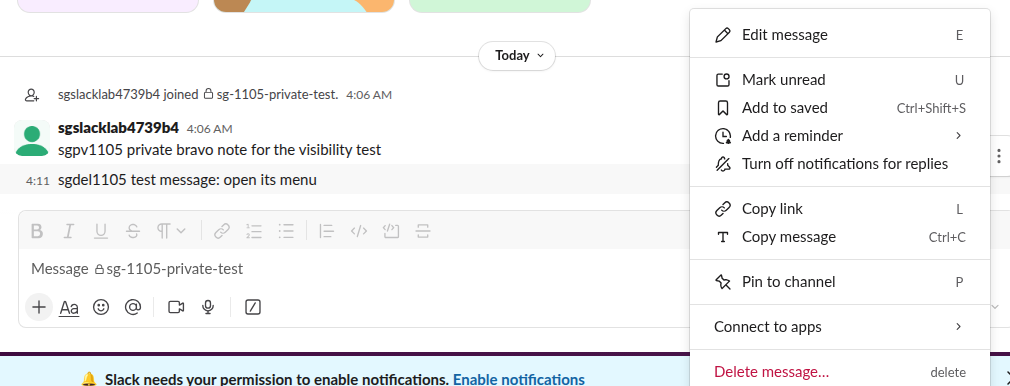
When the item is there and you click it, Slack asks once more, and the deletion cannot be undone:
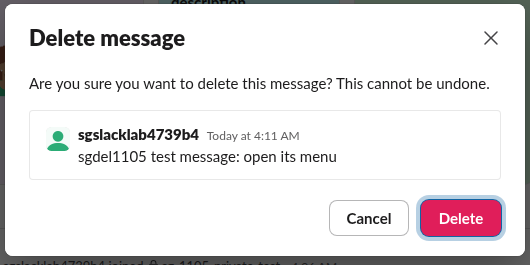
If the item is missing on your own message, the workspace has switched off deletion for your role; see the settings section below.
The error "Message deletion failed"
When a delete request reaches Slack and is refused, the app shows a dialog titled "Message deletion failed". From the client code we downloaded on 5 November, its text depends on the error:
- •
cant_delete_messageshows "Sorry, you do not have permission to delete this message". This is what our member account got for the owner's message and for the "joined" line. - • Any other error shows "Sorry, something went wrong with deleting your message." That one is worth a retry, because it covers network failures and a message that was already gone.
Never appear "away" on Slack again
Cloud-based. No downloads. Works 24/7 even when your laptop is off.
Who can delete which messages
| Role | Own messages | Other people's messages |
|---|---|---|
| Member or guest | Yes, unless an admin turned it off | No |
| Workspace admin or owner | Yes | Yes, in channels they can open |
| App with a bot token | Messages the bot posted | No |
Owners and admins change the member rule under Workspace settings, in Slack's permission for message editing and deletion. When it is off, members lose Delete message on their own messages too, which matches the Reddit reports of "message deletion is disabled" at companies with record-keeping rules. If you need a coworker's message removed, ask an admin; our guide on deleting someone else's Slack message covers what an admin sees. For bots, the chat.delete page lists the token rules.
Messages with files and threads
Deleting a message with an upload does not delete the file. Slack's confirm dialog says so for uploads: "Note that deleting this message will not delete the file that was uploaded." Delete the file itself from the file's menu, as in how to delete files in Slack.
For a thread, deleting the parent message leaves the replies in place under a gray "This message was deleted." placeholder (our 27 October test); each reply has to go on its own. Our page on deleting a Slack thread shows the steps.
FAQ
Can I delete a message in a DM with someone else?
Only your own messages in it. Their messages show no Delete option for you, the same as in a channel.
Does the other person know I deleted a message?
Slack sends no alert, but anyone who already saw it or got a notification or email copy keeps that. See can Slack see deleted messages for what stays in exports.
Why can't I delete a "joined the channel" message?
Those lines are system messages. Our member account got cant_delete_message for its own join line, both in an active and an archived channel.
Stop Jiggling Your Mouse.
Join hundreds of remote workers who never worry about their Slack status. Set it up once, stay green forever.
Related Articles
Slack SDK for Rust: slack-morphism Tested (Post, History, Socket Mode)
Slack has no official Rust SDK. The community crate that works today is slack-morphism: on 5 November 2026 we used version 2.31.1 to post a message, page through history with a cursor and answer a mention over Socket Mode. Code and output below.
Slack Deep Links: Every slack:// Command in the Current App
A Slack deep link is a slack:// URL such as slack://channel?team=T123&id=C123 that opens the desktop or mobile app on a channel, person, file or setting. We read the handler in Slack's current code, listed the commands it accepts, and tested the https fallbacks.
How to Show Unread Channels on Top in Slack (What Works Now)
Slack has no sort that lifts unread channels to the top. The closest is Filter and sort > Unreads, which hides every read channel. We tried each sort and filter in the sidebar with one unread channel and screenshot the order.