
How to Show Unread Channels on Top in Slack (What Works Now)
Slack has no sort that lifts unread channels to the top. The closest is Filter and sort > Unreads, which hides every read channel. We tried each sort and filter in the sidebar with one unread channel and screenshot the order.
Slack has no setting that moves unread channels to the top of the sidebar. The closest thing is the sidebar's Filter and sort menu set to Unreads, which hides every channel you have read, so the unread ones are all that is left. The three sorts, A–Z, Recency and Priority, never put a channel first because it is unread. We checked each option in the Slack web app on 5 November 2026 with one unread channel and three read ones; the screenshots below show the order each produced.
Where the setting is
Click the gear icon at the top of the sidebar, next to the workspace name, and point to Filter and sort. Slack shows two groups:
- • Filter conversations by: Active only (new activity within the last 30 days), Unreads, Mentions, All, Custom by section.
- • Sort conversations by: A–Z, Recency, Priority.
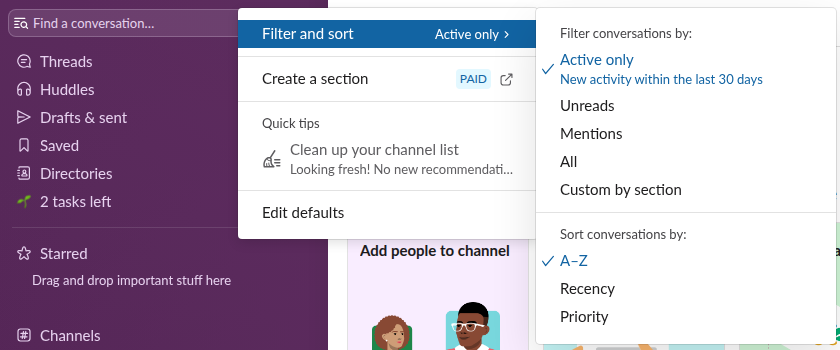
The choice is saved in your Slack preferences, not in the browser, so it applies wherever you sign in. In the API it shows as two preferences, sidebar_behavior (for example hide_inactive_channels or hide_read_channels) and channel_sort (default, recent or priority).
What each option did with an unread channel
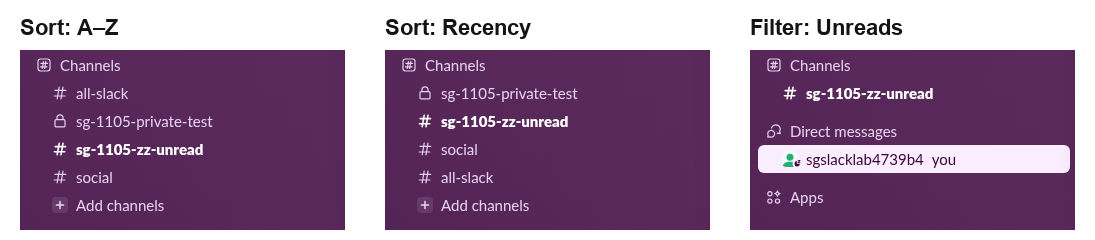
Our test sidebar had four channels. sg-1105-zz-unread held one unread message, and sg-1105-private-test had a newer message that we had already read.
| Option | Where the unread channel ended up |
|---|---|
| Sort: A–Z | Third of four, in its alphabetical place, in bold |
| Sort: Recency | Second; the read channel with the newer message was first |
| Sort: Priority | Same order as A–Z in our new test workspace |
| Filter: Unreads | Alone in the Channels section; every read channel was hidden |
Recency comes close but is not the same thing: it sorts by the newest message, read or not. A busy channel you just caught up on stays above a quiet one with an unread message. Priority leans on your past activity in each conversation, which our new test account did not have, so it fell back to the alphabetical order.
Never appear "away" on Slack again
Cloud-based. No downloads. Works 24/7 even when your laptop is off.
The two ways to see unread channels first
On paid plans you can also make custom sidebar sections, and the Custom by section filter points to a setting per section. On Free, Create a section carries a PAID label, so we could not test it. Our page on Slack sidebar sections covers the paid options.
When a channel stays bold after you read it
If a channel keeps showing as unread, the usual cause is an unread thread reply or a message you marked unread earlier. See Slack threads keep showing unread, and mark as unread in Slack for how the marker works. We made our test channel unread the same way, by moving the read marker back before its message.
FAQ
Did Slack ever have an unread-first sort?
Older versions had a filter menu with "Unreads and mentions" and an option to show them in order, which Reddit answers from 2022 still describe. The menu in the web app we tested on 5 November 2026 has no such option.
Does switching the filter mark channels as read?
No. Our unread test channel stayed bold through A–Z, Recency, Priority and Unreads, and was still unread when we put the settings back.
Can I set this for the whole workspace?
No. Filter and sort is a personal preference. Admins can set default channels for new members, not their sidebar sort.
Stop Jiggling Your Mouse.
Join hundreds of remote workers who never worry about their Slack status. Set it up once, stay green forever.
Related Articles
Lock Icon Next to a Slack Channel? What the Lock and Grey Text Mean
A padlock next to a Slack channel means it is private. Grey text with a crossed-out bell means you muted it. We made a private, muted, archived and unread channel and screenshot each one in the sidebar.
Slack Channels Disappeared From the Sidebar? How to Get Them Back
Slack channels usually disappear from the sidebar because of a filter: Active only hides conversations with no new activity in 30 days, and muted channels can be hidden. Fix it from the Manage my sidebar menu. Other causes: collapsed sections, archived channels, leaving channels, the wrong workspace.
Slack SDK for Rust: slack-morphism Tested (Post, History, Socket Mode)
Slack has no official Rust SDK. The community crate that works today is slack-morphism: on 5 November 2026 we used version 2.31.1 to post a message, page through history with a cursor and answer a mention over Socket Mode. Code and output below.