
Slack All Unreads: Turn It On, Shortcuts, and Clear Everything
Slack's Unreads view collects every unread message on one page. We turned it on, opened it with Cmd+Shift+A, cleared one channel with Esc and the whole workspace with Shift+Esc, and read Slack's own unread counts before and after each step.
Slack's All Unreads view is now called Unreads. Turn it on in Preferences > Home under Always show in the sidebar, or open it at any time with Cmd+Shift+A on a Mac (Ctrl+Shift+A on Windows). It lists every unread message, grouped by conversation. Esc marks the conversation you are on as read, and Shift+Esc marks everything in the workspace as read, after a confirm dialog. We tested each step in the Slack web app on 3 October 2026, with a test bot posting 5 unread messages, and read Slack's client.counts before and after.
Turn on Unreads in the sidebar
- Click your workspace name, then Preferences.
- Open Home.
- Under Always show in the sidebar, tick Unreads.
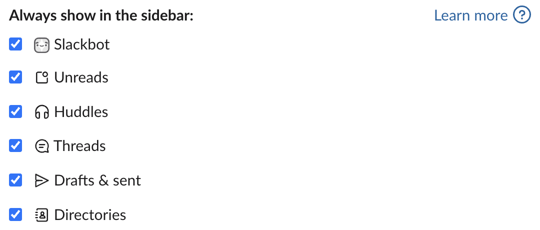
Unreads appeared at the top of the sidebar at once, above Threads. In users.prefs.get this is enable_unread_view, which went from false to true.
The shortcut does not need the setting. With Unreads unticked again, Cmd+Shift+A still opened the Unreads view, and the sidebar showed the Unreads item only while the view was open.
What the Unreads view shows
Our bot posted "unread test 1 of 5" to "5 of 5" in a test channel while we were in another channel. client.counts then reported the channel with has_unreads: true and its last_read behind its latest message. Cmd+Shift+A opened this:
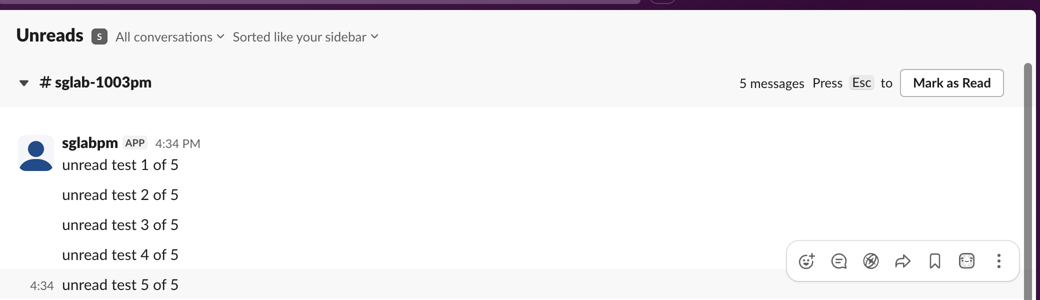
Each conversation is a section with its message count and a Mark as Read button. The two menus at the top filter by conversation type and change the sort order. At the bottom of the list there is a Mark All Messages Read button.
Mark one conversation read with Esc
Pressing Esc did nothing until we clicked inside the first section. After that, Esc collapsed it to "5 messages marked read", with Undo:

client.counts no longer listed the channel as unread.
Never appear "away" on Slack again
Cloud-based. No downloads. Works 24/7 even when your laptop is off.
Clear all unreads with Shift+Esc
We had the bot post 5 more messages, then pressed Shift+Esc. Slack asked first:
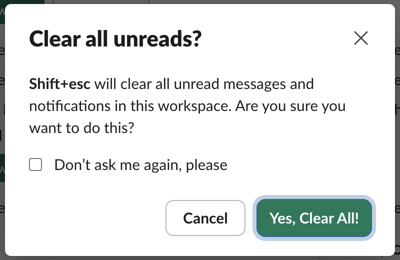
After Yes, Clear All!, client.counts returned no channel and no DM with unreads, and the badges on the app DM and on Activity were gone. "Notifications" in the dialog means that: Activity was cleared too, mentions included. We left Don't ask me again unticked.
One display bug: the open Unreads view kept showing the cleared messages, with a "5 new messages" pill, until we left it and opened it again. Then it showed "There! Caught up." If the view still lists messages after you cleared them, reopen it before you assume the clear failed.
When unreads will not go away
Shift+Esc cleared everything in our test, so we could not reproduce a stuck unread here. Thread badges and the red dot have their own causes, tested on Slack shows unread messages when there are none and Slack red dot won't go away. Other shortcuts are on Slack keyboard shortcuts.
Questions
Is Shift+Esc only for the channel I am in? No. In our test it cleared every channel, DM and Activity item in the workspace. Use Esc in the Unreads view for one conversation.
Can I undo Shift+Esc? The dialog has no undo button, and no Undo toast appeared after we confirmed. Single-conversation Esc in the Unreads view does show Undo.
Stop Jiggling Your Mouse.
Join hundreds of remote workers who never worry about their Slack status. Set it up once, stay green forever.
Related Articles
Slack Mute a Channel Without Hiding It: The Setting, Tested
In current Slack, muting a channel also hides it from the sidebar until you turn off one checkbox in Preferences. We muted a test channel, had a bot post and then @mention us in it, and recorded what the sidebar, the badge and Activity showed each time.
Slack Bookmarks: Where They Are Now, and Why They Disappear
Slack channel bookmarks now live in folder tabs above the messages, not in a bookmarks bar. We added, moved and deleted them in a test channel and through the bookmarks API, and found the delete that hides bookmarks the API still lists.
Slack Work Objects: A Working Unfurl, Flexpane and the Errors We Hit
We built a Work Object unfurl for a fake ticket tracker in a free Slack workspace: the manifest setting, the chat.unfurl metadata that rendered the card, the entity_details_requested event behind the flexpane, and every error on the way.