
슬랙 xoxc·xoxd 토큰이란? 확인 방법까지 정리
xoxc는 슬랙 웹 클라이언트 토큰, xoxd는 세션 쿠키입니다. 둘 중 하나만으로는 동작하지 않습니다. 각 접두사의 의미, 확인 방법, 유효 기간을 정리했습니다.
슬랙을 켜 둔 채 브라우저 개발자 도구를 열어 본 적이 있다면, 낯선 문자열 두 개를
봤을 것입니다. 하나는 xoxc-로, 다른 하나는 xoxd-로 시작합니다. 둘 다 슬랙
API 문서에는 없고, 검색해도 설명 없는 한 문단짜리 gist가 대부분입니다.
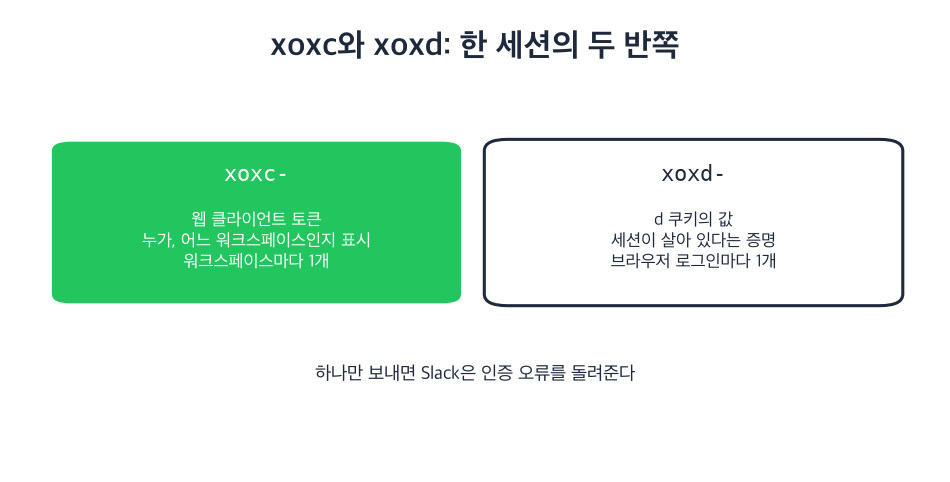
정체는 이렇습니다. xoxc는 슬랙 웹 클라이언트가 슬랙 내부 API를 호출할 때 쓰는
토큰입니다. xoxd는 로그인할 때 슬랙이 심어 주는 d 쿠키의 값입니다. 두 개가
하나의 세션을 반씩 나눠 갖고 있어서, 하나만 보내면 슬랙은 인증 오류를
돌려줍니다.
프레즌스에서 이 쌍이 중요한 이유는, 봇 토큰으로는 본인의 프레즌스를 바꿀 수 없지만 이 쌍으로는 바꿀 수 있기 때문입니다. 한쪽이 빠졌을 때 슬랙이 무엇을 돌려주는지는 아래 테스트에 있습니다.
xoxc 토큰이란?
xoxc는 슬랙 웹 클라이언트 토큰입니다. 브라우저에서 슬랙을 열면 페이지가 로컬
스토리지에 담긴 토큰과 함께 뜨고, 웹 앱이 보내는 모든 요청의
Authorization: Bearer 헤더에 이 토큰이 실립니다.
워크스페이스 단위로 발급됩니다. 워크스페이스 네 곳에 로그인해 있다면 xoxc 값도
네 개, 워크스페이스마다 하나씩입니다.
봇 토큰도 OAuth 토큰도 아닙니다. 앱 설치 과정에서 발급되는 것이 아니고, 권한 동의 화면도 없습니다. 브라우저 세션 그 자체라서, 그 워크스페이스에서 내가 할 수 있는 일은 전부 할 수 있습니다.
xoxd 토큰이란?
xoxd는 엄밀히 말하면 토큰이 아닙니다. 로그인할 때 .slack.com에 설정되는
d라는 쿠키의 값입니다. 요청이 훔친 문자열이 아니라 실제로 로그인된 세션에서
왔다는 것을 증명하는 역할을 합니다.
Bearer 토큰이 아니라 쿠키 헤더로 보냅니다.
Cookie: d=xoxd-your-value-herexoxc와 달리 xoxd는 그 브라우저에서 로그인한 모든 워크스페이스에 공통입니다.
개별 워크스페이스가 아니라 슬랙 로그인 자체에 속하기 때문입니다.
왜 xoxc와 xoxd는 쌍으로만 동작하나요?
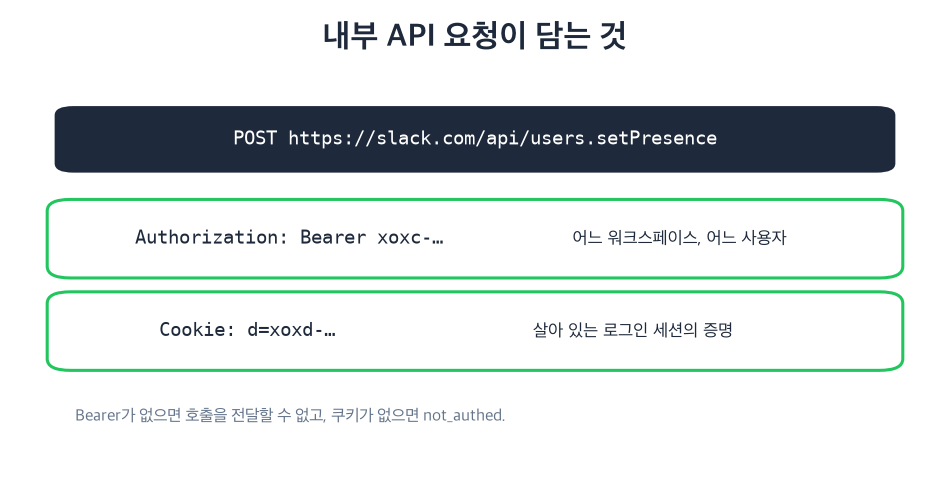
슬랙이 둘 다 검사하기 때문입니다. xoxc 토큰은 어느 워크스페이스의 어느
사용자로 행동하는지를 밝히고, d 쿠키는 그 토큰 뒤의 세션이 아직 살아 있음을
증명합니다. 하나라도 빠지면 호출은 실패합니다.
슬랙 내부 API 요청은 이렇게 생겼습니다.
curl 'https://slack.com/api/users.setPresence' \
  -H 'Authorization: Bearer xoxc-...' \
  -H 'Cookie: d=xoxd-...' \
  -H 'Content-Type: application/x-www-form-urlencoded' \
  --data 'presence=auto'
2026년 10월 6일, 로그인된 슬랙 웹 탭에서 직접 확인했습니다. 탭의 xoxc 토큰으로 auth.test를 호출하면서 쿠키를 넣었다 뺐다 한 결과입니다.
xoxc as Bearer header + d cookie   -> ok: true, user: sieun
xoxc as Bearer header, no cookie   -> ok: false, error: invalid_auth
xoxc in the form body + d cookie   -> ok: true, user: sieun
xoxc in the form body, no cookie   -> ok: false, error: invalid_auth
d cookie only, no token            -> ok: false, error: not_authed
즉 쿠키 없는 토큰은 invalid_auth로, 토큰 없는 쿠키는 not_authed로 거부됩니다. 토큰이 없으면 슬랙이 어느 워크스페이스를 말하는지 알 수 없기 때문입니다. 클라이언트가
실시간 이벤트용으로 여는 WebSocket 연결도 같은 규칙을 따라서, 핸드셰이크에 d
쿠키를 실어 보냅니다.
다른 슬랙 토큰 접두사는 무슨 뜻인가요?
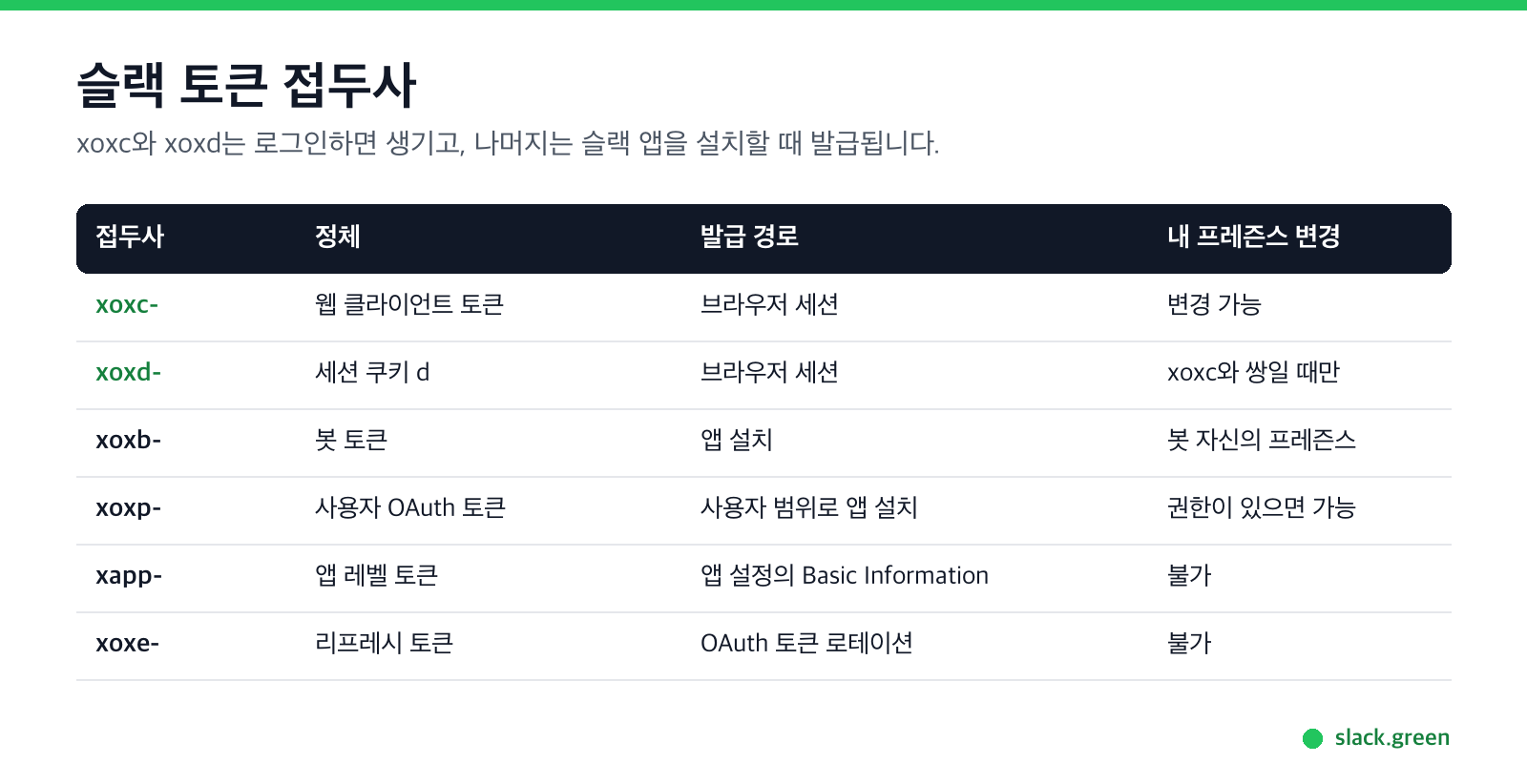
슬랙은 접두사로 자격 증명의 종류를 구분합니다. 이 글에서 다루는 쌍은 슬랙 개발자 문서에 나오는 토큰들과는 다른 부류입니다.
| 접두사 | 정체 | 발급 경로 | 내 프레즌스 변경 |
|---|---|---|---|
xoxc- | 웹 클라이언트 토큰, 워크스페이스별 | 브라우저 세션 | 가능 |
xoxd- | 세션 쿠키 d의 값 | 브라우저 세션 | xoxc와 쌍일 때만 |
xoxb- | 봇 토큰 | 앱 설치 | 불가, 봇은 자기 프레즌스가 따로 있음 |
xoxp- | 사용자 OAuth 토큰 | 사용자 범위로 앱 설치 | 권한을 받았다면 가능 |
xapp- | 앱 레벨 토큰 | 앱 설정의 Basic Information | 불가 |
xoxe- | 리프레시 토큰, 로테이션 활성 시 | OAuth 로테이션 | 불가 |
실무 구분은 단순합니다. xoxb와 xoxp는 앱을 설치해서 받고, 승인한 범위가
붙어 있습니다. xoxc와 xoxd는 로그인만 하면 생기고, 범위 목록이 없으며, 슬랙
웹 앱 자신이 쓰는 바로 그 자격 증명입니다.
xoxc와 xoxd 토큰은 어디서 확인하나요?
내 계정, 내 브라우저 기준으로 이렇게 확인합니다.
- 브라우저 탭에서 슬랙을 열고 원하는 워크스페이스에 로그인합니다.
- 개발자 도구를 열고 Application 패널로 이동합니다.
- Local Storage에서
localConfig_v2항목을 찾습니다. 내 워크스페이스의 - Cookies에서
slack.com항목을 열고d라는 쿠키의 값을 복사합니다. 그것이
token 필드가 xoxc-로 시작합니다.
xoxd- 값입니다.
분명히 해 둘 경고 두 가지. 이 자격 증명은 범위 제한 없이 나로서 행동하므로, 비밀번호처럼 다루고 신뢰할 수 없는 사이트에는 절대 붙여 넣지 마세요. 그리고 내 계정의 것만 써야 합니다. 남의 토큰을 가져가는 것은 연동이 아니라 계정 탈취입니다.
Slack에서 다시는 '자리 비움'으로 표시되지 마세요
클라우드 기반. 다운로드 불필요. 노트북이 꺼져 있어도 24시간 작동.
사람들은 이 토큰으로 무엇을 하나요?
웹 클라이언트는 할 수 있지만 공개 API의 봇에게는 막혀 있는 일 전부입니다. 저희가 가장 자주 보는 사례는 프레즌스·상태 자동화, 본인 메시지 기록 내보내기, 그리고 n8n이나 MCP 서버처럼 봇 토큰이 용도에 맞지 않는 도구의 워크플로 스크립팅입니다.
프레즌스가 가장 분명한 예시고, 저희에게 이 토큰 쌍이 중요한 이유이기도 합니다.
슬랙은 입력이 없으면 약 10분 뒤 자리비움으로 바꿉니다. 자세한 내용은
슬랙 활성 상태 유지 시간에
정리돼 있습니다. 봇 토큰으로는 해결할 수 없습니다. 봇의 프레즌스는 내 것과
별개이기 때문입니다. xoxc·xoxd 쌍은 해결할 수 있습니다. 슬랙 입장에서는 내
클라이언트가 직접 말하는 것과 같기 때문입니다. 마우스 지글러 없이
슬랙을 활성 상태로 유지하는
원리가 이것이고, 토큰을 직접 들고 있고 싶은 분들을 위한
셀프 호스팅 CLI도 같은
원리로 동작합니다.
xoxc와 xoxd 토큰은 얼마나 유지되나요?
뒤에 있는 브라우저 세션이 살아 있는 만큼 유지됩니다. 슬랙이 로그인을 계속 유지해 주기 때문에, 보통은 몇 달씩 갑니다.
그 워크스페이스에서 로그아웃하거나, 관리자가 세션을 종료하거나, 워크스페이스에
세션 만료 정책이 있어 만료되면 동작을 멈춥니다. 탭을 닫는 것은 영향이 없습니다.
쿠키를 지우면 d 쿠키가 사라지므로 멈춥니다.
이 쌍에는 갱신 엔드포인트가 없습니다. 만료되면 다시 로그인해서 새 값을 읽어야 합니다. 이 토큰 위에 무언가를 만든다면, 인증 오류를 감지해 새 토큰을 요청해야 하며 무한 재시도를 해서는 안 됩니다.
내 토큰을 쓰는 것이 슬랙 규정 위반인가요?
슬랙 API 약관은 자동화된 접근을 다루고 있고, 이 토큰은 내 세션을 나타낸다는 점에서 내 것입니다. 실무에서 더 중요한 것은 회사 정책입니다. 프레즌스는 관리자가 지켜보기도 하는 값이기 때문입니다. 현실적인 답은 걸릴까요?에 써 두었습니다.
저희가 지키는 선은 이렇습니다. 내 계정, 내 세션만 쓰고, 다른 사람의 데이터를 긁지 않으며, 관리자에게 보여야 할 보안 이벤트를 숨기지 않습니다.
자주 묻는 질문
xoxc는 레거시 토큰과 같은 건가요?
아닙니다. 레거시 토큰은 xoxp-로 시작했고 신규 워크스페이스에서는 슬랙이
퇴역시켰습니다. xoxc는 현행 웹 클라이언트 토큰이고 별개입니다.
xoxc를 n8n, MCP 서버 같은 연동에 쓸 수 있나요?
Bearer 토큰이므로 기술적으로는 가능하지만, d 쿠키도 함께 보내야 합니다. 대부분의
연동 도구에는 토큰 입력란이 하나뿐입니다. xoxc 값만 넣었을 때 invalid_auth가
나오는 이유가 보통 그 입력란 하나 때문입니다.
토큰 로테이션이 xoxc·xoxd에도 적용되나요?
아닙니다. xoxe- 리프레시 토큰을 쓰는 로테이션은 앱 설치 쪽 기능입니다. 세션
자격 증명은 다시 로그인하면 새것으로 교체됩니다.
VPN을 쓰면 xoxc 토큰이 왜 멈추나요? 보통 토큰 자체가 멈추는 것이 아닙니다. 슬랙이 낯선 위치의 로그인을 감지해 기존 세션을 끝내면서 세션이 깨지는 것입니다. 다시 로그인한 뒤 토큰을 새로 읽으세요.
모든 요청에 둘 다 필요한가요? 네, 슬랙 내부 API에서는 그렇습니다. 하나만 받아 주는 엔드포인트는 없습니다.
요약
xoxc는 누가, 어디서인지 말하고, xoxd는 세션이 살아 있음을 증명합니다. 슬랙 웹
클라이언트는 모든 호출에 둘을 함께 보내므로, 그 클라이언트를 흉내 내는 것은
무엇이든 똑같이 해야 합니다.
Related Articles
How to See All Your DMs in Slack, Including the Hidden Ones
The DMs tab lists your direct messages with people. App DMs, Slackbot and DMs with deleted accounts sit elsewhere. We compared the tab with the full list the Slack API returned.
Slack Images Not Showing? 5 Causes We Reproduced
We uploaded images to a Slack test channel and then switched each image setting off, ran /collapse, and posted from a bot that was not in the channel. Five causes, each reproduced.
How to Message Yourself on Slack (and What It Notifies)
Your own name under Direct messages opens a private DM with yourself. We sent it a note, a file, a scheduled message and a reminder, and checked which ones raised a badge.