
Set Up Mobile Overrides in Slack: What the Checkbox Changes
Slack's Set up mobile overrides checkbox lets your phone get a different notification level than your computer. We ticked it in every combination and read back the saved settings after each click.
"Set up mobile overrides" is a checkbox in Slack's Notifications preferences. It lets your phone get a different level of notifications than your computer. When you tick it, a second menu appears with two choices: Everything, or Mentions and direct messages. We tested it in the Slack web app on 30 September 2026. After each click we read the saved settings back with Slack's users.prefs.get method, and the table below shows what changed.
Where to find it
- Click your profile picture, then Preferences.
- Open Notifications.
- Under "Also notify you about", tick Set up mobile overrides.
- Pick what your phone should get from the menu that appears under it.
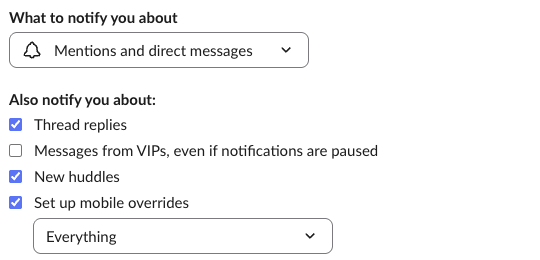
The main menu above it, "What to notify you about", sets the level for your computer, and for your phone too when no override is set. In the screenshot, the computer gets only mentions and DMs while the phone gets everything:
What each click saved
Slack stores the two levels as global_desktop and global_mobile. We started from the defaults and made one change at a time:
| What we did | global_desktop | global_mobile |
|---|---|---|
| Defaults, box not ticked | everything | everything |
| Ticked the box, left it on Everything | everything | everything |
| Set the override to Mentions and direct messages | everything | mentions_dms |
| Unticked the box | everything | everything |
| Main menu set to Mentions and direct messages, no override | mentions_dms | mentions_dms |
| Ticked the box, set the override to Everything | mentions_dms | everything |
| Main menu set back to Everything | everything | everything |
Two things follow from this. Unticking the box resets your phone to match the main menu, so your override choice is lost. And there is no separate on/off setting. After the last row we closed Preferences and opened it again, and the box was unticked. Slack shows it ticked only while the two levels differ. Setting the override to the same level as the main menu does nothing.
Group DMs did not move in any row. Their own settings, global_mpdm_desktop and global_mpdm_mobile, stayed on everything the whole time.
Never appear "away" on Slack again
Cloud-based. No downloads. Works 24/7 even when your laptop is off.
Overrides for one channel
A single channel has its own mobile override. Click the bell icon in the channel header, then More options, then Advanced settings, and open Show advanced mobile overrides:
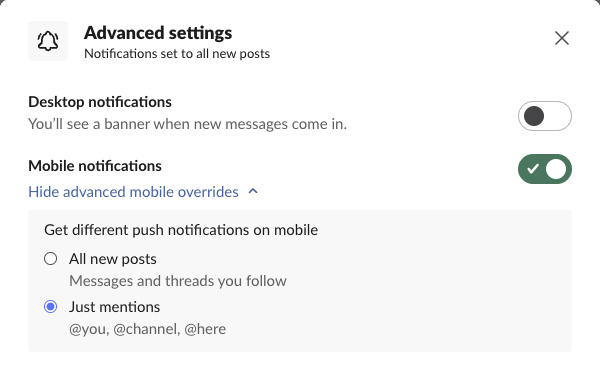
Choosing Just mentions saved {"C0B7GGE8Q1Y": {"mobile": "mentions_dms"}} under that channel. The rest of your settings stayed as they were. Before the change, the first option read "All new posts, Same as desktop". Once the override was set, it read "Messages and threads you follow". That wording shows whether an override is on. The desktop switch is off in the screenshot because the browser we tested in never had permission to show notifications.
Overrides change what reaches your phone, not when
A separate menu decides when Slack sends to your phone. It is lower on the same Notifications page, under "When you're not active on desktop". It has nine choices, from "Immediately, even if I'm active" through "As soon as I'm inactive" to "After I've been inactive for 30 minutes". The default is "As soon as I'm inactive". With that default, the override decides which messages reach your phone, and this menu decides that they wait until you stop using your computer. Our page on using Slack on several devices explains how Slack decides which device you are active on. Do Not Disturb and the notification schedule pause both devices, and the Do Not Disturb guide covers those.
FAQ
How do I turn off phone notifications completely?
The override menu has no "Nothing" option. Untick Mobile notifications under "How to notify you" at the top of the same page.
Does a mobile override get through Do Not Disturb?
The override has no exception for paused notifications. The only exception on that page is "Messages from VIPs, even if notifications are paused", and it applies to both devices.
Why does my phone still buzz for DMs with the override on Mentions?
"Mentions and direct messages" includes every DM, as the name says. Group DMs follow their own setting, which the override did not change in our test.
Stop Jiggling Your Mouse.
Join hundreds of remote workers who never worry about their Slack status. Set it up once, stay green forever.
Related Articles
Slack chat.scheduleMessage: Limits and Errors We Measured
We called chat.scheduleMessage with a bot token for times from 10 seconds to 121 days ahead, listed and deleted the results, and watched which messages still arrived. The limits, the exact errors, and a delete that returned ok but did not stop the post.
Slack Invite Link Expiration: 30 Days, and How to Check One
Slack invite links expire after 30 days and have no longer option. We made links in a test workspace, deactivated them, and found a signed-out check that tells a live link from a dead one.
Slack Pinned Messages: Where Pins Are Now, and the 100-Pin Limit
In the current Slack desktop and web app, pinned messages sit in a Pins tab at the top of the channel. We pinned, edited, deleted and searched pins in a test workspace, and pinned messages until Slack refused the 101st.