
Slack invalid_auth: What Causes It, and the Token Errors Next to It
We called auth.test with no token, a broken token, a revoked token and tokens from an uninstalled and a deleted app, and wrote down every response. invalid_auth, not_authed, account_inactive and token_revoked each point to a different fix.
Slack returns invalid_auth when it does not recognise the token string you sent. In our tests that meant one of these: the token had a typo or a missing character, it carried a newline or quotes from a config file, it was sent in the URL query string, or it was a token Slack had already replaced. A token Slack still knows but has turned off gives a different error, account_inactive or token_revoked, and no token at all gives not_authed. We reproduced each case on 1 October 2026 with auth.test and a test app in our own workspace.
Check the token with auth.test
auth.test needs no scope, so it isolates token problems from scope problems:
curl -s https://slack.com/api/auth.test -H "Authorization: Bearer $SLACK_BOT_TOKEN"A working bot token returned:
{"ok": true, "url": "https://slack-0yr1948.slack.com/", "team": "Slack", "user": "w1test", "team_id": "T0B7JBCDKC1", "user_id": "U0C5DA22W79", "bot_id": "B0C5YBH4ZPW", "is_enterprise_install": false}Every failure below also came back with HTTP 200, so code that checks only the status code treats them as success. Read ok and error.
What we sent, and what came back
| What we sent | error |
|---|---|
| No token | not_authed |
Authorization: xoxb-... without the word Bearer | not_authed |
Authorization: bearer xoxb-... (lowercase) | not_authed |
Authorization: Basic xoxb-... | not_authed |
xoxb-not-a-real-token | invalid_auth |
| A real token with its last character cut off | invalid_auth |
| A real token wrapped in double quotes | invalid_auth |
A real token with a trailing newline, as a token form field | invalid_auth |
A real token as ?token= on a GET request | invalid_auth |
| A real token with a trailing space in the header | ok: true |
A real token as a token form field in a POST body | ok: true |
So not_authed means Slack found no token it could read: the header is missing or not in the Bearer form. Slack read the lowercase bearer as no token. invalid_auth means it found a string and the string is wrong. The quotes and newline rows are the ones that happen in real code, when a value comes from a .env file with quotes or from a file read that keeps the line break. The query-string row is how many old tutorials pass the token; Slack does not accept it there.
In Python, slack_sdk raises SlackApiError with this text for a bad token:
slack_sdk.errors.SlackApiError: The request to the Slack API failed. (url: https://slack.com/api/auth.test)
The server responded with: {'ok': False, 'error': 'invalid_auth'}
The same client with an empty string raised the same exception with not_authed. It accepted the token with a trailing newline, because it sends the token in the header, where Slack ignored the extra whitespace. The same token in a form body failed. If one tool works and another gets invalid_auth with the same token, compare how each one sends it.
Never appear "away" on Slack again
Cloud-based. No downloads. Works 24/7 even when your laptop is off.
Revoked, uninstalled and deleted: what each token returns
Next we turned the token off in four ways, in order, and called auth.test after each step:
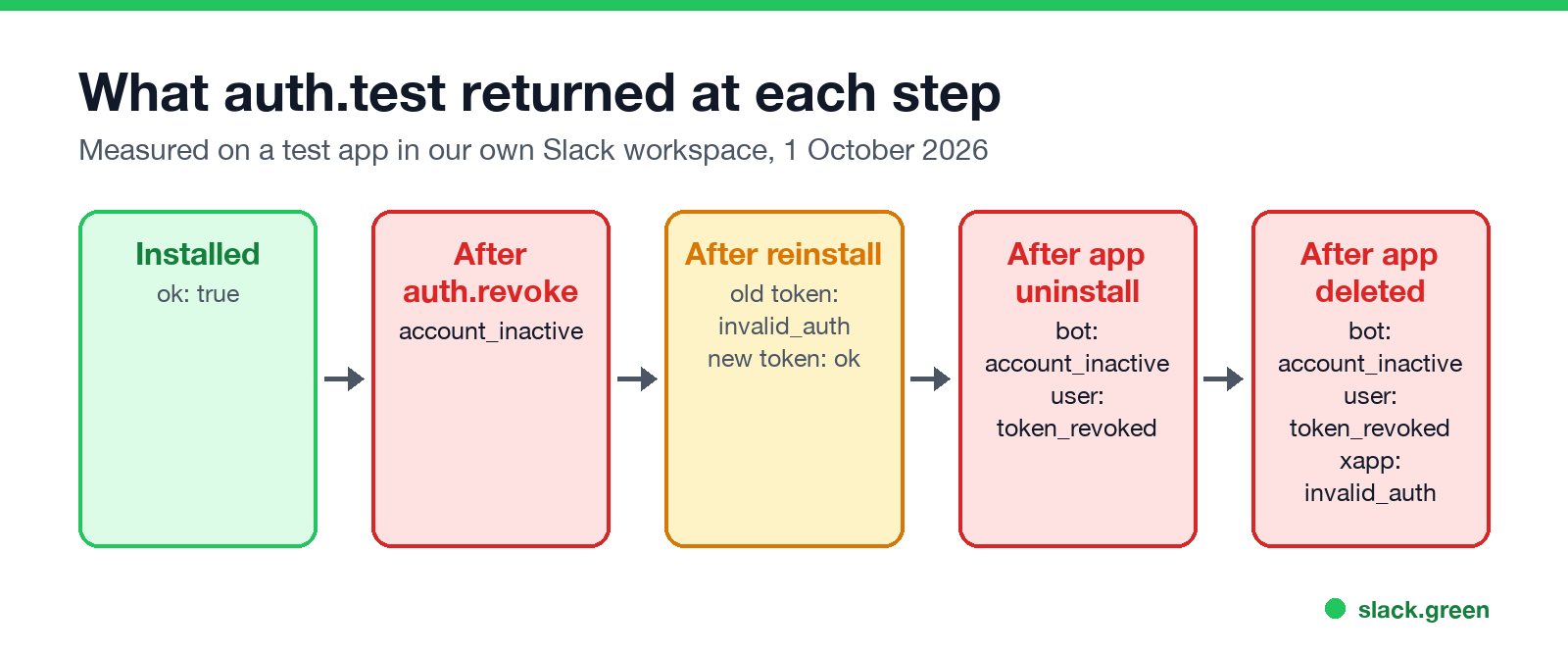
auth.revokewith the bot token returned{"ok": true, "revoked": true}. After that the bot token gaveaccount_inactive, nottoken_revoked. The user token from the same install still worked.- We reinstalled the app. Slack issued a new bot token, a different string, and the old one changed from
account_inactivetoinvalid_auth. This is the usual cause ofinvalid_authin a service that ran fine for months: someone reinstalled the app, and the server still has the old token. - We uninstalled the app with
apps.uninstall, which returned{"ok": true, "uninstalled": true}. The bot token gaveaccount_inactiveand the user token gavetoken_revoked. - We deleted the app. The bot and user tokens kept the same two errors, and the app-level
xapp-token, which still worked after the uninstall, now gaveinvalid_auth. - •
not_authed: send the header asAuthorization: Bearer xoxb-..., with a capital B, or check that the variable holding the token is not empty. - •
invalid_auth: copy the token again from OAuth & Permissions in your app settings, and print its length and first 5 characters from inside the running program. Strip quotes and line breaks. If it was reinstalled, the stored token is out of date. - •
account_inactive: the bot token was revoked, or the app was uninstalled or deleted. Reinstall the app and use the new token. - •
token_revoked: the user token was revoked, usually because the app was uninstalled or the user removed it. The user has to install or authorize the app again. - •
not_allowed_token_type: the token is valid but the wrong kind for the method, such as anxapp-token onchat.postMessage. Which token goes where is in Slack bot token and, for Socket Mode, in Socket Mode with Python.
A reinstall does not always change the token. Earlier the same day we added a scope and reinstalled, and both the bot and user token strings stayed the same, as they did in our missing_scope test. It was the reinstall after a revoke that made a new bot token.
How to fix each error
FAQ
Does an xapp- token work on auth.test?
Yes. Ours returned {"ok": true, "app_name": "w1 test 1001", "app_id": "A0C5NDV7U0K"}, with no team or user, because it belongs to the app, not to a workspace.
Stop Jiggling Your Mouse.
Join hundreds of remote workers who never worry about their Slack status. Set it up once, stay green forever.
Related Articles
Slack OAuth Redirect URL on localhost: What Slack Accepts, Tested
We added localhost, 127.0.0.1, https, custom-scheme and tunnel redirect URLs to a Slack app on 1 October 2026, then ran the OAuth flow against a local server. What was accepted, how Slack matches the URL, and the PKCE rules.
Slack App Manifest Example: YAML and JSON That Worked, Tested
A Slack app manifest we used to create a working app on 1 October 2026, in YAML and JSON, plus the validation errors from broken versions and real output from apps.manifest.validate, export, create and update.
Slack chat.delete API: Who Can Delete What, Tested
chat.delete removes a message by channel and ts. We deleted bot messages, a person's messages, a thread parent and an already deleted message with bot and user tokens, and list every response, including cant_delete_message and the tombstone a thread parent leaves.