
Can Insightful Detect a Mouse Jiggler? Software Yes, Hardware Not by the Alert
Insightful's Irregular Behavior Alert flags software mouse jigglers and auto-clickers, from a list of known apps and from precise, repetitive input. Its own FAQ says it does not detect USB or mechanical jigglers. What it checks, when managers see it, and what hardware jigglers still leave in the logs.
Yes, for software. Insightful, the employee monitoring tool formerly called Workpuls, flags software mouse jigglers and auto-clickers with a feature called Irregular Behavior Alert. It checks each completed shift against "a maintained list of known activity-simulation software, plus behavioral signals like unusually precise or repetitive input", in Insightful's own words. Hardware is different: the same FAQ says the alert "doesn't detect physical or hardware jiggler devices, since those register as ordinary mouse movement." A USB or mechanical jiggler still leaves other traces in Insightful's logs, covered below.
Most people ask this because they want a chat status to stay green. A jiggler does not do that for Slack, which counts only input inside its own window. Slack Green keeps your Slack status active from our servers during the hours you set, with nothing installed on the work computer for Insightful to log.
What Insightful checks for
Insightful's page for the feature, titled "Irregular Behavior Alerts: Mouse Jiggler Detection", lists two checks:
- • Known simulation software. The installed agent sees which apps run, so Mouse Jiggler, Move Mouse, Caffeine-style tools and auto-clickers are matched by name against Insightful's list.
- • Behavioral signals. Input that is "unusually precise or repetitive": the same small move or click at fixed intervals, which people do not produce.
Insightful says a case is flagged only "once it clears a high-confidence threshold", and that ordinary mouse movement is not treated as fake on its own. Before this, in June 2025, Insightful announced an Activity Verification feature that it said could tell real keyboard and mouse input from simulated input "with 99% accuracy" and show "the application or device from which the activity stems". The 99% figure is Insightful's own claim.
What Insightful catches, by jiggler type
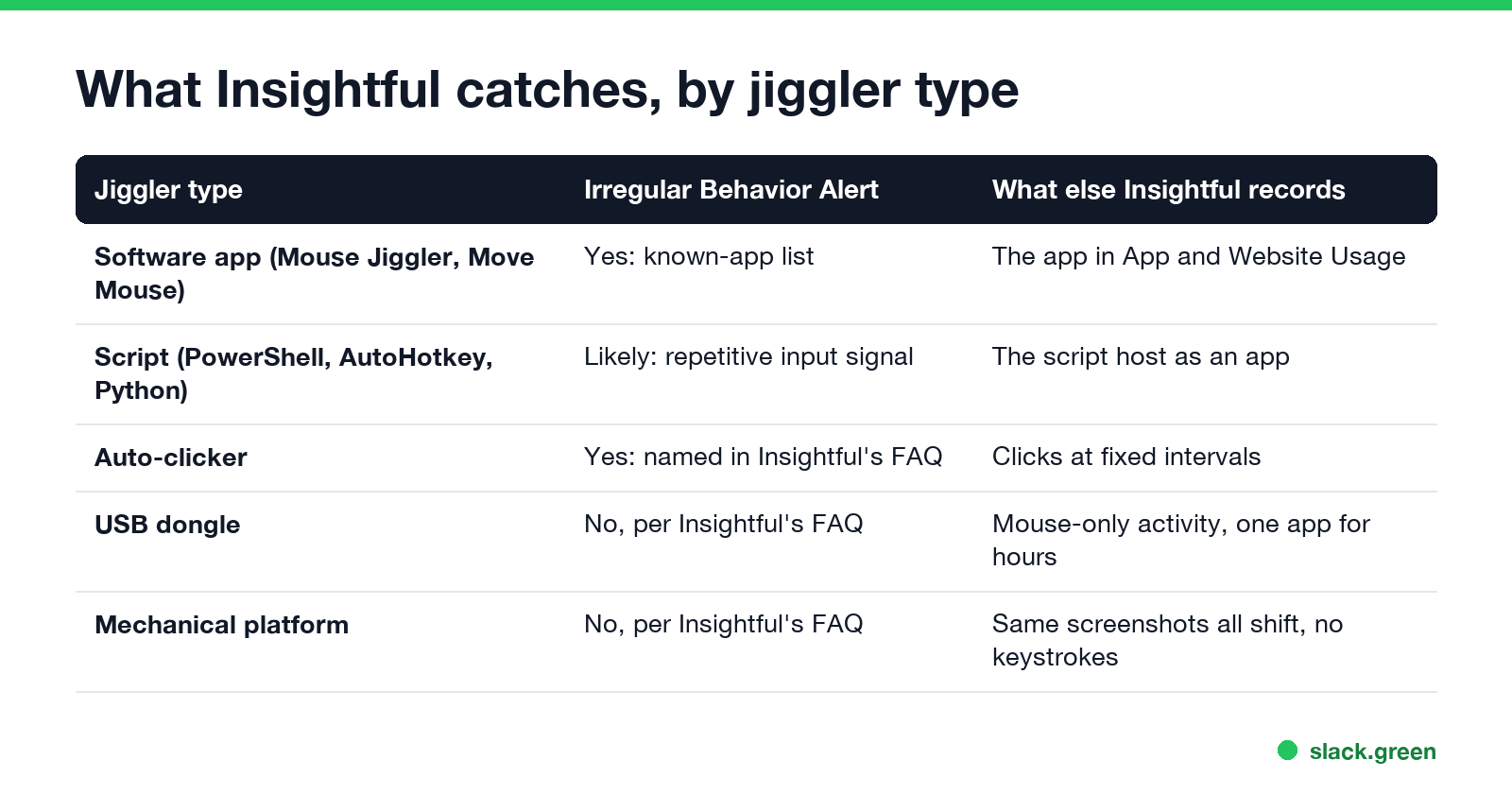
| Jiggler type | Irregular Behavior Alert | What else Insightful records |
|---|---|---|
| Software app (Mouse Jiggler, Move Mouse) | Yes, from the known-app list | The app in App and Website Usage |
| Script (PowerShell, AutoHotkey, Python) | Likely, from the repetitive-input signal | The script host running as an app |
| Auto-clicker | Yes, named in Insightful's FAQ | Clicks at fixed intervals |
| USB dongle | No, per Insightful's FAQ | Mouse-only activity, one app in front for hours |
| Mechanical platform | No, per Insightful's FAQ | The same screenshot all shift, no keystrokes |
The hardware rows matter more than the alert. Insightful records active and idle time from keyboard and mouse input, which apps and websites are in front, and, if the company turns it on, screenshots at intervals. A USB jiggler keeps the active-time number up, but a manager looking at the day sees mouse activity with no typing and the same window for hours. On Windows, software movement also carries an "injected" flag that any monitoring agent can read; how that works is in how to detect a mouse jiggler.
When a manager sees the alert
Never appear "away" on Slack again
Cloud-based. No downloads. Works 24/7 even when your laptop is off.
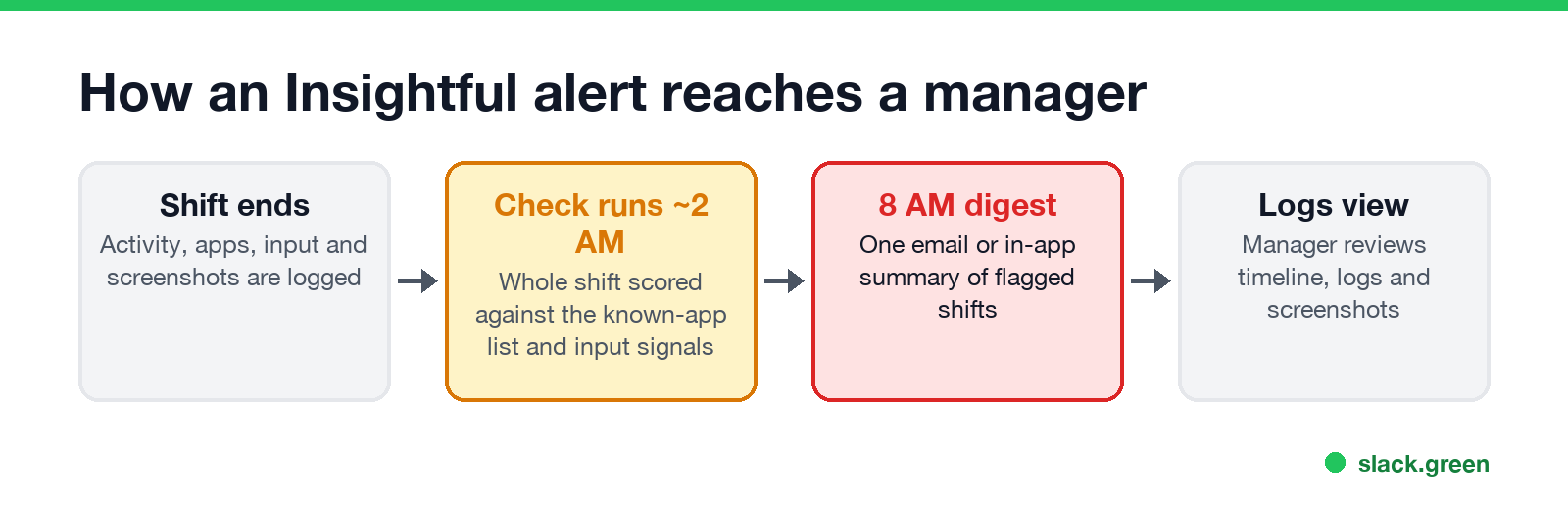
The alert does not fire while you work. Insightful's FAQ says results are compiled "starting about two hours after midnight" in the organization's time zone, and managers get one consolidated notification at 8 AM covering the day before. Admins set up alerts for any team; managers can set them up for the employees they already oversee. Delivery is in-app, by email or both.
From the alert, the manager opens the Logs view for that window: the activity timeline, the activity logs and screenshots, if screenshots are enabled for you. Insightful describes a flagged case as "a starting point, not a verdict". The feature is included on the Workforce Analytics plan, the Combo plan and Enterprise, and in the free trial.
How Insightful compares with other monitoring tools
| Tool | How it flags jigglers |
|---|---|
| Insightful | Known-app list plus repetitive input, checked after each shift |
| ActivTrak | Potential False Activity alarms: simulation software, repetitive activity, long single-screen sessions |
| Hubstaff | Activity rate from input, app and URL tracking, optional screenshots |
| Teramind | Input and behavior analytics, screen recording |
The ActivTrak and Hubstaff details are in can ActivTrak detect a mouse jiggler and can Hubstaff detect a mouse jiggler. For every type of jiggler and every check IT can run, see can a mouse jiggler be detected.
Is it worth the risk?
A jiggler raises the active-time number. It does not produce work, and the gap between the two is what monitoring tools are built to find. In 2024 Wells Fargo fired more than a dozen employees over "simulation of keyboard activity", as covered in are mouse jigglers legal. If your employer uses Insightful, it is in the endpoint agent on your laptop, and the software list, the input pattern and the screenshots all come from that agent.
FAQ
Never appear "away" on Slack again
Cloud-based. No downloads. Works 24/7 even when your laptop is off.
Can Insightful detect a mouse jiggler? Software jigglers and auto-clickers, yes. Insightful's Irregular Behavior Alert matches known apps and repetitive input. Its FAQ says hardware jigglers are not detected by the alert.
Can Insightful detect a USB mouse jiggler? Not by the alert, which Insightful says sees hardware movement as ordinary. The logs still show mouse-only activity and, if enabled, the same screenshot for hours.
Does Insightful track mouse movement? It records keyboard and mouse input to measure active and idle time. It uses the pattern of that input to flag simulated activity.
Does Insightful alert managers in real time? No. It checks each shift after it ends and sends one digest at 8 AM for the day before.
Is Insightful the same as Workpuls? Yes. Workpuls renamed itself Insightful.
Stop Jiggling Your Mouse.
Join hundreds of remote workers who never worry about their Slack status. Set it up once, stay green forever.
Related Articles
Don't Sleep for Windows: Download, Settings and Start Parameters
Don't Sleep is a free, portable 267 KB Windows app from SoftwareOK that blocks standby, hibernate, the screen saver, log off and shutdown while it runs, with a timer and CPU or network rules. Where to get the real one, what each option does, the command line for a batch file, and what it does not do for Slack or Teams.
Skype Status Icons Meaning: Every Color in Skype and Skype for Business
In Skype for Business, green means Available, yellow means Inactive, Away, Be right back or Off work, red means Busy, In a call or In a meeting, red with a bar means Do not disturb or Presenting, and grey means Offline or Unknown. A red star means Out of office. Consumer Skype used a green check, yellow clock, red minus and an empty circle.
Best Chrome Extensions for Remote Workers, by the Job They Do
14 Chrome extensions for remote work, grouped by the job: async video, meetings, focus, writing, passwords, tabs, screenshots, time tracking and keeping the screen on. Each checked on the Chrome Web Store, with user counts, cost, and the extensions to avoid on a work laptop.