
Sign in with Slack (OpenID Connect): A Tested Python Example
Sign in with Slack is OpenID Connect on top of OAuth 2.0: send the user to slack.com/openid/connect/authorize, swap the code at openid.connect.token, and check the RS256 id_token. We ran the whole flow on 5 November 2026 and show the real claims and errors.
Sign in with Slack is Slack's OpenID Connect (OIDC) service. Your site sends the user to https://slack.com/openid/connect/authorize with the scopes openid, profile and email, Slack redirects back with a code, and your server swaps that code at openid.connect.token for an id_token: a JWT signed with RS256 that says who the user is and which workspace they came from. On 5 November 2026 we ran the full flow with a test app and a member account, verified the token against Slack's published keys, and tried the mistakes people hit. The script and its real output are below.
Set up the app
Create an app at api.slack.com/apps and, under OAuth & Permissions, add a redirect URL and the user scopes openid, profile and email. No bot scopes are needed for sign-in. In a manifest it looks like this:
"oauth_config": {
  "redirect_urls": ["https://example.com/slack/callback"],
  "scopes": { "user": ["openid", "profile", "email"] }
}
Slack publishes the rest of the setup at https://slack.com/.well-known/openid-configuration. When we read it on 5 November it listed only the code response type, only the query response mode, RS256 as the signing algorithm, keys at https://slack.com/openid/connect/keys, and client_secret_post and client_secret_basic for the token call. So there is no implicit flow: your server always does the code exchange.
Step 1: send the user to Slack
Build the authorize URL with a fresh state (to stop request forgery) and a fresh nonce (to tie the token to this login):
https://slack.com/openid/connect/authorize
  ?response_type=code
  &scope=openid%20profile%20email
  &client_id=YOUR_CLIENT_ID
  &state=RANDOM_STATE
  &nonce=RANDOM_NONCE
  &redirect_uri=https%3A%2F%2Fexample.com%2Fslack%2Fcallback
Slack shows a consent screen named after your app, with a yellow warning when the app was made by a workspace member and not reviewed by Slack:
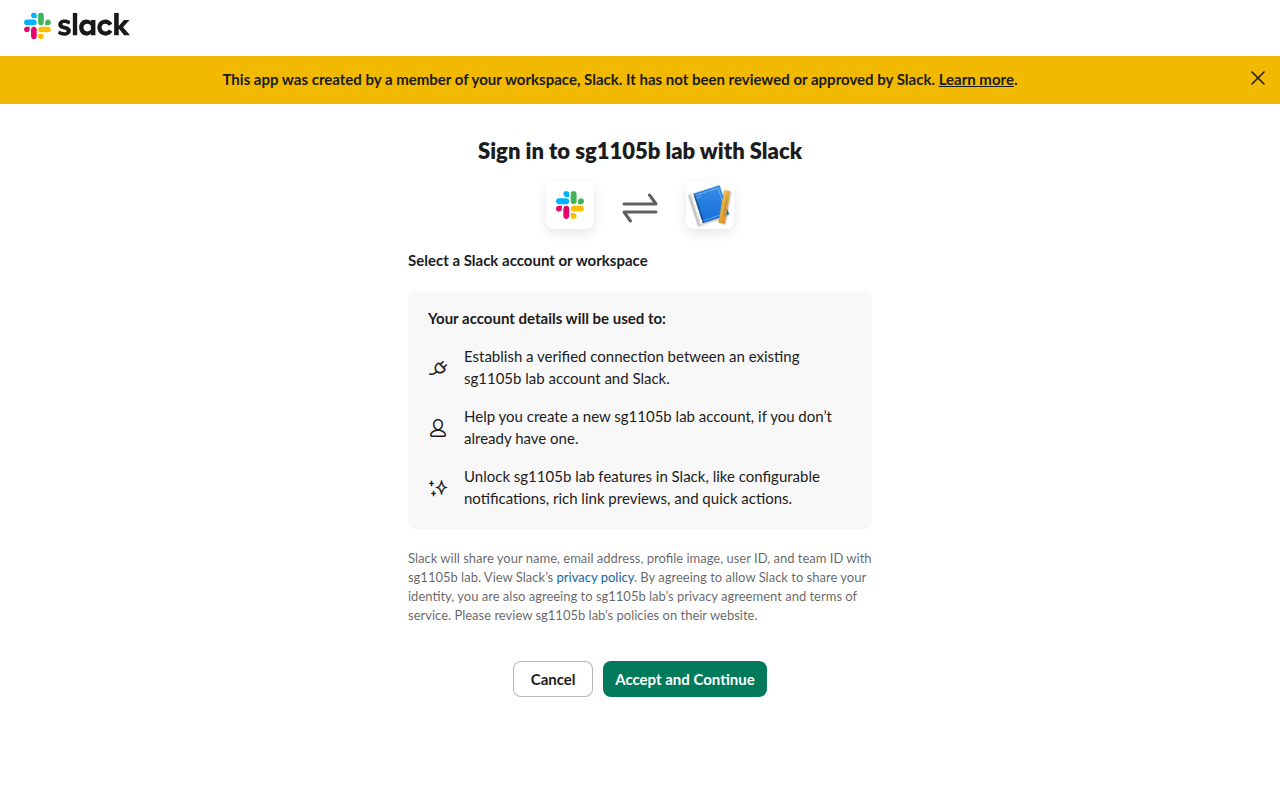
It also lists exactly what it will share: name, email address, profile image, user ID and team ID. In our runs the screen came back on every sign-in, even after the member had accepted before. After Accept and Continue, the browser went to our redirect URL with ?code=...&state=....
Step 2: swap the code and check the token
This is the script we ran with Python 3 and PyJWT. It swaps the code, checks the token's signature against Slack's keys, checks the nonce, calls openid.connect.userInfo, and then tries the same code again:
import json, os, sys, requests, jwt

CLIENT_ID = os.environ["SLACK_CLIENT_ID"]
CLIENT_SECRET = os.environ["SLACK_CLIENT_SECRET"]
REDIRECT_URI = "https://example.com/slack/callback"
code, expected_nonce = sys.argv[1], sys.argv[2]

def exchange(redirect_uri):
    return requests.post("https://slack.com/api/openid.connect.token", data={
        "client_id": CLIENT_ID, "client_secret": CLIENT_SECRET,
        "code": code, "redirect_uri": redirect_uri}, timeout=20).json()

tok = exchange(REDIRECT_URI)
print("token response:", {k: (v[:12] + "...") if isinstance(v, str) and len(v) > 20 else v
                          for k, v in tok.items()})

# Check the id_token signature with Slack's published keys
jwks = jwt.PyJWKClient("https://slack.com/openid/connect/keys")
key = jwks.get_signing_key_from_jwt(tok["id_token"])
claims = jwt.decode(tok["id_token"], key.key, algorithms=["RS256"],
                    audience=CLIENT_ID, issuer="https://slack.com")
print("header:", jwt.get_unverified_header(tok["id_token"]))
print("claims:", json.dumps(claims, indent=2))
if claims["nonce"] != expected_nonce:
    sys.exit("nonce mismatch: reject this sign-in")
print("nonce matches")

info = requests.get("https://slack.com/api/openid.connect.userInfo",
                    headers={"Authorization": "Bearer " + tok["access_token"]},
                    timeout=20).json()
print("userInfo keys:", sorted(info))

again = exchange(REDIRECT_URI)
print("same code again:", again)
The output, with our test member's email and avatar hash masked:
token response: {'ok': True, 'access_token': 'xoxp-1125638...', 'token_type': 'Bearer', 'id_token': 'eyJhbGciOiJS...', 'state': 'qOUYej5enl6zkFN1'}
header: {'alg': 'RS256', 'typ': 'JWT', 'kid': 'mB2MAyKSn555isd0EbdhKx6nkyAi9xLq8rvCEb_nOyY'}
claims: {
  "iss": "https://slack.com",
  "sub": "U0CDVBA6TMZ",
  "aud": "11256386461409.12517168328292",
  "exp": 1793863747,
  "iat": 1793863447,
  "auth_time": 1793863447,
  "nonce": "ZaxDY8PDxDQqwFhyzz5AuQ",
  "at_hash": "ryfnY3rgx_ZE4kzO4bHwdA",
  "https://slack.com/team_id": "T0B7JBCDKC1",
  "https://slack.com/user_id": "U0CDVBA6TMZ",
  "email": "test-member@(masked)",
  "email_verified": true,
  "date_email_verified": 1793603050,
  "locale": "en-US",
  "name": "sgslacklab4739b4",
  "picture": "https://secure.gravatar.com/avatar/(hash).jpg?s=512&d=...",
  "given_name": "sgslacklab4739b4",
  "family_name": "",
  "https://slack.com/team_name": "Slack",
  "https://slack.com/team_domain": "slack-0yr1948",
  "https://slack.com/team_image_230": "https://a.slack-edge.com/80588/img/avatars-teams/ava_0006-230.png",
  "https://slack.com/team_image_default": true
}
nonce matches
userInfo keys: ['date_email_verified', 'email', 'email_verified', 'family_name', 'given_name', 'https://slack.com/team_domain', 'https://slack.com/team_id', 'https://slack.com/team_image_102', 'https://slack.com/team_image_132', 'https://slack.com/team_image_230', 'https://slack.com/team_image_34', 'https://slack.com/team_image_44', 'https://slack.com/team_image_68', 'https://slack.com/team_image_88', 'https://slack.com/team_image_default', 'https://slack.com/team_name', 'https://slack.com/user_id', 'https://slack.com/user_image_192', 'https://slack.com/user_image_24', 'https://slack.com/user_image_32', 'https://slack.com/user_image_48', 'https://slack.com/user_image_512', 'https://slack.com/user_image_72', 'locale', 'name', 'ok', 'picture', 'sub']
same code again: {'ok': False, 'error': 'invalid_code'}
Three things in that output matter for your code:
- • The
id_tokenlives 5 minutes:expis exactly 300 seconds afteriat. Check it right away and start your own session; do not keep the token around. - • The
subclaim is the Slack user ID, andhttps://slack.com/team_idis the workspace. A person in two workspaces has two different user IDs, so store the pair, not the email alone. - • Slack echoed our
statein the token response, but your callback should still check thestatethat came on the redirect, before the exchange.
openid.connect.userInfo returned the same identity plus the profile image in seven sizes (24 to 512 pixels) and the workspace icon in seven sizes. If you only need the user's name, email and ID, the id_token is enough and you can skip that call.
Never appear "away" on Slack again
Cloud-based. No downloads. Works 24/7 even when your laptop is off.
The errors we hit
| What we did | What Slack returned |
|---|---|
Swapped the code with a different redirect_uri | {"ok": false, "error": "bad_redirect_uri"} |
Then swapped the same code with the right redirect_uri | {"ok": false, "error": "invalid_code"} |
| Swapped a code a second time after it worked | {"ok": false, "error": "invalid_code"} |
Called auth.test with the sign-in access token | invalid_auth |
Called users.profile.get with it | missing_scope |
The first two rows are the trap. A failed exchange with the wrong redirect URL still uses up the code, so a retry with the right URL fails too, and the user has to sign in again. Make sure the redirect_uri in the token call matches the one in the authorize URL character for character.
A mismatched nonce is not an error Slack sends. Slack puts your nonce in the token, and the check is yours, as in the script's sys.exit line. If you skip it, a token from another login could be replayed into yours.
The access token from this flow (xoxp-) is only good for openid.connect.userInfo. For anything else, such as reading channels or posting, you need the normal OAuth install described in our oauth.v2.access guide. If you test the redirect on your own machine, our post on Slack OAuth redirect URLs on localhost shows what Slack accepts.
What the user sees afterwards
Each Sign in with Slack login is recorded in the member's own access log under the app's name, next to their normal Slack sign-ins. Our guide to seeing the devices logged into Slack shows where that list is.
FAQ
Can I get the user's Slack token for API calls from Sign in with Slack?
No. The token only reads the identity. Ask for user or bot scopes in a separate OAuth install if your app needs to act in Slack.
Do I need PKCE?
Slack's configuration document lists no code_challenge methods, and our flow worked with the client secret. Keep the exchange on your server so the secret never reaches the browser.
Stop Jiggling Your Mouse.
Join hundreds of remote workers who never worry about their Slack status. Set it up once, stay green forever.
Related Articles
Slack SDK for Rust: slack-morphism Tested (Post, History, Socket Mode)
Slack has no official Rust SDK. The community crate that works today is slack-morphism: on 5 November 2026 we used version 2.31.1 to post a message, page through history with a cursor and answer a mention over Socket Mode. Code and output below.
Slack Deep Links: Every slack:// Command in the Current App
A Slack deep link is a slack:// URL such as slack://channel?team=T123&id=C123 that opens the desktop or mobile app on a channel, person, file or setting. We read the handler in Slack's current code, listed the commands it accepts, and tested the https fallbacks.
Slack oauth.v2.access: The Install Flow and Every Error We Got
We ran Slack's Add to Slack flow against a 34-line Python callback on localhost, then broke each step: a reused code, a typo, a wrong secret, a wrong redirect_uri, a cancelled consent screen and a code we held for 11 minutes.