
Can You Put a Link in a Slack Status? We Tested 3 Ways
You can type a URL into a Slack status, but it shows as plain text that nobody can click. We tried a pasted URL, Markdown and Slack's own link syntax on 29 September 2026; none became a link.
You can put a URL in a Slack status, but it will not be a link. Slack stores the status as plain text and shows the URL as plain text on your profile and in the tooltip over your status emoji. Nobody can click it. Markdown like [notes](https://...) and Slack's own <https://...|notes> syntax do not help either: both show up character for character.
We tested this on 29 September 2026 in a one-person test workspace, in Slack in the browser. We set the same status three ways: typed into the Set a status dialog, and twice through the users.profile.set API with link syntax. The screenshots below are from those runs.
What a URL in your status looks like
Typing a URL in the Set a status dialog works. Slack takes it and saves it without a warning:
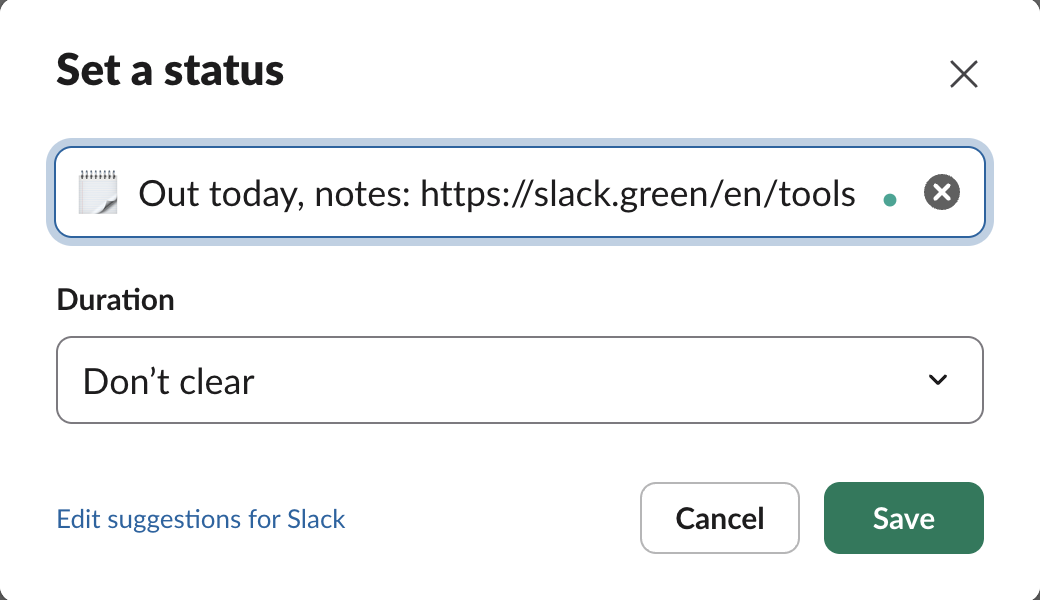
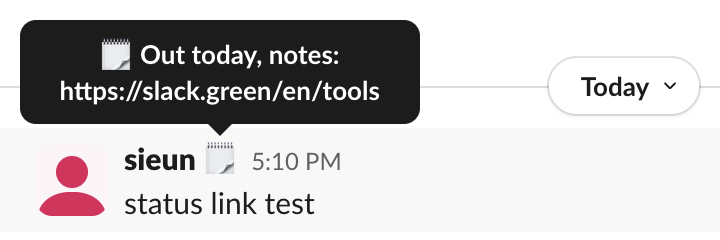
Coworkers see the status in two places. Hovering over the emoji next to your name in a conversation shows a tooltip with the full text, and your profile shows it under your name. In both, the URL is plain black text. We checked the profile panel's page code after saving: there was no link element for the URL anywhere on the page, so a click does nothing.
Markdown and Slack link syntax stay literal
Slack messages turn <https://example.com|text> into a link with your own words, and some Slack surfaces read Markdown. We sent both forms to the status through the API. Slack accepted each one with "ok": true and then showed it exactly as typed:
| What we set | How Slack stored it | What people see | Clickable |
|---|---|---|---|
Out today, notes: https://slack.green/en/tools (dialog) | Same text | The URL as text | No |
Out today, see [notes](https://slack.green/en/tools) (API) | Same text | Brackets and URL | No |
| Slack link syntax in angle brackets, shown above (API) | Same text | Angle brackets, pipe and URL | No |
users.profile.get returned each status_text unchanged, so Slack does not convert the syntax on save. It is a text field, and every client shows it as text. The API side of statuses is in set a Slack status with the API.
Never appear "away" on Slack again
Cloud-based. No downloads. Works 24/7 even when your laptop is off.
The URL counts toward the 100 characters
A status holds at most 100 characters, and a URL uses them fast. A 100-character status saved. At 101 characters the API refused it:
{
  "ok": false,
  "error": "too_long",
  "limit": 100,
  "field": "status_text"
}
https://slack.green/en/tools alone is 28 characters. If you want people to find a page, give them a name they can search for, and put the real link where Slack does make links: a message you pin in your team channel, or your channel's bookmarks. Then point to it in the status, such as "Out today, handover pinned in #design".
What to put in the status instead
Short statuses that say where to go work better than a raw URL:
- • 🌴 "Out until Monday, handover pinned in #design"
- • 📝 "Writing the Q4 plan, doc linked in #planning"
- • 🎤 "At a conference, slides in #events bookmarks"
More lines that fit in 100 characters are in the Slack status ideas tool, and everything else about statuses, from the clear-after timer to automatic statuses, is in our Slack status guide.
FAQ
Can a Slack app put a clickable link in my status?
No. Apps set the status through the same users.profile.set method we used, and the text stays plain text.
Does a link work in the status on the Slack phone app? We did not test the phone apps. The status is stored as plain text, so there is no link for any app to show.
Stop Jiggling Your Mouse.
Join hundreds of remote workers who never worry about their Slack status. Set it up once, stay green forever.
Related Articles
Slack Member ID: Where to Copy It, and What the U Means
A Slack member ID is the U... code that identifies a person. Copy it from their profile under the three-dot menu, or look it up with users.info and users.list. Tested in two workspaces, with the ID formats we found.
Slack API Rate Limits: What We Hit, and the 429 You Get Back
Slack answers too many calls with HTTP 429 and a Retry-After header. We burst chat.postMessage, conversations.history and an incoming webhook from an internal app and logged every response: where the 429s started, the bodies, and a retry loop that never hit one.
Slack files.upload Deprecated: The 3-Step Upload That Replaces It
files.upload now returns method_deprecated. Use files.getUploadURLExternal, POST the bytes, then files.completeUploadExternal, or files_upload_v2 in the SDK. Tested with curl and Python, including two silent failures.