
How to Update Slack on a Mac, and Why Downloaded Is Not Installed
Click Slack in the menu bar, choose Check for Updates…, then Restart to Apply Update. Slack's own logs on our test Mac show it checks every hour, and that an update it downloaded on 30 October was still not installed on 3 November.
To update Slack on a Mac, open Slack, click Slack in the menu bar at the top of the screen and choose Check for Updates…. When that item changes to Restart to Apply Update, click it, and Slack quits, installs the new version and opens again. If you installed Slack from the Mac App Store, the same menu item opens the App Store's Updates page instead. We read the updater code of Slack for Mac 4.52.182 and the updater logs on our own test Mac from 21 October to 3 November 2026, and they show two things the help pages leave out: Slack does not offer every new version at once, and an update it has downloaded can sit unused for days.
The update item has five states
Slack's code gives the item in the Slack menu one of five labels, and only two of them can be clicked:
| Label in the Slack menu | What it means | Can you click it |
|---|---|---|
| Check for Updates… | No update is known yet | Yes, it starts a check |
| Checking for Update | A check is running | No |
| Downloading Update | Slack is downloading the new version | No |
| An Update Is Available | Slack found a version and has not started the download | No |
| Restart to Apply Update | The new version is downloaded and ready | Yes, it installs it |
The same item appears in the right-click menu of Slack's menu bar icon when your account has one. If the item is missing from the Slack menu, this copy has turned its own updates off. The code does that for a copy that runs from the disk image or from a temporary folder, for a developer build, and when an administrator has turned updates off. A copy that runs straight from the downloaded disk image first asks "Move Slack to Applications?", and you should say yes.
What Slack does on its own
Slack checks for an update when it starts and then once an hour (setInterval of 3,600,000 ms in the code). On our test Mac, Slack's log ~/Library/Application Support/Slack/logs/default/browser.log holds 193 checks from 21 October to 1 November, one per hour whenever the Mac was awake.
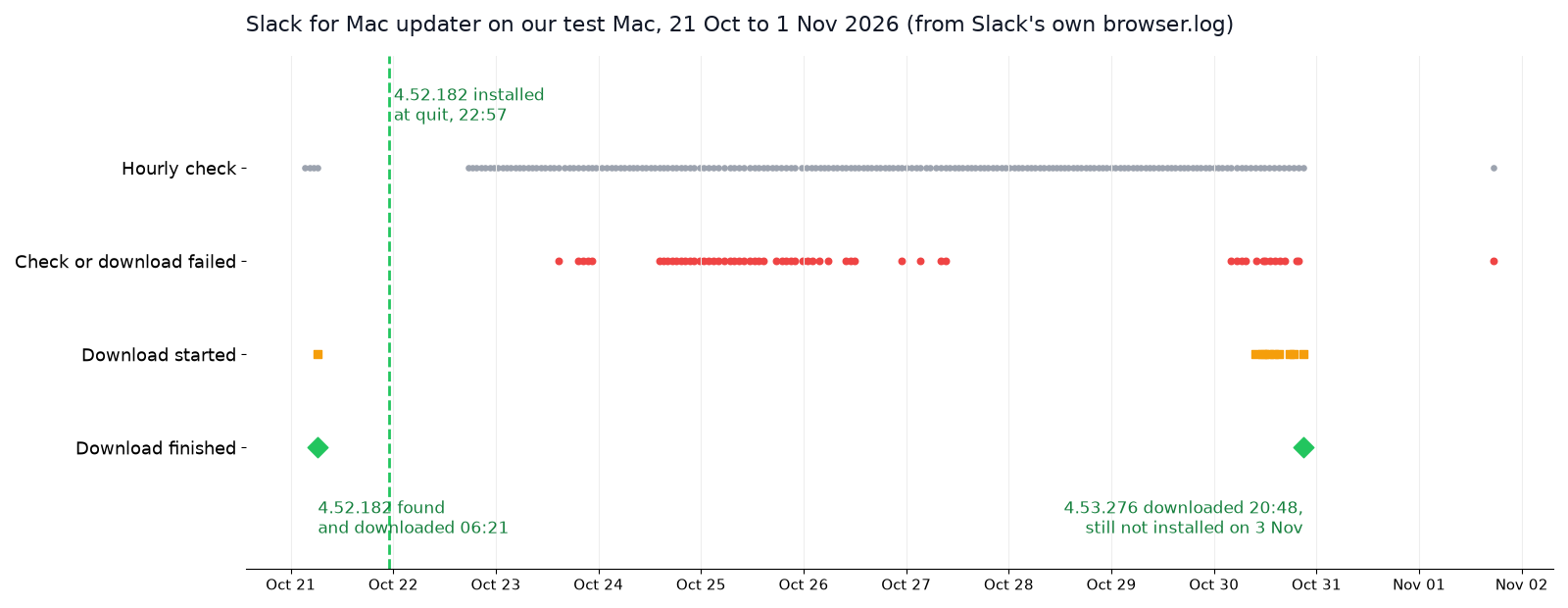
The two updates in that log went differently:
- • On 21 October at 06:21 (Mac time, UTC+9), the check found 4.52.182, which Slack had released the day before. The download took 3 seconds. Slack installed it when the app quit at 22:57 that night, and Squirrel's installer log shows the swap took 1.2 seconds.
- • On 30 October at 09:43, the check found 4.53.276. The download failed 8 times with "The network connection was lost." and once with "A TLS error caused the secure connection to fail.", and it finished at 20:48, 11 hours later. On 3 November the Mac still ran 4.52.182.
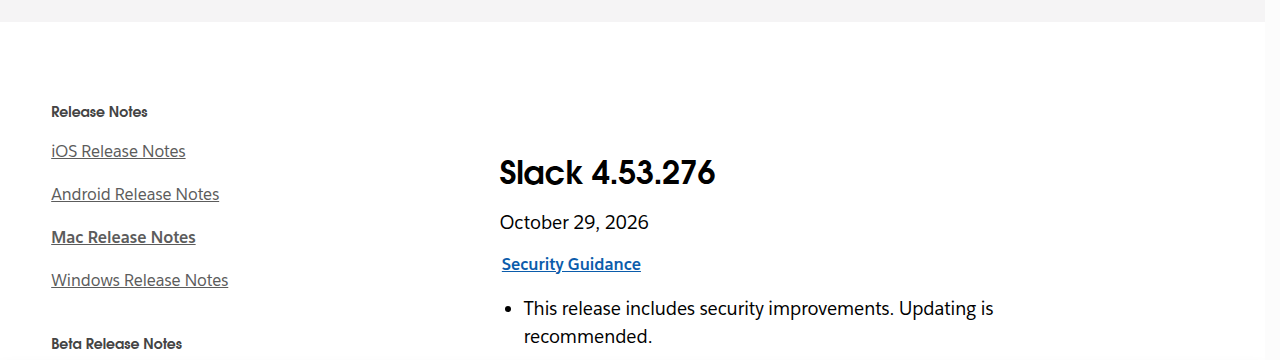
Slack's server also chooses when to offer a version. Slack's release notes list 4.53.269 on 26 October and 4.53.276 on 29 October, but our Mac's checks answered "up-to-date" 83 times between 26 October at noon and 30 October at 08:36. It was never offered 4.53.269 at all. So a manual check that says you are up to date can still be behind slack.com/release-notes/mac.
Downloaded is not installed
When Slack has an update ready, the new app waits in Squirrel's cache folder until the app restarts. You can see both versions from Terminal:
defaults read /Applications/Slack.app/Contents/Info CFBundleShortVersionString
ls ~/Library/Caches/com.tinyspeck.slackmacgap.ShipIt/
cat ~/Library/Caches/com.tinyspeck.slackmacgap.ShipIt/ShipItState.plist
On our Mac on 3 November the first command printed 4.52.182, while the cache held a ready copy of 4.53.276 in a folder named update.WbFOkjd. Slack had been opened again on 1 November and quit on 2 November, and its installer logged no install after 30 October. On 21 October an ordinary quit was enough. On 2 November it was not, and we did not find out why.
What the code does show is the difference between the two ways out. Restart to Apply Update calls Electron's autoUpdater.quitAndInstall, which installs and relaunches. A normal quit with Command-Q calls app.quit and leaves the install to the Squirrel helper. So when the menu says Restart to Apply Update, click it. Do not wait for the next quit.
Never appear "away" on Slack again
Cloud-based. No downloads. Works 24/7 even when your laptop is off.
Check which Slack you have
Choose Slack > About Slack for the version number. To tell the two Mac builds apart, run:
ls /Applications/Slack.app/Contents/_MASReceiptIf that folder exists, the copy came from the Mac App Store and the App Store updates it. If the command says "No such file or directory", it is the direct download, which updates itself as above. Our test Mac's copy is the direct download, signed by Slack's team ID BQR82RBBHL and built for arm64 only. The App Store and direct download builds differ in more than updates.
Turn off automatic updates (for admins)
Slack reads an AutoUpdate setting, and when it is false, the code logs "updates disabled via external config" and hides the update item. On a Mac it counts that setting only when it is forced, which means set by a configuration profile, usually from an MDM such as Jamf or Intune. A plain defaults write does not count. We tested the macOS call that this check depends on, with a throwaway preferences domain:
$ defaults write green.slack.forcedtest AutoUpdate -bool false
$ swift forced.swift
AutoUpdate value: Optional(0)
AutoUpdate forced: false
The value is there, but macOS reports it as not forced, so Slack would ignore it. To turn updates off, put AutoUpdate = false for the domain com.tinyspeck.slackmacgap in a configuration profile. For a single Mac you own, the App Store copy also stops self-updates if you turn off automatic updates in the App Store's settings.
Update without opening Slack
If Slack will not start or will not update, install over it:
https://slack.com/ssb/download-osx-silicon for Apple silicon.With Homebrew, brew upgrade --cask --greedy slack does the same. The Slack cask is marked auto_updates, so a plain brew upgrade skips it. On 3 November Homebrew's cask was already at 4.53.276. For the developer CLI that Homebrew also installs, see Slack CLI with Homebrew.
FAQ
How do I make Slack check right now?
Choose Slack > Check for Updates…. It runs the same check as the hourly one, so it can also answer that you are up to date while a newer version is listed in the release notes.
Does the App Store version get updates at the same time?
Close to it. Apple's listing shows 4.53.276 on 30 October 2026 at 17:33 UTC, a day after the date in Slack's release notes.
Will updating sign me out?
An in-place update replaces only the app in /Applications. Your sign-in lives in ~/Library/Application Support/Slack, which the update leaves alone. On our test Mac, Slack opened on 22 October as 4.52.182 and loaded its workspaces with no new sign-in.
Stop Jiggling Your Mouse.
Join hundreds of remote workers who never worry about their Slack status. Set it up once, stay green forever.
Related Articles
How to Resolve or Close a Slack Thread (and Who Can Lock One)
Slack has no Resolve or Close button for threads. We checked every thread menu as a member, found the admin-only lock in Slack's code, and tested the workarounds that do work: a checkmark, a to-do you mark complete, and muting replies.
How to Search for Images in Slack, Including Text Inside Them
To find an image in Slack, search, switch the results from Messages to Files and set File type to Images, or type type:images. We tested 6 images: Slack also found words written inside PNGs, but not inside JPGs.
Lock Icon Next to a Slack Channel? What the Lock and Grey Text Mean
A padlock next to a Slack channel means it is private. Grey text with a crossed-out bell means you muted it. We made a private, muted, archived and unread channel and screenshot each one in the sidebar.