
Slack Events API Retries: Measured Timing and How to Stop Them
We made a Slack Events API endpoint fail on purpose and logged every redelivery with its X-Slack-Retry-Num and X-Slack-Retry-Reason headers. Slack retried 3 times, at about 0 s, 1 minute and 6 minutes. Measured timing, what X-Slack-No-Retry does, and a handler that stops the retries.
Slack retries an Events API delivery when your endpoint does not answer with HTTP 2xx within about 3 seconds. In our test it sent the same event 3 more times: right away, about 1 minute later, and about 5 minutes after that. Each retry carries X-Slack-Retry-Num (1, 2, 3) and X-Slack-Retry-Reason (http_timeout or http_error). Every retry has the same event_id as the first delivery, so deduplicate on it. We measured this on 1 October 2026 with a test app whose Request URL pointed at a Flask server behind a cloudflared tunnel.
What we measured
We posted one message per test into a DM with our app. The message.im event went to a handler that failed in a different way each time. The times are seconds from the post to each delivery:
| Handler behaviour | Deliveries (s after the post) | Retry reason |
|---|---|---|
| Sleeps 5 s, then 200 | 0.2 s, 3.7 s, 66.5 s, 369.7 s | http_timeout |
| Returns HTTP 500 | 0.3 s, 0.6 s, 61.4 s, 362.0 s | http_error |
Sleeps 4 s, then 200 with X-Slack-No-Retry: 1 | 0.2 s, 3.2 s, 66.8 s, 369.6 s | http_timeout |
Returns 500 with X-Slack-No-Retry: 1 at once | 0.2 s | none, no retry |
| Sleeps 2 s, then 200 | 0.1 s | none, no retry |
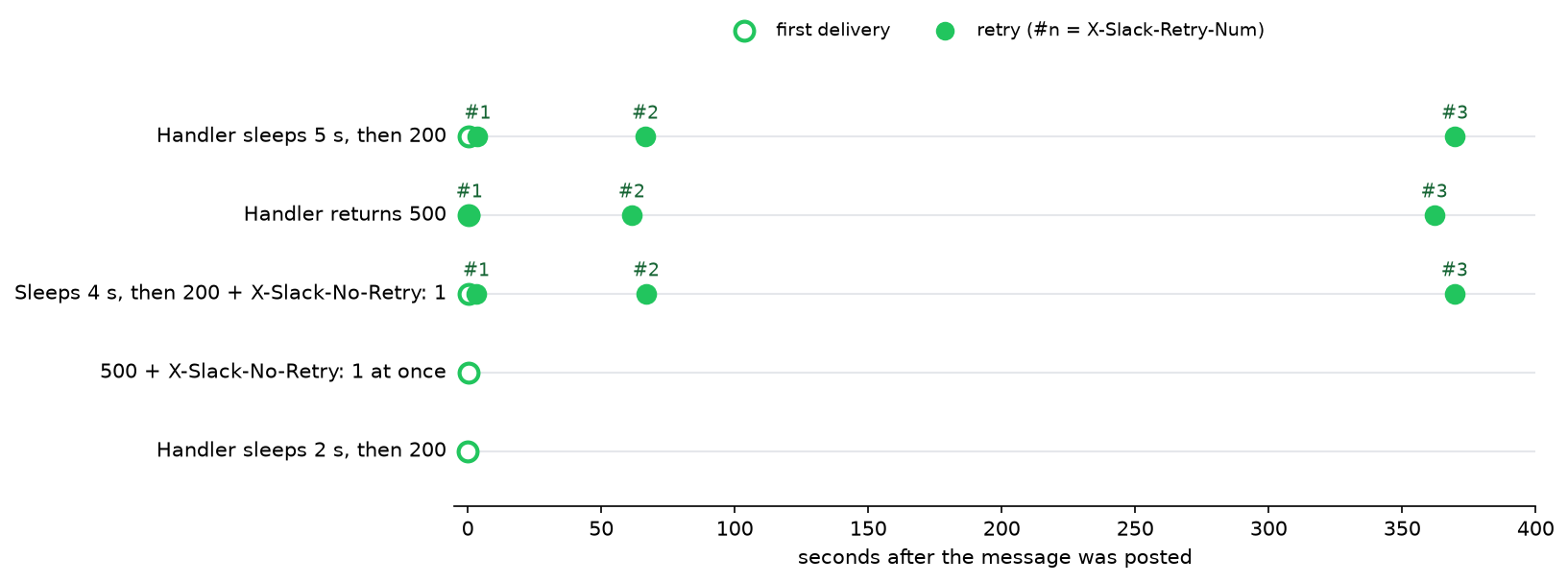
After retry 3 we saw nothing more for that event.
The headers on a retry
This is the full header set of the first retry for the 5-second handler, minus the signature:
{
  "User-Agent": "Slackbot 1.0 (+https://api.slack.com/robots)",
  "Content-Type": "application/json",
  "X-Slack-Request-Timestamp": "1790838690",
  "X-Slack-Retry-Num": "1",
  "X-Slack-Retry-Reason": "http_timeout"
}
The arrival log for that one message, from our handler:
16:11:27.935  Ev0C5FB2K75M  retry=None  reason=None
16:11:31.403  Ev0C5FB2K75M  retry=1  reason=http_timeout
16:12:34.211  Ev0C5FB2K75M  retry=2  reason=http_timeout
16:17:37.381  Ev0C5FB2K75M  retry=3  reason=http_timeout
The first retry came 3.5 s after the first delivery started, which is Slack's timeout plus the network. The second came about 63 s after that, and the third about 5 minutes after the second. The body of each retry was identical to the first, event_id included.
X-Slack-No-Retry only works if Slack gets your response
X-Slack-No-Retry: 1 is a response header. It worked when the handler sent it at once with a 500: Slack did not retry. When the handler slept 4 seconds first, Slack had already given up on the request, never saw the header, and retried 3 times anyway. So the header can tell Slack "do not resend this failure", but it cannot rescue a slow handler.
Never appear "away" on Slack again
Cloud-based. No downloads. Works 24/7 even when your laptop is off.
A handler that stops the retries
The fix is to answer first and work after. This handler returns 200 at once, does the slow part in a thread, and ignores an event_id it has already seen:
import threading, time
from flask import Flask, jsonify, request

app = Flask(__name__)
seen = set()


def handle(event):
    time.sleep(5)  # the slow part: an API call, a database write, an LLM
    print(time.strftime("%H:%M:%S"), "done:", event.get("text"), flush=True)


@app.post("/slack/events")
def slack_events():
    body = request.get_json()
    if body.get("type") == "url_verification":
        return jsonify(challenge=body["challenge"])
    retry = request.headers.get("X-Slack-Retry-Num")
    print(time.strftime("%H:%M:%S"), body["event_id"], "retry:", retry, flush=True)
    if body["event_id"] in seen:
        return "", 200
    seen.add(body["event_id"])
    threading.Thread(target=handle, args=(body["event"],)).start()
    return "", 200


if __name__ == "__main__":
    app.run(port=8791)
We pointed the app at it and sent one message. Its log, with the 5-second job finishing after the 200 had gone out:
16:32:18 Ev0C5FG6BTAB retry: None
16:32:23 done: w1 576 ack-first handler test
Slack delivered the event once. We kept the handler running past the 1-minute mark, when the second retry would have come, and nothing else arrived. The seen set lives in memory, so it is lost on a restart and not shared between processes. In production keep the IDs in Redis or a database table with a short expiry.
Delayed Events
The Event Subscriptions page now has a Delayed Events switch with this text: "If this feature is enabled, we will retry any missed event deliveries slowly over 24 hours. Enable this feature if you want to recover events that your app missed initially during downtime." We turned it on and made the endpoint fail one more event. The first three retries came at the same times as before (0.5 s, 0.9 s, 61.5 s, 362.5 s). We watched for 9 more minutes after retry 3 and no fourth delivery came. Slack's text spreads the slow retries over 24 hours, so a window that short cannot show their timing; we have not measured it.
With Delayed Events off, an event that fails all four deliveries did not come back in our logs. A message history call such as conversations.history can fill the gap for messages. The challenge request that verifies your Request URL in the first place is covered in Slack URL verification; it has the same 3-second limit.
FAQ
Do Socket Mode apps get retries?
Yes. In our Socket Mode test, a message posted while no connection was open reached the app 61 seconds after it was sent, which matches the 1-minute retry here. A Socket Mode app acknowledges each envelope instead of returning HTTP 200.
Does a retry mean the first request failed?
Not always. Our 5-second handler finished its work every time; Slack had only stopped waiting. That is why the work ran 4 times without deduplication.
Stop Jiggling Your Mouse.
Join hundreds of remote workers who never worry about their Slack status. Set it up once, stay green forever.
Related Articles
Slack Interactivity Payload: Real block_actions JSON and response_url Limits
We clicked a button, a static_select and a datepicker in Slack on 1 October 2026 and logged the block_actions payloads our app received. Then we measured response_url: 5 posts, then used_url; it worked at 29:50 and was dead at 30:10.
Slack unfurl_links and unfurl_media: What Each Flag Does, Tested
We posted a web page, a YouTube video and an image with every combination of unfurl_links and unfurl_media on 1 October 2026, then built a custom preview with link_shared and chat.unfurl. The flags do not split the way the names suggest.
Slack Scheduled Message Didn't Send? 5 Cases We Tested
We scheduled five messages for 4:40 PM on 1 October 2026, then archived, left and deleted their channels and deleted a thread parent before the send time. Two sent, three never did, and Slack gave no notice about the three.