
Slack Member ID: Where to Copy It, and What the U Means
A Slack member ID is the U... code that identifies a person. Copy it from their profile under the three-dot menu, or look it up with users.info and users.list. Tested in two workspaces, with the ID formats we found.
A Slack member ID is the code Slack uses for a person, such as U0B7L4YK420. To copy yours, click your profile picture, choose Profile, click the three-dot More button and pick Copy member ID. For someone else, open their profile the same way (click their name in a message). Slack calls it a member ID in the app and a user ID in the API; they are the same value. We checked the menu, the API calls and the ID formats below on 29 September 2026.
Copy a member ID from a profile
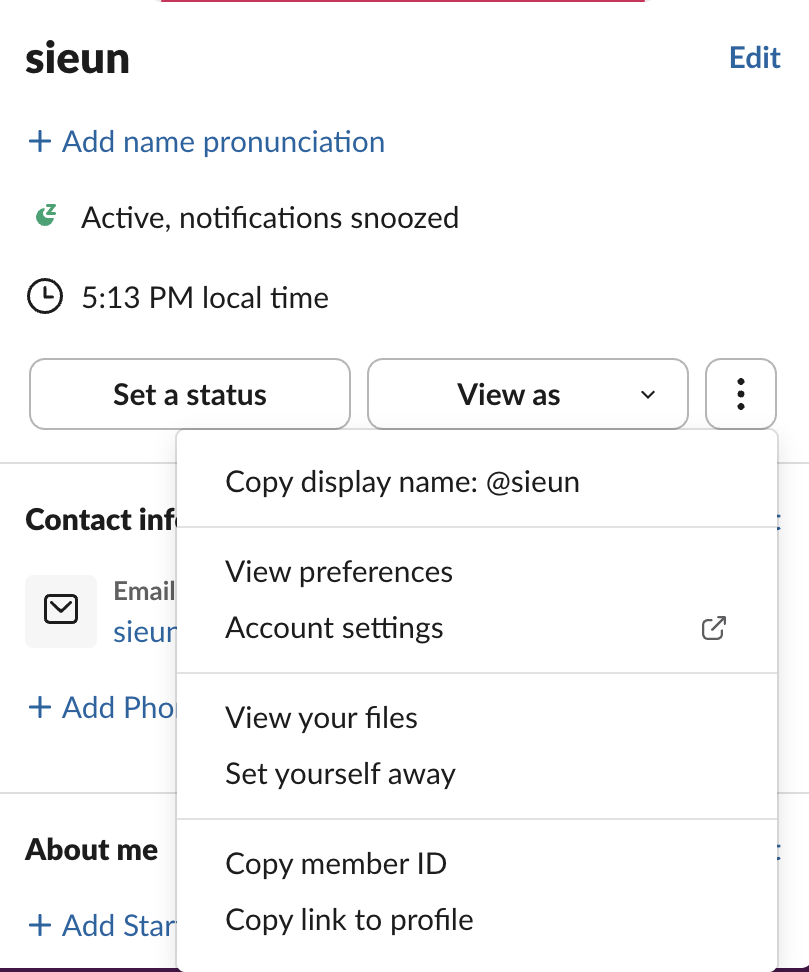
- Click a person's name or picture, or your own picture at the bottom left and then Profile.
- In the profile panel, click the three-dot More button at the end of the button row.
- Click Copy member ID.
We saw no confirmation message after clicking, but the clipboard held the ID: pasting gave U0B7L4YK420.
What a Slack user ID looks like
Every human ID we saw starts with U and has 11 characters:
| Where | Users | Starting letter | Length |
|---|---|---|---|
A 3-person Slack workspace, all members listed with users.list | 3 | U | 11, except USLACKBOT (9) |
| A second workspace, 11 members | 11 | U | 10 IDs of 11 characters, USLACKBOT of 9 |
Slack's docs say user IDs can also start with W, which Enterprise Grid org-wide accounts use, and that the length may grow. Neither of our workspaces is on Enterprise Grid, so we saw no W. Match IDs with a pattern such as ^[UW][A-Z0-9]{8,}$ rather than a fixed length.
A bot has three IDs, and only one of them goes in a mention. Our test bot's user ID was U0C61H3JW5N, its bot ID B0C52236M9B, and its app ID A0C572AF69Y. users.info on the user ID returned "is_bot": true plus the other two in its profile.
Never appear "away" on Slack again
Cloud-based. No downloads. Works 24/7 even when your laptop is off.
Get the ID, or the name, with the API
users.info turns an ID into a person. It needs the users:read scope:
curl -s https://slack.com/api/users.info \
  -H "Authorization: Bearer $SLACK_BOT_TOKEN" -d user=U0B7L4YK420
The fields that answer "slack user id to name", from our response:
{"id": "U0B7L4YK420", "team_id": "T0B7JBCDKC1", "name": "sieun", "real_name": "sieun", "tz": "Asia/Seoul", "is_admin": true, "is_owner": true, "is_bot": false, "deleted": false}Things that did not work:
users.info with a username (user=sieun) returned user_not_found. It takes IDs only.user_not_found.users.lookupByEmail, the way to go from email to ID, returned missing_scope with "needed": "users:read.email". Add that scope and reinstall; the steps are in missing_scope.To list everyone, users.list returns every member with id, name and is_bot. It pages at up to 200 per call through response_metadata.next_cursor.
Use the ID in a mention
Wrap the ID in <@...> and Slack shows the person's current name. Without the brackets it stays plain text. We posted this to a DM:

The mention keeps working after a person changes their display name, which is why bots store IDs instead of names. Mentions from webhooks, user groups and @here are covered in how to mention a user in a Slack webhook. If you want a date that shows in each reader's own time zone next to a mention, the Slack timestamp generator builds the <!date> code.
FAQ
Is the member ID the same in every workspace?
No. The account we tested with is signed in to three workspaces and has three IDs: U0APM2X5V99, U0B7L4YK420 and U0B7A85MCM9.
Can someone see my email from my member ID?
Not through the API without users:read.email. Our bot with users:read got name, time zone and admin flags from users.info; the profile in the response had no email field. A person can still see an email on a profile if its owner shows it.
Where is the workspace ID?
It is the T... value, team_id in users.info and auth.test. Channel IDs start with C, and the channel ID sits at the bottom of the channel details; see channel_not_found for where.
Stop Jiggling Your Mouse.
Join hundreds of remote workers who never worry about their Slack status. Set it up once, stay green forever.
Related Articles
Slack API Rate Limits: What We Hit, and the 429 You Get Back
Slack answers too many calls with HTTP 429 and a Retry-After header. We burst chat.postMessage, conversations.history and an incoming webhook from an internal app and logged every response: where the 429s started, the bodies, and a retry loop that never hit one.
Slack files.upload Deprecated: The 3-Step Upload That Replaces It
files.upload now returns method_deprecated. Use files.getUploadURLExternal, POST the bytes, then files.completeUploadExternal, or files_upload_v2 in the SDK. Tested with curl and Python, including two silent failures.
Slack channel_not_found: 7 Causes We Reproduced, With Fixes
channel_not_found means Slack cannot see the channel with the token you used: a wrong ID, a name that does not exist, a private channel the bot is not in, or a channel in another workspace. Each case tested on a real bot.