
Slack search.messages API: Token, Paging and Limits, Tested
search.messages works only with a user token that has search:read. We ran it against our own test workspace: the response shape, the bot token error, 10 search modifiers with their counts, paging limits that fail silently, how long new messages take to show up, and the newer assistant.search.context.
To search Slack messages from code, call search.messages with a user token (xoxp-) that has the search:read scope, and pass the same query you would type in Slack's search bar, modifiers included. A bot token does not work: it returns not_allowed_token_type. The results are the messages that user can see, with a total, a page of matches and paging data. We ran every call below against our own test workspace on 1 October 2026.
Call search.messages with a user token
Add search:read under User Token Scopes (not Bot Token Scopes) in your app's OAuth & Permissions, reinstall, and copy the User OAuth Token:
curl -s https://slack.com/api/search.messages \
  -H "Authorization: Bearer $SLACK_USER_TOKEN" \
  -d query=hello -d count=2
The top of our response, with the fields of the first match:
{"ok": true, "query": "hello", "messages": {"total": 11,
  "pagination": {"total_count": 11, "page": 1, "per_page": 2, "page_count": 6, "first": 1, "last": 2},
  "paging": {"count": 2, "total": 11, "page": 1, "pages": 6},
  "matches": [{"type": "message", "user": "U0B7L4YK420", "username": "sieun", "ts": "1790817584.025669", "text": "hello 2",
    "permalink": "https://slack-0yr1948.slack.com/archives/C0C5UGH9QPL/p1790817584025669", "score": 310.72}]}}
Each match also carries a channel object (id, name, is_private, is_im) and the message blocks. Slack's own search bar found the same 11 messages for the same query:
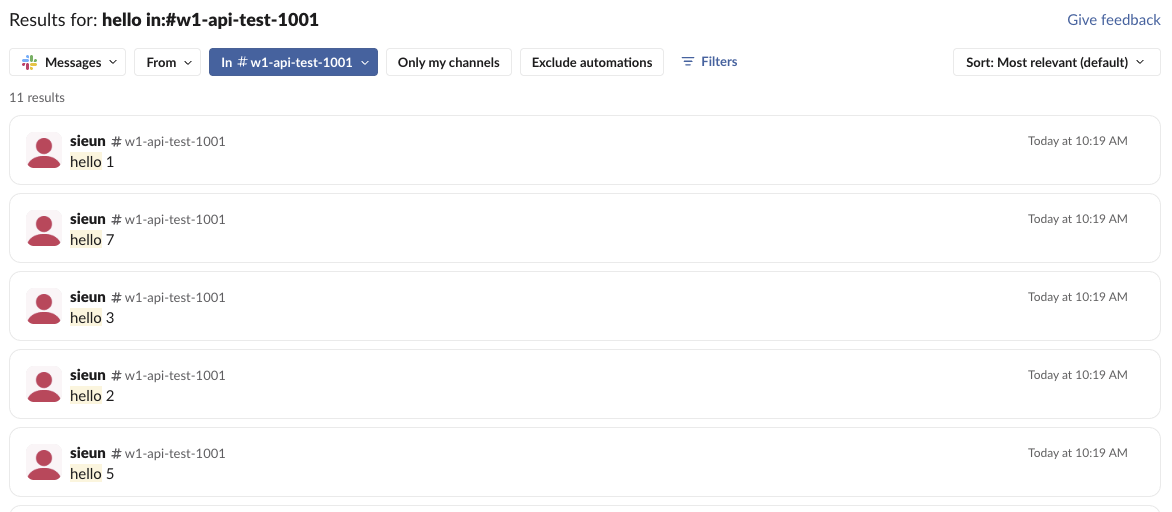
The same call with the bot token:
{"ok": false, "error": "not_allowed_token_type"}There is no bot scope that fixes this. If your app has only a bot token, read the channels it is in with conversations.history instead; our tested script is in get messages from a channel. A user token without search:read gets missing_scope with that scope in needed, as in missing_scope.
Search modifiers in the query
query takes the same modifiers as the search bar. Our test channel held 11 messages containing "hello" and 11 messages from the bot. Another channel, #social, had none. The counts we got back:
| query | total |
|---|---|
hello | 11 |
hello in:#w1-api-test-1001 | 11 |
hello in:#social | 0 |
hello from:@me | 11 |
from:@w1test (the bot) | 11 |
hello 8 | 1 |
"reply from process" | 8 |
hel* | 11 |
hello on:2026-10-01 | 11 |
hello before:2026-10-01 | 0 |
before: leaves out the date you give, so a message sent on 1 October does not match before:2026-10-01. from:@me resolves to the owner of the token. Two words without quotes must both appear, which is why hello 8 matched one message. The full list of modifiers, as people use them in the search bar, is in Slack search operators.
Never appear "away" on Slack again
Cloud-based. No downloads. Works 24/7 even when your laptop is off.
Paging, sorting and limits
These were the surprises. None of them returned an error:
| Parameter | What came back |
|---|---|
count=100 | 100 per page, the most allowed |
count=101 | 20 per page, with "warnings": ["max_count_limit"] in paging |
page=7 when there were 6 pages | ok: true, no matches, "warnings": ["max_total_pages"] |
page=101 | Page 1, with "warnings": ["max_page_limit"] |
highlight=true | Matched words wrapped in \ue000 and \ue001 |
A loop that asks for count=500 gets 20 per page and never sees an error, so check paging.warnings. A loop that runs past the last page gets an empty matches list, which is a safe stop condition.
The default sort=score is not a stable order when scores tie. All our "hello" matches scored 310.72. One call returned "hello 2" and "hello 5" first, a later identical query returned "hello 1", "hello 7" and "hello 3". For a stable order, pass sort=timestamp with sort_dir=asc or desc; with asc we got "hello", "hello 1", "hello 2".
New messages are not searchable at once. We posted three messages with a random word and polled search.messages once a second. They showed up after 15.4, 30.6 and 30.4 seconds. A bot that posts a message and searches for it right away will not find it.
assistant.search.context, the Real-time Search API
Slack's newer search method is assistant.search.context. Our user token with only search:read got:
{"ok": false, "error": "missing_scope", "needed": "search:read.public", "provided": "identify,channels:history,search:read,users:read,chat:write"}After we added search:read.public to both scope lists and reinstalled, the user token returned the same 11 messages in a flatter shape:
{"author_name": "sieun", "author_user_id": "U0B7L4YK420", "team_id": "T0B7JBCDKC1", "channel_id": "C0C5UGH9QPL", "channel_name": "w1-api-test-1001", "message_ts": "1790817584.025669", "content": "hello 2", "is_author_bot": true, "permalink": "https://slack-0yr1948.slack.com/archives/C0C5UGH9QPL/p1790817584025669"}results also has files, channels and users lists, and paging is a next_cursor. The bot token, with the same scope, returned {"ok": false, "error": "invalid_action_token"}. A bot can call this method only with an action_token taken from an event a user started. is_author_bot was true for messages we had posted with the user token through the app, so do not read it as "a bot user wrote this". A new message took 51 seconds to appear here in our one try.
FAQ
Is there a search API for files?
Yes, search.files and search.all take the same user token and search:read scope. We tested only search.messages.
Stop Jiggling Your Mouse.
Join hundreds of remote workers who never worry about their Slack status. Set it up once, stay green forever.
Related Articles
Slack OAuth Redirect URL on localhost: What Slack Accepts, Tested
We added localhost, 127.0.0.1, https, custom-scheme and tunnel redirect URLs to a Slack app on 1 October 2026, then ran the OAuth flow against a local server. What was accepted, how Slack matches the URL, and the PKCE rules.
Slack App Manifest Example: YAML and JSON That Worked, Tested
A Slack app manifest we used to create a working app on 1 October 2026, in YAML and JSON, plus the validation errors from broken versions and real output from apps.manifest.validate, export, create and update.
Slack chat.delete API: Who Can Delete What, Tested
chat.delete removes a message by channel and ts. We deleted bot messages, a person's messages, a thread parent and an already deleted message with bot and user tokens, and list every response, including cant_delete_message and the tombstone a thread parent leaves.