
Slack Search Operators: Every Modifier With Examples
Slack search operators narrow results: in:#channel, from:@name, with:@name, before:, after:, on:, during:, has::emoji:, is:saved, has:pin, is:thread, "exact phrase", -word and rep*. Every modifier from the Slack help center with examples, date formats and recipes.
Slack search operators, which Slack calls modifiers, narrow your results. Type them after your search words: in:#channel or in:@name for a conversation, from:@name for who sent it, with:@name for threads and DMs with someone, before:, after: and on: with a date, during: with a month or year, has::emoji: for a reaction, is:saved or has:pin, and is:thread. Put words in quotes for an exact phrase, a dash before a word to exclude it, and an asterisk after three or more letters to match word starts. You can combine as many as you need, such as budget from:@Sara in:#finance after:2026-09-01.
Press Cmd+G (Mac) or Ctrl+G (Windows) to start a search, or Cmd+F / Ctrl+F to search the current conversation. For everything else Slack shows about you and your team, start at the Slack status hub.
Every Slack search modifier
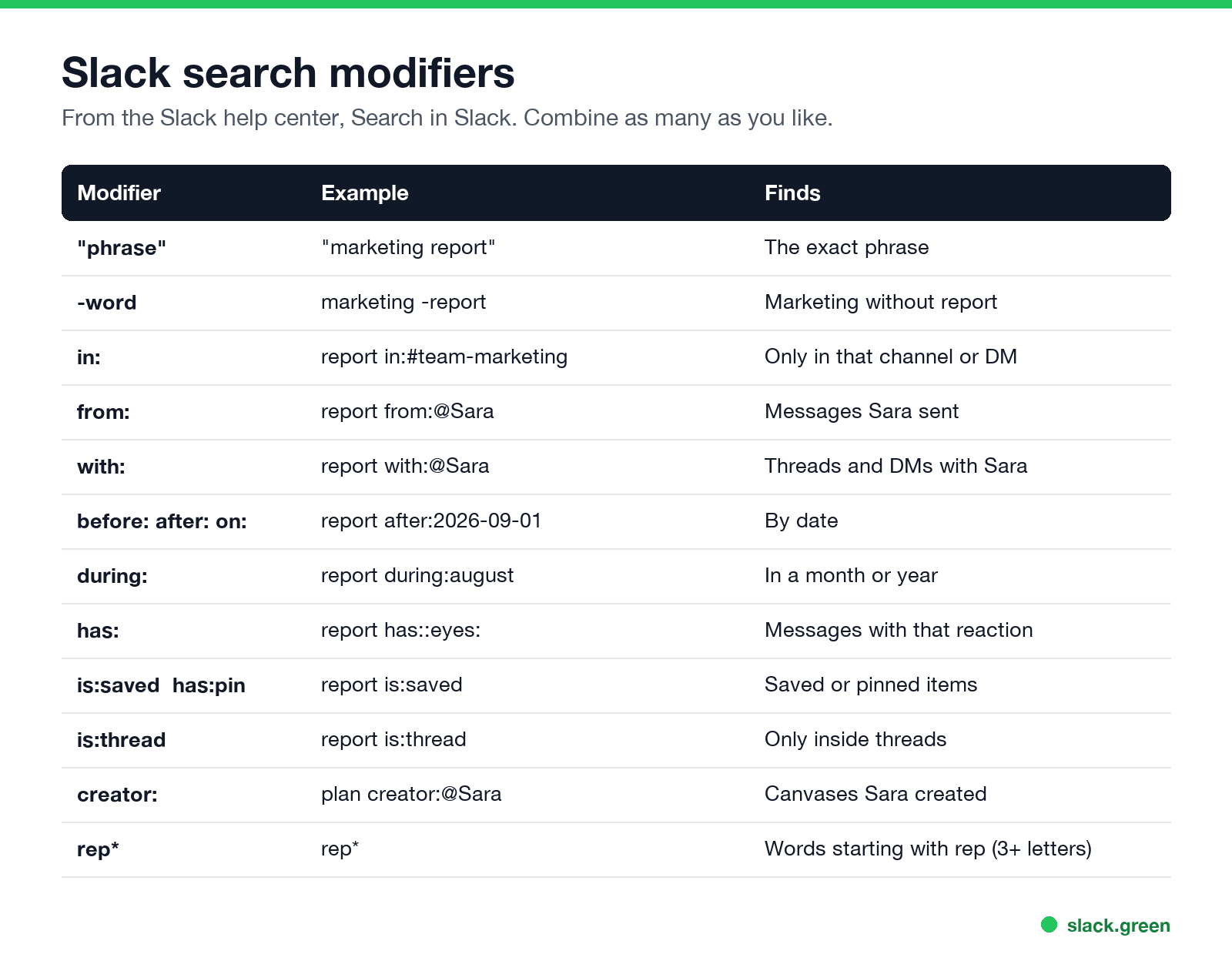
| Modifier | Example | Finds |
|---|---|---|
"phrase" | "marketing report" | The exact phrase |
-word | marketing -report | Marketing without "report" |
in: | report in:#team-marketing | Only that channel, DM or section |
from: | report from:@Sara | Messages Sara sent |
with: | report with:@Sara | Threads and DMs with Sara |
before: after: on: | report after:2026-09-01 | By date |
during: | report during:august | In a month or year |
has: | report has::eyes: | Messages with that reaction |
hasmy: | hasmy::eyes: | Messages you reacted to |
is:saved, has:pin | report is:saved | Saved or pinned items |
is:thread | report is:thread | Only inside threads |
creator: | plan creator:@Sara | Canvases Sara created |
-in:, -from: | report -in:#alerts | Excludes a channel or person |
word* | rep* | Words starting with those letters |
All of these come from Slack's help center article on search. The wildcard needs at least three letters.
How to search Slack by date or date range
Use before:, after: and on: with a date, or during: with a month or year:
invoice after:2026-09-01 before:2026-09-15
standup on:2026-09-22
offsite during:august
roadmap during:2025
Combine after: and before: for a range. After you search, you can also use Filters in the results to pick a date range from a menu.
How to search Slack DMs
Never appear "away" on Slack again
Cloud-based. No downloads. Works 24/7 even when your laptop is off.
- •
in:@Sarasearches your DM with Sara. - •
with:@Sarasearches threads and DMs you share with Sara. - •
from:@Sarafinds what Sara sent, anywhere you can see. - • It is older than your plan keeps. Free workspaces keep a limited history, and owners can set retention on any plan; see Slack message retention and can Slack see deleted messages.
- • It was deleted or edited.
- • You are not in the conversation. Search covers only what you can see.
- • Wrong modifier syntax. Use the display name after
from:and a#before channel names.
You can only search conversations you are part of. Nobody, including admins, can search your DMs from the Slack app; what admins can export is in can Slack admins see DMs.
Slack search recipes
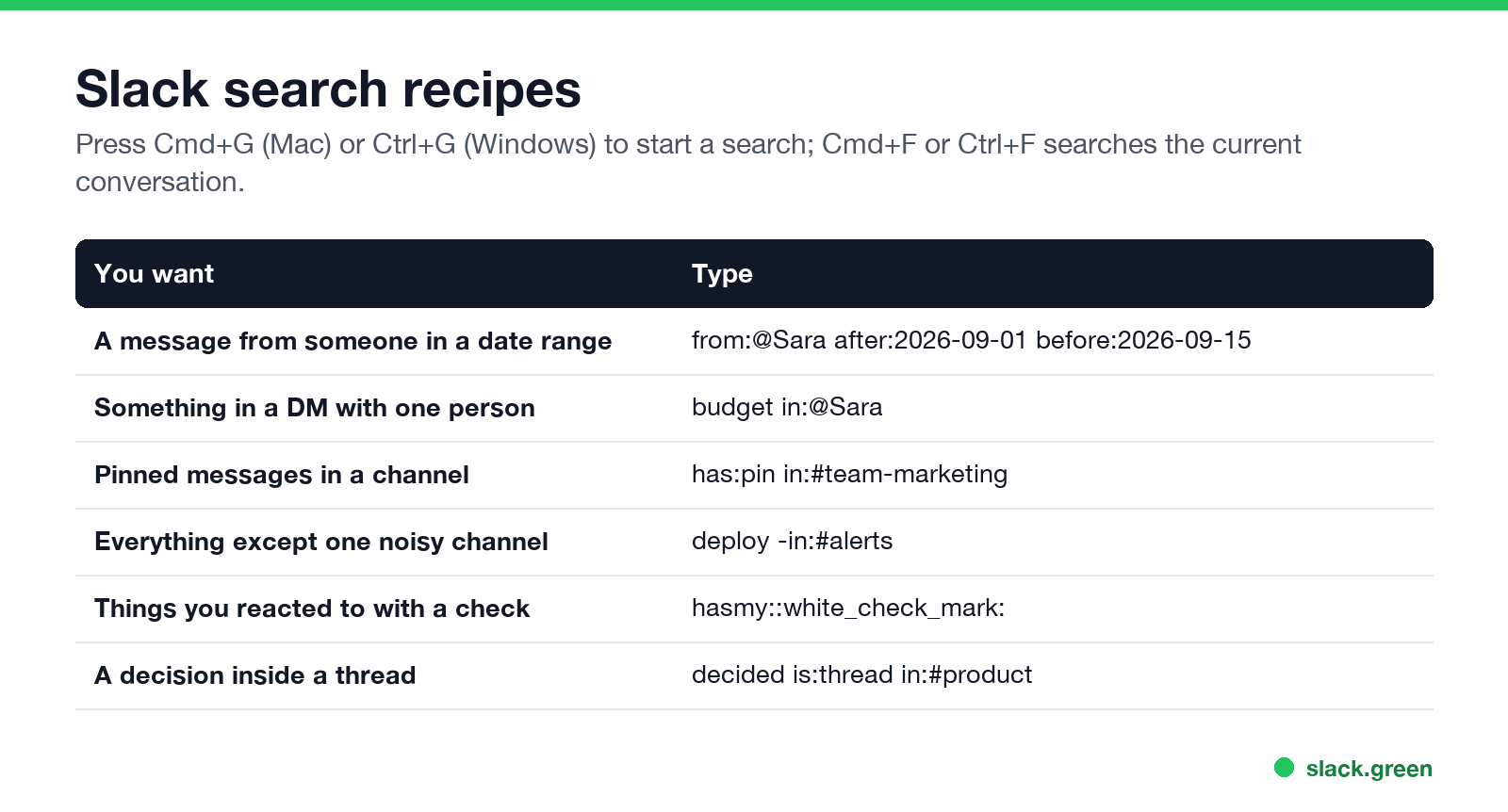
| You want | Type |
|---|---|
| A message from someone in a date range | from:@Sara after:2026-09-01 before:2026-09-15 |
| Something in a DM with one person | budget in:@Sara |
| Pinned messages in a channel | has:pin in:#team-marketing |
| Everything except a noisy channel | deploy -in:#alerts |
| Things you marked done | hasmy::white_check_mark: |
| A decision inside a thread | decided is:thread in:#product |
Teams that mark requests with 👀 can find claimed ones with has::eyes:; the convention is explained in what does the eyes emoji mean in Slack.
Why Slack search does not find a message
FAQ
Never appear "away" on Slack again
Cloud-based. No downloads. Works 24/7 even when your laptop is off.
How do I search for a message from a specific person in Slack?
Add from:@name, for example invoice from:@Sara.
How do I search Slack by date?
Use after:, before: or on: with a date like 2026-09-01, or during: with a month or year.
Can I search Slack DMs?
Yes, yours: in:@name or with:@name.
Does Slack search support wildcards?
Yes, an asterisk after at least three letters, such as rep*.
What is the Slack search shortcut?
Cmd+G on Mac, Ctrl+G on Windows and Linux. More in the Slack keyboard shortcuts cheat sheet.
Stop Jiggling Your Mouse.
Join hundreds of remote workers who never worry about their Slack status. Set it up once, stay green forever.
Related Articles
Slack Workflow Builder Examples: 12 Workflows to Copy, With Triggers and Steps
Twelve Slack Workflow Builder examples with the exact trigger and steps for each: daily standups, channel welcomes, time-off approvals, help desk requests, emoji escalations, keyword routing, incidents, list updates and webhooks from other tools. Plus where Workflow Builder lives, what it costs and how branches work.
Slack Timer: How to Set a Countdown, Pomodoro or Focus Timer in Slack
Slack has no built-in timer, but four built-in tools act like one: /remind me to ... in 25 minutes, a status that clears itself, /dnd for a focus block, and Workflow Builder for dated countdowns. For a live countdown in a channel, use a Marketplace app or a 15-line bot script.
Slack Red Dot Won't Go Away? What It Counts and How to Clear It
A red dot on the Slack icon means unread activity somewhere; a red number means DMs, mentions, keywords or followed thread replies. Press Shift+Esc to mark all read, check Threads, Activity, Later and other workspaces, then clear the cache or reset the OS badge.