
Slack Search Operators: Every Modifier With Examples
Slack search operators narrow results: in:#channel, from:@name, with:@name, before:, after:, on:, during:, has::emoji:, is:saved, has:pin, is:thread, "exact phrase", -word and rep*. Every modifier from the Slack help center with examples, date formats and recipes.
Slack search operators, which Slack calls modifiers, narrow your results. Type them after your search words: in:#channel or in:@name for a conversation, from:@name for who sent it, with:@name for threads and DMs with someone, before:, after: and on: with a date, during: with a month or year, has::emoji: for a reaction, is:saved or has:pin, and is:thread. Put words in quotes for an exact phrase, a dash before a word to exclude it, and an asterisk after three or more letters to match word starts. You can combine as many as you need, such as budget from:@Sara in:#finance after:2026-09-01.
Press Cmd+G (Mac) or Ctrl+G (Windows) to start a search, or Cmd+F / Ctrl+F to search the current conversation. For everything else Slack shows about you and your team, start at the Slack status hub.
Every Slack search modifier
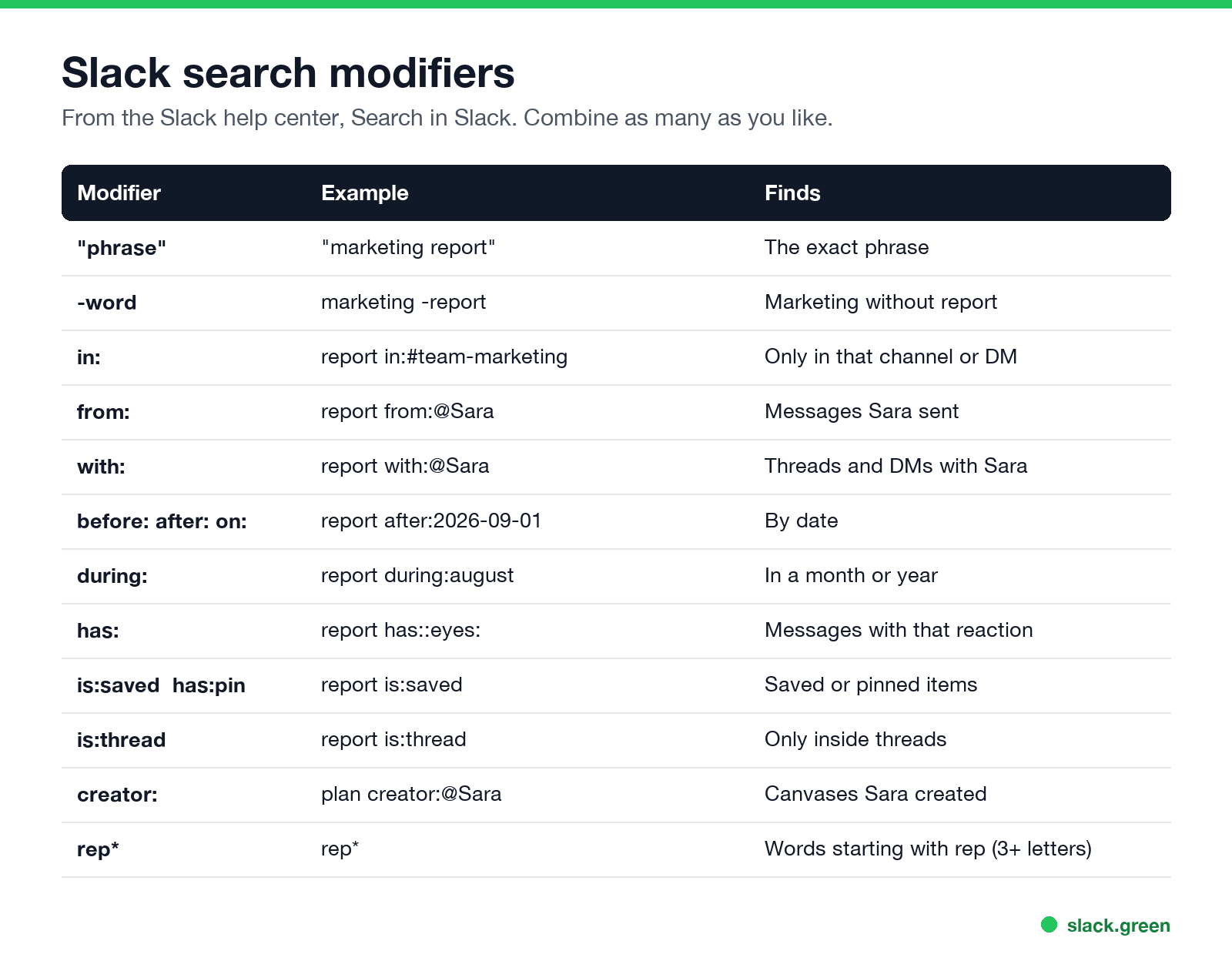
| Modifier | Example | Finds |
|---|---|---|
"phrase" | "marketing report" | The exact phrase |
-word | marketing -report | Marketing without "report" |
in: | report in:#team-marketing | Only that channel, DM or section |
from: | report from:@Sara | Messages Sara sent |
with: | report with:@Sara | Threads and DMs with Sara |
before: after: on: | report after:2026-09-01 | By date |
during: | report during:august | In a month or year |
has: | report has::eyes: | Messages with that reaction |
hasmy: | hasmy::eyes: | Messages you reacted to |
is:saved, has:pin | report is:saved | Saved or pinned items |
is:thread | report is:thread | Only inside threads |
creator: | plan creator:@Sara | Canvases Sara created |
-in:, -from: | report -in:#alerts | Excludes a channel or person |
word* | rep* | Words starting with those letters |
All of these come from Slack's help center article on search. The wildcard needs at least three letters.
How to search Slack by date or date range
Use before:, after: and on: with a date, or during: with a month or year:
invoice after:2026-09-01 before:2026-09-15
standup on:2026-09-22
offsite during:august
roadmap during:2025
Combine after: and before: for a range. After you search, you can also use Filters in the results to pick a date range from a menu.
How to search Slack DMs
- •
in:@Sarasearches your DM with Sara. - •
with:@Sarasearches threads and DMs you share with Sara. - •
from:@Sarafinds what Sara sent, anywhere you can see. - • It is older than your plan keeps. Free workspaces keep a limited history, and owners can set retention on any plan; see Slack message retention and can Slack see deleted messages. On the free plan, search covers only the last 90 days; see Slack free plan limits.
- • It was deleted or edited.
- • You are not in the conversation. Search covers only what you can see.
- • Wrong modifier syntax. Use the display name after
from:and a#before channel names.
You can only search conversations you are part of. Nobody, including admins, can search your DMs from the Slack app; what admins can export is in can Slack admins see DMs.
Slack search recipes
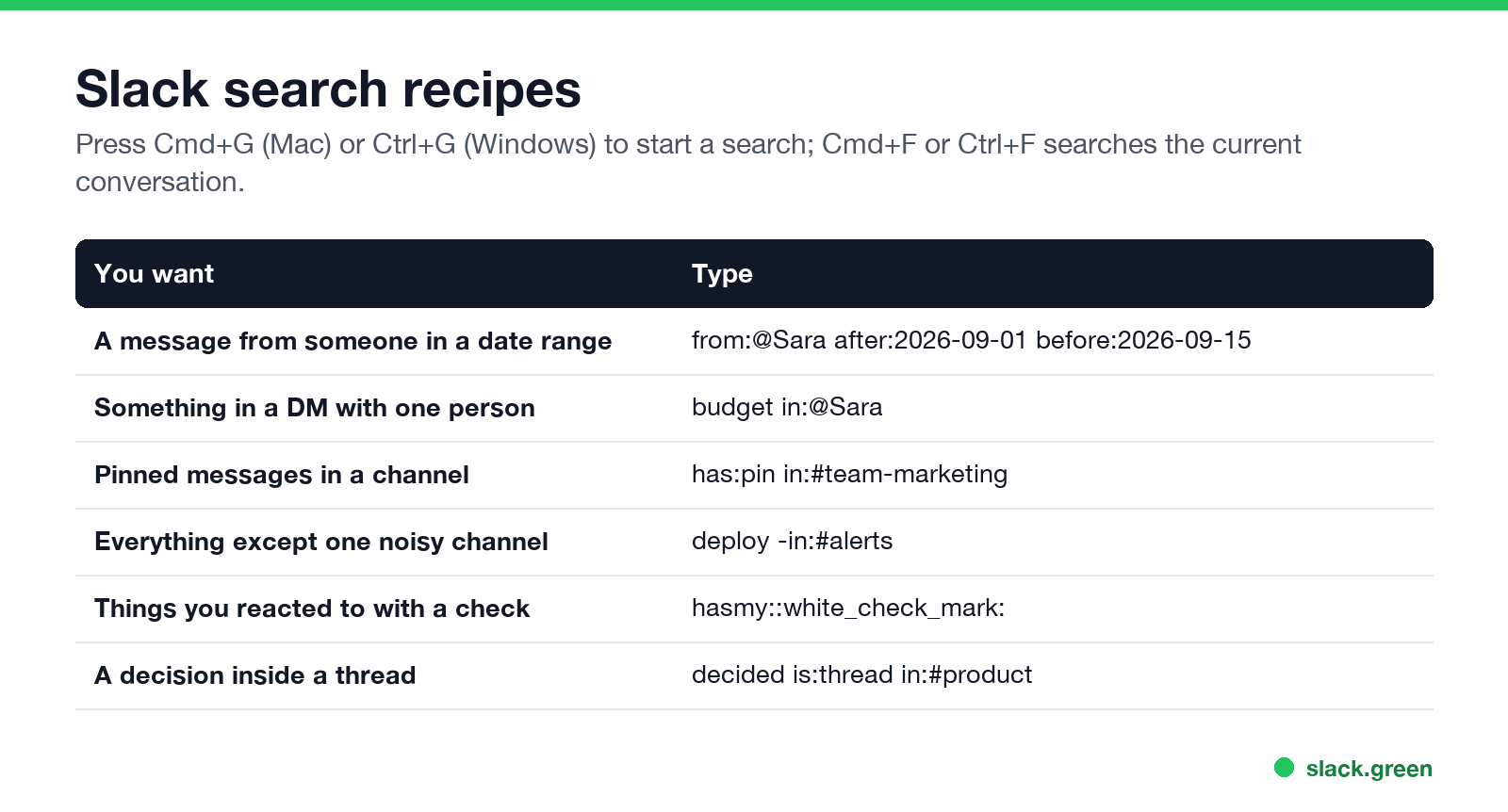
| You want | Type |
|---|---|
| A message from someone in a date range | from:@Sara after:2026-09-01 before:2026-09-15 |
| Something in a DM with one person | budget in:@Sara |
| Pinned messages in a channel | has:pin in:#team-marketing |
| Everything except a noisy channel | deploy -in:#alerts |
| Things you marked done | hasmy::white_check_mark: |
| A decision inside a thread | decided is:thread in:#product |
Teams that mark requests with 👀 can find claimed ones with has::eyes:; the convention is explained in what does the eyes emoji mean in Slack.
Why Slack search does not find a message
FAQ
How do I search for a message from a specific person in Slack?
Add from:@name, for example invoice from:@Sara.
How do I search Slack by date?
Use after:, before: or on: with a date like 2026-09-01, or during: with a month or year.
Can I search Slack DMs?
Yes, yours: in:@name or with:@name.
Does Slack search support wildcards?
Yes, an asterisk after at least three letters, such as rep*.
What is the Slack search shortcut?
Cmd+G on Mac, Ctrl+G on Windows and Linux. More in the Slack keyboard shortcuts cheat sheet.
Related Articles
Slack Jira Integration: Setup, /jira Commands and Notifications
Install the Jira Cloud for Slack app, type /jira connect in a channel to send a Jira space's updates there, /jira notify for personal notifications as DMs, and create work items from any message with More actions. Every /jira command, Jira automation to Slack, and fixes when previews or notifications stop.
How to Create a Slack Workspace, on Desktop or Phone
Go to slack.com/get-started, enter your email, type the confirmation code, and click Create a Workspace. It is free to start, you become the Primary Owner, and it takes about five minutes. Steps for desktop, iPhone and Android, and what to set up next.
Slack Sidebar Sections: Create, Sort, Share and Fix Them
Slack sidebar sections are custom groups of channels, DMs and apps in your sidebar. Only you see them, and they need a paid plan. How to create one on desktop and mobile, move many channels at once, sort and filter each section, share a section with your team, and get disappeared sections back.