
Slack Message Retention: How Long Slack Keeps Messages, by Plan
On the free Slack plan you can only see and search the last 90 days of messages and files, and data older than one year is deleted. Paid plans keep everything for the life of the workspace by default. Retention options by plan, file retention, DMs, and who can change them.
How long Slack keeps messages depends on the plan and on what the workspace Owner chose. On the free plan, you can only see and search the most recent 90 days of messages and files; older ones are hidden, and data more than one year old is deleted on a rolling basis (since August 26, 2024). On paid plans (Pro, Business+ and Enterprise), Slack keeps messages, files, canvases and lists for the life of the workspace by default, and upgrading a free workspace reveals the hidden history that has not yet been deleted. Owners can shorten retention on any plan, and can let members set retention for individual channels and DMs. Data deleted by a retention setting is gone for good, and deleting a channel deletes its messages regardless of the setting.
Retention decides what is kept about your messages. What people see in real time is your presence dot, which goes grey 10 minutes after your last input in Slack. Slack Green keeps it active during the working hours you set, from the cloud.
Slack message retention by plan
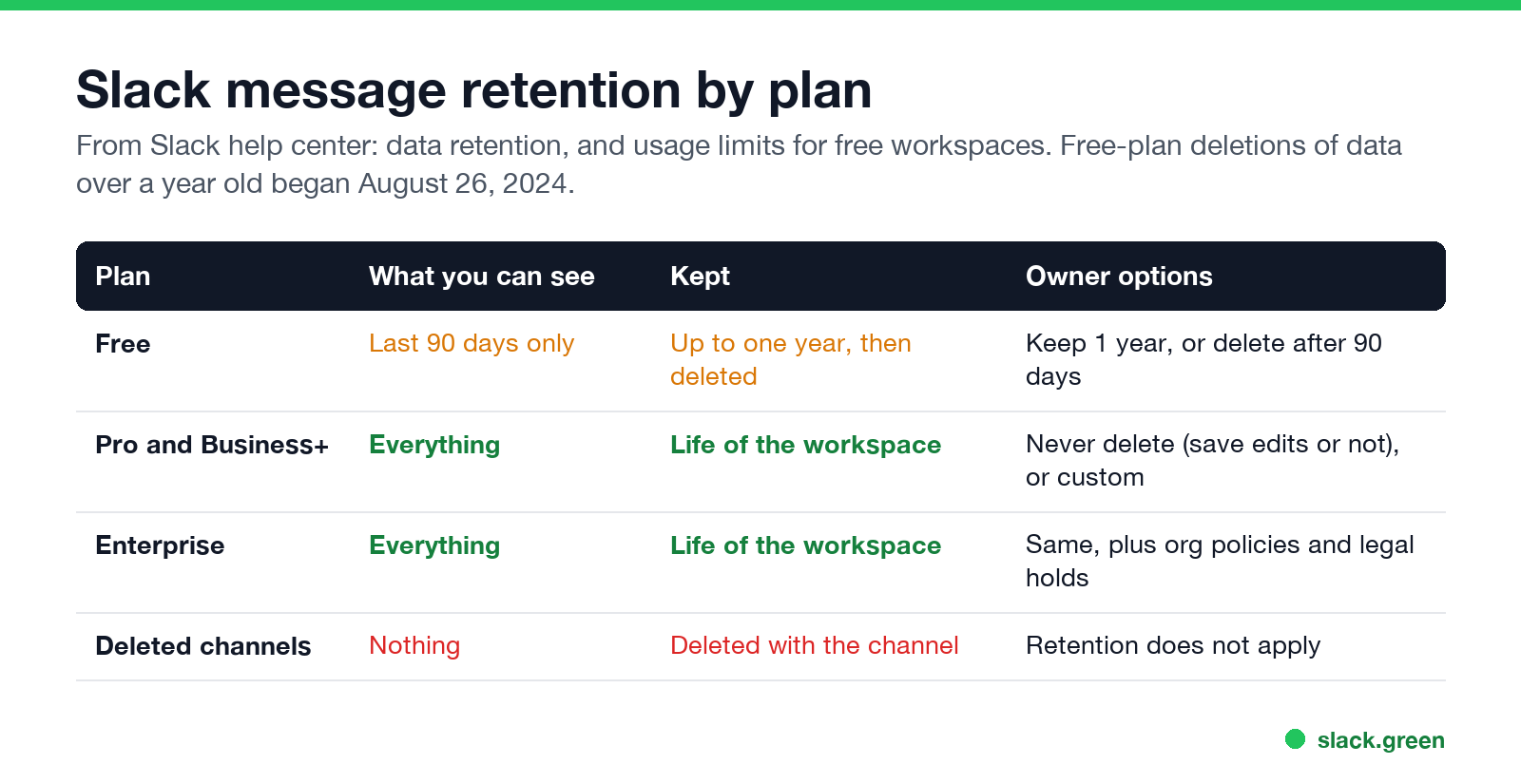
| Plan | What you can see | Kept | Owner options |
|---|---|---|---|
| Free | Last 90 days only | Up to one year, then deleted on a rolling basis | Keep 1 year without edit tracking, or delete after 90 days |
| Pro and Business+ | Everything kept | Life of the workspace | Never delete, with or without saving edits, or a custom timeline |
| Enterprise | Everything kept | Life of the workspace | Same, plus org-level policies and legal holds |
This comes from Slack's help center articles on data retention and on free-plan usage limits. Retention applies to messages, files, canvases and lists, including pinned and saved items. Deletions run once a day.
Does Slack delete messages after 90 days?
On the free plan, messages older than 90 days are hidden, not deleted. Slack's help center says free workspaces can view and search messages and files from the last 90 days only; older ones are hidden to make room for new ones, and messages and files more than one year old are permanently deleted. Slack started those deletions on August 26, 2024. Upgrading to a paid plan reveals hidden messages that are less than a year old.
They are deleted at 90 days only if the Owner chose Delete messages after 90 days; that setting also deletes anything the 90-day limit hides. Paid plans delete nothing unless the Owner sets a shorter retention. Every other free plan limit (apps, huddles, Slack Connect) is in Slack free plan limits.
Slack DM retention
Retention settings cover public channels, private channels and DMs. On paid plans, Owners can allow members to set retention for individual channels and DMs, so a DM can have a shorter life than the workspace default. Whether a deleted DM survives depends on whether retention saves edits and deletions; see can Slack see deleted messages.
Slack file retention
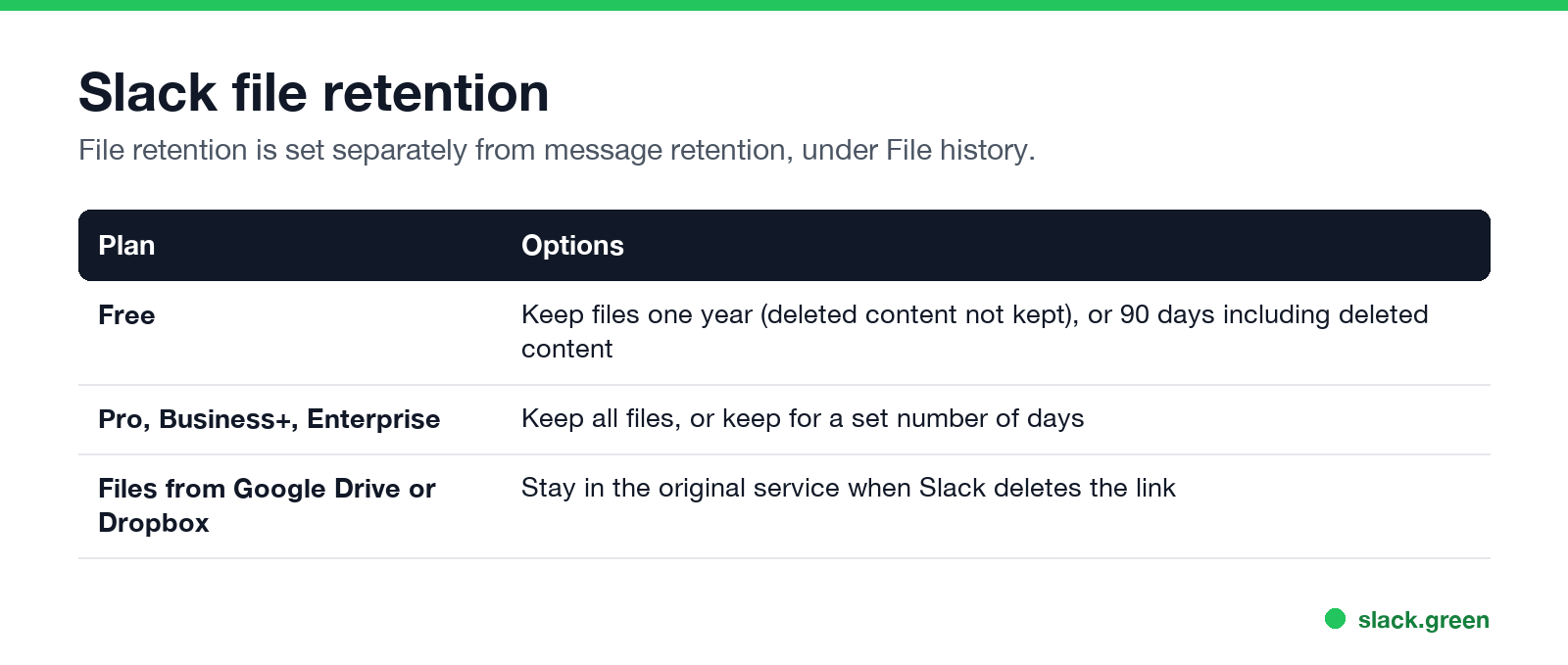
File retention is a separate setting, under File history:
- • Free: keep files for one year (deleted content not kept), or 90 days including deleted content.
- • Pro, Business+, Enterprise: keep all files, or keep them for a set number of days.
Files shared from Google Drive or Dropbox stay in that service when Slack removes them.
How to change retention in Slack
Workspace Owners: click Admin in the sidebar, choose Workspace settings, click Expand next to Data retention, choose the settings, Save, and confirm. On Enterprise, Org Owners can set an org-level policy through Slack support that applies to every workspace.
Members cannot change the workspace setting. If the Owner allows it, you can change retention for a channel or DM you are in, from its settings.
What retention means for you
FAQ
How long does Slack keep messages?
For the life of the workspace on paid plans by default. On the free plan you can see only the last 90 days, and data older than one year is deleted.
Does Slack delete messages after 90 days on the free plan?
It hides them after 90 days and deletes them after one year, unless the Owner chose to delete after 90 days. Hidden messages under a year old come back if you upgrade.
Can I recover messages deleted by retention?
No. Slack says data deleted by a retention setting is permanent.
Does retention apply to DMs?
Yes. It covers public channels, private channels and DMs.
Who can change Slack retention?
Workspace Owners, and Org Owners on Enterprise. Members only for channels and DMs, if allowed.
Related Articles
Slack Huddles vs Zoom: Which to Use for Team Calls
Slack huddles are quick calls inside Slack: 1:1 on the free plan, up to 50 people on paid plans, no recording. Zoom is built for scheduled, recorded and large meetings, with a free plan of 100 people for 40 minutes. Limits, cost, recording and privacy side by side.
Is Slack AI Worth It? What It Costs Now and What You Get
Slack no longer sells Slack AI as an add-on. Pro includes AI summaries and huddle notes; search answers, recaps, translations and Slackbot come with Business+, at $7.75 more per user a month. What each AI feature does, who it pays off for, and what it does with your data.
Is Slack Pro Worth It? Price, What You Get and Who Should Skip It
Slack Pro is worth it if your team needs messages older than 90 days, group huddles, shared channels with clients or workflows. It costs $7.25 a user a month paid yearly. What Pro adds over free, what it costs for 5 to 50 people, and when Business+ is the better buy.