
How to Clear Slack Search History (Recent Searches)
Slack keeps your recent searches on its servers, so they follow you to every device. We found where to delete them, and the one way the delete button worked for us.
To clear your Slack search history, click the search bar, click the clock icon (Show search history) at the right of the box, hover a search and click the X (Delete). Slack deletes that one entry. There is no button that clears the whole list, so you remove entries one by one. The list is stored with your account, not in your browser, so a delete removes it from your account, not only from one browser. We tested this on 9 October 2026 in Slack web on the Free plan.
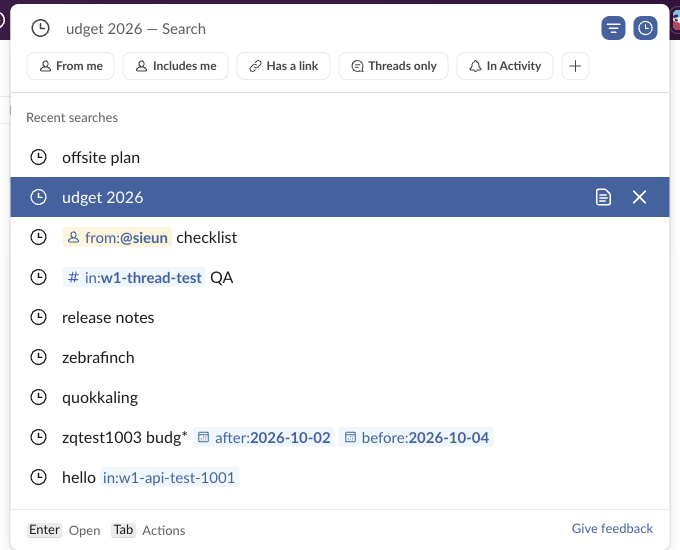
Where Slack keeps your recent searches
When you click the search bar, Slack first shows unread items and Recent places, the channels and DMs you opened last. Your past searches are one click further: the clock icon at the right of the box. The list is titled Recent searches. Each entry has two buttons when you hover it: Copy search query (the page icon) and Delete (the X).
We ran five searches in a row and then read our account preferences with the users.prefs.get API. The searches were in a preference called recents, under a search key, each with the query, a type and a timestamp:
{"search": [
  {"query": "offsite plan", "type": "SLACK", "timestamp": 1791537...},
  {"query": "from:<@U0B7L4YK420> checklist", "type": "SLACK", ...},
  {"query": "in:<#C0C7TKGD411|w1-thread-test> QA", "type": "SLACK", ...},
  {"query": "release notes", "type": "SLACK", ...},
  {"query": "zebrafinch", "type": "SLACK", ...}
]}
The list also held searches made days earlier from other sessions of the same account, for example "zebrafinch" from 7 October and a search from 1 October. So recent searches are synced through Slack's servers. Clearing your browser cache or Slack's app cache does not remove them. They should show in the desktop and mobile apps too; we checked Slack web only.
Deleting a recent search
The steps that worked:
- Click the search bar at the top of Slack.
- Click the clock icon, Show search history.
- Move to the search you want to remove and click X.
In our test, clicking the X with the mouse closed the list without deleting the entry, three times in a row. This matches a Reddit complaint that the X "just searches the keyword". Our clicks came from browser automation, so a person's click may behave differently. The keyboard route worked on the first try: press the Down arrow until the entry is highlighted, press Tab once (the copy button is focused), press Tab again (Delete is focused), then press Enter. The entry left the list, and four seconds later it was also gone from recents on the server:
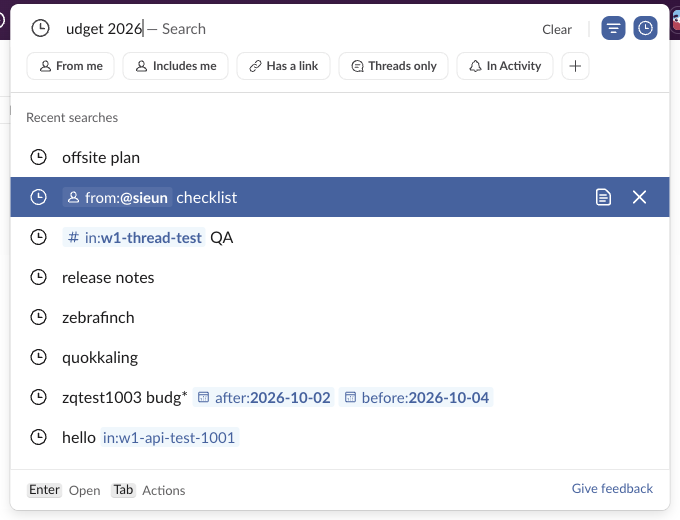
The Clear button in the search box only empties the text you typed. It does not clear the history.
Never appear "away" on Slack again
Cloud-based. No downloads. Works 24/7 even when your laptop is off.
Can others see what you searched?
The list is a preference of your own account, read with your own token, and Slack shows it only in your own search box. We found no member-facing place where another person's searches appear. The full answer for admins, with the audit log actions we checked, is on our page can Slack admins see what you search.
For better searches next time, our Slack search operators guide lists every modifier we tested, such as from:, in: and before:.
FAQ
Does deleting a recent search delete any messages?
No. It removes the query text from your list only. The messages and files that the search found stay where they are.
Stop Jiggling Your Mouse.
Join hundreds of remote workers who never worry about their Slack status. Set it up once, stay green forever.
Related Articles
Does Slack Compress Images? We Uploaded a PNG, JPEG, HEIC and MP4 to Check
We uploaded four files to Slack and downloaded them again. The PNG and MP4 came back byte for byte, the JPEG came back re-encoded without its EXIF, and the chat only ever shows a 1024 px preview.
Can You Have a GIF Profile Picture on Slack? We Uploaded One
We set a 12-frame animated GIF as a Slack profile photo and downloaded every size Slack made. All of them were still images, frame 1 only.
How to Move a Slack Message to Another Channel (Slack Can Only Copy It)
Slack has no Move option for messages. We forwarded a message, a thread and a file to a new channel, deleted the original, and checked what the copy kept.