
Slack Search Operators: Every Modifier With Examples, Tested
Slack search operators narrow results: in:#channel, from:@name, with:@name, before:, after:, on:, during:, has::emoji:, is:saved, has:pin, is:thread, "exact phrase", -word and rep*. Every modifier from the Slack help center with examples, date formats and recipes.
Slack search operators, which Slack calls modifiers, narrow your results. Type them after your search words: in:#channel or in:@name for a conversation, from:@name for who sent it, with:@name for threads and DMs with someone, before:, after: and on: with a date, during: with a month or year, has::emoji: for a reaction, is:saved or has:pin, and is:thread. Put words in quotes for an exact phrase, a dash before a word to exclude it, and an asterisk after three or more letters to match word starts. You can combine as many as you need, such as budget from:@Sara in:#finance after:2026-09-01. To search by date, on:2026-09-22 finds one day; for a range, after: and before: both leave out the date you type, so after:2026-08-31 before:2026-09-16 covers 1 to 15 September.
Press Cmd+G (Mac) or Ctrl+G (Windows) to start a search, or Cmd+F / Ctrl+F to search the current conversation. The search box also keeps a list of your recent searches on Slack's servers; how to clear Slack search history shows how to delete them one at a time.
We checked the modifiers on 3 October 2026: we posted five test messages in our own workspace, ran 22 searches on them, then deleted the messages. Two rules surprised us: after: and before: leave out the date you type, and a word also finds longer forms of it.
Every Slack search modifier
| Modifier | Example | Finds |
|---|---|---|
"phrase" | "marketing report" | The exact phrase |
-word | marketing -report | Marketing without "report" |
in: | report in:#team-marketing | Only that channel, DM or section |
from: | report from:@Sara | Messages Sara sent |
with: | report with:@Sara | Threads and DMs with Sara |
before: after: on: | report after:2026-09-01 | By date |
during: | report during:august | In a month or year |
has: | report has::eyes: | Messages with that reaction |
hasmy: | hasmy::eyes: | Messages you reacted to |
is:saved, has:pin | report is:saved | Saved or pinned items |
is:thread | report is:thread | Only inside threads |
creator: | plan creator:@Sara | Canvases Sara created |
-in:, -from: | report -in:#alerts | Excludes a channel or person |
word* | rep* | Words starting with those letters |
The list comes from Slack's help center article on search. The results below are from our own test.
What each modifier returned in our test
The five messages: "quarterly budget draft", "budgeting meeting notes", "final report ready" (with an :eyes: reaction), "marketing report attached", and a thread reply, "decided in a thread reply", under the first one. All five started with the same made-up word, so the searches below found only them. All were posted on 3 October 2026, Seoul time.
| Search (after the test word) | Results | What it shows |
|---|---|---|
budget | 2 | Also found "budgeting": Slack matches longer forms of a word |
budg* | 2 | Wildcard with 4 letters works |
bu* | 0 | Wildcard with 2 letters finds nothing |
-report | 3 | Dropped both messages containing "report" |
"marketing report" | 1 | Exact phrase |
"report marketing" | 0 | Word order counts inside quotes |
is:thread | 2 | The thread reply and its parent message |
has::eyes: | 1 | The message with the reaction |
from:me | 5 | Same as from:@yourname |
on:2026-10-03 | 5 | The day itself |
after:2026-10-02 | 5 | |
after:2026-10-03 | 0 | after: leaves out the date you type |
before:2026-10-03 | 0 | So does before: |
before:2026-10-04 | 5 | |
during:october, during:2026 | 5 | Month and year both work |
on:today, after:yesterday | 5 | Words work in place of dates |
The search screen shows the same thing. Here budg* with a two-day window found the two budget messages and listed the thread reply under its parent:
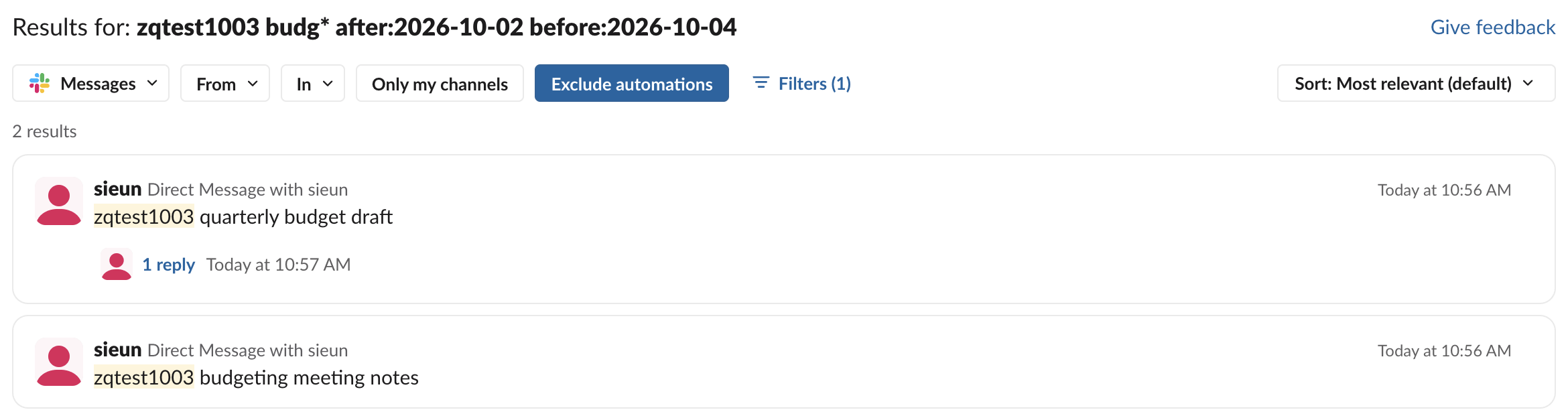
The results page also had Exclude automations selected by default. If you are looking for a message that an app or a workflow posted, turn it off. If a brand-new message is missing, wait half a minute: in our Slack search not working test, new messages took 20 to 31 seconds to reach search.
How to search Slack by date or date range
Use before:, after: and on: with a date, or during: with a month or year:
invoice after:2026-09-01 before:2026-09-15
standup on:2026-09-22
offsite during:august
roadmap during:2025
Combine after: and before: for a range, and remember that both leave out the dates you type. after:2026-09-01 before:2026-09-15 covers 2 to 14 September. For a single day, on: is simpler than a range. After you search, you can also use Filters in the results to pick a date range from a menu. Results open on Messages, so switch the type to Canvases to search canvas text, as how to find a canvas in Slack shows.
Never appear "away" on Slack again
Cloud-based. No downloads. Works 24/7 even when your laptop is off.
How to search Slack DMs
- •
in:@Sarasearches your DM with Sara. - •
with:@Sarasearches threads and DMs you share with Sara. - •
from:@Sarafinds what Sara sent, anywhere you can see. - • It is older than your plan keeps. Free workspaces keep a limited history, and owners can set retention on any plan; see Slack message retention and can Slack see deleted messages. On the free plan, search covers only the last 90 days; see Slack free plan limits.
- • It was deleted or edited.
- • You are not in the conversation. Search covers only what you can see.
- • Wrong modifier syntax. Use the display name after
from:and a#before channel names. - • The date is on the edge of your range.
after:andbefore:exclude the dates you type. - • The wildcard is too short.
bu*found nothing in our test; use at least three letters. - • It came from an app. Turn off Exclude automations on the results page.
You can only search conversations you are part of. Nobody, including admins, can search your DMs from the Slack app; what admins can export is in can Slack admins see DMs.
Slack search recipes
| You want | Type |
|---|---|
| A message from someone, 1 to 15 September | from:@Sara after:2026-08-31 before:2026-09-16 |
| Something in a DM with one person | budget in:@Sara |
| Pinned messages in a channel | has:pin in:#team-marketing (the channel's Pins tab lists them too; see Slack pinned messages) |
| Everything except a noisy channel | deploy -in:#alerts |
| Things you marked done | hasmy::white_check_mark: |
| A decision inside a thread | decided is:thread in:#product |
To find a shared image rather than a message, type:images lists it under Files, and our test of searching for images in Slack shows it also matches words written inside PNG files. Teams that mark requests with 👀 can find claimed ones with has::eyes:; the convention is explained in what does the eyes emoji mean in Slack. Every reaction modifier we tested, including has:reaction and -has:reaction, is in how to search Slack by emoji reaction.
Why Slack search does not find a message
Stop Jiggling Your Mouse.
Join hundreds of remote workers who never worry about their Slack status. Set it up once, stay green forever.
Related Articles
Slack Jump to Date: Where the Menu Is and What Each Option Does
Slack's Jump to date menu hides in the date divider above messages. We tested it in a 500-message channel and an older channel: which options appear, how far back the calendar goes, and how to do it by API.
How to Edit a Slack Reminder (and Why Some Only Let You Delete)
One-time Slack reminders can only be moved to a new time from the To-dos tab, called Later until October 2026. Recurring and channel reminders cannot be edited at all: delete them from /remind list and set them again.
Slack Canvas vs Lists: Which One to Use, and What the Free Plan Allows
A Slack canvas is a document for briefs and notes; a Slack list tracks items with owners, due dates, board views and a thread per item. We tested the Free plan: one canvas per conversation works, standalone canvases and lists need Pro.