
Webex Away Message: How to Tell People You Are Away
Webex has no auto-reply for chat. To leave an away message, set a custom status of up to 75 characters that clears on its own, turn on out of office in Outlook or Google Calendar so Webex shows an airplane, or record an Extended Away voicemail greeting if you use Webex Calling.
Webex has no automatic reply for chat messages, so your away message is your status. In the Webex App, click Set a status in the header, type a message of up to 75 characters such as "Away from my desk, back at 2:30 PM", pick when it should clear, and click Save. For a day or more away, turn on automatic replies in Outlook or a vacation reply in Google Calendar; Webex reads it within 20 minutes and puts an airplane on your picture. If people phone you through Webex Calling, record an Extended Away voicemail greeting too.
What each Webex icon means is in Webex status icons meaning.
Four ways to leave an away message in Webex
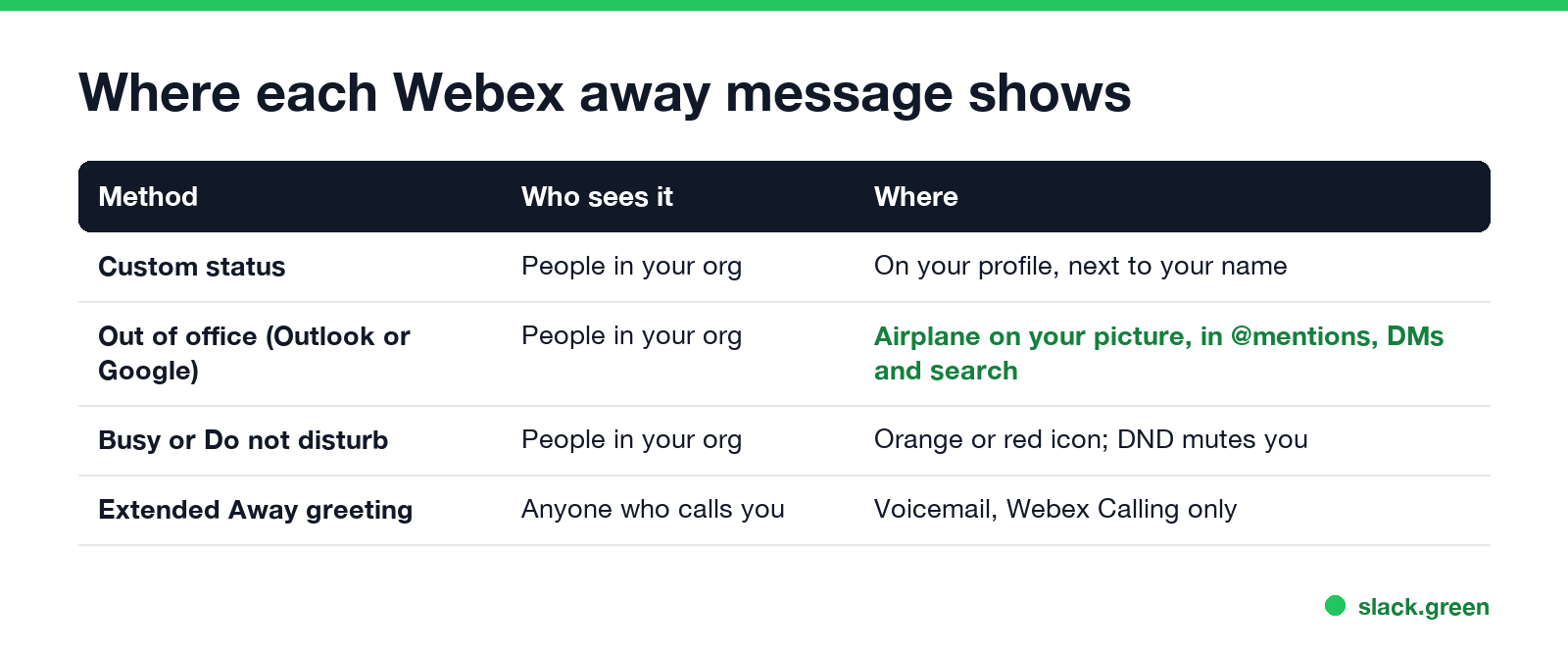
| Method | Best for | Who sees it | Clears |
|---|---|---|---|
| Custom status | Lunch, an errand, a few hours off | People in your organization | After 30 minutes to 30 days, your choice |
| Out of office from Outlook or Google Calendar | Vacation, sick days, travel | People in your organization, plus anyone who emails you | When the calendar reply ends |
| Busy or Do not disturb | Focus time with a clear end | People in your organization | At the time you set |
| Extended Away greeting | Callers while you are out | Anyone who calls your Webex number | When you turn it off |
Your Webex status only shows inside your own organization. People from other companies in a shared space do not see it, so for customers the email auto-reply and the voicemail greeting do the work.
Set a Webex away status message
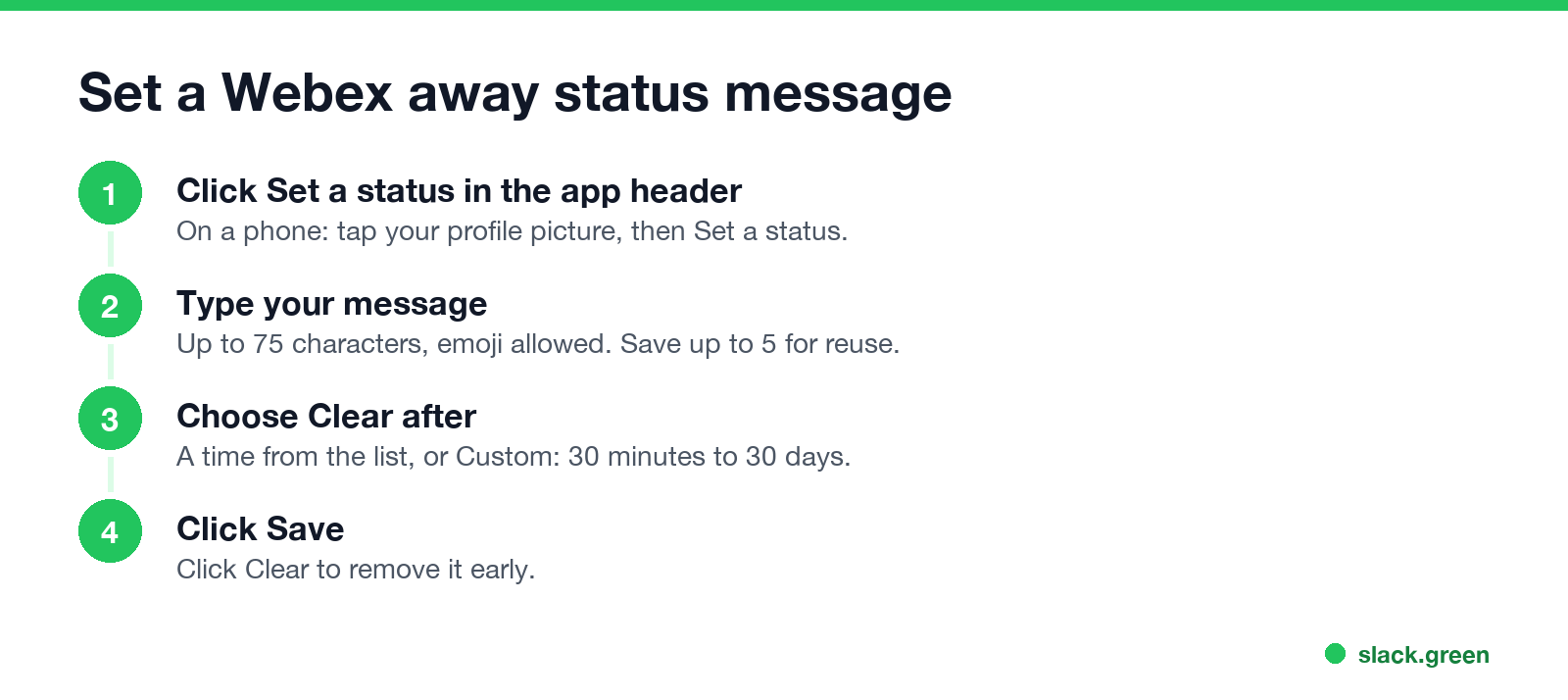
From Cisco's help article on custom status:
- Desktop: click Set a status in the app header. Phone: tap your profile picture, then Set a status.
- Pick a saved status or type a new one in What's your status? Each status can be up to 75 characters and can include emoji. You can keep up to five in the list for reuse.
- Under Clear after, pick a time, or Custom for a date and time. A status lasts at least 30 minutes and at most 30 days.
- Click Save (on a phone, Done). Click Clear to remove it early.
- In Outlook, turn on Automatic replies. In Google Calendar, set an Out of office or vacation reply in Gmail.
- Wait. Webex updates within 20 minutes and shows an airplane on your profile picture.
- Turn the reply off when you are back, and the airplane goes away.
- Dial
*62from your desk phone or the Webex App to reach the voice portal. - From your own phone, enter your voicemail PIN and
#. From another phone, press*, enter your mailbox ID (usually your extension) and#, then your PIN and#. - Open the greetings menu and choose the Extended Away greeting. The menu reads each option out, and Cisco's article lists 4 for this greeting.
- Record after the tone and press
#to stop, then activate the greeting. - When you are back, go through the same menu and deactivate it.
- • Away from my desk, back at 2:30 PM
- • At lunch until 1 PM. Call my cell if urgent
- • Out sick today. Replies tomorrow
- • On vacation until Mon 14 Oct. Urgent: ask Priya
- • Heads down on a deadline, replying at 4 PM
- • In training all day, back online at 5 PM
- • Out of office. For support, message @helpdesk
A status message does not change your availability icon. If you also want the icon to say you are busy, open your profile picture, Availability, and choose Busy (notifications stay on) or Do not disturb (notifications off), with an end time. Both are covered in Webex do not disturb.
Show out of office in Webex
Webex has no out-of-office switch of its own. It copies your calendar:
Cisco lists where people see it: when they @mention you, in the space list, under your name in a direct message, in a space's People list, and in search results. You still get notifications while it is on. An Outlook meeting marked Out of Office is different and does not set this status; your calendar also has to be connected to Webex, which your admin controls.
The airplane outranks every other state, so if it sticks after you return, check that the Outlook reply has an end date, then sign out of Webex and back in. Other stuck states are in Webex status stuck in a meeting.
Webex Calling Extended Away greeting
If your company uses Webex Calling, callers hear your voicemail greeting, not your status. The Extended Away greeting tells them you are out and, per Cisco, plays after the number of rings set in your voicemail settings so your mailbox does not fill up. Your admin must have set up the voice portal for your location first.
To set the away time in advance, Cisco points to personal call routing in the User Hub at user.webex.com, which can also forward calls while you are out.
Webex away message examples
Each one fits the 75-character limit:
Say when you are back and who to contact. The status message generator gives more ideas by situation; its messages are written for Slack and work the same in Webex if you keep them under 75 characters.
For more lines to put in your status, see Webex status ideas.
Webex, Teams and Slack away messages
| App | Chat away message | Out of office source | Length limit |
|---|---|---|---|
| Webex | Custom status | Outlook or Google Calendar | 75 characters |
| Microsoft Teams | Status message, optional "show when people message me" | Outlook automatic replies | 280 characters |
| Slack | Custom status, or a Workflow Builder auto-reply | Calendar apps | 100 characters |
The Teams steps are in how to set an away message in Teams and the Slack ones in Slack out of office message. If your aim is the opposite, staying green while you step away for a minute, see how to keep Webex status active.
FAQ
Can Webex auto-reply to chat messages? No. The Webex App has no chat auto-reply. People see your custom status or the out-of-office airplane when they message you.
How long can a Webex status message be? Up to 75 characters, with emoji. It clears after 30 minutes to 30 days.
Why does Webex not show me as out of office? Webex only reads automatic replies from Outlook or Google Calendar, and only when your calendar is connected. It can take up to 20 minutes to update.
Is there an Away status in Webex? Webex shows a clock and "Active X minutes ago" on its own when you stop using the app, and some Webex Calling setups show Away from desk with a grey handset. To say you are away on purpose, choose Busy or Do not disturb, or set a custom status.
Related Articles
Webex Status Ideas: 35 Custom Statuses Under 75 Characters
35 Webex status ideas you can paste into Set a status: funny ones, meetings, focus time, lunch, out of office and time zones, each under Webex's 75-character limit. How to set a custom status, save five for reuse, and make it clear on its own.
How to Use Slack Block Kit Builder: Templates, Preview, Payload
Slack's Block Kit Builder at app.slack.com/block-kit-builder lets you pick a template, add blocks, preview the message on Desktop or Mobile, and copy the JSON payload for a webhook or chat.postMessage. A walk through the current builder, a working deploy message, and the steps to send it.
Wireless Mouse With a Jiggler: How the Built-in Mode Works
A wireless mouse with a jiggler is a normal mouse with a jiggle mode in its firmware: hold the DPI button for about 3 seconds and the cursor moves on its own. Two models in the top results, how they compare with a USB dongle and a mechanical mover, and what they do for Teams and Slack.