
Slack Audit Logs: What They Record, Who Sees Them, and the API
Slack audit logs record actions across an Enterprise organization, such as sign-ins with IP address, file downloads, channel joins and app installs, not message text. Where admins view and export them, what the 785 action types cover, and how to pull them with the Audit Logs API.
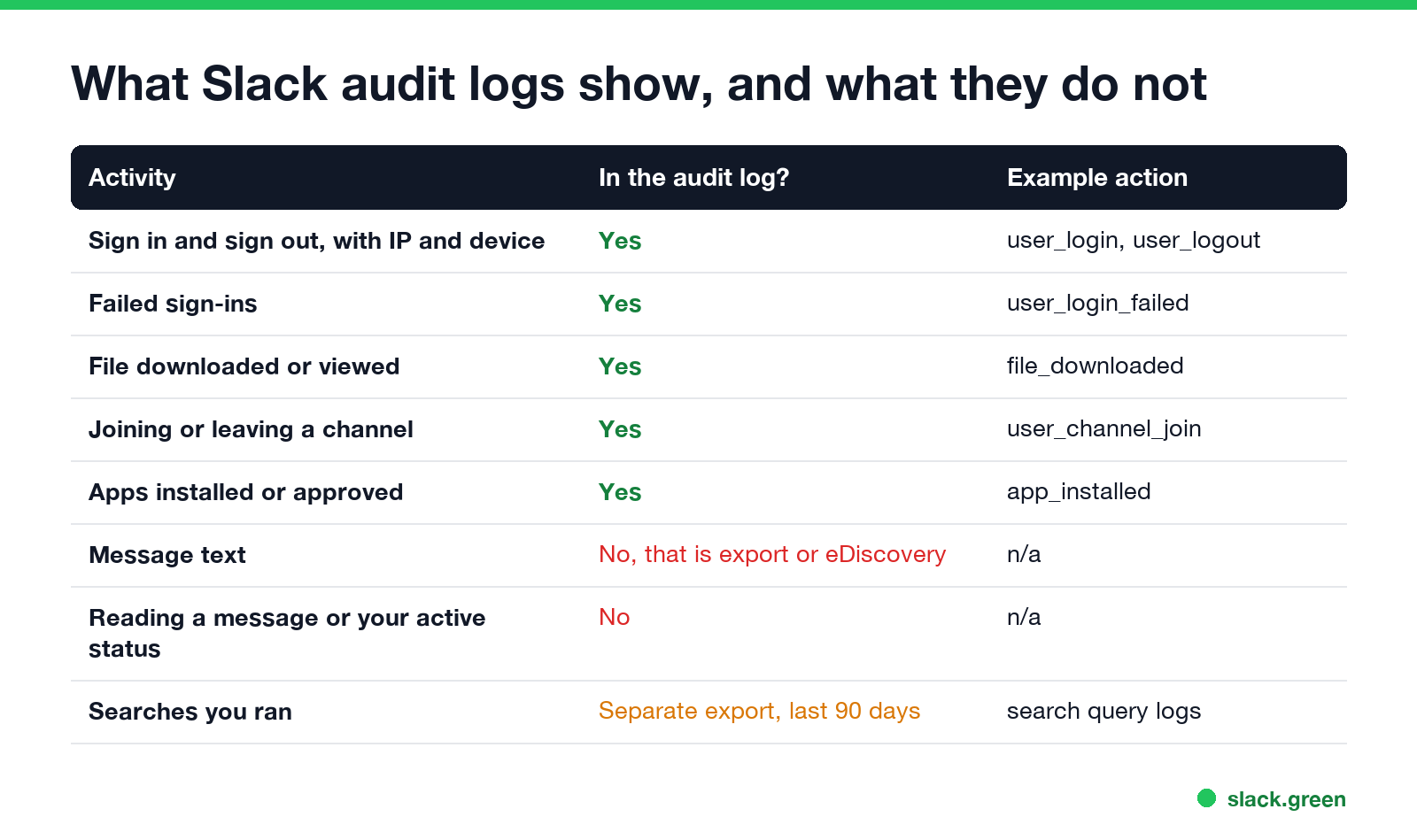
Slack audit logs are a record of actions in a Slack Enterprise organization: who signed in and from which IP address and device, who downloaded a file, joined or left a channel, installed an app, changed a setting or exported data. They do not contain message text, and they do not record reading messages or your active status. Org Owners and members with the Audit Logs Admin role view them in Organization settings > Security > Audit logs, export them as CSV or JSON, or pull them with the Audit Logs API at api.slack.com/audit/v1/logs. Audit logs are only on Enterprise plans.
Your green or away dot is not in the audit log. Slack sets it from input in the Slack window and shows you away after 10 minutes without it. Slack Green keeps your status green during the hours you set, from a server.
What Slack audit logs show
Every entry has four parts: an actor (the user), an action, an entity (the user, channel, file, app, workspace or organization acted on) and a context (the workspace or organization, plus IP address, user agent and session ID). A sign-in looks like this, from Slack's API documentation:
{
  "id": "0123a45b-6c7d-8900-e12f-3456789gh0i1",
  "date_create": 1521214343,
  "action": "user_login",
  "actor": { "type": "user", "user": { "id": "W123AB456", "name": "Charlie Parker", "email": "bird@slack.com" } },
  "entity": { "type": "user", "user": { "id": "W123AB456", "name": "Charlie Parker", "email": "bird@slack.com" } },
  "context": {
    "location": { "type": "enterprise", "id": "E1701NCCA", "name": "Birdland", "domain": "birdland" },
    "ua": "Mozilla/5.0 (Macintosh; Intel Mac OS X 10_12_6) ...",
    "session_id": "847288190092",
    "ip_address": "1.23.45.678"
  }
}
We counted the action types from Slack's public list endpoint on 25 September 2026: 785 actions in 27 groups, from user and channel to file, huddle, canvas, workflow and anomaly. The ones people ask about most:
| Group | Example actions |
|---|---|
| User | user_login, user_logout, user_login_failed, user_email_updated, role_change_to_admin |
| Channel | user_channel_join, user_channel_leave, public_channel_created, channel_retention_changed |
| File | file_downloaded (downloaded or viewed in Slack), file_public_link_created, file_deleted |
| App | app_installed, app_approved, app_uninstalled |
| Export | manual_export_started, manual_export_downloaded, scheduled_export_completed |
| Huddle | screen sharing started and stopped, such as huddle_screenshare_off |
| Anomaly | anomaly, for sign-ins and app use Slack flags as unusual |
Can Slack admins see your activity?
Admins see actions, not reading or typing. An audit log shows that you signed in at 8:52 from a certain IP, joined #hiring, and downloaded a PDF. It does not show which messages you read, how long you had Slack open, or what you typed. Slack's API guide says the audit methods "do not enable monitoring of message content". Message text is a separate route: exports and eDiscovery tools, covered in can Slack be used to monitor employees.
Two related records sit next to the audit log. The search query log lets an Org Owner with a custom role export what members searched for, and Slack's help center says it covers only the last 90 days. Access logs, on non-Enterprise plans, list each sign-in with device and IP. What a login record on the computer itself holds is in can my employer see when I log into my computer.
How to view and export Slack audit logs
Never appear "away" on Slack again
Cloud-based. No downloads. Works 24/7 even when your laptop is off.
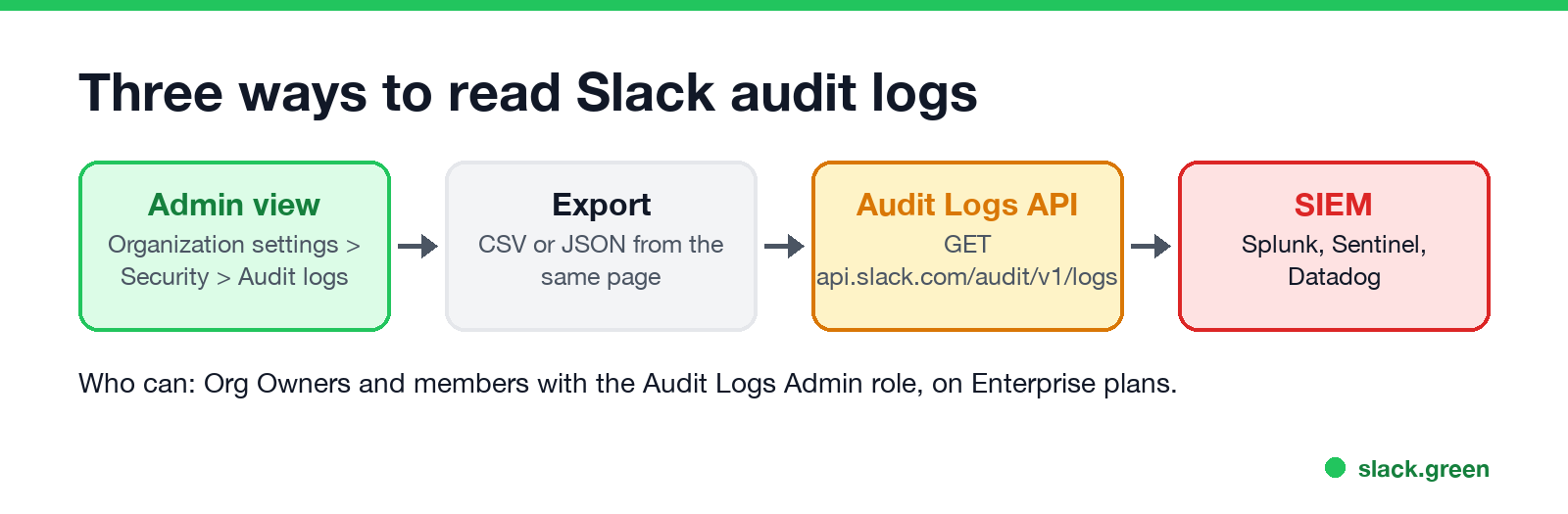
- On desktop, click your organization name in the sidebar.
- Choose Tools & settings, then Organization settings.
- Click Security in the left sidebar, then Audit logs.
- Use Filter to narrow by date range, acting user, what was affected (user, workspace or organization) or event.
- Click Export in the top-right corner and choose Export CSV or Export JSON.
The Security Detections tab on the same page lists anomaly events, and admins can sign a member out from an entry there.
Slack Audit Logs API
The API is read-only and has three endpoints on https://api.slack.com/audit/v1/: logs for the events, and schemas and actions for the lists of entity types and action names. The last two need no token, so you can check the current action list yourself:
# number of audit action types Slack lists right now
curl -s https://api.slack.com/audit/v1/actions | jq -r '.actions[][]' | sort -u | wc -l
The logs endpoint needs a user token with the auditlogs:read scope, from an app that the Owner of the Enterprise organization installs on the organization, not on one workspace. Filters are optional query parameters:
| Parameter | What it does |
|---|---|
oldest, latest | Unix timestamps. Slack's reference says data is not available before March 2018 |
limit | Results per page, up to 9999 |
action | Up to 30 action names, comma separated |
actor | The user ID who acted |
entity | The ID of the user, channel, file or app acted on |
cursor | The next page, from response_metadata.next_cursor |
A call for last week's sign-ins and file downloads, printed one line per event:
# needs an Enterprise org token with auditlogs:read in SLACK_AUDIT_TOKEN
curl -s -G https://api.slack.com/audit/v1/logs \
  -H "Authorization: Bearer $SLACK_AUDIT_TOKEN" \
  --data-urlencode "action=user_login,file_downloaded" \
  --data-urlencode "oldest=$(date -v-7d +%s)" \
  --data-urlencode "limit=200" |
  jq -r '.entries[] | [(.date_create | todate), .action, .actor.user.email, .context.ip_address] | @tsv'
date -v-7d is the macOS form; on Linux use date -d '7 days ago' +%s. Without a valid token, Slack answers HTTP 401 with an empty body, which we saw when we ran the call with a dummy token; we checked the jq line against the sample entry above. All audit methods are rate-limited at Tier 3, about 50 calls a minute, counted across the whole organization rather than per app.
Sending Slack audit logs to Splunk or a SIEM
Most teams do not call the API by hand. Splunk, Microsoft Sentinel, Datadog, Sumo Logic and other SIEM tools have Slack audit log connectors that poll the same endpoint with the same auditlogs:read token. Set the connector to poll every few minutes and store id as the unique key, because a page can repeat events across polls.
Slack audit log retention
Never appear "away" on Slack again
Cloud-based. No downloads. Works 24/7 even when your laptop is off.
Slack's documentation gives no fixed expiry for audit events, and the API reference says data goes back to March 2018 at the earliest. Keep your own copy in a SIEM if you need a set retention period for compliance. Search query exports are the exception with a stated limit: 90 days. Message retention is separate and set per workspace or channel; changes to it show in the audit log as channel_retention_changed and similar actions.
FAQ
What do Slack audit logs show? Actions such as sign-ins with IP address, file downloads, channel joins, app installs and exports. Not message text.
Can my Slack admin see what messages I read? No. Audit logs record actions, not reading. Message text is only available through exports or eDiscovery.
Who can see Slack audit logs? Org Owners and members with the Audit Logs Admin role, on Enterprise plans.
How long does Slack keep audit logs? Slack states no fixed expiry, and the API returns data back to March 2018. Search query logs cover 90 days.
Is there a Slack audit logs API? Yes. GET api.slack.com/audit/v1/logs with a token that has the auditlogs:read scope, installed by the org Owner.
Stop Jiggling Your Mouse.
Join hundreds of remote workers who never worry about their Slack status. Set it up once, stay green forever.
Related Articles
How to Send a Slack Message From GitHub Actions
Add slackapi/slack-github-action@v4.0.0 as a step, give it a bot token or an incoming webhook URL from repository secrets, and write the message as YAML. Working workflows for failure alerts, threads and message updates, plus a curl version with no third-party action.
LinkedIn Active Status: What the Green Dot Means and How to Hide It
On LinkedIn, a solid green dot on someone's photo means they are active on LinkedIn now. A hollow green circle means they are not, but the mobile app will notify them at once. Turn yours off under Settings & Privacy, Visibility, Manage active status; with No one, you also stop seeing other people's status.
Teams Status Light: Busy Lights That Follow Your Teams Status
A Teams status light is a USB or Bluetooth busy light that copies your Microsoft Teams presence: green when Available, red in a call or on Do not disturb. Luxafor, Kuando and Embrava sell them; PresenceLight and a short Graph API script do it free with a smart bulb. The light shows your status; it cannot change it.