
How to Delete Files in Slack (Deleting the Message Is Not Enough)
Delete a Slack file from Files or from the file's own menu with Delete file. In our October 27, 2026 test, Delete message on a file post removed the post but left the file on Slack's servers. We also deleted files in bulk with a short script.
To delete a file in Slack, open Files in the left rail, click the three-dot menu on the file and choose Delete file, then confirm. Do not stop at Delete message: in our test on October 27, 2026, deleting the message removed the post from the channel but the file itself was still on Slack's servers. We uploaded 6 files to our Free test workspace and deleted them three different ways.
Delete a file from Files
- Click Files in the left rail, then All files.
- Find the file. Images and snippets are hidden by the default 6 Types filter, so open that filter first if the file is missing; where Slack files are stored shows the filter.
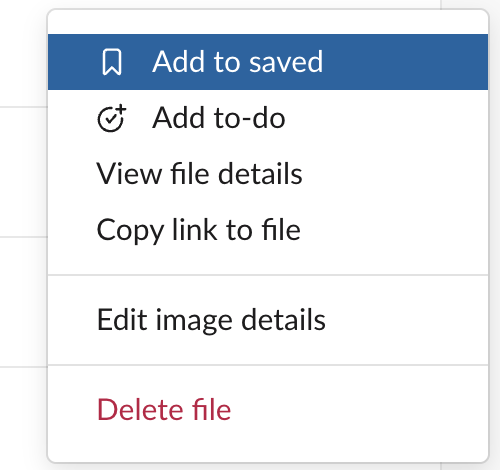
- Click the three-dot menu on the file's row and choose Delete file:
- Confirm in the dialog:
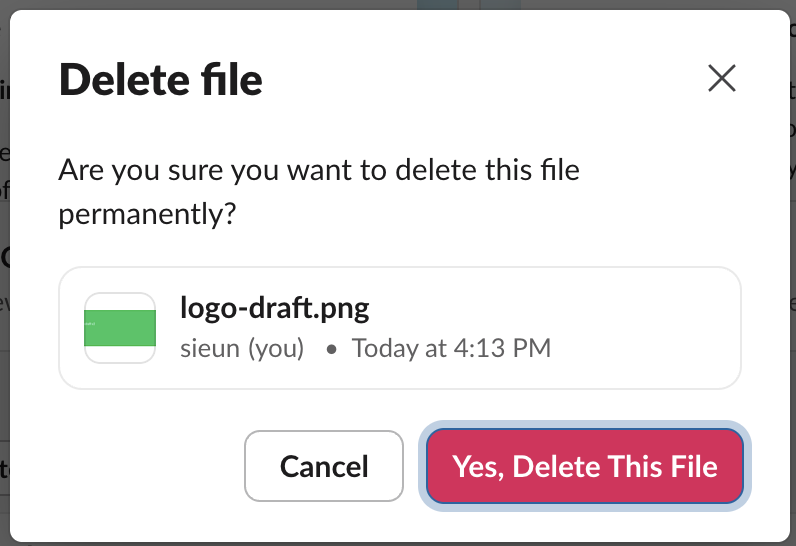
After we clicked Yes, Delete This File, the post with the image left the channel with no "deleted" placeholder. Slack's API answered file_deleted for that file, and its files.slack.com link returned 404 with "The requested file could not be found."
Delete message is not delete file
When you hover over a message that holds a file, Slack shows two toolbars: one for the message and one for the file. The message's menu has Delete message…, not Delete file:
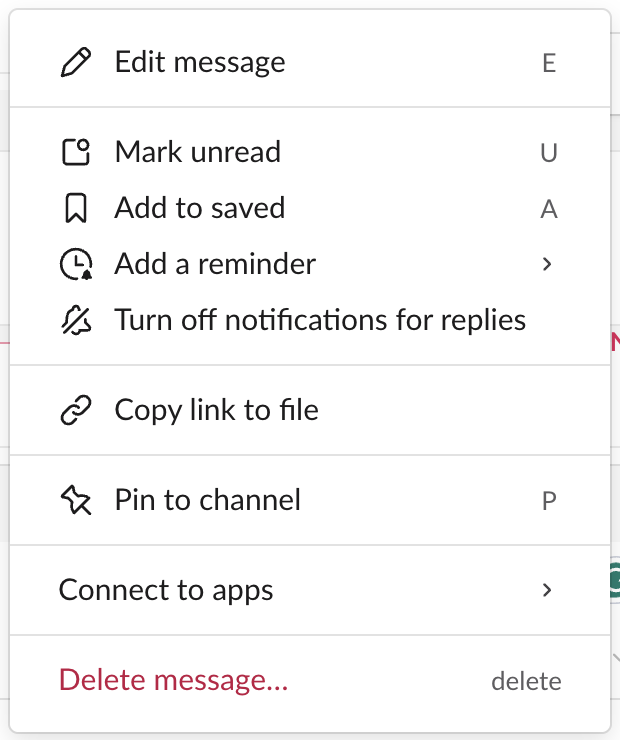
We used Delete message… on a post that held meeting-notes.txt. The dialog asked only about the message ("This cannot be undone"). The post disappeared from the channel, but when we looked the file up through Slack's API with the owner's account, it still existed: same name, same size, same private address, now shared in no channel.
| How we deleted | Post in channel | File on Slack |
|---|---|---|
| Files > three-dot menu > Delete file | Gone, no placeholder | Deleted, link returns 404 |
| Message menu > Delete message… | Gone | Still there, shared nowhere |
files.delete script | Gone | Deleted, link returns 404 |
So if you want a file gone, use Delete file in Files, not Delete message in the channel. The file preview in the channel has its own small toolbar with a separate three-dot menu; we did not use it in this test.
There is no trash for files
Files has a Deleted section, but it is only for canvases and lists:

The image we had deleted a minute earlier was not in it. A deleted file cannot be restored.
Never appear "away" on Slack again
Cloud-based. No downloads. Works 24/7 even when your laptop is off.
Delete many files at once with a script
We found no way to select several files at once in Files. For a pile of old uploads, the files.delete API method takes one file ID per call. We made a test app with the files:write scope, had it upload three files, and ran this:
import os, sys, json, urllib.parse, urllib.request

token = os.environ["SLACK_BOT_TOKEN"]
for file_id in sys.argv[1:]:
    req = urllib.request.Request(
        "https://slack.com/api/files.delete",
        data=urllib.parse.urlencode({"file": file_id}).encode(),
        headers={"Authorization": "Bearer " + token},
    )
    print(file_id, json.load(urllib.request.urlopen(req, timeout=30)))
We passed the three app files and, as a check, one file the owner had uploaded:
F0CC9C0SVNH {'ok': True}
F0CCGHKR68H {'ok': True}
F0CCJBN89DJ {'ok': True}
F0CCGHLM34H {'ok': False, 'error': 'cant_delete_file'}
The app's own three files were deleted, and all three links returned 404 afterwards. The owner's CSV came back cant_delete_file: a bot token can delete the files its app uploaded, not other people's. To clean up files that people uploaded, the script needs a token from that person, or from an admin. To find file IDs first, list them with files.list, as the download script for a channel's files does.
Who can delete a file
We tested as the workspace owner, who could delete every file in the test. Our workspace has one human member, so we could not test what a regular member sees on someone else's file. How to delete someone else's message in Slack shows what an owner can remove. If your workspace deletes files automatically after a set time, that is a retention setting; see Slack message retention.
FAQ
Does deleting a file in Slack delete it for everyone?
Yes. In our test the post with the image left the channel for everyone, and the file's link stopped working. There is no "delete for me" for files.
Can I get a deleted Slack file back?
Not from Slack. The Deleted section in Files only restores canvases and lists, within 24 hours. If you downloaded the file before, the copy on your computer is not affected.
Stop Jiggling Your Mouse.
Join hundreds of remote workers who never worry about their Slack status. Set it up once, stay green forever.
Related Articles
How to Mark a Message Urgent in Slack (There Is No Flag)
Slack has no urgent or priority flag on messages. On October 27, 2026 we checked every menu in the Free plan's message box and message menu and found none. What works instead: a DM, @here or @channel, a reminder on the message, and the reader's VIP and keyword settings.
How to Delete a Thread in Slack (Parent and Replies)
Slack has no delete-thread button. Deleting the first message leaves 'This message was deleted.' with the replies still attached; the thread only disappears once every reply is deleted too. We tested both in the app and through the API on October 27, 2026.
Where Are Slack Files Stored? Servers, Files Tab and Downloads
Files you share in Slack are stored on Slack's servers under files.slack.com, not on your computer. Inside Slack you find them in Files and in each channel's Files tab, and downloads go wherever your app or browser saves them. We tested where each one shows up.