
Why Is Slack So Slow on Mac? Causes and Fixes in Order
Slack slows down on a Mac when memory runs short, when you run the Intel build on Apple silicon, with many workspaces or animated emoji, or when the app has been open for days. How to check each one in Activity Monitor and Terminal, and the fix for each.
Slack is slow on a Mac for one of a few reasons: the Mac is short of memory, Slack is the Intel build running through Rosetta on an Apple silicon Mac, you are signed in to many workspaces, busy channels are full of animated GIFs and emoji, or Slack has been open for days. Open Activity Monitor: a yellow or red Memory Pressure graph points to memory, and an Intel label in the Kind column points to the wrong build. The fastest fix is to quit Slack with Cmd+Q and open it again. The rest of this page checks each cause in order.
A slow Slack is still an open Slack; your status depends on input, not speed. Slack shows you away after 10 minutes with no input in its window. Slack Green keeps your status green from a server during the hours you set, so Slack does not need to stay open for that.
Find the cause
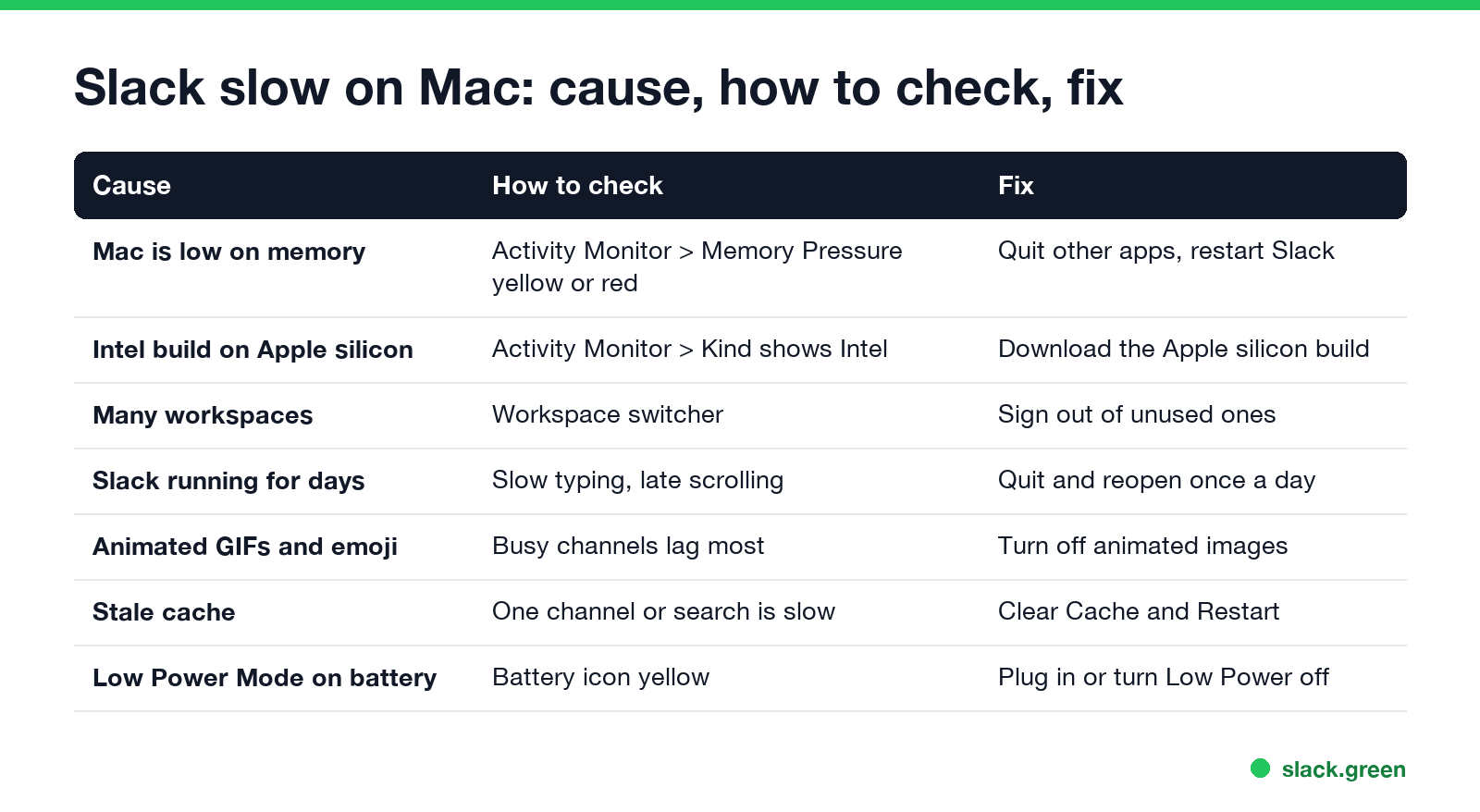
| Cause | How to check | Fix |
|---|---|---|
| Mac is low on memory | Activity Monitor > Memory, Memory Pressure yellow or red | Quit other apps, restart Slack |
| Intel build on Apple silicon | Activity Monitor > CPU, Kind column says Intel | Install the Apple silicon build |
| Many workspaces | Count them in the workspace switcher | Sign out of the ones you do not use |
| Slack open for days | Typing and scrolling lag | Quit and reopen once a day |
| Animated GIFs and emoji | Busy channels lag, quiet ones do not | Turn off animated images |
| Stale cache | One channel or search is slow | Clear Cache and Restart |
| Low Power Mode | Battery icon is yellow | Plug in, or turn Low Power Mode off |
Measure what Slack uses on your Mac
Slack is an Electron app: it runs a copy of the Chrome engine, split into a main process and several Slack Helper processes. Activity Monitor lists them separately, which makes the total hard to see. This one-liner adds them up:
# total memory and CPU of every Slack process
ps -axo rss,pcpu,comm | grep '/Slack.app/' | awk '{r+=$1; c+=$2; n++} END {printf "%d processes, %.0f MB, %.1f%% CPU\n", n, r/1024, c}'
We ran it on an M2 Max MacBook Pro with Slack 4.52, one workspace, sitting idle: 8 processes, 256 MB, 0.3% CPU. Numbers well above 1 GB, or CPU that stays above 10% while you do nothing in Slack, point to one of the causes below. What pushes the number up, workspace by workspace, is in why does Slack use so much memory.
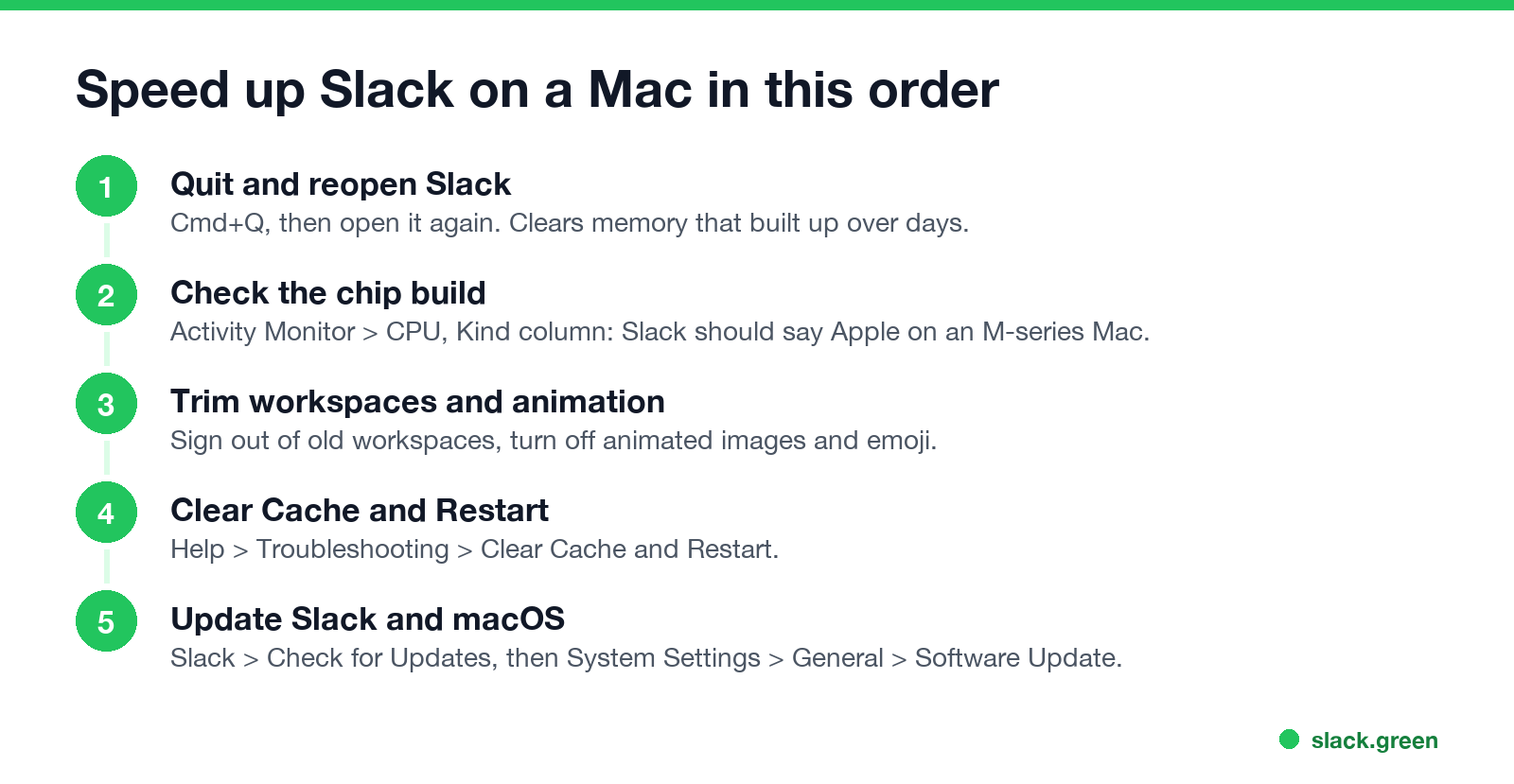
Fix 1: quit and reopen Slack
Never appear "away" on Slack again
Cloud-based. No downloads. Works 24/7 even when your laptop is off.
Clicking the red button only hides Slack. Its memory keeps growing over days as you open channels, files and huddles. Press Cmd+Q, wait a few seconds, and open it again. If Slack is frozen, press Option+Cmd+Esc and choose Force Quit. Quitting once a day keeps most Macs fast.
Fix 2: run the Apple silicon build
On an M1, M2, M3 or M4 Mac, open Activity Monitor > CPU and look at the Kind column for Slack. Apple is right. Intel means macOS translates Slack through Rosetta, which costs speed and battery. In Terminal:
# arm64 = Apple silicon build; x86_64 only = Intel build under Rosetta
file /Applications/Slack.app/Contents/MacOS/Slack
Ours printed Mach-O 64-bit executable arm64. If yours says only x86_64, delete Slack and download it again from slack.com, choosing the Apple silicon download, or install it from the Mac App Store.
Fix 3: fewer workspaces, less animation
Every workspace you are signed in to keeps its own data loaded. Click the workspace switcher and sign out of the ones you open less than once a week; you can sign back in any time.
Animated GIFs and custom emoji redraw all the time in a busy channel. Open Slack > Settings > Accessibility and turn off Allow animated images and emoji. Large channels scroll noticeably better with it off, especially on an external monitor.
Fix 4: clear the cache
Never appear "away" on Slack again
Cloud-based. No downloads. Works 24/7 even when your laptop is off.
When one channel, search or file list is slow and the rest is fine, the local cache is often the cause. Open Help > Troubleshooting > Clear Cache and Restart. Slack keeps you signed in and reloads everything from the server.
Fix 5: hardware acceleration, on or off
Slack draws its window with the Mac's graphics chip. Keep hardware acceleration on in most cases; turning it off moves the drawing to the CPU and usually makes Slack slower. Turn it off only if you see flicker, black panels or a blank window, often with some external displays. The option is in Slack > Settings > Advanced, and Slack saves it as useHwAcceleration in ~/Library/Application Support/Slack/local-settings.json. If Slack also crashes, the other fixes are in Slack keeps crashing.
Fix 6: memory pressure on the Mac itself
Slack is rarely the only large app. Open Activity Monitor > Memory and sort by Memory. If Chrome, Docker, Teams or a design app holds several GB and Memory Pressure is yellow or red, macOS is swapping to disk and every app feels slow, Slack included. Close what you do not need, or restart the Mac once a week. On battery, Low Power Mode (System Settings > Battery) slows the CPU as well.
Fix 7: update Slack and macOS
Never appear "away" on Slack again
Cloud-based. No downloads. Works 24/7 even when your laptop is off.
Slack ships performance fixes often. Click Slack > Check for Updates, and check System Settings > General > Software Update. If a new macOS version made Slack slow, the Slack update that follows usually fixes it.
Slack not responding or freezing on Mac
A beach ball and "Slack (Not Responding)" in Force Quit means the main Slack process is stuck, most often on memory. Force Quit Slack, open it again, then work through Fixes 2 to 4. If it freezes every day, compare with Slack in a browser at app.slack.com: if the browser is fast, the problem is the desktop install, and a clean reinstall helps. The trade-offs of each are in Slack desktop app vs browser.
FAQ
Why is Slack so slow on my Mac? Usually low memory, the Intel build on an Apple silicon Mac, many workspaces, or Slack open for days.
How do I make Slack faster on Mac? Quit and reopen it, sign out of unused workspaces, turn off animated emoji, and clear the cache.
Should I disable hardware acceleration in Slack on Mac? Only if you see flicker or a blank window. Off, Slack usually gets slower, not faster.
Why does Slack freeze on my Mac? The main process runs short of memory. Force Quit, reopen, and check Memory Pressure in Activity Monitor.
Is there an Apple silicon version of Slack? Yes. Check Activity Monitor: Kind should say Apple. If it says Intel, download Slack again from slack.com.
Stop Jiggling Your Mouse.
Join hundreds of remote workers who never worry about their Slack status. Set it up once, stay green forever.
Related Articles
Slack Screen Sharing Not Working on Mac? Fix the Permission
On a Mac, Slack can share your screen in a huddle only with the Screen & System Audio Recording permission, and macOS applies it only after Slack restarts. The steps, what a wallpaper-only share means, how to reset the permission, and the browser case.
Slack App Not Opening? How to Fix It on Windows and Mac
When the Slack app will not open, it is usually already running with no window, or its window sits on a monitor you unplugged. End every Slack process and open it again. If that fails: reset the app data, reinstall, and check what the sign-in link does. Steps for Windows 11 and Mac.
Slack Keeps Crashing? How to Fix It on Mac, Windows and Phone
Slack crashes or closes by itself for a handful of reasons: an old version, a corrupt cache, the graphics driver, broken app data, or on Android the System WebView. The fixes in order for Mac, Windows, iPhone and Android, with the commands to reset Slack without losing messages.