
Slack Work Objects: A Working Unfurl, Flexpane and the Errors We Hit
We built a Work Object unfurl for a fake ticket tracker in a free Slack workspace: the manifest setting, the chat.unfurl metadata that rendered the card, the entity_details_requested event behind the flexpane, and every error on the way.
A Slack Work Object is a link preview built from structured data instead of blocks. Your app answers the link_shared event with chat.unfurl and a metadata object that names an entity type (task, file, incident and so on) and its fields. Slack draws the card, and when someone clicks it, opens a side panel (the flexpane) that your app fills through the entity_details_requested event. We built one for a fake ticket tracker on 3 October 2026, in a test workspace on Slack's free plan, with Bolt for Python 1.30.0. It worked on the free plan.
Turn it on: the setting and the manifest key
In the app settings, Work Object Previews has an on switch and a list of entity types. We added slack#/entities/task and saved.
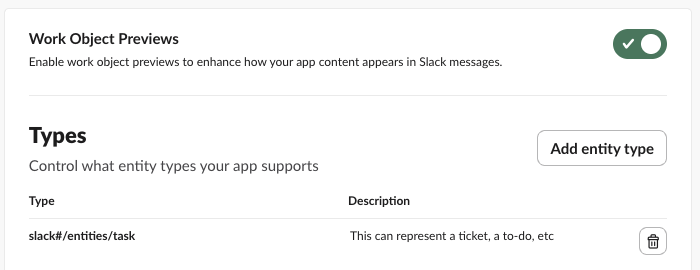
After saving, apps.manifest.export showed where the setting lives, so you can put it in your manifest instead:
"features": {
  "unfurl_domains": ["dvd-instantly-graphics-guild.trycloudflare.com"],
  "rich_previews": {"is_active": true, "entity_types": ["slack#/entities/task"]}
}
The key is rich_previews, not "work objects". You also need the classic unfurl setup: your domain under unfurl_domains, the links:read and links:write scopes, and the link_shared bot event. For the flexpane add the entity_details_requested bot event. We added both with apps.manifest.update, and the new event was delivered without reinstalling the app.
The unfurl handler that rendered the card
def task_payload(doc_id, status="In progress"):
    return {
        "attributes": {"title": {"text": f"Fix login redirect loop (#{doc_id})"}, "display_id": f"SG-{doc_id}",
                       "display_type": "Ticket", "product_name": "sglab tracker"},
        "fields": {"status": {"value": status},
                   "description": {"value": "Users bounce between /login and /home after the SSO change."},
                   "assignee": {"type": "slack#/types/user", "user": {"user_id": "U0B7L4YK420"}},
                   "date_created": {"value": 1790900000}, "priority": {"value": "High"}},
    }

@app.event("link_shared")
def on_link(event, client):
    url = event["links"][0]["url"]
    doc_id = re.search(r"/task/(\d+)", url).group(1)
    metadata = {"entities": [{
        "app_unfurl_url": url, "url": url,
        "external_ref": {"id": doc_id, "type": "task"},
        "entity_type": "slack#/entities/task",
        "entity_payload": task_payload(doc_id),
    }]}
    client.api_call("chat.unfurl", json={"unfurl_id": event["unfurl_id"], "source": event["source"],
                                         "metadata": json.dumps(metadata)})
We posted https://<our domain>/task/481 in a channel. The link_shared event came 0.3 seconds after the post, chat.unfurl returned {"ok": true}, and this card appeared. Clicking the card opened the flexpane on the right:
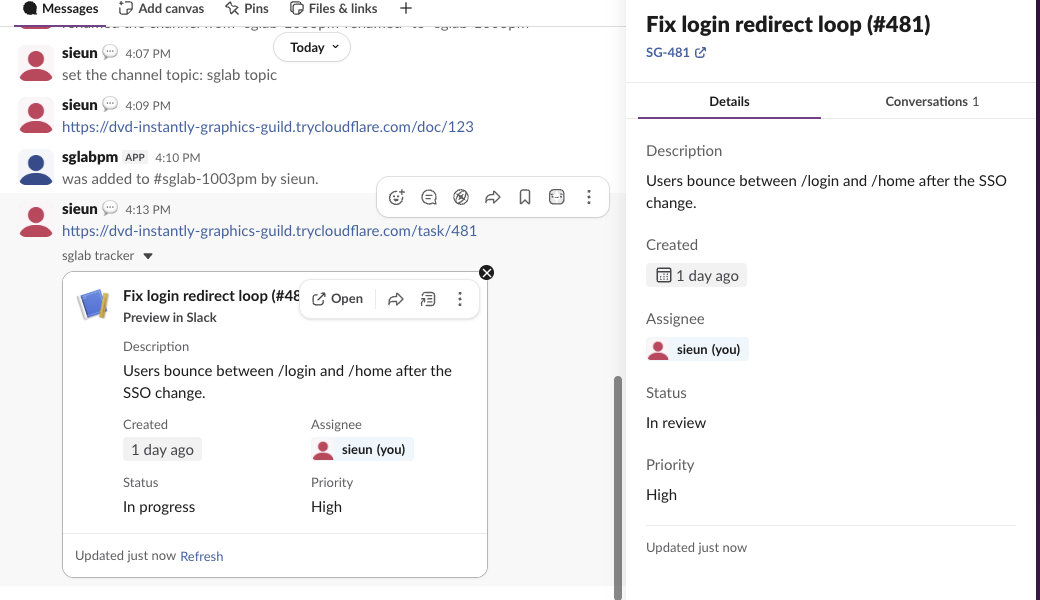
What Slack did with our fields:
- •
date_createdas a Unix time became "1 day ago". - • The
slack#/types/userassignee became a user chip, "sieun (you)". - •
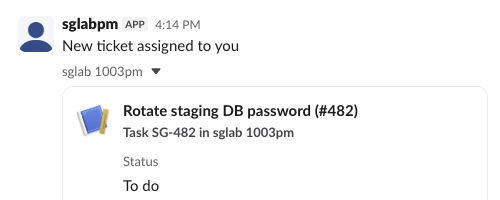
display_type"Ticket" andproduct_name"sglab tracker" made the header line "Ticket SG-481 in sglab tracker". On a second card where we left both out, Slack wrote "Task SG-482 in sglab 1003pm", the entity type and the app name. - •
statusandpriorityare plain text. Slack did not color them.
The flexpane: entity_details_requested
Clicking the card sent this event (trigger ID shortened):
{"type": "entity_details_requested", "user": "U0B7L4YK420", "trigger_id": "12204537763399.11256386461409.40d2...",
 "channel": "C0C6HQAM8JV", "external_ref": {"id": "481", "type": "task"},
 "link": {"url": "https://dvd-instantly-graphics-guild.trycloudflare.com/task/481", "domain": "dvd-instantly-graphics-guild.trycloudflare.com"},
 "entity_url": "https://dvd-instantly-graphics-guild.trycloudflare.com/task/481", "user_locale": "en-US",
 "message_ts": "1791011598.245629", "app_unfurl_url": "https://dvd-instantly-graphics-guild.trycloudflare.com/task/481",
 "event_ts": "1791011627.608285"}
Our handler answered it with entity.presentDetails, using the trigger_id and one entity without the entities array:
@app.event("entity_details_requested")
def on_details(event, client):
    ref = event["external_ref"]
    meta = {"entity_type": "slack#/entities/task", "url": event["entity_url"], "external_ref": ref,
            "entity_payload": task_payload(ref["id"], status="In review")}
    client.api_call("entity.presentDetails", json={"trigger_id": event["trigger_id"], "metadata": json.dumps(meta)})
We sent a different status on purpose, "In review", to see which call drew what. The flexpane showed "In review" while the card kept "In progress", so the two calls are separate renders. The flexpane also had a Conversations tab and an Open in sglab tracker button that we did not code.
Never appear "away" on Slack again
Cloud-based. No downloads. Works 24/7 even when your laptop is off.
Refresh: the card is redrawn from your app every time
0.8 seconds after entity_details_requested, a second link_shared arrived for the same message, now with "is_unfurl_refresh": true. Reloading Slack with the flexpane open sent the pair again: we logged three pairs in 70 seconds, one from the click and two from reloads. Each answer replaced the card.
To test the Refresh link on the card, we restarted the app with the status set to "Done" and clicked it. link_shared came with is_unfurl_refresh: true, our handler answered, and the card changed to "Status Done" with "Updated just now". The practical rule: the card always shows what your link_shared handler returns, so read the status from your own data on every call. A status you push once by hand is gone at the next refresh.
Posting a Work Object without a link
chat.postMessage takes the same metadata shape, minus app_unfurl_url. Our bot posted "New ticket assigned to you" with a second task entity and got this:
Errors from chat.unfurl
We sent each broken version against the same message, one change at a time:
| What we changed | Response |
|---|---|
| Valid task entity | {"ok": true} |
entity_type slack#/entities/file, not enabled in settings | error_processing_metadata, "App does not support rich preview type slack#/entities/file" |
entity_type slack#/entities/document, which does not exist | error_processing_metadata + warning invalid_metadata_format, "must be a valid enum value (pointer: /metadata/entities/0/entity_type)" |
entity_payload with attributes but no fields | error_processing_metadata, "missing required field: fields" |
No external_ref | error_processing_metadata, "missing required field: external_ref" |
app_unfurl_url that is not in the message | cannot_unfurl_message |
metadata as a JSON object instead of a string, in a JSON body | {"ok": true} |
The full text of a schema error also lists "missing required field: event_type" and "event_payload". Ignore those two: Slack tries your object as message event metadata too and reports both failures. The entity part is after "For entity metadata". For classic block unfurls and the unfurl_links flags, see Slack unfurl links. The link_shared payload and the other events we logged are on Slack Events API event types.
Questions
Do Work Objects need a paid Slack plan? No. Our workspace was on the free plan, and the card, the flexpane and the refresh all worked.
Which entity types exist?
The settings menu offered six: file, incident, task, item, content_item and calendar_event, each as slack#/entities/<name>. Your app can only send the ones you enable.
Stop Jiggling Your Mouse.
Join hundreds of remote workers who never worry about their Slack status. Set it up once, stay green forever.
Related Articles
Slack All Unreads: Turn It On, Shortcuts, and Clear Everything
Slack's Unreads view collects every unread message on one page. We turned it on, opened it with Cmd+Shift+A, cleared one channel with Esc and the whole workspace with Shift+Esc, and read Slack's own unread counts before and after each step.
Slack Mute a Channel Without Hiding It: The Setting, Tested
In current Slack, muting a channel also hides it from the sidebar until you turn off one checkbox in Preferences. We muted a test channel, had a bot post and then @mention us in it, and recorded what the sidebar, the badge and Activity showed each time.
Slack Bookmarks: Where They Are Now, and Why They Disappear
Slack channel bookmarks now live in folder tabs above the messages, not in a bookmarks bar. We added, moved and deleted them in a test channel and through the bookmarks API, and found the delete that hides bookmarks the API still lists.