
Slack Bolt for Python Example: An HTTP App With Flask, Tested
A Bolt for Python app over HTTP that answers a message, a slash command and a button through the Flask adapter, then the same app as AsyncApp on aiohttp. Console logs from a real run, and the errors a wrong signing secret and an unhandled event gave.
A Bolt for Python app over HTTP is one App object with your bot token and signing secret, plus listeners for each thing you want to answer. Slack sends every event, slash command and button click as a POST to one URL, and Bolt checks the signature and routes it. We ran the app below in a test workspace on 3 October 2026 with slack_bolt 1.30.0, slack_sdk 3.45.0, Flask 3.1.3 and Python 3.12. It answered a message, a slash command and a button. Then we ran the same listeners as AsyncApp on aiohttp, and broke the signing secret to see what fails.
This page is HTTP mode only. If you have no public URL, Slack Socket Mode in Python runs the same listeners over a WebSocket.
Install
pip install slack_bolt flaskpip install slack_bolt on its own pulled exactly two packages in a clean virtualenv: slack-bolt 1.30.0 and slack-sdk 3.45.0. Bolt does not install Flask or aiohttp for you. Each adapter imports its web framework only when you use it, so add the one you need.
The app: a message, a slash command and a button
This is the app we ran, minus a middleware that wrote every request to a log file for this page.
import os, logging
from flask import Flask, request
from slack_bolt import App
from slack_bolt.adapter.flask import SlackRequestHandler

logging.basicConfig(level=logging.INFO)
app = App(token=os.environ["SLACK_BOT_TOKEN"], signing_secret=os.environ["SLACK_SIGNING_SECRET"])

@app.message("ping")
def pong(message, say, logger):
    logger.info("message from %s: %s", message["user"], message["text"])
    say(f"pong (Bolt for Python, Flask adapter) <@{message['user']}>")

@app.command("/sglabpm")
def slash(ack, command, respond, logger):
    ack()
    logger.info("slash command %s text=%r", command["command"], command["text"])
    respond(blocks=[
        {"type": "section", "text": {"type": "mrkdwn", "text": f"You ran `{command['command']} {command['text']}`"}},
        {"type": "actions", "elements": [{"type": "button", "action_id": "approve",
            "text": {"type": "plain_text", "text": "Approve"}, "value": "42"}]},
    ], text="slash reply")

@app.action("approve")
def approve(ack, body, respond, logger):
    ack()
    logger.info("button %s clicked by %s value=%s", body["actions"][0]["action_id"], body["user"]["id"], body["actions"][0]["value"])
    respond(replace_original=True, text=f"Approved by <@{body['user']['id']}> (value {body['actions'][0]['value']})")

flask_app = Flask(__name__)
handler = SlackRequestHandler(app)

@flask_app.route("/slack/events", methods=["POST"])
def slack_events():
    return handler.handle(request)

if __name__ == "__main__":
    flask_app.run(port=8943)
One route serves everything. In the app settings we set the same URL, https://<tunnel>/slack/events, as the Event Subscriptions request URL, the Interactivity request URL and the slash command URL. Our tunnel was a cloudflared tunnel --url http://localhost:8943 quick tunnel. The bot needs chat:write, commands and channels:history, and the message.channels bot event, for the three listeners above. A full manifest with those settings is on Slack app manifest.
What happened when we ran it
We typed ping in a test channel, ran /sglabpm hello from the composer, and clicked Approve. The console log:
 * Running on http://127.0.0.1:8943
2026-10-03 16:04:17,441 INFO app_flask.py:pong message from U0B7L4YK420: ping
2026-10-03 16:04:35,806 INFO app_flask.py:slash slash command /sglabpm text='hello from the composer'
2026-10-03 16:04:58,552 INFO app_flask.py:approve button approve clicked by U0B7L4YK420 value=42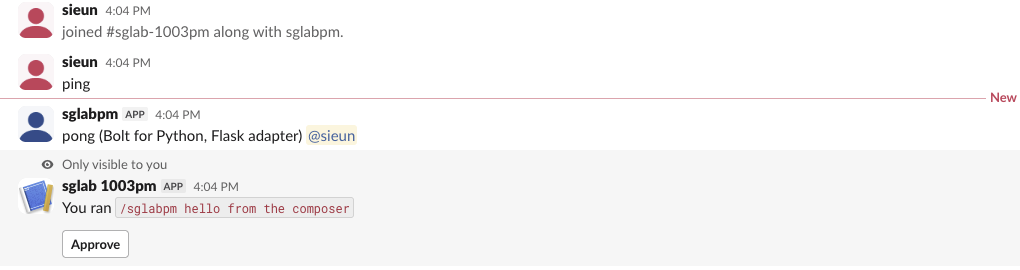
Clicking Approve replaced that reply with "Approved by @sieun (value 42)". The slash command reply is ephemeral ("Only visible to you") because respond() posts to the command's response_url, which defaults to an ephemeral message. Use say() for a reply the whole channel sees. The fields in each payload are listed in Slack slash command payload and block_actions payload.
Two things in the log that confused us at first:
- • The bot's own
pongmessage also came back as amessageevent. Bolt answered it with 200 and ran no listener, becauseAppignores events from its own bot user by default. - • Every event the app is subscribed to arrives at the same URL, including ones you have no listener for. When the bot joined the channel,
channel_createdandmember_joined_channelcame in, and Bolt logged this:
2026-10-03 16:04:13,017 WARNING slack_bolt.App Unhandled request ({'type': 'event_callback', 'event': {'type': 'channel_created'}})
2026-10-03 16:04:13,017 INFO werkzeug 127.0.0.1 - - [03/Oct/2026 16:04:13] "POST /slack/events HTTP/1.1" 404 -
Bolt answers an unhandled event with HTTP 404, and Slack treats that as a failed delivery. The same channel_created event (same event_id) came back three more times: 0.7 seconds, 61 seconds and 6 minutes 3 seconds after the first try. Either remove the event from your subscriptions or add a listener that does nothing. The retry schedule is measured in more detail on Slack Events API retries.
Never appear "away" on Slack again
Cloud-based. No downloads. Works 24/7 even when your laptop is off.
The same app as AsyncApp on aiohttp
For async, import from slack_bolt.async_app, make each listener async def, and await every ack(), say() and respond(). AsyncApp.start() runs its own aiohttp server, so no Flask is needed:
import os, logging
from slack_bolt.async_app import AsyncApp

logging.basicConfig(level=logging.INFO)
app = AsyncApp(token=os.environ["SLACK_BOT_TOKEN"], signing_secret=os.environ["SLACK_SIGNING_SECRET"])

@app.message("ping")
async def pong(message, say, logger):
    logger.info("message from %s: %s", message["user"], message["text"])
    await say(f"pong (AsyncApp, aiohttp) <@{message['user']}>")

@app.command("/sglabpm")
async def slash(ack, command, respond):
    await ack()
    await respond(blocks=[
        {"type": "section", "text": {"type": "mrkdwn", "text": f"Async: you ran `{command['command']} {command['text']}`"}},
        {"type": "actions", "elements": [{"type": "button", "action_id": "approve",
            "text": {"type": "plain_text", "text": "Approve"}, "value": "42"}]},
    ], text="slash reply")

@app.action("approve")
async def approve(ack, body, respond):
    await ack()
    await respond(replace_original=True, text=f"Approved by <@{body['user']['id']}> (async)")

if __name__ == "__main__":
    app.start(port=8943, path="/slack/events")
The run log, with the same three actions:
2026-10-03 16:05:54,798 INFO slack_bolt.AsyncApp ⚡️ Bolt app is running!
2026-10-03 16:06:05,131 INFO app_async.py:pong message from U0B7L4YK420: ping
2026-10-03 16:06:10,279 INFO app_async.py:slash slash command /sglabpm text='async run'
2026-10-03 16:06:14,343 INFO app_async.py:approve button approve clicked by U0B7L4YK420
In a virtualenv with only slack_bolt installed, the import itself fails before any code runs:
  File ".../slack_bolt/app/async_app.py", line 8, in <module>
    from aiohttp import web
ModuleNotFoundError: No module named 'aiohttp'
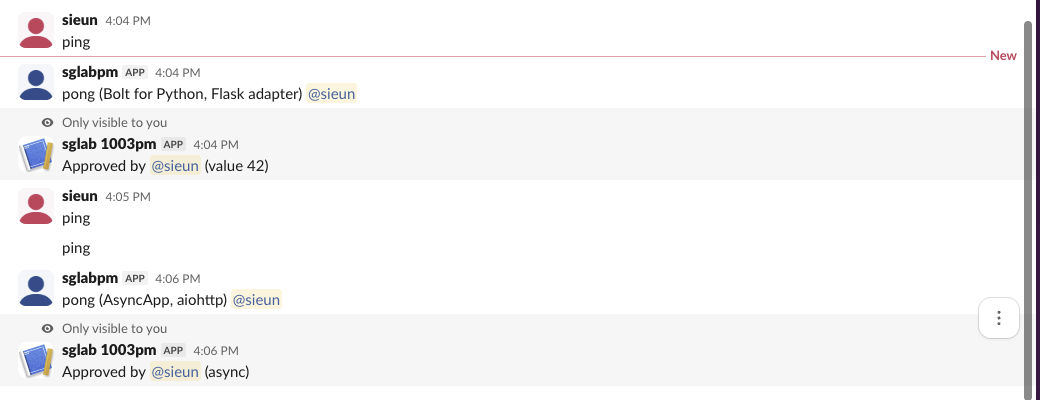
Run pip install aiohttp and it starts. The screenshot below shows both runs in one channel. The bare ping at 4:05 PM with no answer is the wrong-secret test from the next section.
A wrong signing secret
We restarted the Flask app with a made-up 32-character signing secret and repeated the test. Nothing failed at startup, because Bolt only checks the secret when a request arrives. Then every request got a 401:
2026-10-03 16:05:25,309 INFO slack_bolt.RequestVerification Invalid request signature detected (signature: v0=49af6536..., timestamp: 1791011127, body: {"token":"...","team_id":"T0B7JBCDKC1", ...})
2026-10-03 16:05:25,310 INFO werkzeug 127.0.0.1 - - [03/Oct/2026 16:05:25] "POST /slack/events HTTP/1.1" 401 -
The ping message got no answer, and Slack sent the event again 0.3 seconds later, with the same 401. The slash command showed this in Slack:

Slack shows the same "did not respond" text for a wrong secret, a crashed app and a dead tunnel, so check the console for the 401 first. Other causes of that message are on Slack dispatch_failed. The signing secret is under Basic Information > App Credentials. It is a different value from the bot token and from the deprecated verification token, and Bolt logs this warning at the INFO level, so a logger set to WARNING hides it.
Questions
Do I need Flask to run Bolt for Python over HTTP?
No. app.start(port=8951) on a plain App runs a small built-in HTTP server, meant for development. We started it and it answered on /slack/events. Use an adapter when you deploy into a web framework you already run: slack_bolt 1.30.0 ships adapters for Flask, FastAPI, Django, AWS Lambda, Google Cloud Functions, Starlette, Sanic, Tornado, Bottle, Falcon, Pyramid, CherryPy, ASGI and WSGI.
Why does curl to my endpoint return 401?
Bolt rejects any request without a valid X-Slack-Signature header. An unsigned curl -X POST to the built-in server got 401, the same status as the wrong-secret test. Test through Slack, or sign the request with the signing secret yourself.
Why does my listener run but Slack shows an error?
Slack waits about 3 seconds for the HTTP answer to a slash command or a button click. Call ack() first and do slow work after it, as the examples above do. The timeout we measured is on Slack dispatch_failed.
Stop Jiggling Your Mouse.
Join hundreds of remote workers who never worry about their Slack status. Set it up once, stay green forever.
Related Articles
Slack All Unreads: Turn It On, Shortcuts, and Clear Everything
Slack's Unreads view collects every unread message on one page. We turned it on, opened it with Cmd+Shift+A, cleared one channel with Esc and the whole workspace with Shift+Esc, and read Slack's own unread counts before and after each step.
Slack Mute a Channel Without Hiding It: The Setting, Tested
In current Slack, muting a channel also hides it from the sidebar until you turn off one checkbox in Preferences. We muted a test channel, had a bot post and then @mention us in it, and recorded what the sidebar, the badge and Activity showed each time.
Slack Bookmarks: Where They Are Now, and Why They Disappear
Slack channel bookmarks now live in folder tabs above the messages, not in a bookmarks bar. We added, moved and deleted them in a test channel and through the bookmarks API, and found the delete that hides bookmarks the API still lists.