
Slack Interactivity Payload: Real block_actions JSON and response_url Limits
We clicked a button, a static_select and a datepicker in Slack on 1 October 2026 and logged the block_actions payloads our app received. Then we measured response_url: 5 posts, then used_url; it worked at 29:50 and was dead at 30:10.
When someone clicks a button, picks from a select menu or chooses a date in a Slack message, Slack sends your app a block_actions payload. The control that was used is in actions[0], the current value of every input in the message is in state.values, and response_url lets you post back or replace the message without a token. On 1 October 2026 we posted a message with three controls from a throwaway app in Socket Mode, clicked each one in Slack web, and logged what arrived. Then we tested how long and how often response_url works: it took 5 posts and refused the 6th, and it worked until 29 minutes 50 seconds after the click and was expired at 30 minutes 10 seconds.
The message we clicked
[
  {
    "type": "section",
    "text": {
      "type": "mrkdwn",
      "text": "*Deploy request #42*\nInteractivity test: click each control."
    }
  },
  {
    "type": "actions",
    "block_id": "deploy_actions",
    "elements": [
      {
        "type": "button",
        "action_id": "approve_btn",
        "text": {
          "type": "plain_text",
          "text": "Approve"
        },
        "style": "primary",
        "value": "deploy-42"
      },
      {
        "type": "static_select",
        "action_id": "env_select",
        "placeholder": {
          "type": "plain_text",
          "text": "Environment"
        },
        "options": [
          {
            "text": {
              "type": "plain_text",
              "text": "staging"
            },
            "value": "staging"
          },
          {
            "text": {
              "type": "plain_text",
              "text": "production"
            },
            "value": "production"
          }
        ]
      },
      {
        "type": "datepicker",
        "action_id": "deploy_date",
        "placeholder": {
          "type": "plain_text",
          "text": "Pick a date"
        }
      }
    ]
  }
]
You need Interactivity turned on in the app settings. Over HTTP, Slack POSTs to the Interactivity Request URL as a form field named payload. In Socket Mode, which we used, the same JSON comes over the WebSocket. Each click must be acknowledged within 3 seconds.
The block_actions payload, field by field
This is what arrived for the third click, the datepicker, after we had already picked "production" in the select. We shortened token, trigger_id, response_url and the copy of the message's blocks:
{
  "type": "block_actions",
  "user": {
    "id": "U0B7L4YK420",
    "username": "sieun",
    "name": "sieun",
    "team_id": "T0B7JBCDKC1"
  },
  "api_app_id": "A0C5WFLQ10S",
  "token": "<verification token, deprecated>",
  "container": {
    "type": "message",
    "message_ts": "1790839285.958459",
    "channel_id": "C0C5QDNUJ7M",
    "is_ephemeral": false
  },
  "trigger_id": "12200682638674...",
  "team": {
    "id": "T0B7JBCDKC1",
    "domain": "slack-0yr1948"
  },
  "enterprise": null,
  "is_enterprise_install": false,
  "channel": {
    "id": "C0C5QDNUJ7M",
    "name": "w2-lab-1001"
  },
  "message": {
    "type": "message",
    "ts": "1790839285.958459",
    "text": "Deploy request #42",
    "blocks": "[... the original blocks ...]",
    "user": "U0C5QDUGPV1",
    "bot_id": "B0C5WFWMXT4"
  },
  "state": {
    "values": {
      "deploy_actions": {
        "env_select": {
          "type": "static_select",
          "selected_option": {
            "text": {
              "type": "plain_text",
              "text": "production",
              "emoji": true
            },
            "value": "production"
          }
        },
        "deploy_date": {
          "type": "datepicker",
          "selected_date": "2026-10-08"
        }
      }
    }
  },
  "response_url": "https://hooks.slack.com/actions/T0B7JBCDKC1/...",
  "actions": [
    {
      "type": "datepicker",
      "action_id": "deploy_date",
      "block_id": "deploy_actions",
      "selected_date": "2026-10-08",
      "action_ts": "1790839338.194143"
    }
  ]
}
What each part is for:
| Field | What it held in our test |
|---|---|
actions[0] | the control just used: its action_id, block_id, type and new value |
state.values | every input in the message, by block_id then action_id, including the select we had set earlier |
container.message_ts, channel.id | where the message is, for chat.update |
user.id | who clicked |
response_url | a URL to post to; it needs no token |
trigger_id | needed to open a modal; it expires after a few seconds, see expired_trigger_id |
token | the deprecated verification token; check the request signature instead |
The value sits in a different key for each control type. These are the three actions[0] objects we received:
{"action_id": "approve_btn", "block_id": "deploy_actions", "text": {"type": "plain_text", "text": "Approve", "emoji": true}, "value": "deploy-42", "style": "primary", "type": "button", "action_ts": "1790839301.388125"}
{"type": "static_select", "action_id": "env_select", "block_id": "deploy_actions", "selected_option": {"text": {"type": "plain_text", "text": "production", "emoji": true}, "value": "production"}, "placeholder": {"type": "plain_text", "text": "Environment", "emoji": true}, "action_ts": "1790839323.674158"}
{"type": "datepicker", "action_id": "deploy_date", "block_id": "deploy_actions", "selected_date": "2026-10-08", "action_ts": "1790839338.194143"}
A button sends its value. A static select sends selected_option. A datepicker sends selected_date as YYYY-MM-DD. The first click, on the button, came with "state": {"values": {}} because nothing had been chosen yet. Read state.values when you need the whole form, and actions[0] when you only need the control that was clicked.
Never appear "away" on Slack again
Cloud-based. No downloads. Works 24/7 even when your laptop is off.
Replacing the message with response_url
To change the message after a click, POST JSON to response_url with replace_original: true:
import requests

requests.post(response_url, json={
    "replace_original": True,
    "text": "Deploy request #42 approved",
    "blocks": [{"type": "section", "text": {"type": "mrkdwn",
        "text": "*Deploy request #42*\n:white_check_mark: Approved by <@U0B7L4YK420> for *production* on 2026-10-08"}}],
}, timeout=10)
It returned HTTP 200 with {"ok":true} and the message changed in place, with the controls gone:
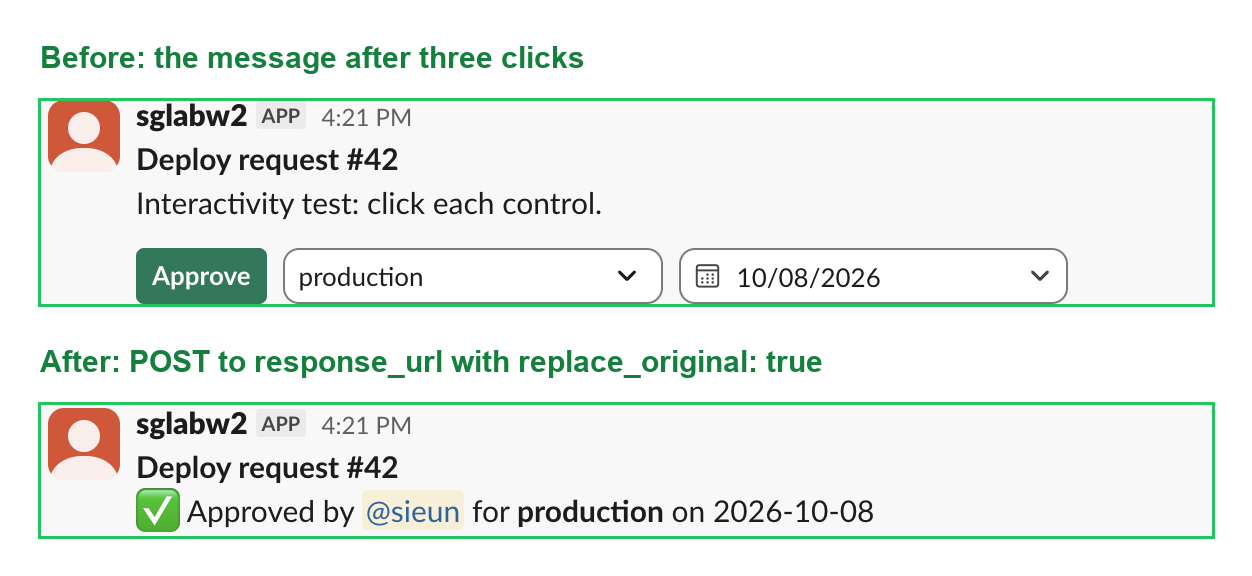
Without replace_original, the post is a new message; our count and time tests below used "response_type": "in_channel", so every post showed in the channel. Editing a message by ts with a token instead is covered in Slack chat.update, tested.
How often and how long response_url works
We posted seven times in a row to the response_url from the select click:
| Post | HTTP status | Body |
|---|---|---|
| 1 | 200 | {"ok":true} |
| 2 | 200 | {"ok":true} |
| 3 | 200 | {"ok":true} |
| 4 | 200 | {"ok":true} |
| 5 | 200 | {"ok":true} |
| 6 | 404 | {"ok":false,"error":"used_url"} |
| 7 | 404 | {"ok":false,"error":"used_url"} |
The 6th post got used_url. A failed post does not tell you which earlier post used up the URL, so count your uses: 5 per click in our test.
For time, we kept the response_url from the button click and posted to it later:
| Time after the click | HTTP status | Body |
|---|---|---|
| 60.4 s | 200 | {"ok":true} |
| 1801.3 s | 404 | {"ok":false,"error":"expired_url"} |
| 1860.8 s | 404 | {"ok":false,"error":"expired_url"} |
It worked at 1 minute and was already expired 1,801 seconds after the click, one second past 30 minutes. To find the edge we clicked a second button and posted to its response_url just before 30 minutes:
| Time after the click | HTTP status | Body |
|---|---|---|
| 1740.8 s | 200 | {"ok":true} |
| 1770.8 s | 200 | {"ok":true} |
| 1790.8 s | 200 | {"ok":true} |
| 1810.8 s | 404 | {"ok":false,"error":"expired_url"} |
It still worked at 29 minutes 50 seconds and was expired at 30 minutes 10 seconds, so the limit is 30 minutes from the click, and the 5-use limit applies inside that window. After that, update the message with chat.update and a bot token.
A click your app does not answer
We stopped the app process and clicked a button. After a few seconds Slack put a warning icon next to the button, with no text and nothing else for the person to read:

When the app came back, that click was never delivered: Slack does not retry interactivity payloads the way it retries events. The same goes for a handler that answers after 3 seconds. Acknowledge first, then do the work. The Block Kit Builder is the quickest way to design the message before you wire the handler.
Stop Jiggling Your Mouse.
Join hundreds of remote workers who never worry about their Slack status. Set it up once, stay green forever.
Related Articles
Slack unfurl_links and unfurl_media: What Each Flag Does, Tested
We posted a web page, a YouTube video and an image with every combination of unfurl_links and unfurl_media on 1 October 2026, then built a custom preview with link_shared and chat.unfurl. The flags do not split the way the names suggest.
Slack Scheduled Message Didn't Send? 5 Cases We Tested
We scheduled five messages for 4:40 PM on 1 October 2026, then archived, left and deleted their channels and deleted a thread parent before the send time. Two sent, three never did, and Slack gave no notice about the three.
Slack Bot Not Responding to @Mentions? 9 Causes We Reproduced
We broke a Slack bot nine ways on 1 October 2026, in Socket Mode and over HTTP, and wrote down what the person in Slack saw and what the app received each time. The table of causes, symptoms and fixes comes from those runs.