
Is It Legal for My Employer to Monitor Me? US, EU and UK Rules
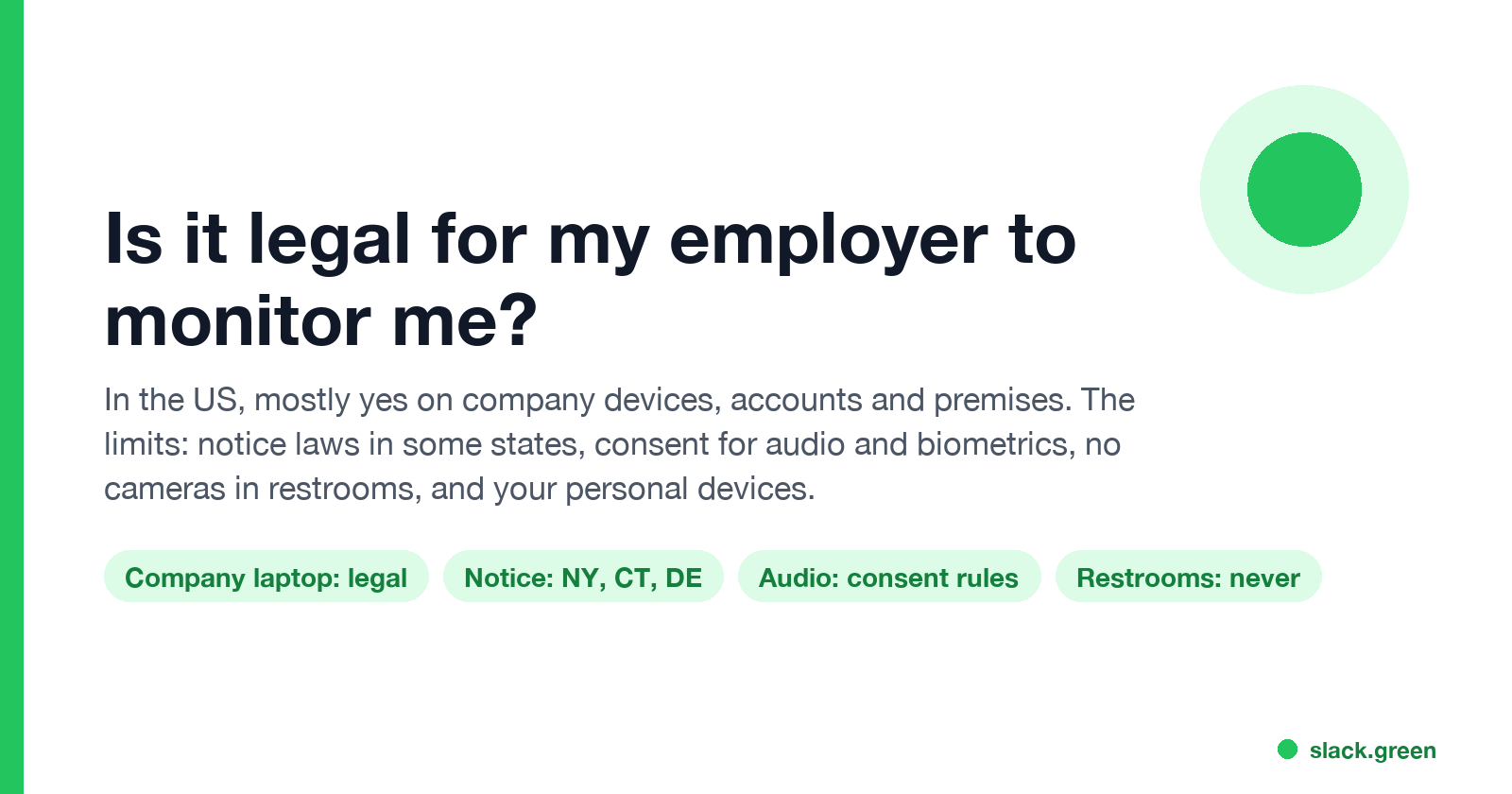
In the US it is mostly legal for an employer to monitor company devices, accounts and premises, often without asking. The limits are state notice laws in New York, Connecticut and Delaware, consent rules for audio recording and biometrics, bans on cameras in restrooms, and your personal devices. The EU, UK and parts of Canada and Australia add notice and proportionality rules.
In the US, it is mostly legal for your employer to monitor you on company devices, company accounts and company premises, often without asking first. Federal law, the Electronic Communications Privacy Act, allows monitoring in the ordinary course of business and with consent, and the IT policy you signed usually counts as consent. The limits come from the states and from the type of monitoring: New York, Connecticut and Delaware require written notice of electronic monitoring, many states require all parties' consent to record audio, Illinois requires written consent for fingerprint and face scans, cameras are banned in restrooms and changing rooms, and your personal devices are off limits without your consent. Outside the US, the EU, UK, Ontario and New South Wales require notice, and in Europe monitoring must also be necessary and proportionate.
This page is general information, not legal advice. For a real dispute, talk to an employment lawyer in your state.
One kind of monitoring needs no software at all: the presence dot in work chat. Slack shows every coworker whether you are active, and turns you grey after 10 minutes without input in the Slack window. Slack Green keeps your Slack status active during the hours you set, from the cloud, with nothing installed on the work computer.
What US employers can legally monitor
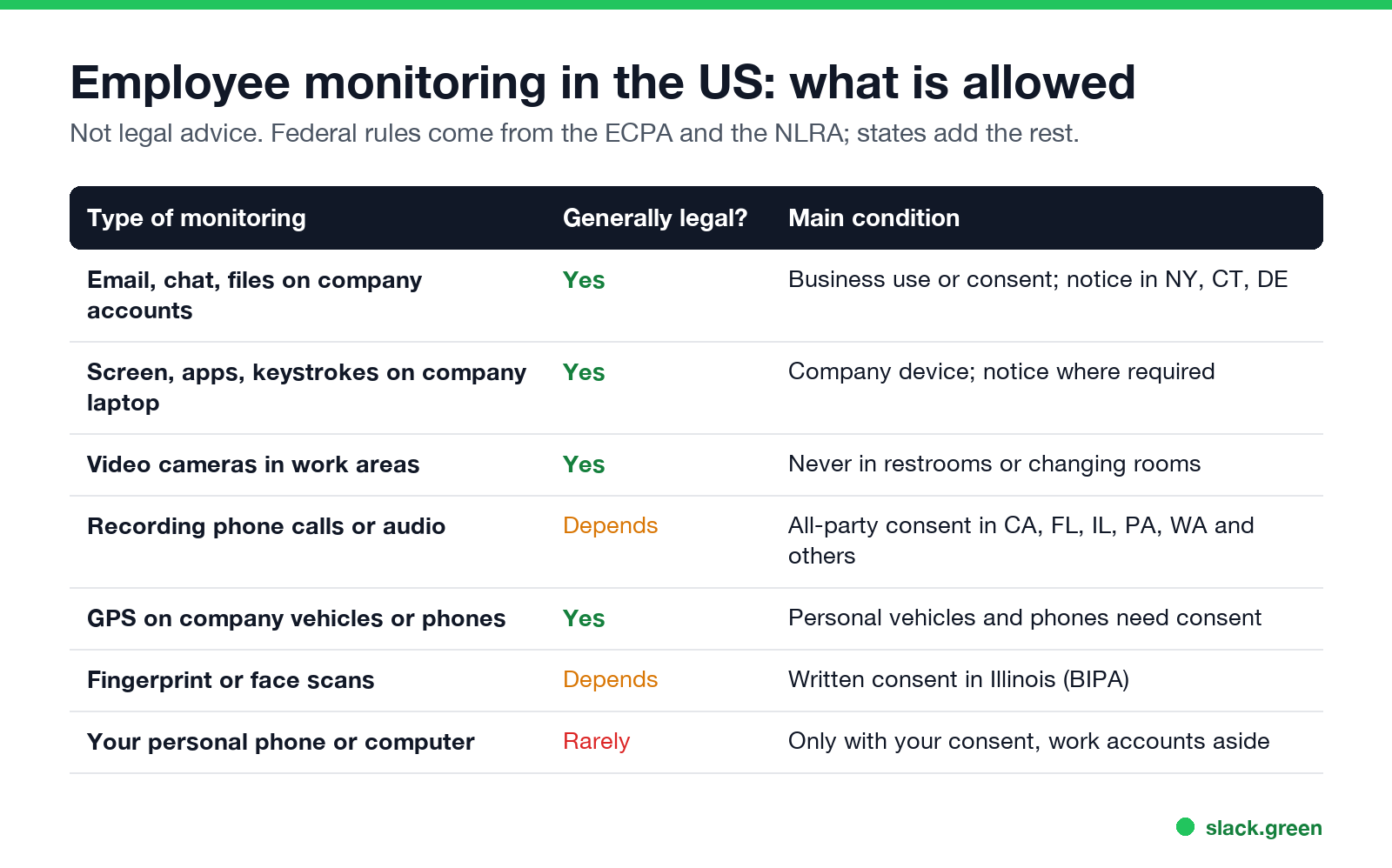
| Type of monitoring | Generally legal? | Main condition |
|---|---|---|
| Email, chat and files in company accounts | Yes | Business use or consent; written notice in NY, CT, DE |
| Screen, apps, websites, keystrokes on a company laptop | Yes | Company device; notice where a state requires it |
| Video cameras in work areas | Yes | Never in restrooms, locker rooms or changing rooms |
| Recording phone calls or conversations | Depends | All-party consent states, such as California, Florida, Illinois, Pennsylvania and Washington |
| GPS on company vehicles or company phones | Yes | Tracking a personal car or phone needs your consent |
| Fingerprint or face scans for time clocks | Depends | Illinois requires written consent under BIPA; Texas and Washington have their own rules |
| Your personal phone or computer | Rarely | Only with your consent; work apps on it are still logged |
Two federal limits apply everywhere:
- • Personal calls. Under the ECPA's business-use exception, an employer that monitors business calls must stop listening once it is clear a call is personal. The leading case is Watkins v. L.M. Berry & Co. (11th Cir. 1983).
- • Organizing. The National Labor Relations Act protects employees who discuss pay and conditions or organize. An employer may not use surveillance to interfere with that. The NLRB General Counsel's memo GC 23-02 (2022) set out a stricter test for electronic monitoring and AI tools.
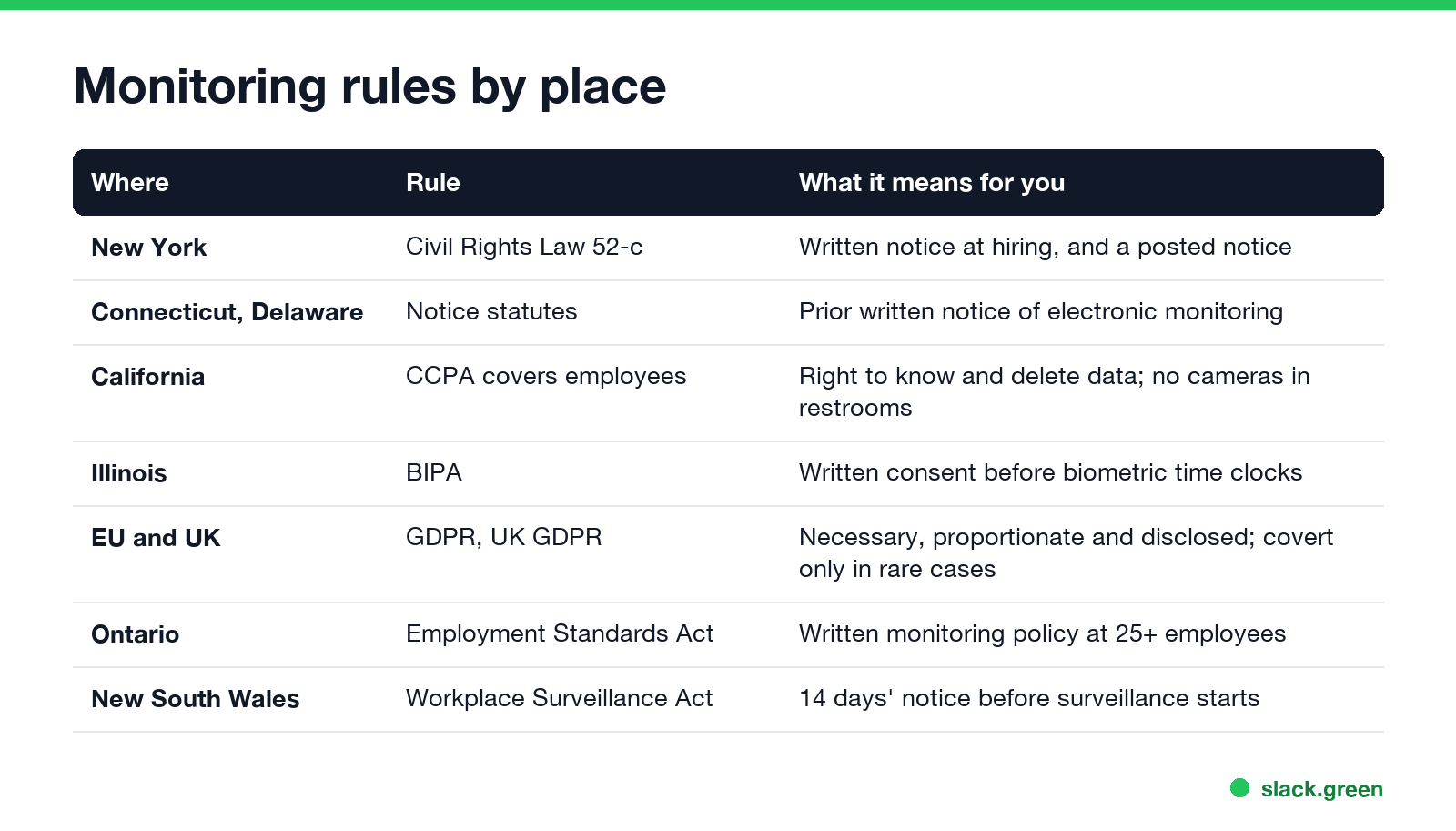
- • New York (Civil Rights Law section 52-c, since May 2022). Written notice at hiring that phone, email and internet use may be monitored, an acknowledgment from you, and a notice posted where employees can see it.
- • Connecticut (General Statutes section 31-48d). Prior written notice of the types of electronic monitoring used.
- • Delaware (Title 19, section 705). Notice before monitoring phone, email or internet use, acknowledged once or shown each day.
What each monitoring tool actually captures, layer by layer, is in how employers monitor remote workers.
Can my employer monitor me without telling me?
In most US states, yes, on company systems. Three states require notice:
Everywhere else, the notice is usually in the handbook or acceptable use policy you accepted when you joined. How to find out what your company runs, including checks for monitoring agents and HTTPS inspection, is in how to tell if you are being monitored at work.
Cameras, GPS and your personal devices
Never appear "away" on Slack again
Cloud-based. No downloads. Works 24/7 even when your laptop is off.
CCTV. Video in offices, warehouses and shops is legal in every state. Cameras in restrooms, locker rooms and changing rooms are not; California Labor Code section 435 bans audio or video recording there. Audio on a camera brings in the call-recording consent rules, which is why many workplace cameras record video only.
GPS. Tracking company vehicles and company phones is broadly legal, usually during work hours. Tracking a car you own is different: California Penal Code section 637.7 bans putting an electronic tracking device on a vehicle without the owner's consent.
Webcams. Your employer sees you on camera during video calls and when monitoring software turns the camera on. What that looks like is in can my employer see me through my laptop camera.
Personal devices. An employer cannot install monitoring software on your own phone or computer without your consent. It can still see what you do in work apps on that device, because those apps log activity on the company's side. See can my employer see what I do on my phone. More than 20 states also bar employers from demanding passwords to your personal social media accounts.
Employee monitoring in California
California has no single monitoring statute, but three rules give employees more than most states:
Rules outside the US
What to do if you think monitoring crossed a line
Never appear "away" on Slack again
Cloud-based. No downloads. Works 24/7 even when your laptop is off.
The mouse jiggler side of this, including the Wells Fargo firings in 2024, is in are mouse jigglers legal.
FAQ
Is my employer allowed to track me?
On company devices, accounts and vehicles, usually yes. Tracking your personal phone or car needs your consent in most cases.
Can my employer watch me on CCTV all day?
In work areas, yes, in every US state. Never in restrooms or changing rooms. Audio recording adds consent rules.
Do I have to consent to employee monitoring?
In the US, using company systems after a written policy usually counts as consent. Illinois biometrics and all-party audio states need explicit consent.
Can my employer read my personal messages?
Not by logging in to your personal accounts. What you do on a company device can be captured by screenshots or logs; see can my employer see my personal email on my work computer.
Is keystroke logging legal?
On a company-owned computer, generally yes in the US, with notice in New York, Connecticut and Delaware. In the EU and UK, it is hard to justify as proportionate.
Stop Jiggling Your Mouse.
Join hundreds of remote workers who never worry about their Slack status. Set it up once, stay green forever.
Related Articles
How to Keep Skype Status Active: Skype for Business Idle Timers
To keep your Skype for Business status active, open Options, Status, and raise both idle timers, Inactive and then Away, from 5 minutes to as much as 360 minutes each. Consumer Skype shut down on May 5, 2025 and Skype for Business Online in 2021, so for most people the real question is now Teams. What still works, status icons, Outlook, and status not updating.
Can My Employer See My Personal Email on My Work Computer?
Your employer cannot sign in to your Gmail, and doing so without permission can break the Stored Communications Act. But on a work computer, screenshot and keystroke monitoring, browser history, HTTPS inspection and Outlook's local cache can all expose personal email. Work email is fully visible, deleted messages included. Case by case, with what to do.
Best Calendar App for Slack: Official Apps and Add-Ons Compared
Slack has no calendar of its own. The best calendar app for most teams is Slack's free Google Calendar or Outlook Calendar app, whichever matches your email: reminders, invites, a daily agenda and automatic In a meeting status. Add Calendly, Reclaim, a leave tracker or a birthday bot only for the job those miss.