
How to Keep Skype Status Active: Skype for Business Idle Timers
To keep your Skype for Business status active, open Options, Status, and raise both idle timers, Inactive and then Away, from 5 minutes to as much as 360 minutes each. Consumer Skype shut down on May 5, 2025 and Skype for Business Online in 2021, so for most people the real question is now Teams. What still works, status icons, Outlook, and status not updating.
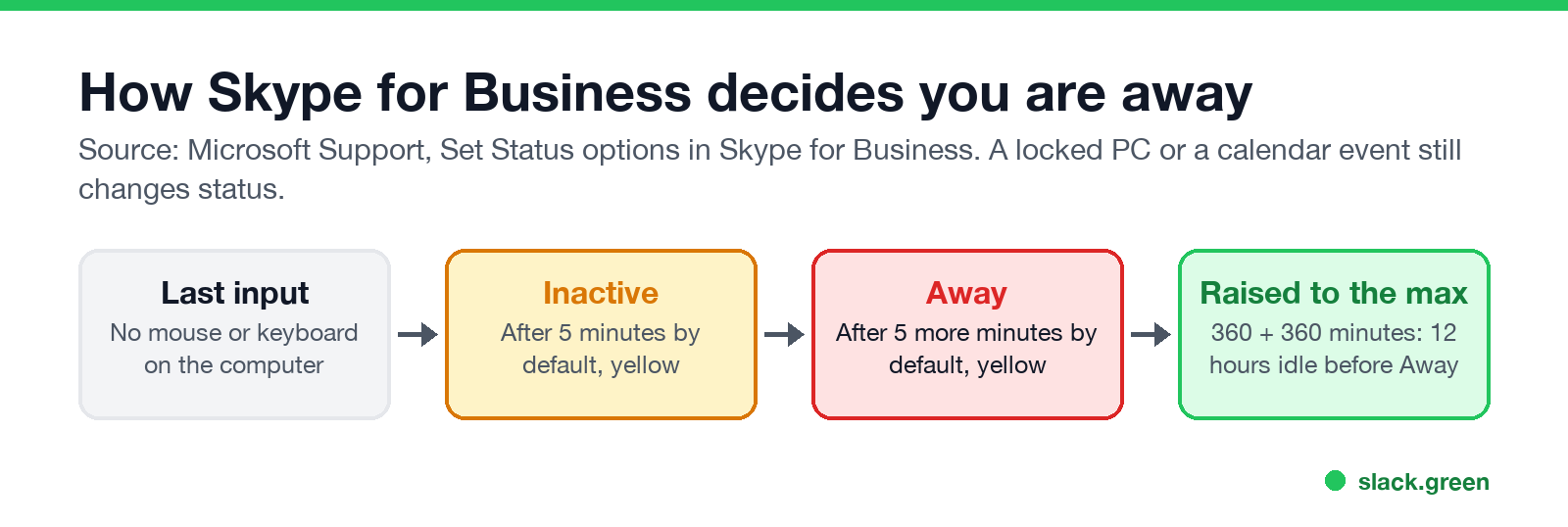
To keep your Skype for Business status active, click the gear icon, open Tools, Options, then Status. Raise Show me as Inactive when my computer has been idle for this many minutes and Change my status from Inactive to Away after this many minutes. Both default to 5 minutes, and Microsoft's support page says the maximum for each is 360 minutes. At the maximum, you stay Available for 6 hours without input, then Inactive for 6 more, before Skype shows Away.
That applies to Skype for Business Server, which some companies still run on their own servers. Consumer Skype shut down on May 5, 2025, and Microsoft moved its users to Teams Free. Skype for Business Online retired on July 31, 2021. If your company moved to Teams, the answer is in how to keep your Teams status available. If Slack runs next to it, Slack turns grey after 10 minutes without input in the Slack window; Slack Green keeps your Slack status active during the hours you set, from the cloud.
Which Skype do you have?
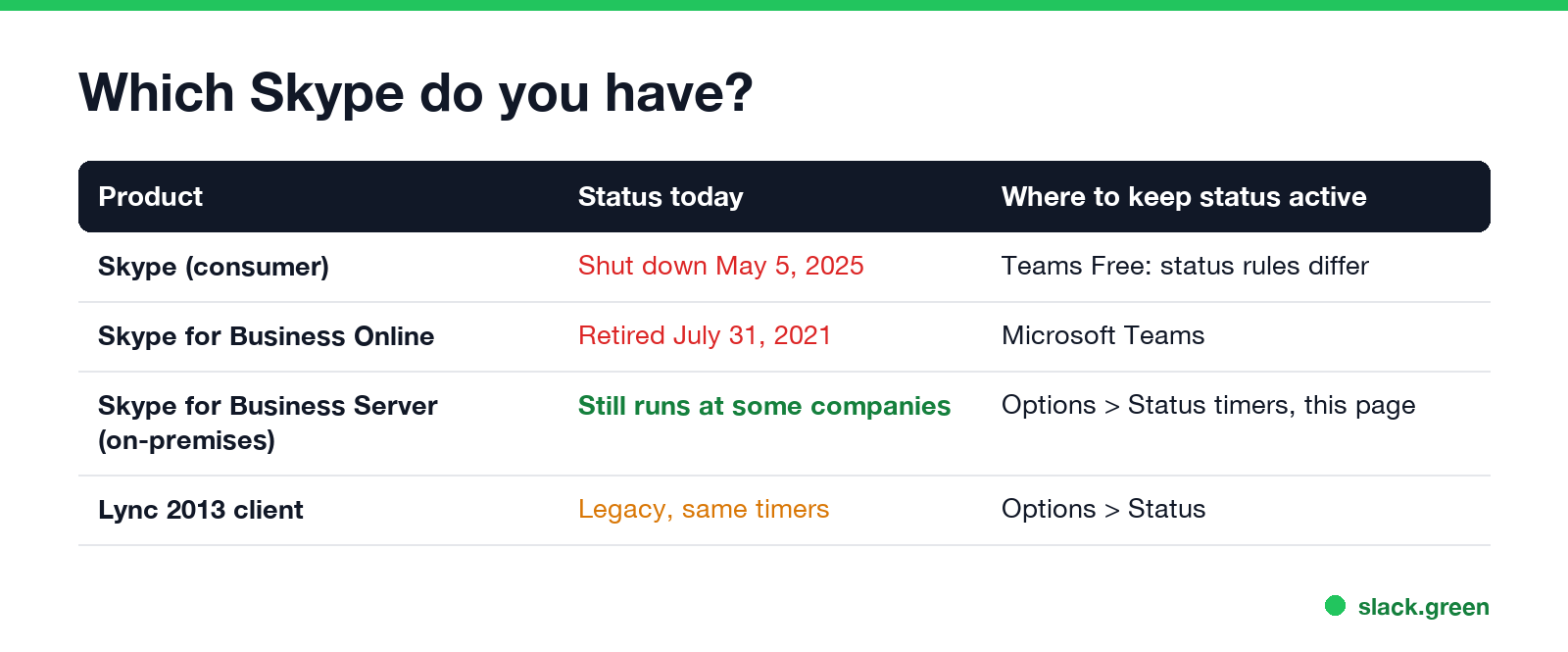
| Product | Status today | What to do |
|---|---|---|
| Skype (consumer) | Shut down on May 5, 2025 | Use Teams Free; its status follows Teams rules |
| Skype for Business Online | Retired July 31, 2021 | Your company uses Microsoft Teams |
| Skype for Business Server (on-premises) | Still runs at some companies | Raise the idle timers below |
| Lync 2013 client | Legacy, same timers | Options, Status |
If the app you open at work is blue with an "S" and your company runs its own servers, you have Skype for Business Server. The steps below are for you.
How to keep Skype for Business status active
- In the Skype for Business main window, click the gear icon, then Tools, Options.
- Select Status.
- Next to Show me as Inactive when my computer has been idle for this many minutes, set a higher number, up to 360.
- Next to Change my status from Inactive to Away after this many minutes, set a higher number, up to 360.
- Click OK.
- • Locking the computer sets Away in most setups.
- • Calendar events. With calendar integration on, a Busy event in Outlook shows you as In a meeting.
- • Signing out or closing the client shows you as Offline.
- • Presenting. If Show me as Do Not Disturb when I present my desktop is on, sharing your screen sets Presenting.
Skype for Business counts mouse and keyboard input anywhere on the computer, not only in its own window. So any work you do on the PC keeps you Available, and the timers only matter when you step away. Microsoft describes both Inactive and Away as a yellow status indicator.
What still changes your status after that:
To set a status by hand, click the status menu under your name and choose Available, Busy, Do not disturb, Be right back, Off work or Appear away. Choose Reset status to hand control back to Skype.
Skype status icons
Never appear "away" on Slack again
Cloud-based. No downloads. Works 24/7 even when your laptop is off.
| Icon color | Status |
|---|---|
| Green | Available |
| Yellow | Inactive, Away, Be right back, Off work, Appear away |
| Red | Busy, In a call, In a meeting |
| Red with a white bar | Do not disturb, Presenting |
| Grey | Offline or presence unknown |
Teams and Outlook use the same colors today, with purple added for Out of office; see Outlook status colors meaning and Microsoft Teams status icons meaning.
Skype for Business status not updating, and Outlook
Skype status message
At the top of the Skype for Business main window, click the box above your name and type a personal note, such as "Heads down until 3, call if urgent". It shows next to your name for contacts. Microsoft notes that the presence states themselves are fixed and cannot be customized, so the note is the only way to add detail. For Teams, the equivalent is covered in how to set an away message in Teams.
FAQ
Never appear "away" on Slack again
Cloud-based. No downloads. Works 24/7 even when your laptop is off.
How do I keep my Skype status always Available?
In Skype for Business, raise both idle timers in Options, Status, to 360 minutes. There is no setting to disable them entirely.
How long before Skype for Business shows Away?
5 minutes to Inactive, then 5 more to Away, by default. Each can go up to 360 minutes.
Does consumer Skype still exist?
No. Microsoft shut it down on May 5, 2025 and moved users to Teams Free.
Does a mouse jiggler keep Skype for Business active?
Yes. Skype counts input anywhere on the computer, so a jiggler resets the idle timer. Company policy may forbid it; see are mouse jigglers legal.
Why does Skype show me Away when I am working?
Your idle timer is short, the computer locked, or you set Appear away by hand and did not reset it.
Stop Jiggling Your Mouse.
Join hundreds of remote workers who never worry about their Slack status. Set it up once, stay green forever.
Related Articles
Is It Legal for My Employer to Monitor Me? US, EU and UK Rules
In the US it is mostly legal for an employer to monitor company devices, accounts and premises, often without asking. The limits are state notice laws in New York, Connecticut and Delaware, consent rules for audio recording and biometrics, bans on cameras in restrooms, and your personal devices. The EU, UK and parts of Canada and Australia add notice and proportionality rules.
Can My Employer See My Personal Email on My Work Computer?
Your employer cannot sign in to your Gmail, and doing so without permission can break the Stored Communications Act. But on a work computer, screenshot and keystroke monitoring, browser history, HTTPS inspection and Outlook's local cache can all expose personal email. Work email is fully visible, deleted messages included. Case by case, with what to do.
Best Calendar App for Slack: Official Apps and Add-Ons Compared
Slack has no calendar of its own. The best calendar app for most teams is Slack's free Google Calendar or Outlook Calendar app, whichever matches your email: reminders, invites, a daily agenda and automatic In a meeting status. Add Calendly, Reclaim, a leave tracker or a birthday bot only for the job those miss.