
Slack Notifications From Rails: slack-notifier, slack-ruby-client and Net::HTTP Tested
Three ways to post to Slack from Rails, run on Ruby 3.4 and Rails 8.1 on 5 November 2026: plain Net::HTTP to a webhook, the slack-notifier gem (last release 2021, still works), and slack-ruby-client with a bot token. Plus exception_notification sending a real error to Slack.
To send Slack notifications from a Rails app, post JSON to a Slack incoming webhook with Net::HTTP, use the slack-notifier gem for the same thing with less code, or use slack-ruby-client with a bot token when you need the full Web API. On 5 November 2026 we ran all three from Ruby 3.4.12 and Rails 8.1.4.1 in a Docker container against a test workspace, then wired exception_notification so an unhandled error in a Rails route posted itself to Slack. The code below is what we ran, and the output is what we got.
Which one to use
We read each gem's record on rubygems.org on 5 November 2026:
| Option | Version we ran | Last release | Downloads | Use it for |
|---|---|---|---|---|
Net::HTTP (standard library) | Ruby 3.4.12 | n/a | n/a | One-way alerts, no dependency |
slack-notifier | 2.4.0 | 2021-05-07 | 143,351,280 | One-way alerts with link conversion |
slack-ruby-client | 3.3.0 | 2026-10-10 | 94,753,615 | Bots, reading channels, threads, errors as exceptions |
exception_notification | 5.0.1 | 2025-08-03 | 24,749,846 | Errors from Rails, sent through slack-notifier |
slack-notifier has had no release for over five years, but its job is small and it still worked. For anything beyond posting into one channel, slack-ruby-client is the maintained choice; our slack-ruby-client guide covers it in depth.
Both webhook options need an incoming webhook URL. Our guide to creating a Slack webhook shows the screens. Keep the URL in Rails credentials or an environment variable, never in the repository.
1. Plain Net::HTTP
require "net/http"
require "json"

uri = URI(ENV.fetch("SLACK_WEBHOOK_URL"))
res = Net::HTTP.post(uri, { text: "Deploy finished (Net::HTTP)" }.to_json,
                     "Content-Type" => "application/json")
puts "#{res.code} #{res.body}"
Output: 200 ok. With the last characters of the URL changed, the same script printed 403 invalid_token and raised nothing, so check res.code yourself if a lost alert matters.
2. The slack-notifier gem
require "slack-notifier"

notifier = Slack::Notifier.new(ENV.fetch("SLACK_WEBHOOK_URL"))
res = notifier.ping "Deploy finished (slack-notifier), see [the log](https://example.com/log)"
puts res.map { |r| "#{r.code} #{r.body}" }
Output: 200 ok. The gem rewrote the Markdown link before sending: Slack stored the text as see <https://example.com/log|the log>, Slack's own link format, so "the log" showed as a link. Plain Net::HTTP would have sent the brackets as typed.
Never appear "away" on Slack again
Cloud-based. No downloads. Works 24/7 even when your laptop is off.
3. slack-ruby-client with a bot token
require "slack-ruby-client"

client = Slack::Web::Client.new(token: ENV.fetch("SLACK_BOT_TOKEN"))
msg = client.chat_postMessage(channel: ENV.fetch("SLACK_CHANNEL"), text: "Deploy finished (slack-ruby-client)")
puts "ok=#{msg.ok} ts=#{msg.ts}"

begin
  client.chat_postMessage(channel: "C000BAD", text: "x")
rescue Slack::Web::Api::Errors::SlackError => e
  puts "#{e.class}: #{e.message}"
end
Output:
ok=true ts=1793864307.275429
Slack::Web::Api::Errors::ChannelNotFound: channel_not_found
Unlike the webhook, the client raises on a Slack error, with a class per error code, so a typo in a channel ID cannot fail quietly. It needs a bot token with chat:write, and the bot must be in the channel. The ts it returns lets you reply in a thread or edit the message later, which a webhook cannot do.
Send Rails exceptions to Slack
We made a minimal app with rails new demo --minimal, added two gems and one initializer, and gave it a route that raises:
# Gemfile
gem "exception_notification"
gem "slack-notifier"

# config/initializers/exception_notification.rb
require "exception_notification/rails"
ExceptionNotification.configure do |config|
  config.add_notifier :slack, {
    webhook_url: ENV.fetch("SLACK_WEBHOOK_URL"),
    additional_parameters: { mrkdwn: true }
  }
end

# config/routes.rb
Rails.application.routes.draw do
  get "/boom", to: proc { raise ArgumentError, "invoice total is negative" }
end
We started the server in production mode and requested /boom. The browser got a 500, the log showed ArgumentError (invoice total is negative), and this arrived in Slack along with the three messages above:
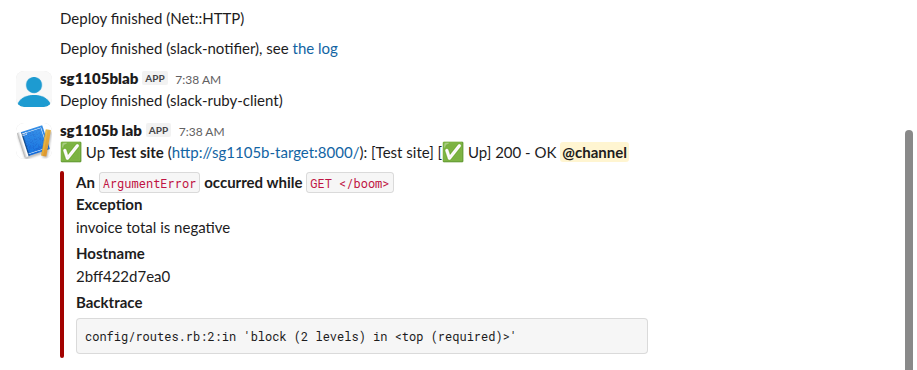
The card holds the exception class, the request, the message, the server's hostname and the first backtrace line. Our hostname was the Docker container ID, so the field tells you which server failed only if your hosts have meaningful names. exception_notification uses slack-notifier under the hood for this notifier, which is why both gems are in the Gemfile.
Tips from the run
- • Send from a background job (
perform_later) in request code, so a slow Slack response never slows a page. A job also gives you retries. - • Use one webhook per channel. A webhook made by a Slack app ignores
channel,usernameandicon_emojioverrides; we tested that in our Uptime Kuma Slack guide. - • For formatting, both webhooks and
chat.postMessageread Slack's mrkdwn, not standard Markdown. Our Slack Block Kit Markdown guide shows what renders.
FAQ
Does slack-notifier still work in 2026?
Yes. In our run, version 2.4.0 posted to a current Slack webhook from Ruby 3.4.12 and converted the link as before. It is unmaintained, so for new code that needs more than one-way posts, use slack-ruby-client.
Can Rails 8 send to Slack without a gem?
Yes, with Net::HTTP as in the first example. Rails has no built-in Slack notifier.
Stop Jiggling Your Mouse.
Join hundreds of remote workers who never worry about their Slack status. Set it up once, stay green forever.
Related Articles
Sign in with Slack (OpenID Connect): A Tested Python Example
Sign in with Slack is OpenID Connect on top of OAuth 2.0: send the user to slack.com/openid/connect/authorize, swap the code at openid.connect.token, and check the RS256 id_token. We ran the whole flow on 5 November 2026 and show the real claims and errors.
Slack SDK for Rust: slack-morphism Tested (Post, History, Socket Mode)
Slack has no official Rust SDK. The community crate that works today is slack-morphism: on 5 November 2026 we used version 2.31.1 to post a message, page through history with a cursor and answer a mention over Socket Mode. Code and output below.
Slack Deep Links: Every slack:// Command in the Current App
A Slack deep link is a slack:// URL such as slack://channel?team=T123&id=C123 that opens the desktop or mobile app on a channel, person, file or setting. We read the handler in Slack's current code, listed the commands it accepts, and tested the https fallbacks.