
How to Convert a Slack DM or Group DM to a Channel (Tested)
Slack can turn a group DM into a private channel: open the conversation details, go to Settings and click Change to a private channel. A one-to-one DM has no such option. We converted a group DM on 7 November 2026 and recorded what moved, what changed and what the dialog refused.
You can convert a Slack group DM (a direct message with three or more people) into a private channel: open the conversation's details, choose the Settings tab and click Change to a private channel, then give the channel a name. Every earlier message, thread and file stays in it. A one-to-one DM cannot be converted, and a group DM cannot become a public channel. On 7 November 2026 we converted a real group DM in the Slack web app as a regular member of a Free workspace. The steps, Slack's own wording and the before-and-after details are below.
Steps to convert a group DM
- Open the group DM.
- Click the names at the top of the conversation, or the three-dot menu at the top right and then Conversation details > Open conversation details.
- Choose the Settings tab. In a group DM it holds a single row: Change to a private channel.
- Type a channel name and click Change to Private.
Slack shows this dialog before it changes anything:
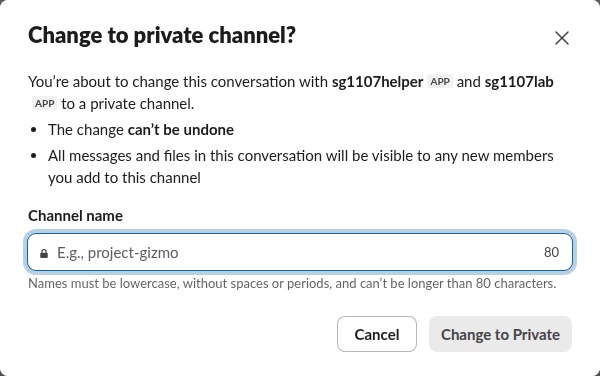
The two warnings matter more than they look. The change can't be undone, so the channel never turns back into a DM. And everything said in the DM becomes readable to anyone you add to the channel later, including messages written when only the original group could see them.
Naming rules the dialog enforces
The name field counts down from 80 characters. When we typed Project Gizmo.v2, Slack lowercased it and turned the space into a hyphen as we typed, then refused the period:
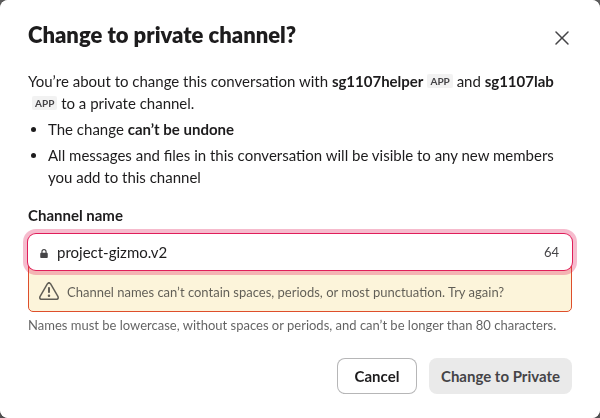
So use lowercase letters, numbers, hyphens and underscores. We renamed it sg-1107-from-gdm and the button went through.
What happened after the change
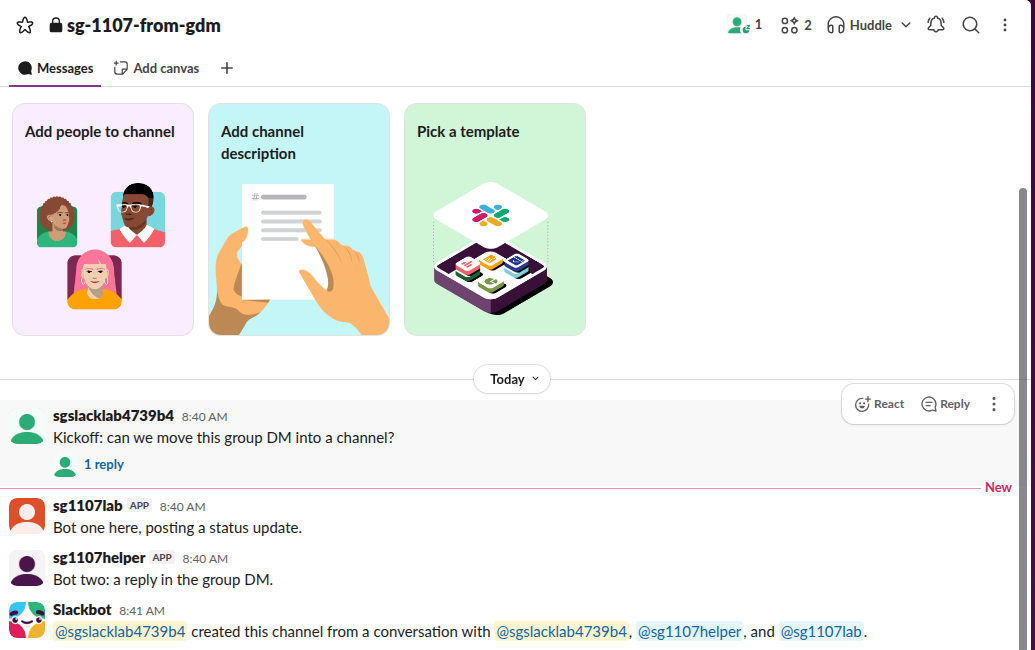
We checked the conversation through the Slack API before and after:
| Before | After | |
|---|---|---|
| Conversation ID | C0CFTM8R7ND | C0CFTM8R7ND (the same) |
| Name | mpdm-sgslacklab4739b4--sg1107lab--sg1107helper-1 | sg-1107-from-gdm |
is_mpim | true | false |
is_private | true | true |
| Messages | 3, one with a thread reply | The same 3 and the reply, plus one Slackbot line |
The ID did not change, so message links built on it still point to the same conversation. Slackbot added "@member created this channel from a conversation with @member, @app1, and @app2", and the member who clicked the button became the channel's creator. Both apps were still members, and the first one posted to the new channel right away.
On a Free workspace, a regular member could do this; no admin was involved. We did not test a workspace where owners limit who can create channels.
Never appear "away" on Slack again
Cloud-based. No downloads. Works 24/7 even when your laptop is off.
A one-to-one DM has no convert option
In a DM between two people, the details window has only About and Tabs, and no Settings tab. Its About tab offers Add people to this conversation, which starts a separate group DM. A DM with an app shows App details instead. So there is no in-place way to make a one-to-one DM a channel.
What works instead:
Private only, but you can go public later
The dialog offers only a private channel. If the team later wants everyone to see it, a channel manager can switch it from private to public; our page on making a private Slack channel public covers that step and what members see. For which kind to pick in the first place, see public vs private channels.
FAQ
Do the people in the group DM get a notification?
No one had to approve it. The only notice we saw was the Slackbot line inside the conversation, and the sidebar entry moved from Direct messages to Channels under the new name.
Can I convert a group DM to a public channel directly?
No. In our test the only choice was Change to a private channel. Make it public afterwards if you need to.
Can I convert it back to a group DM?
No. Slack's dialog says "The change can't be undone".
Stop Jiggling Your Mouse.
Join hundreds of remote workers who never worry about their Slack status. Set it up once, stay green forever.
Related Articles
Slack Public vs Private Channels: What a Non-Member Can See
A public channel can be found, read and searched by every full member of the workspace, even before they join. A private channel is invisible to anyone who is not in it. We tested both from a member account.
Lock Icon Next to a Slack Channel? What the Lock and Grey Text Mean
A padlock next to a Slack channel means it is private. Grey text with a crossed-out bell means you muted it. We made a private, muted, archived and unread channel and screenshot each one in the sidebar.
How to Make a Slack Channel Private, and Why It Can Fail for Members
Open the channel, click its name, go to Settings and choose Change to a private channel. We tried it as a regular member on a free workspace: Slack showed the option and then failed with Something went wrong.