
Slack Headphones Icon: What It Means in Each Spot, and Huddling Alone
The headphones icon in Slack means huddles: the button that starts one, a live huddle next to a channel, the bar you are in. We started a huddle alone to show every spot, and checked whether you can huddle in your own DM.
The headphones icon in Slack stands for a huddle, Slack's live audio and video call. Where it sits tells you which part: in a conversation header it is the button that starts a huddle, next to a channel or DM in the sidebar it means a huddle is live there right now, and in a bar at the bottom of the window it means you are in one. As someone's status emoji, 🎧 is just a status that person picked, usually "heads down".
We started a huddle on our own in a private test channel on 29 September 2026, in the Slack web app, and screenshotted each spot.
Where the headphones show up during a huddle
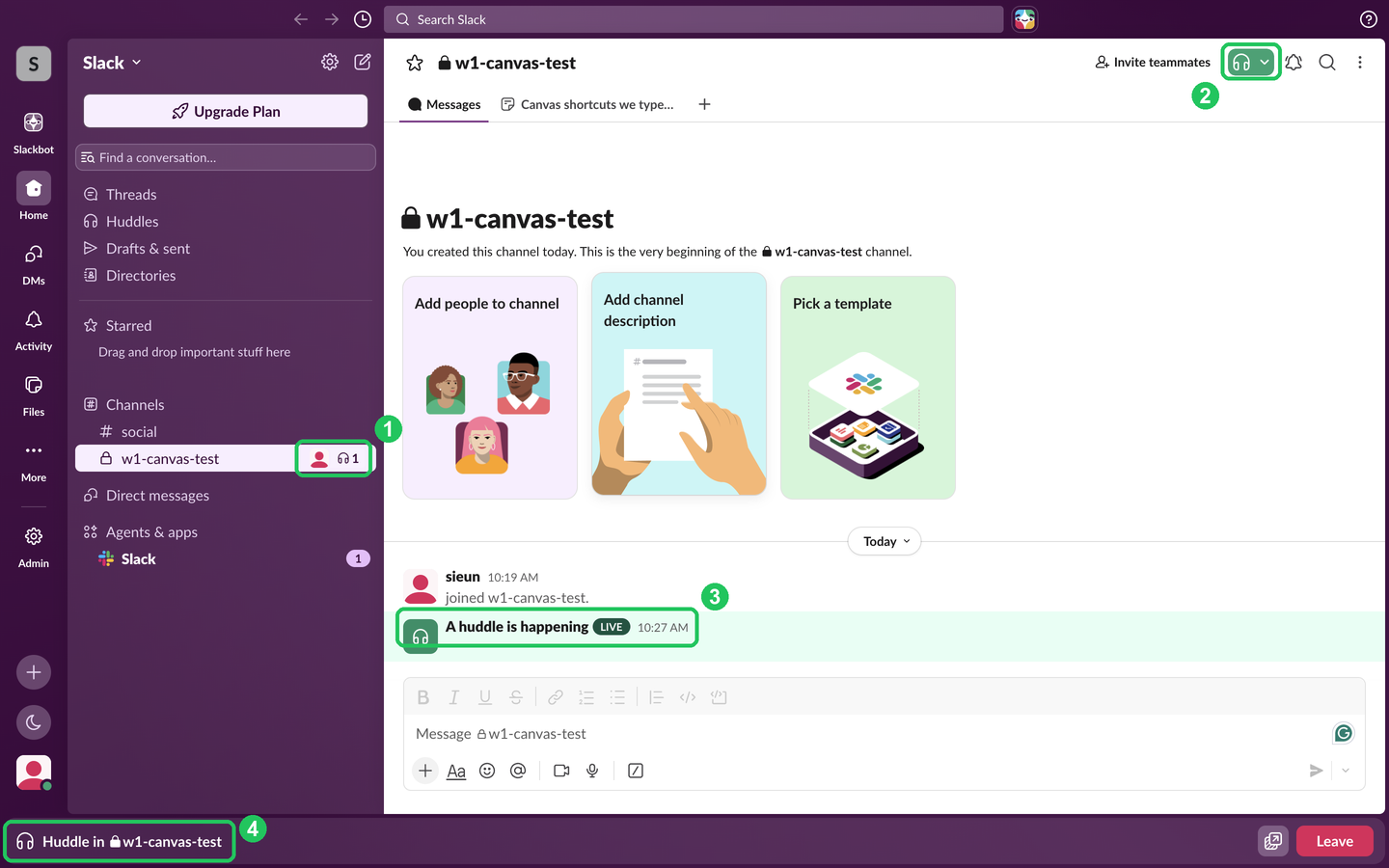
- Sidebar, next to a channel or DM. An avatar, the headphones and a number: a huddle is live there, and the number is how many people are in it.
- Conversation header. Grey headphones are the button to start or join a huddle. They turned green while we were in the huddle; the small arrow next to them opens more huddle options.
- In the message list. Slack posted "A huddle is happening" with a LIVE label and a headphones avatar. When our huddle ended with no messages in its thread, that post was removed from the channel.
- Bottom bar. "Huddle in #channel" with a Leave button stays at the bottom while you move around Slack.
The tooltip on the header button also gives the keyboard shortcut: Cmd+Option+Shift+H on a Mac. Who gets told when you join, and how to join muted, is in can people see when you join a Slack huddle.
Headphones next to a person's name
A 🎧 emoji after someone's name is their status emoji. Many people set :headphones: with text such as "Heads down until 2" to say they are focusing. It does not mean they are in a huddle, and it does not change their green or grey dot.
We could not check from a second account whether other members saw a huddle mark next to our name. Our own profile did not change: during the huddle, users.profile.get returned an empty status_emoji and huddle_state default_unset, the same as before. What every other Slack icon and dot means is in Slack status icons meaning.
Never appear "away" on Slack again
Cloud-based. No downloads. Works 24/7 even when your laptop is off.
Can you start a Slack huddle with yourself?
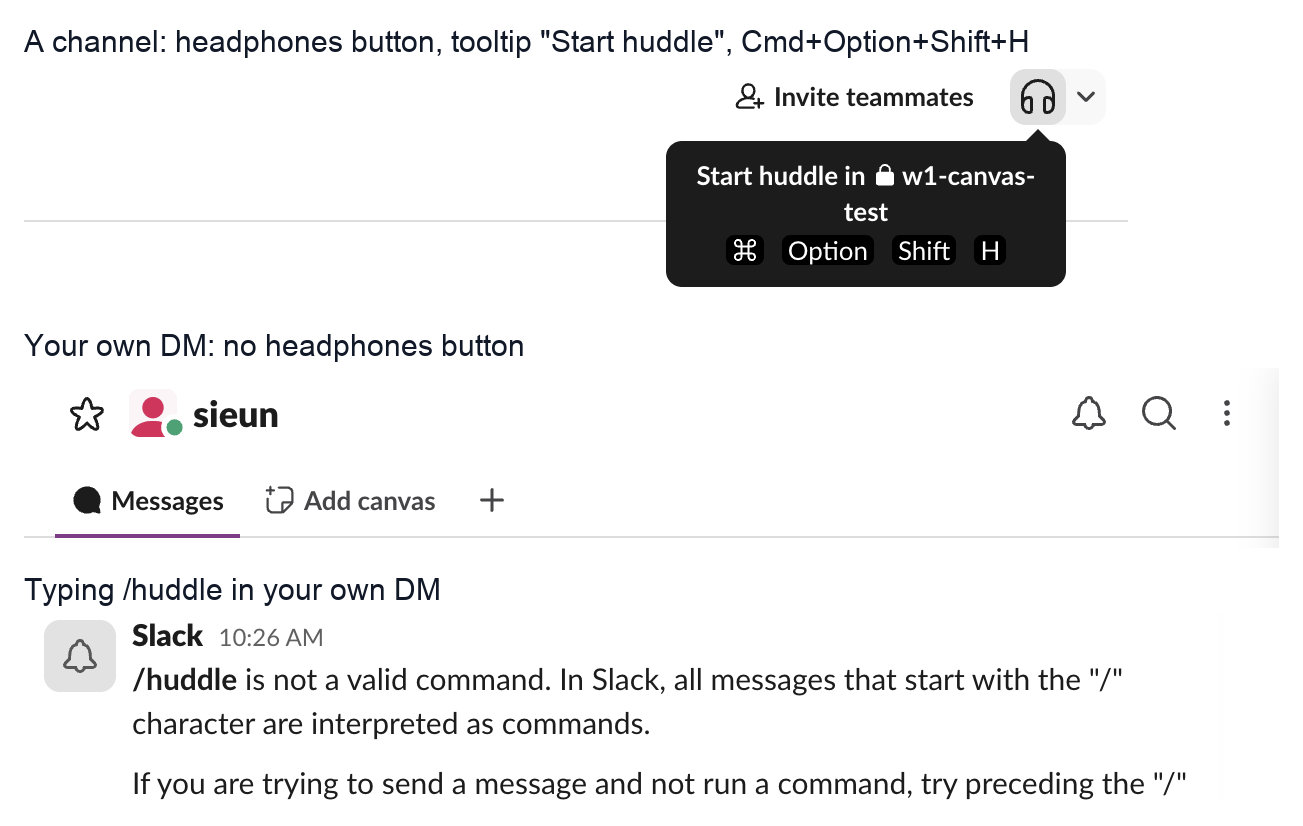
Not in your own DM. The DM with yourself has no headphones button in its header, and typing /huddle there got "/huddle is not a valid command".
A huddle alone works in any channel where you are the only member. We made a private channel, clicked the headphones, and clicked Start Huddle. The browser had no microphone permission, and Slack showed "Allow microphone access" in the preview, but the huddle still started with the mic off. A solo huddle is a way to check your microphone and camera before a real call.
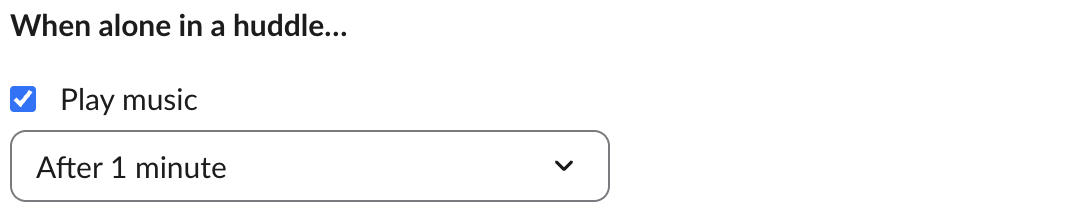
Slack has a setting for exactly this case. Under Preferences > Audio & video, When alone in a huddle plays music, and you pick when it starts: right when you join, after 30 seconds, or after 1 minute, which was the setting in our workspace.
To test your setup without a call, the same settings page has Run test under Troubleshooting, which runs an audio, video and screen sharing test.
FAQ
What does the headphones icon with a number mean in Slack?
A huddle is live in that channel or DM, and the number is how many people are in it.
Can I hide that I am in a huddle?
We found no setting for it under Preferences > Audio & video. Slack posts the live huddle in the channel, so its members can see it while it runs.
Does being in a huddle keep my Slack status active?
The huddle did not change our status or our away setting. Your dot still follows your activity in the Slack window; the rules are in how long does Slack stay active.
Stop Jiggling Your Mouse.
Join hundreds of remote workers who never worry about their Slack status. Set it up once, stay green forever.
Related Articles
Slack Canvas Formatting: Shortcuts That Work and Ones That Stay as Text
We typed every common markdown shortcut into a Slack canvas. Headings, lists, checklists, quotes and code convert as you type; a single *star* makes bold, not italic; links, dashes for a divider and ==highlight== stay as plain text.
Slack Huddle Background: Blur, Pictures, Uploads and Themes
A Slack huddle has two backgrounds: the one behind you on camera, and the theme behind the whole huddle window. Where each one is, what you can pick, and why many people see no upload button.
Slack "Remind me about this": What Happens When the Time Comes
Set a reminder on a Slack message from its three-dot menu, then watch where it goes. We tested it on 29 September 2026: the message waits in Later and fires as a card in Activity, with no Slackbot DM.