
Slack Status Icons Meaning: Every Dot, Z, Shape and Emoji
A solid green dot means active, a hollow dot means away, and a small z means notifications are paused. What every Slack status icon, color, shape and default status emoji means, in one chart.
A solid green dot next to a Slack name means the person is active right now. A hollow or grey dot (an empty circle) means they are away. A small z on the dot means they paused their notifications, and it can sit on a green dot or a hollow one. Everything else next to a name is either a status emoji the person chose, such as a palm tree for vacation, or a fixed badge that says who they are, such as a square or triangle for a guest.
Slack has only two presence states: active and away. There is no separate "offline" color and no mobile badge. The dot changes on its own. On a computer you turn away after 10 minutes with no input in the Slack window. On a phone you turn away as soon as you leave the app.
That automatic timer is why so many people search for these icons: they look away while they are working. Slack Green fixes that part. It is a cloud service that keeps your dot green during the working hours you set, with nothing installed on your computer. The rest of this page is the full icon list.
Slack status colors: the dot next to every name
The dot shows presence. Slack calls it availability. Slack's help center puts it in one line: you are set to active when Slack is open on your desktop or mobile device, and to away after 10 minutes of desktop inactivity or when you leave or close the mobile app.
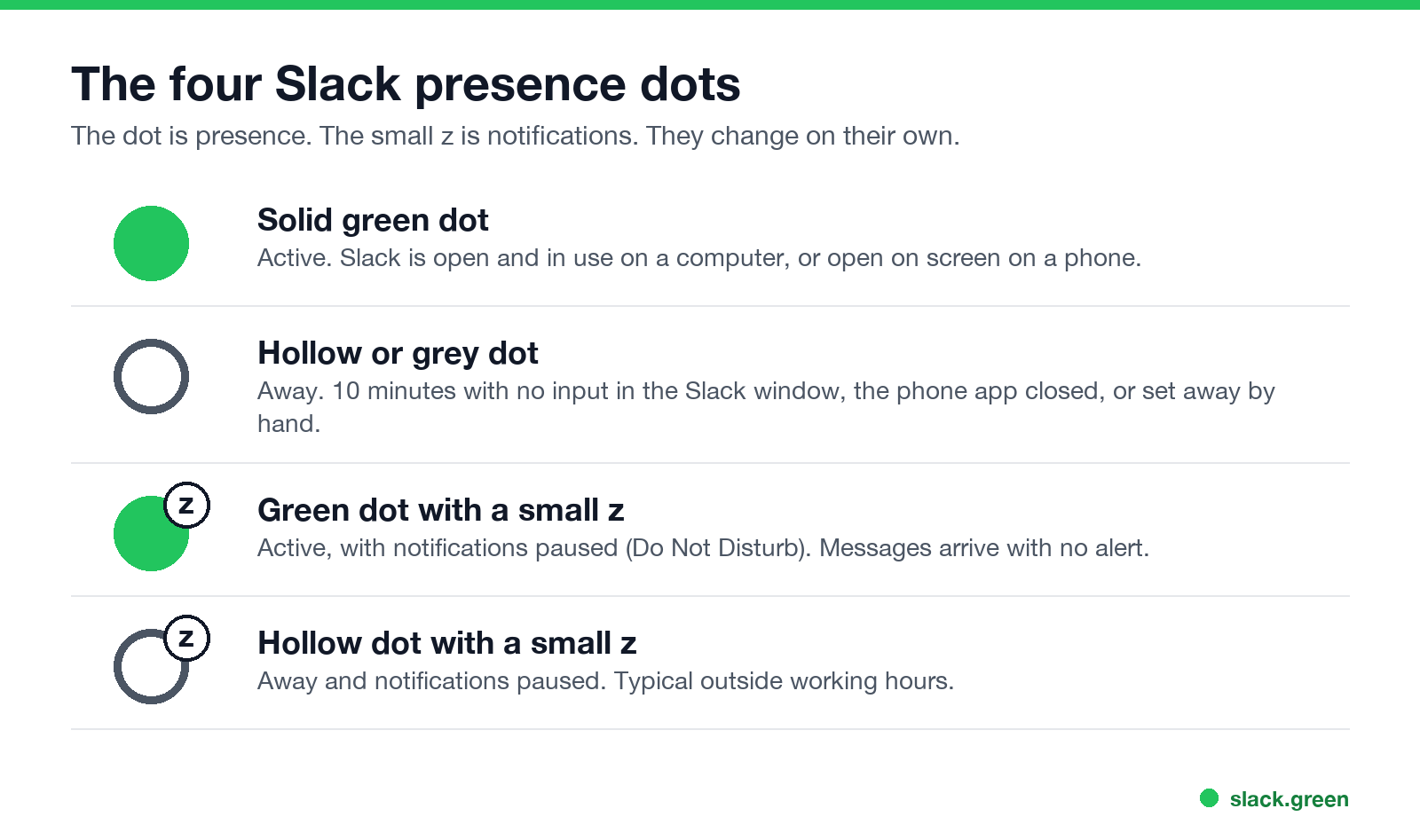
| Icon | Status | What it means |
|---|---|---|
| Solid green dot | Active | Slack is open and in use on a computer, or open on screen on a phone |
| Hollow dot, grey or empty circle | Away | No input in the Slack window for 10 minutes, the phone app is closed, or the person set themselves away |
| Green dot with a small z | Active, notifications paused | They are in Slack but get no alerts. Do Not Disturb is on |
| Hollow dot with a small z | Away, notifications paused | Not in Slack and no alerts. This is how most people look at night |
Three details trip people up:
- • Slack counts only input inside its own window. Typing in a document, a call in Zoom, or reading in a browser tab does not count. After 10 minutes the dot goes hollow even if you worked the whole time. The full rule is in how Slack decides when you're away.
- • The empty circle does not mean offline or signed out. Slack shows away for idle, closed, asleep, and "set yourself as away" in exactly the same way. Nobody can tell which one it is from the dot.
- • There is no phone icon. A person answering from their phone gets the same green dot. We tested this in does Slack show when you are on mobile.
For the full mechanics behind the green dot, read Slack active status explained. Everything else about Slack status, custom status and outages included, is on our Slack status hub.
What the z on a Slack status means
The small z (older versions drew a crescent moon) is the Do Not Disturb icon. Slack now calls it pause notifications. It says nothing about whether the person is at their desk. The dot under it still does that job.
The z appears for three reasons. The person paused notifications by hand, their notification schedule turned it on outside their working hours, or an admin set default quiet hours for the whole workspace. Messages still arrive while the z is on, and a sender can choose to notify them anyway once per day.
Every combination, and how to remove the z from your own name, is in what a Slack green dot with a z means. The settings themselves are in our Slack Do Not Disturb guide.
Slack status emoji meanings: the palm tree and the rest
Never appear "away" on Slack again
Cloud-based. No downloads. Works 24/7 even when your laptop is off.
The emoji right after a name is a custom status. The person picked it, or an app set it for them. Hover over it on desktop, or open the profile, to read the text that goes with it. If someone sets a status with text but no emoji, Slack shows a speech balloon 💬 by default.
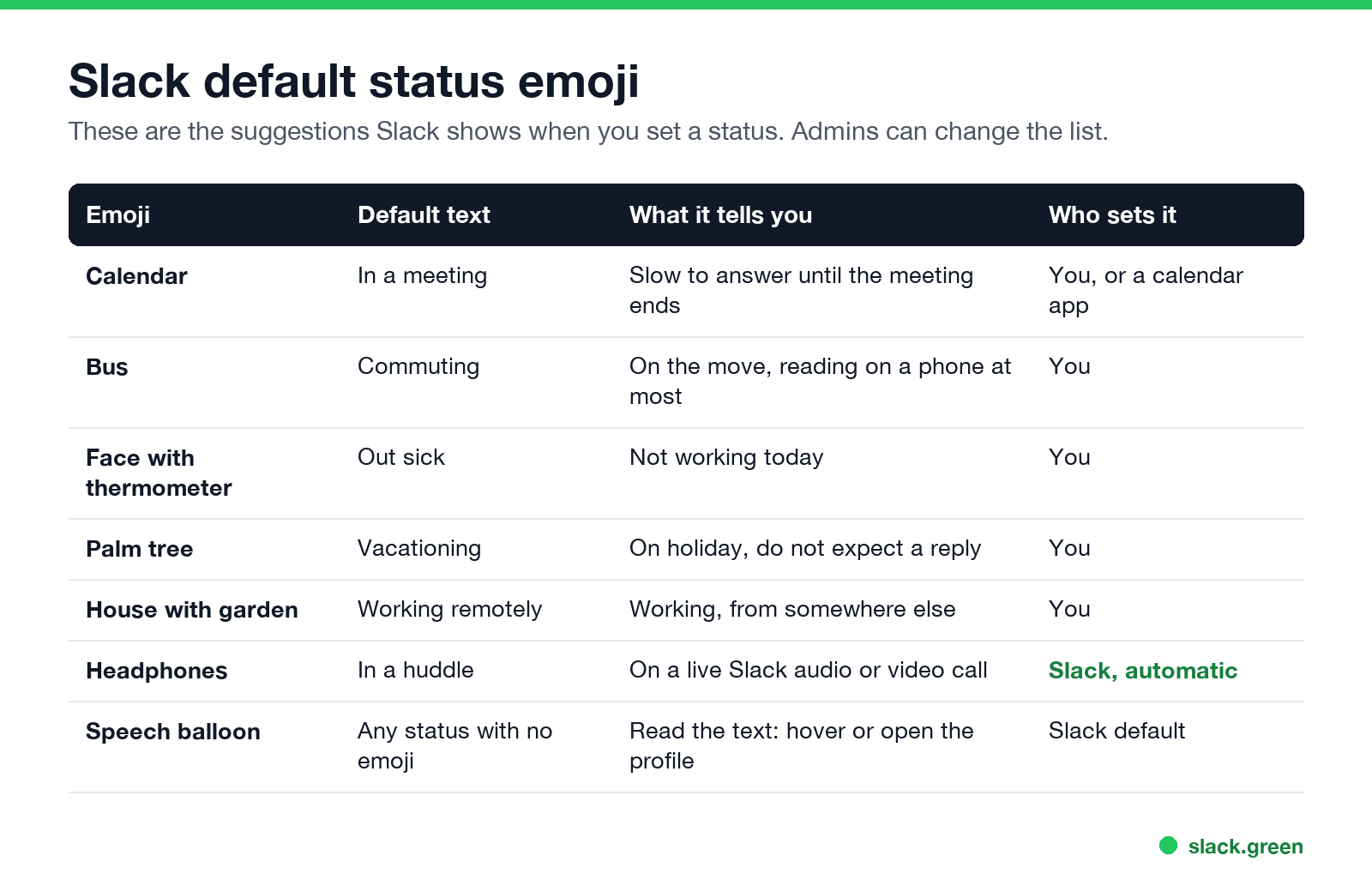
These are the suggestions Slack offers when you set a status:
| Emoji | Default text | What it tells you |
|---|---|---|
| 📆 | In a meeting | Slow to answer until the meeting ends. Calendar apps set it for you |
| 🚌 | Commuting | On the move, maybe reading on a phone |
| 🤒 | Out sick | Not working today |
| 🌴 | Vacationing | On holiday. Do not expect a reply |
| 🏡 | Working remotely | Working, from home or somewhere else |
| 🎧 | In a huddle | On a live Slack call. Slack sets this on its own |
| ⛔ | Out of office | Enterprise plans only. Hover to read their out of office message, which also tells you who to contact. See Slack out of office |
What does the palm tree mean on Slack? The 🌴 is Slack's default emoji for "Vacationing". The person is on holiday or out of office. Many teams also use it for public holidays. Open the profile to see the text and, if they added one, the date it clears.
Admins can edit the suggested list for a workspace, so your team may see different defaults, such as a lunch or focus status. Any emoji can be a status, including custom ones. If you want your own, the Slack emoji maker turns an image into a status emoji, and the Slack status ideas tool has ready-made text for common situations.
Statuses Slack sets for you
Some statuses change without anyone touching them. In Preferences, under Automatic statuses, Slack can update your status when you are in a huddle, in focus mode, or after your working hours. A connected Google Calendar or Outlook Calendar app can also set 📆 In a meeting during events. If you see a status on your own name that you did not set, check these first. To set one yourself, or clear it, follow how to change your status on Slack.
Slack icons next to names: guests, apps and external people
Some icons never change, because they describe the account, not the activity.
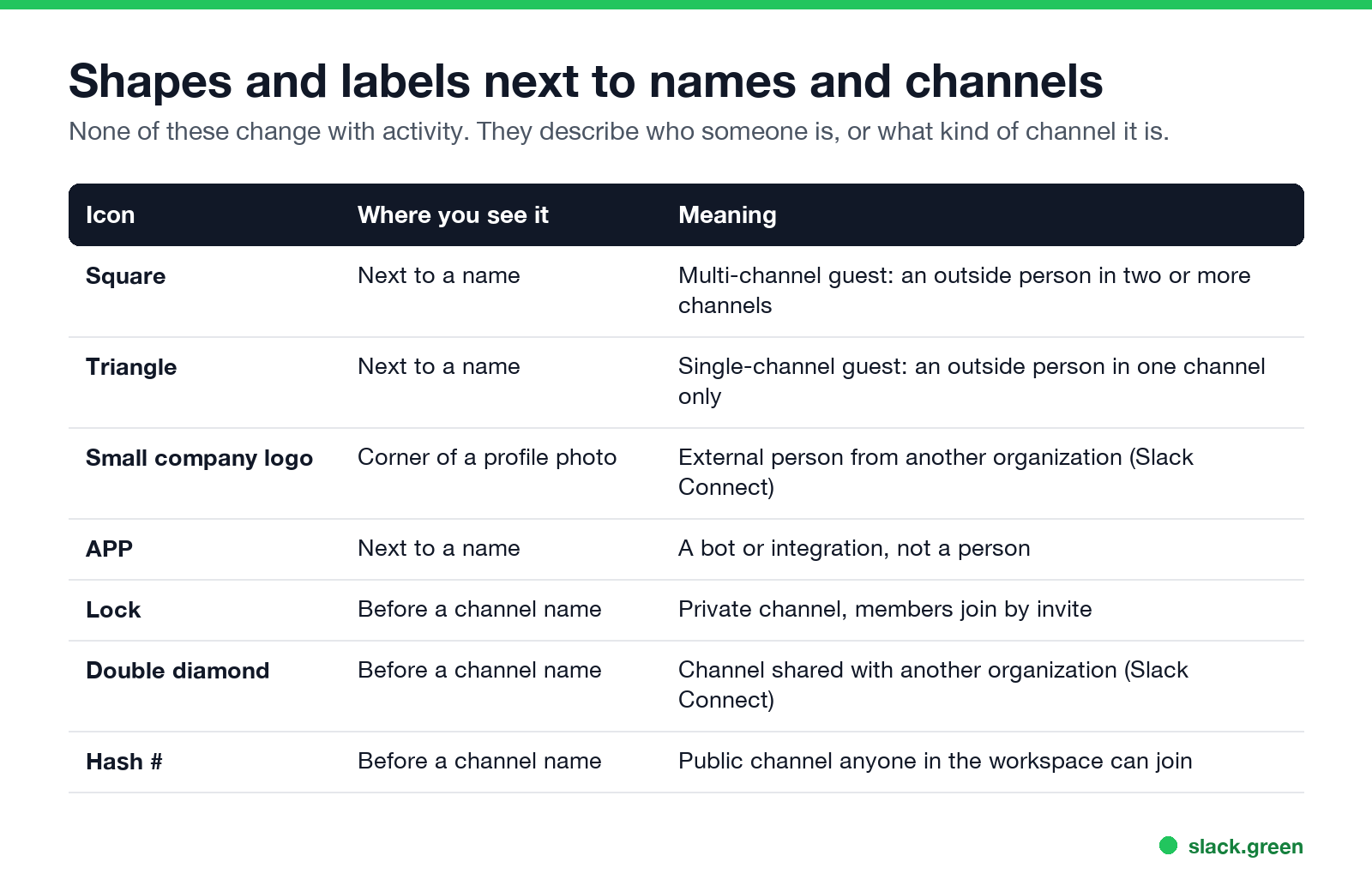
| Icon | Where | Meaning |
|---|---|---|
| Square | Next to a name | Multi-channel guest, an outside person with access to two or more channels |
| Triangle | Next to a name | Single-channel guest, an outside person in one channel only |
| Small company logo | Bottom-right corner of the profile photo | External person from another organization, through Slack Connect |
| APP | Next to a name | A bot or integration, not a person |
Slack's help center confirms the guest shapes: multi-channel guests have a square next to their names and single-channel guests have a triangle. For external people, Slack says their profile photos carry their organization's Slack icon in the bottom-right corner.
Bots have presence too. A bot marked away shows the same grey circle as a person.
Slack channel icons: lock, hash and double diamond
The sidebar uses icons for channels, not people:
What does 👀 mean in Slack?
Never appear "away" on Slack again
Cloud-based. No downloads. Works 24/7 even when your laptop is off.
The eyes emoji is a reaction, not a status. When someone adds 👀 to a message, the team convention is "I have seen this and I am looking at it." It works as a quiet read receipt, because Slack has no read receipts of its own. Other common reactions: ✅ for done, 👍 for agreed, and 🙏 for thanks. The full list of reaction meanings is in what does the eyes emoji mean in Slack.
Your own icons: why your dot goes hollow while you work
Most people who look up these icons have one question about their own dot: why it shows away when they are at their desk. The answer is the rule from the first section. Slack only sees input in its own window, and after 10 minutes without it you are away. How long each device holds you green is in how long does Slack stay active.
You have three options:
If you want the opposite, and prefer to look away while you work, see how to appear offline on Slack.
FAQ
What do the different status icons mean in Slack?
The dot is presence: solid green for active, hollow for away. A small z on either dot means notifications are paused. The emoji after a name is a custom status the person set. A square or triangle marks a guest, and a small company logo on a photo marks someone from another organization.
What does an empty circle mean on Slack?
The person is away. Slack shows this after 10 minutes with no input in the Slack window on a computer, as soon as they leave the phone app, or when they set themselves away. It looks the same in every case.
What does the Z next to my Slack status mean?
Your notifications are paused. Either you paused them, your notification schedule did it outside your working hours, or your admin set default quiet hours. Type /dnd off in any message box to resume them.
Is there an offline status on Slack?
No. Slack has active and away only. A person who closed Slack, a person who is idle, and a person who set themselves away all show the same hollow dot.
How long does a Slack status stay green?
On a computer, 10 minutes after your last input in the Slack window. On a phone, only while the app is open on screen. A custom status emoji stays until the clear time you chose, or until you clear it.
What does the headphones icon mean on Slack?
The person is in a huddle, a live Slack audio or video call. Slack sets this status on its own when the automatic huddle status is on in their preferences.
Stop Jiggling Your Mouse.
Join hundreds of remote workers who never worry about their Slack status. Set it up once, stay green forever.
Related Articles
How to Keep Google Chat Active: Idle at 5 Minutes, Away at 10
Google Chat shows you as Idle after 5 minutes without activity in Gmail or Chat on desktop, and Away after more than 10 minutes. There is no always-active setting. How the status works, what you can set, and what keeps it green.
Slack Status Not Updating? How to Fix a Stuck Status
A Slack status that will not update is usually a status you set yourself blocking the calendar, an app that has not synced, a status set in another workspace, automatic statuses turned off, or a stale client. How to tell which one, fix it, and tell a stuck status from a stuck dot.
Does PowerToys Awake Keep Slack or Teams Active? No, Here Is Why
PowerToys Awake keeps a Windows PC from sleeping, but it does not keep Slack or Teams active. Slack sets you away 10 minutes after your last input in its window and Teams after 5 minutes of inactivity, awake or not. How Awake works, its modes, and what does keep you green.