
How Does Slack Decide When You Are Away? The Signals It Reads
Slack decides you are away from four signals: input inside the Slack window, your computer's sleep and lock state, whether the phone app is on screen, and the manual away setting. Every signed-in device reports on its own, and one active device keeps you green.
Slack decides whether you are away from four signals: input inside the Slack window, your computer's sleep and lock state, whether the phone app is on screen, and whether you chose "Set yourself as away". Each signed-in device reports these on its own, and you show as active if any one device counts as active. Your calendar, your other apps, and your mouse outside the Slack window are not part of the decision.
This page explains how the decision works. The exact timings, such as 10 minutes on a computer, are in how long does Slack stay active.
The design has one gap people run into daily: real work in other apps looks like no activity to Slack. Slack Green closes it by holding a Slack session from a server and keeping it active during the working hours you set, with nothing installed on your computer.
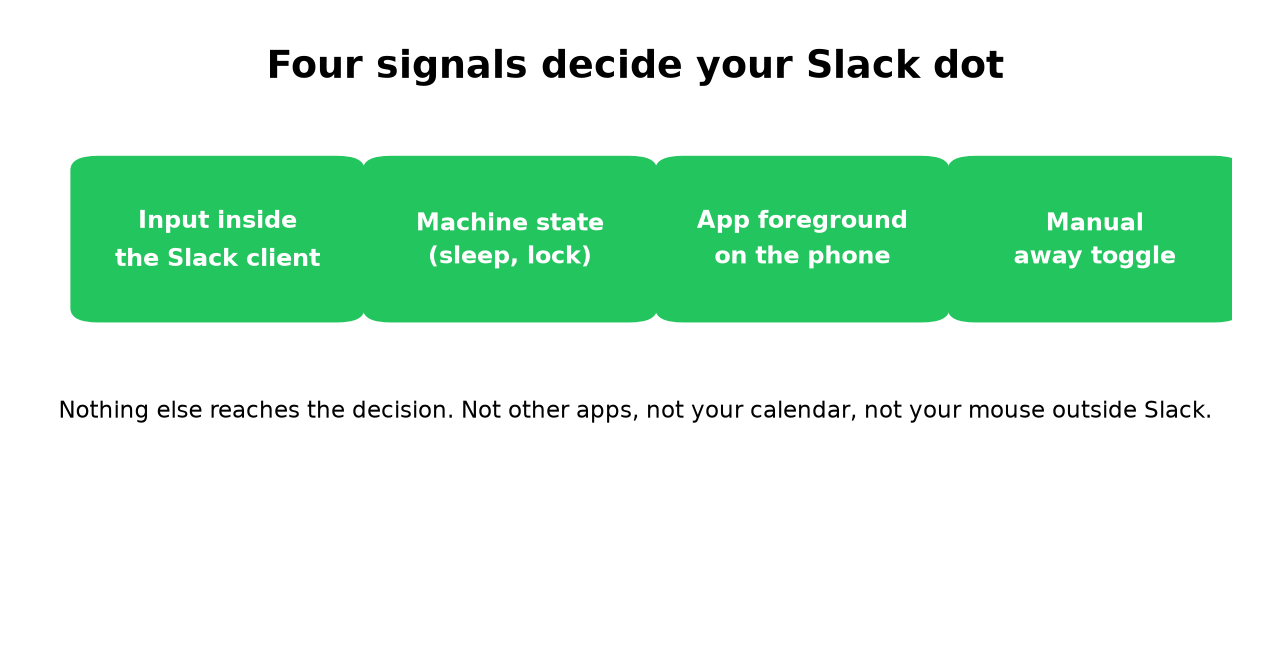
The four signals Slack reads
| Signal | Where it comes from | What it does |
|---|---|---|
| Input in Slack | Clicks, keystrokes and scrolls in the Slack window or tab | Keeps a computer session active for 10 minutes |
| Sleep and lock | The operating system | Sets that computer's session away at once |
| Phone on screen | The mobile app in the foreground | Active while on screen, away when you leave the app |
| Manual away | "Set yourself as away" in your profile menu | Away everywhere until you switch back |
Slack does not read your mouse outside its window, keystrokes in other apps, your screen, or your webcam. We cover that in does Slack track mouse movement.
The order Slack applies them in
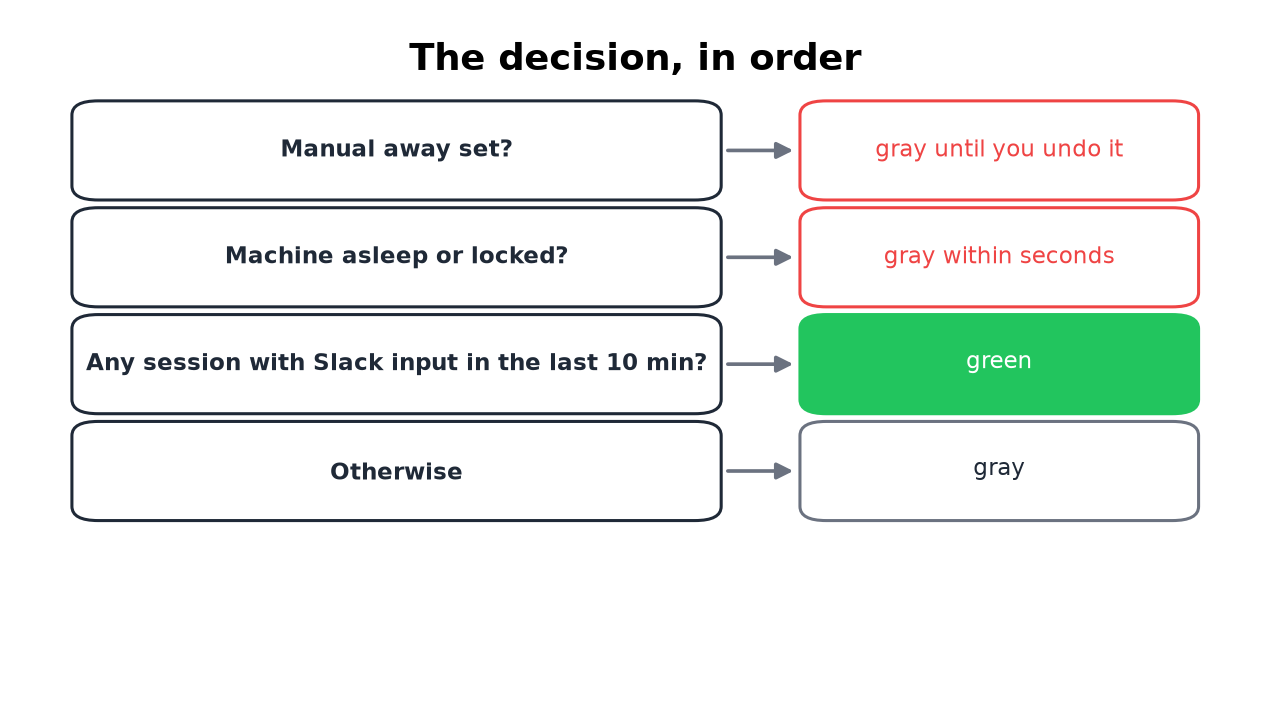
- Manual away comes first. If you chose "Set yourself as away", you stay away until you switch back. Typing and sending messages do not change it.
- Sleep and lock come next. A sleeping or locked computer reports away within seconds. The idle timer does not get to run.
- Then the input window. An awake, unlocked computer stays active for a set time after your last input in Slack, and each new input restarts it. Input in other apps does not count.
- On a phone, being on screen replaces the timer. The app is active while it is in front and away when you leave it.
How several devices combine
Never appear "away" on Slack again
Cloud-based. No downloads. Works 24/7 even when your laptop is off.
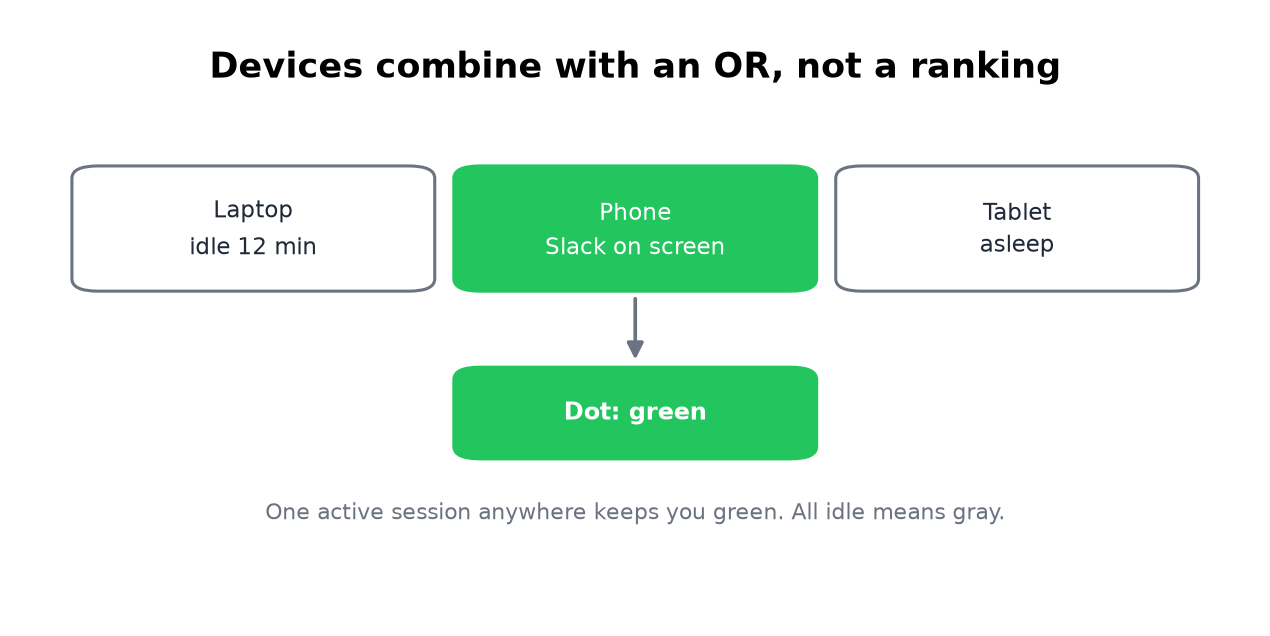
Every signed-in session reports on its own, and your dot shows the result of all of them together: one active session anywhere makes you green, and all sessions idle makes you grey. No device ranks above another.
This explains most "my status changed by itself" reports. A laptop kept you green while you answered on your phone, then the laptop slept, the phone locked, and the last active session disappeared. How to tell these cases apart by timing is in why Slack keeps showing you as away. If the dot stays green when you are gone, see Slack shows me active when I am not.
The connection behind the dot
The Slack app keeps a live connection (a WebSocket) open to Slack's servers and reports activity over it. When that connection drops, after a VPN change, a Wi-Fi switch or a strict proxy, your presence goes stale until the app reconnects. If your dot looks wrong for more than a minute, restart the app or reload the tab to force a fresh connection. The same drop can make every coworker look grey on your screen; that case has its own fix list in Slack showing everyone offline.
This is also why server-side tools work. Anything that connects with your own session tokens counts as a session, with the laptop open or closed. That is the mechanism behind keeping Slack active without touching your computer.
What Slack's API shows about your presence
Slack's users.getPresence method shows the decision from the inside. Ask about another person and you get only active or away. Ask about yourself and Slack returns the parts it combined:
curl -s -H "Authorization: Bearer $SLACK_USER_TOKEN" \
  "https://slack.com/api/users.getPresence"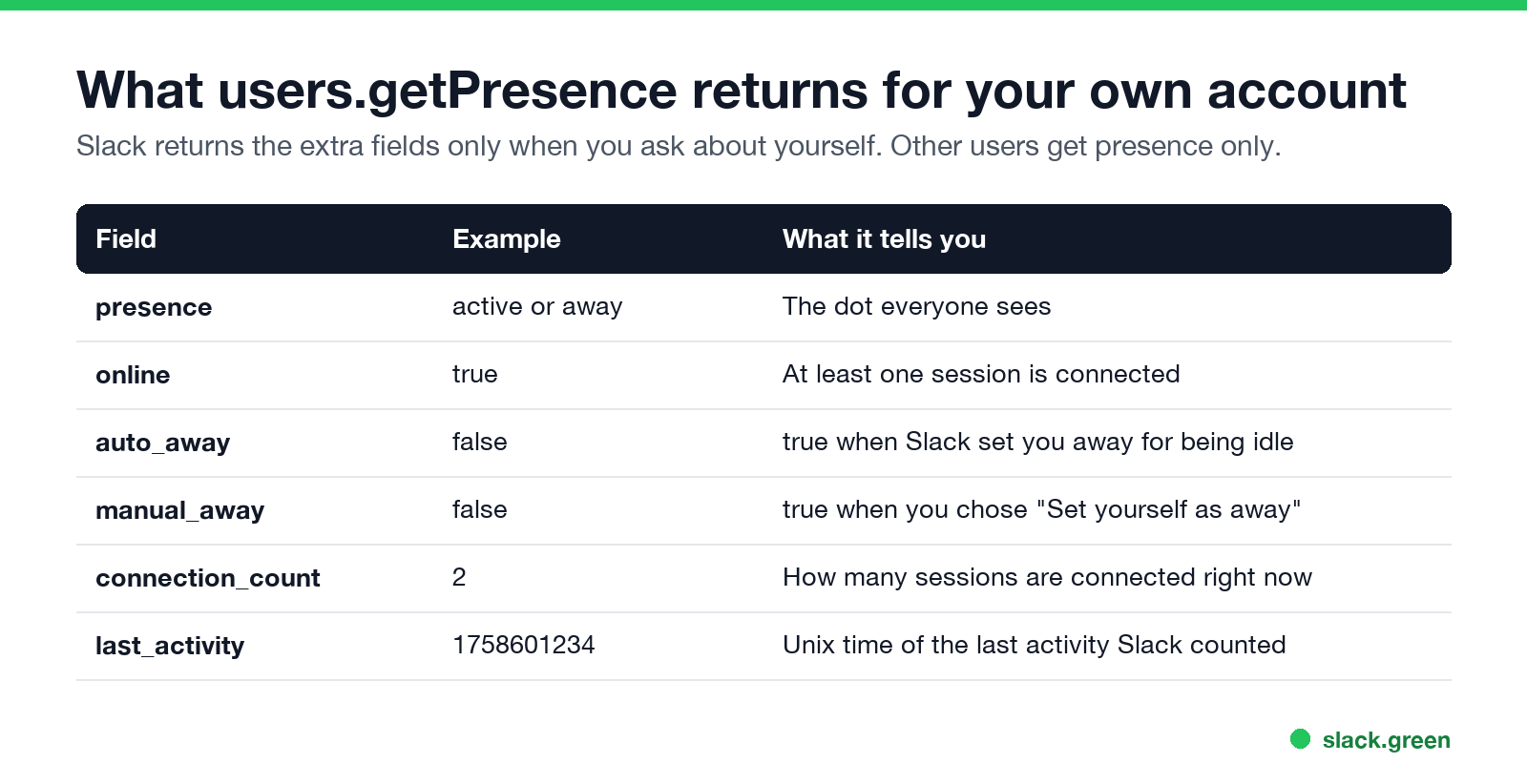
auto_away is true when Slack set you away for being idle.manual_away is true when you chose "Set yourself as away".connection_count is how many sessions are connected right now.last_activity is the last time Slack counted activity from you.The matching write method, users.setPresence, accepts only auto or away. There is no "always active" value. auto hands the decision back to Slack. Code for both methods, in curl and Python, is in our Slack presence API guide.
What the people around you see
Never appear "away" on Slack again
Cloud-based. No downloads. Works 24/7 even when your laptop is off.
Coworkers see a green dot or a hollow grey one. They do not see which signal caused it, how long you have been away, or which device you are on. The same grey dot covers idle, asleep, closed and manual away. What that dot means to them is in Slack away status meaning.
Admins see more, but not live presence history. They see days active and messages posted per person in analytics, and sign-ins with IP address and device in access logs. The full list, plan by plan, is in can Slack be used to monitor employees, and what a presence tool changes in those logs is in will I get caught using Slack Green.
FAQ
When does Slack show you as offline?
Slack has no separate offline state. When you close Slack, sign out, or all your sessions go idle, you show as away with the same hollow grey dot.
Does Slack automatically set you to away?
Yes. On a computer it sets you away after 10 minutes without input in the Slack window, or at once when the computer sleeps or locks. On a phone it sets you away when you leave the app.
Does Slack use my calendar or meetings to set away?
No. Calendar apps can set a status such as "In a meeting", but the dot only follows the four signals above. The dot and the status are separate systems.
How does Slack know I am active if I only read messages?
It does not, unless you scroll or click. Reading without input looks the same as being away from the computer.
Does a huddle keep you active?
Yes, while the huddle runs in the Slack app. Your coworkers also see that you are in a huddle.
Can I change how Slack decides?
No. No plan has a timer setting or an always-active switch, and the API only accepts auto or away. Every method that keeps you green feeds Slack the input signal or holds an active session, compared in how to stop Slack from showing you as away.
Stop Jiggling Your Mouse.
Join hundreds of remote workers who never worry about their Slack status. Set it up once, stay green forever.
Related Articles
Can You See Slack Status History? No, Here Is What Exists
No. Slack shows your active or away dot and your custom status only as they are right now, and keeps no history of either that coworkers or admins can open. Admins on paid plans see a last active date and sign-in logs. How to keep your own status log with the Slack API, from today on.
Slack: Get Notified When Someone Comes Online (No Built-In Alert)
Slack has no alert for when a coworker becomes active. No preference, Workflow Builder trigger or profile button does it. You can watch their green dot, send a message they will see when they return, or run a short script that checks users.getPresence every minute and DMs you.
Slack Active on Multiple Devices: Which One Sets Your Status?
When you use Slack on a phone and a computer at once, one active device is enough to keep you green, and a manual away on any device sets you away on all of them. The rule, common cases, and how notifications pick a device.