
Slack: Get Notified When Someone Comes Online (No Built-In Alert)
Slack has no alert for when a coworker becomes active. No preference, Workflow Builder trigger or profile button does it. You can watch their green dot, send a message they will see when they return, or run a short script that checks users.getPresence every minute and DMs you.
Slack cannot notify you when someone comes online. There is no preference for it, no button on a member's profile, and no Workflow Builder trigger for a change in presence. Microsoft Teams has this feature, but Slack does not. You have three options. You can glance at the person's dot. You can send the message now, so it reaches them when they return. Or you can run a short script that checks users.getPresence every minute and sends you a DM when the dot turns green. The script is below.
Presence is also the thing we work with every day. We build Slack Green, which keeps your own Slack status active from our servers during the hours you set. That same signal is why an online alert in Slack is less reliable than it sounds: a green dot means a Slack window saw input in the last 10 minutes, not that the person is free.
Ways to know when someone is active in Slack
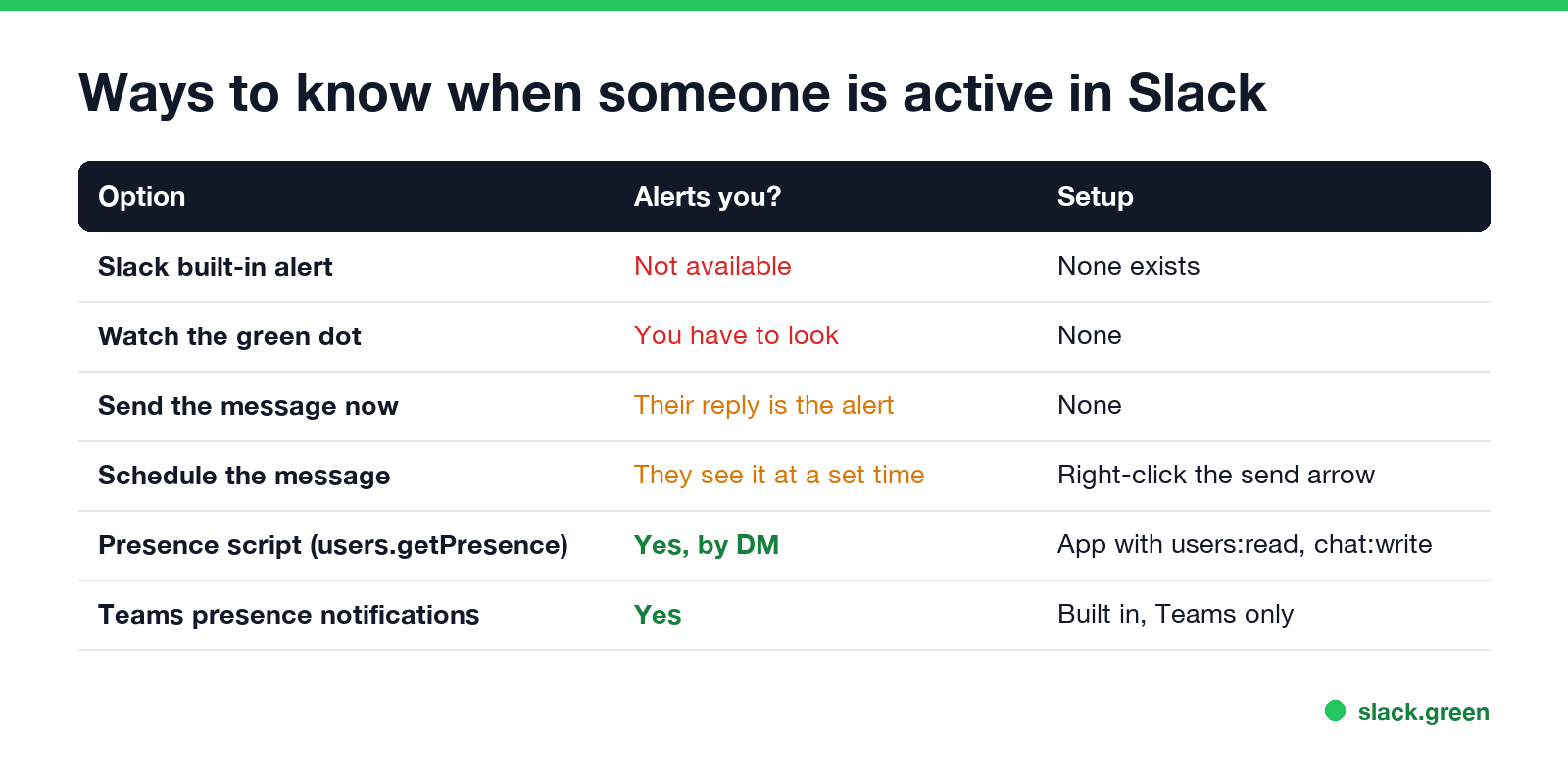
| Option | Alerts you? | Setup | Notes |
|---|---|---|---|
| Slack built-in alert | Not available | None | No preference, profile button or workflow trigger |
| Watch the green dot | No, you have to look | None | Sidebar, DM header and profile show it live |
| Send the message now | They see it on return | None | Their reply is your alert |
| Schedule the message | They see it at a set time | Right-click the send arrow | See how to delay and schedule Slack messages |
Presence script (users.getPresence) | Yes, by DM | Slack app with users:read and chat:write | Checks once a minute |
| Microsoft Teams presence notifications | Yes | Built in | Teams only, for comparison |
For most people the second and third rows are enough. If you wait for a manager to come back, write the message and send it. Slack notifies them when they open it, and their reply tells you they are there.
Why Slack has no online alert
Slack's presence model is simple. A user is active while at least one Slack client is connected, and the person has used it in the last 10 minutes. Otherwise the user is away. Slack's developer docs describe it that way, and the details are in Slack active status explained.
Slack does not publish presence changes to the tools that most people build with:
- • Workflow Builder triggers are messages, emoji reactions, schedules, new channel members, links and webhooks. None of them fire on presence.
- • The Events API sends no presence events at all.
- •
presence_changeevents exist only on the older RTM connection, and you must subscribe to each user withpresence_sub. Only classic Slack apps can open an RTM connection, and Slack stopped letting anyone create classic apps in 2024, so for a new app that route is closed.
Our Slack presence API guide lists each method with its scope and rate limit. The one that works for any app is users.getPresence, which you ask again and again.
Get a DM when someone becomes active (Python script)
Never appear "away" on Slack again
Cloud-based. No downloads. Works 24/7 even when your laptop is off.
You need a Slack app in your workspace with a bot token (xoxb-) and two scopes: users:read to read presence and chat:write to send the DM. Creating one takes a few minutes at api.slack.com/apps, as described in Slack bot token: how to get one. Your workspace may require an admin to approve the app.
Install the official SDK with pip install slack_sdk, then save this as presence_alert.py:
import os
import time
from slack_sdk import WebClient

client = WebClient(token=os.environ["SLACK_BOT_TOKEN"])  # scopes: users:read, chat:write
WATCH = ["U0123ABCD"]   # member IDs of the people to watch
ME = "U0999WXYZ"        # your own member ID; the bot DMs you here
last = {}

while True:
    for uid in WATCH:
        presence = client.users_getPresence(user=uid)["presence"]  # "active" or "away"
        if last.get(uid) == "away" and presence == "active":
            client.chat_postMessage(channel=ME, text=f"<@{uid}> is active in Slack now")
        last[uid] = presence
    time.sleep(60)
Run it with SLACK_BOT_TOKEN=xoxb-... python presence_alert.py. It sends a DM only on a change from away to active, not every minute. To find a member ID, open the person's profile, select the three dots, then Copy member ID.
Three limits to know:
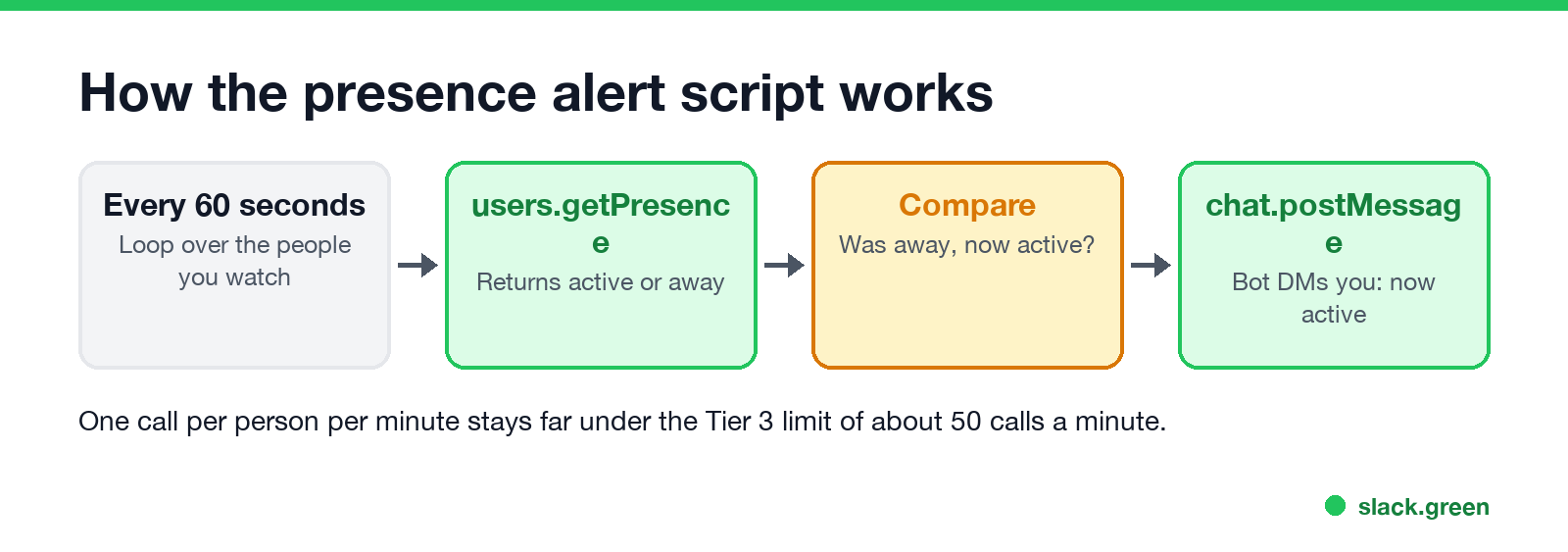
users.getPresence is a Tier 3 method, about 50 calls a minute. One call per person per minute stays well under it for a handful of people.What a green dot does and does not tell you
The alert fires when Slack sees input in one of the person's Slack windows. It does not mean they are free to talk. Someone can be green in a meeting with Slack open on a second screen, or grey while writing code in another app for an hour, because Slack counts only input inside its own window.
The dot also turns green for reasons the person may not control. A phone with Slack open on screen keeps them active, and tools like Slack Green keep the dot green on a schedule. So treat the alert as "Slack is open", and write the message anyway.
Watching when a coworker comes online is also the first step of the dot-tracking that monitoring apps sell. Presence-logging tools use the same users.getPresence loop to build an "online hours" report. What employers can see this way is in can Slack be used to monitor employees. Use the script for one colleague you wait on, not to log a team.
How Teams does it, for comparison
Microsoft Teams has a built-in version. In Teams, open Settings > Notifications and activity > Presence, select Manage notifications, and add the people to track. Microsoft's support page says you then "see when people you work with are available or offline." If your company uses both apps, keep Teams and Slack active covers how the two presence systems differ.
Slack online alert questions
Never appear "away" on Slack again
Cloud-based. No downloads. Works 24/7 even when your laptop is off.
Can Slack notify me when someone is active? Not by itself. You need a script or app that checks users.getPresence and messages you.
Can I get a notification when someone comes online in a Slack DM? No. Opening a DM shows their dot, but Slack sends no alert when it changes.
Does Slack tell people I am watching their status? No. users.getPresence does not notify the person you check.
Can I see when someone was last online in Slack? No. Slack shows only the current dot. See does Slack show last seen.
Stop Jiggling Your Mouse.
Join hundreds of remote workers who never worry about their Slack status. Set it up once, stay green forever.
Related Articles
KeepingYouAwake vs Amphetamine: Which Mac Keep-Awake App to Use
KeepingYouAwake is a free, open-source menu bar switch that runs Apple's caffeinate for you. Amphetamine is a free App Store app with triggers, schedules and a closed-lid mode. Pick KeepingYouAwake for one click and Homebrew, Amphetamine for automation. Neither keeps Slack or Teams active.
Computer Locks After 15 Minutes? How to Tell If Group Policy Set It
A work laptop that locks after exactly 15 minutes, with screen settings greyed out, is almost always following a policy from IT: the Windows machine inactivity limit, a forced screen saver, or an Intune device lock. Security baselines and PCI DSS ask for 15 minutes. How to see which policy it is, and what you can and cannot change.
How to Keep a Citrix Session Active: Find Which Timeout Logs You Out
A Citrix session can end from four different timers: Windows locking inside the virtual desktop, the Citrix session idle timer, the Citrix Gateway session time-out, and the StoreFront web page timeout. Only input from your own device into the Citrix window resets them. How to tell which one hit you and what keeps each one quiet.