
Slack MCP Server: The URL, the Setup, and the 19 Tools We Got
The official Slack MCP server lives at https://mcp.slack.com/mcp and needs a user token from an app with MCP turned on. We built one, connected Claude Code and Codex CLI, sent a message and searched for it, and copied every response.
The official Slack MCP server is at https://mcp.slack.com/mcp. It speaks JSON-RPC over Streamable HTTP and takes a Slack user token (xoxp-) from an app that has the MCP switch turned on. On 30 September 2026 we built that app in a one-person test workspace, connected it to Claude Code and Codex CLI, sent a message and searched for it. The server offered 19 tools with the scopes Slack's docs list for search, reading and sending. It offered 27 after we granted seven more scopes. Every response below is copied from that run.
What you need before any client connects
Slack's docs say only internal apps and apps published in the Slack Marketplace may use MCP. Unlisted distributed apps are blocked. We turned on public distribution for our test app and installed it again, and the server still answered in the app's own workspace. We did not test an install in a second workspace. The server also has no Dynamic Client Registration, so a client cannot register itself. Each client has to use a real Slack app with a fixed client ID and secret.
The app we used was created from a manifest with "is_mcp_enabled": true under settings. That value sets this switch on the app's Agents page in the app settings:
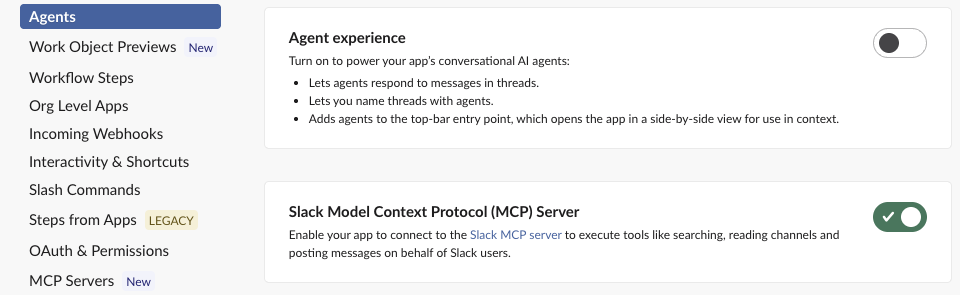
To see what the switch does, we turned it off and sent the same initialize request with a token that had worked a minute earlier. The server returned HTTP 400:
{"jsonrpc":"2.0","id":null,"error":{"code":-32600,"message":"App is not enabled for Slack MCP server access. Please enable it here: https://api.slack.com/apps/A0C5Q29711P/app-assistant"}}A session opened before the switch went off failed the same way, so turning the switch off cuts off open sessions as well as new ones. A request with no token gets HTTP 401, {"code":-32001,"message":"missing_token"}, and a WWW-Authenticate header that points to https://mcp.slack.com/.well-known/oauth-protected-resource.
Getting a user token
The server's metadata names https://slack.com/oauth/v2_user/authorize as the authorization endpoint and oauth.v2.user.access as the token endpoint. It supports PKCE (S256) and client_secret_post. We added http://localhost:8765/callback as the app's redirect URL. Then we opened the authorize URL with the scopes in the scope parameter, clicked Allow, and exchanged the code:
import requests
r = requests.post("https://slack.com/api/oauth.v2.user.access", data={
    "client_id": CLIENT_ID, "client_secret": CLIENT_SECRET,
    "code": code, "redirect_uri": "http://localhost:8765/callback",
}, timeout=30).json()
print(r["ok"], r["token_type"], r["access_token"][:5])
Output: True Bearer xoxp-. This is a user token, so every action runs as you, with your access. A bot token (xoxb-, see how Slack bot tokens work) is not what this endpoint asks for.
The 19 tools, and why you might see 27
With that token, initialize returned serverInfo {"name":"Slack MCP","version":"1.0.0"}, protocol 2025-06-18, and an Mcp-Session-Id header. tools/list returned 19 tools:
| Group | Tools |
|---|---|
| Search | slack_search_public, slack_search_public_and_private, slack_search_channels, slack_search_users, slack_search_emojis |
| Read | slack_read_channel, slack_read_thread, slack_read_canvas, slack_read_file, slack_read_user_profile, slack_list_channel_members, slack_list_user_channels, slack_get_reactions |
| Write | slack_send_message, slack_schedule_message, slack_send_message_draft, slack_add_reaction, slack_create_canvas, slack_update_canvas |
Slack's overview also describes file uploads, lists and creating channels, and those tools were missing. The tool list depends on the scopes on your token. We authorized again and added files:write, lists:read, lists:write, channels:write, groups:write, im:write and mpim:write. Then tools/list returned 27 tools. The 8 new ones were slack_get_file_upload_url, slack_complete_file_upload, slack_create_list, slack_read_list, slack_update_list, slack_add_list_record, slack_update_list_record and slack_create_conversation. If your client shows fewer tools than the docs list, check the token's scopes first. The metadata at /.well-known/oauth-protected-resource lists all 30 scopes the server accepts.
Rate limits follow the Web API. Slack's docs give each tool the tier of the matching method, so sending runs under the chat.postMessage limit. Our Slack API rate limit test logged where those 429s start.
Never appear "away" on Slack again
Cloud-based. No downloads. Works 24/7 even when your laptop is off.
Connecting Claude Code and Codex CLI
Claude Code 2.1.273 accepted the server with the token as a header:
claude mcp add --transport http slack https://mcp.slack.com/mcp -H "Authorization: Bearer xoxp-..."
claude mcp list
claude mcp list printed slack: https://mcp.slack.com/mcp (HTTP) - ✔ Connected, and the session loaded the same 19 tools as mcp__slack__slack_send_message and so on. claude mcp add also has --client-id, --client-secret and --callback-port flags, so Claude Code can run the OAuth flow itself with your app's fixed client. For the Slack-built connection with no app of your own, Slack's changelog of 31 July 2026 names the plugin /plugin install slack@claude-plugins-official.
Codex CLI 0.145.0 read the token from an environment variable:
export SLACK_MCP_TOKEN=xoxp-...
codex exec \
  -c 'mcp_servers.slack.url="https://mcp.slack.com/mcp"' \
  -c 'mcp_servers.slack.bearer_token_env_var="SLACK_MCP_TOKEN"' \
  "send 'hello' to channel D0B7D4VDCUD with slack_send_message"
The first run found the tools, but the send came back as user cancelled MCP tool call. codex exec has no one to approve a write tool, so it cancels the call. Read-only tools such as search ran without approval. After we added -c 'mcp_servers.slack.tools.slack_send_message.approval_mode="approve"', the send worked:
{"message_link":"https://slack-0yr1948.slack.com/archives/D0B7D4VDCUD/p1790771415332219","message_context":{"message_ts":"1790771415.332219","channel_id":"D0B7D4VDCUD"}}In Slack the message shows under your own name, with the app's name below it:

Slack prints that line under every message the app sends for you, so pick an app name you would be happy for coworkers to read.
Search lags a few seconds behind sending
In the same Codex run, slack_search_public_and_private for sg-w2 mcp test ran seconds after the send and returned No results found. The same call about a minute later found the message, with its channel, author, time, permalink and the messages posted just before it. The results are Markdown text inside the JSON, written for a model to read. If an agent sends a message and then searches for it, give search time to catch up, or read the channel with slack_read_channel.
Official server or a community one
korotovsky/slack-mcp-server, a GitHub project that ranks for this query, is a separate open-source server that you run yourself. Its README says it can run in a "stealth mode" with browser session tokens (xoxc/xoxd, explained in what xoxc and xoxd tokens are) and no app install. The official server needs an app that admins can see and approve, with the MCP switch on. If your workspace blocks custom apps, the official route stops at the app approval step. Using someone's browser tokens to get around that step goes around the admin.
FAQ
Does the Slack MCP server work on the free plan?
Our test workspace is on the free plan. Creating the app, turning on MCP, installing it, searching and sending all worked there with no upgrade prompt.
How do I cut off access later?
Delete the app. After we deleted ours, the same token got HTTP 401 with {"code":-32001,"message":"invalid_token"}, and auth.test returned token_revoked. Turning the MCP switch off also stops open sessions, as shown above.
Which clients work without building an app?
Slack's docs list Claude.ai, Claude Code, Perplexity and Cursor as partner clients that connect with Slack's own app. You approve it in an OAuth screen, and your admin can still block it.
Can an admin tool manage the workspace through it?
No. All 27 tools we got act as the signed-in user: search, read, send, canvases, lists, files and channels. None of them manage members, workspace settings or apps.
Stop Jiggling Your Mouse.
Join hundreds of remote workers who never worry about their Slack status. Set it up once, stay green forever.
Related Articles
Slack chat.scheduleMessage: Limits and Errors We Measured
We called chat.scheduleMessage with a bot token for times from 10 seconds to 121 days ahead, listed and deleted the results, and watched which messages still arrived. The limits, the exact errors, and a delete that returned ok but did not stop the post.
Slack Invite Link Expiration: 30 Days, and How to Check One
Slack invite links expire after 30 days and have no longer option. We made links in a test workspace, deactivated them, and found a signed-out check that tells a live link from a dead one.
Slack Pinned Messages: Where Pins Are Now, and the 100-Pin Limit
In the current Slack desktop and web app, pinned messages sit in a Pins tab at the top of the channel. We pinned, edited, deleted and searched pins in a test workspace, and pinned messages until Slack refused the 101st.