
Slack Outgoing Webhooks: Payload, Trigger Words and Timeout, Tested
Slack's legacy Outgoing WebHooks still install on a Free workspace in November 2026. We set one up, sent 15 trigger messages through a tunnel, and logged the exact payload, how trigger words match, which replies Slack posts and when it gives up.
Slack outgoing webhooks send an HTTP POST to your URL when a message in a chosen channel starts with a trigger word, and if your server answers with JSON like {"text": "..."}, Slack posts that answer back in the channel. They are a legacy custom integration that Slack says it does not recommend, but on November 2, 2026 we could still add one to a Free workspace, and it worked. We pointed it at a local server through a Cloudflare quick tunnel and sent 15 test messages. Three results are not in Slack's docs: trigger words match by prefix and ignore case, messages from bots fire the webhook too, and a reply that took 25 seconds still posted while one that took 35 seconds did not.
Is it deprecated?
Not removed, and not recommended. The Outgoing WebHooks page in the Slack Marketplace opens with this note: "this is a legacy custom integration - an outdated way for teams to integrate with Slack. These integrations lack newer features and they will be deprecated and possibly removed in the future. We do not recommend their use." Clicking Add to Slack still opened the setup form for us:
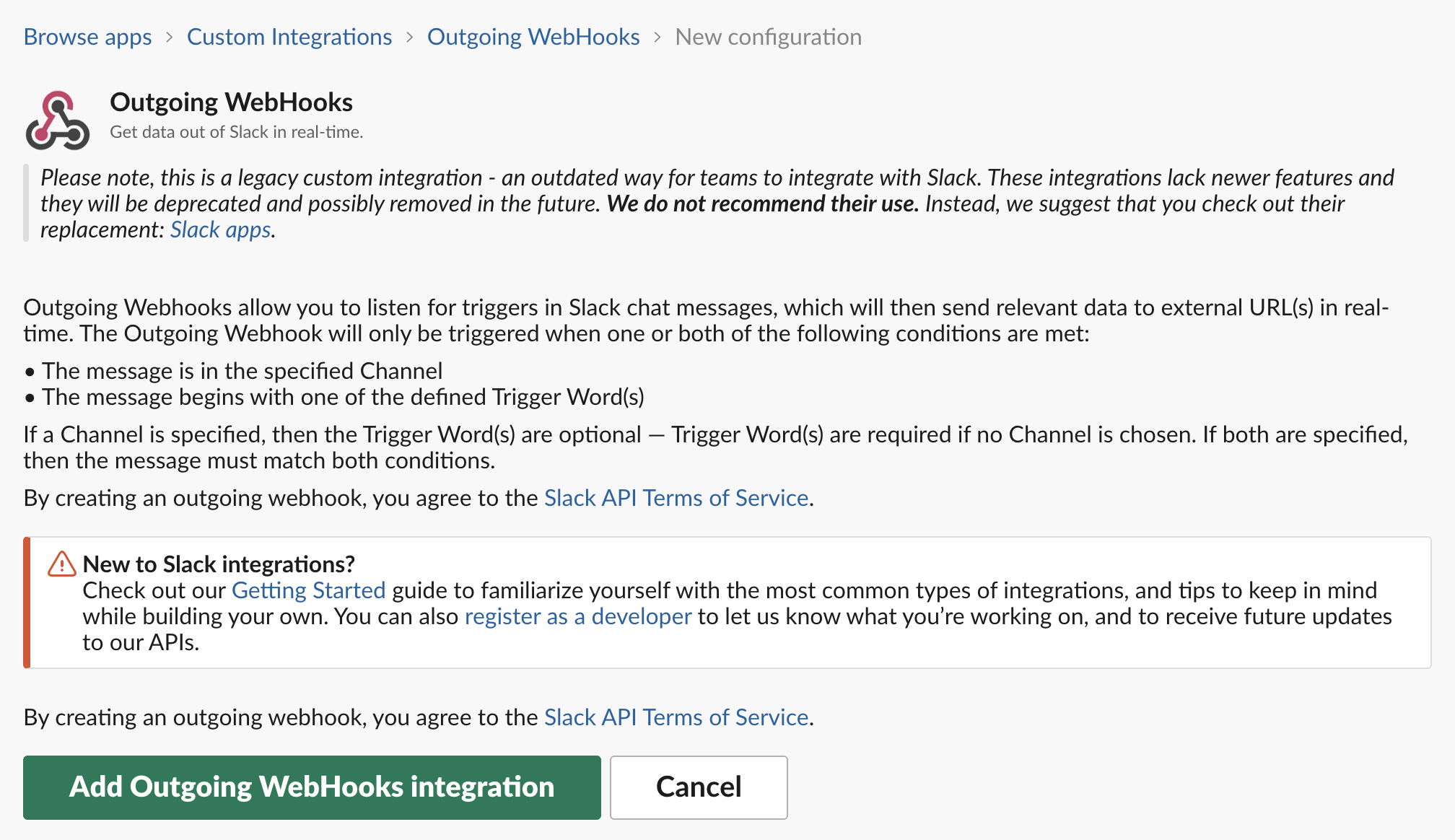
After Add Outgoing WebHooks integration, the settings page asks for:
- • Channel, one public channel, or Any.
- • Trigger Word(s), comma-separated. They are optional when you pick a channel and required when you pick Any.
- • URL(s), one per line. Slack posts to each of them.
- • Token, generated by Slack, with a button to regenerate it. Your server checks it on every request.
- • Descriptive Label, Customize Name and Customize Icon for the replies. Our replies came from "outgoing-webhook" with an APP tag.
We used the channel #w1-1102-lab, the trigger words pingtest,deploy, and a tunnel URL ending in /outgoing. The incoming side, which only posts into Slack, is a different integration with its own status; see are Slack incoming webhooks deprecated.
The payload Slack sends
Each match arrived as a POST with Content-Type: application/x-www-form-urlencoded and User-Agent: Slackbot 1.0 (+https://api.slack.com/robots). This is the body for the message pingtest hello from the lab, with the token removed:
token=<the integration token>
team_id=T0B7JBCDKC1
team_domain=slack-0yr1948
service_id=12461420010231
channel_id=C0CDUG7MRMZ
channel_name=w1-1102-lab
timestamp=1793595092.163689
user_id=U0B7L4YK420
user_name=sieun
text=pingtest hello from the lab
trigger_word=pingtest
bot_id=B0CEV4N3XDW
bot_name=Cron Lab w1
It is form data, not JSON, so parse it as a query string. timestamp is the message ts, which you can pass to chat.postMessage as thread_ts if you answer with an app instead. The request reached our server 0.37 to 0.62 seconds after the message's ts in all 15 tests.
bot_id and bot_name are worth a look. We posted most test messages through the Web API with a user token that belonged to a test app, and those requests carried that app's bot_id even though user_name was a person. A message typed by hand in the Slack composer arrived with no bot_id and no bot_name. So bot_id means "posted through an app", not "posted by a bot user".
How trigger words match
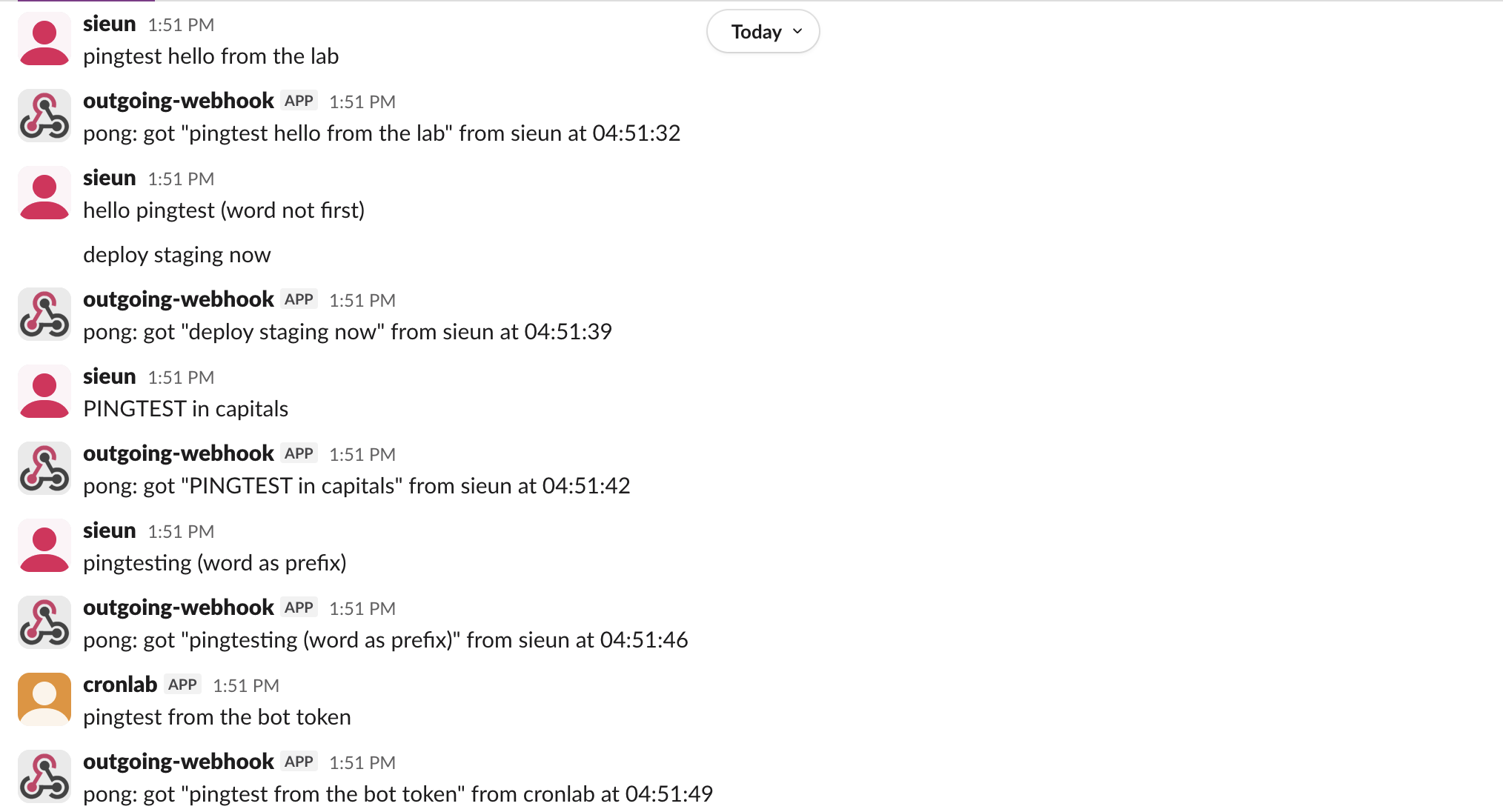
| Message | Fired? | trigger_word sent |
|---|---|---|
pingtest hello from the lab | yes | pingtest |
hello pingtest (word not first) | no | none |
deploy staging now | yes | deploy |
PINGTEST in capitals | yes | PINGTEST |
pingtesting (word as prefix) | yes | pingtest |
pingtest from the bot token (posted by a bot) | yes | pingtest |
pingtest typed in the composer (typed by hand) | yes | pingtest |
The rules we saw:
trigger_word echoes the case the person typed, so compare it in lowercase.pingtesting fired for pingtest, so a short trigger such as go would also fire on good morning.bot_id and ignore those requests, or you can build a loop.Never appear "away" on Slack again
Cloud-based. No downloads. Works 24/7 even when your laptop is off.
What your server can reply
We switched the server's behavior between test messages and watched the channel:
| Server answer | Posted in Slack? |
|---|---|
200 with JSON {"text": "pong: ..."}, at once | yes, 0.5 to 0.76 s after the trigger |
200 with JSON, after waiting 4, 8, 15, 20 or 25 s | yes, each one |
200 with JSON, after waiting 35 s | no |
200 with plain text plain text pong | no |
200 with an empty body | no |
500 with boom | no, and no error shown to anyone |
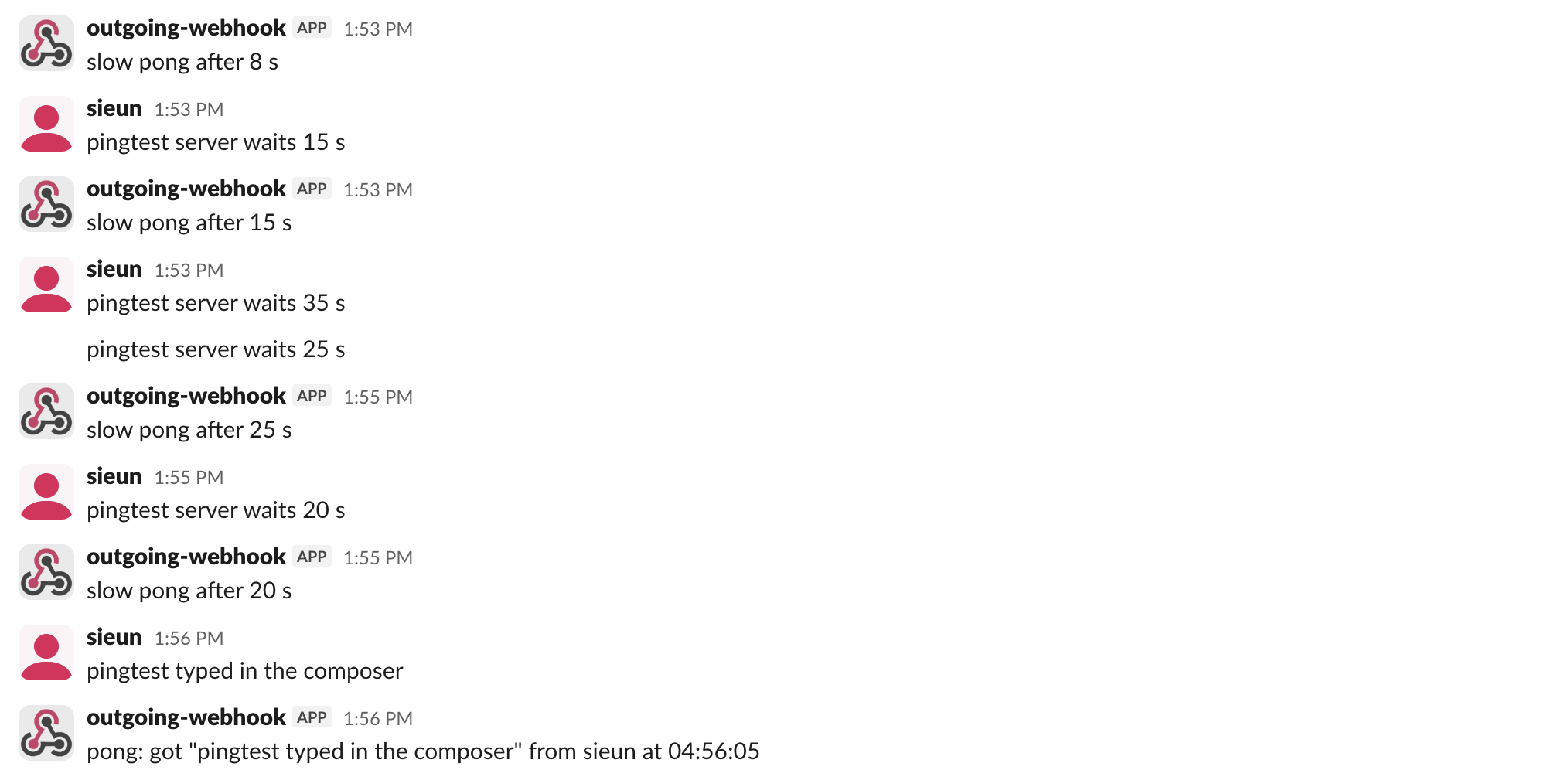
So the reply must be a JSON object with text; plain text is ignored. The cut-off sits somewhere between 25 and 35 seconds in our runs, which is far longer than the 3 seconds Slack allows for slash commands and interactions. We did not narrow it further. Slack sent no second request after the 500 or the 35-second timeout, so a failed delivery is lost; if you need the work done, queue it and answer fast.
A minimal server
This is the handler we checked with three local requests: the right token got 200 with {"text": "got 'pingtest' from sieun"}, a wrong token got 403, and a request with a bot_id got an empty 200 and no reply.
import json, os
from http.server import BaseHTTPRequestHandler, HTTPServer
from urllib.parse import parse_qs

TOKEN = os.environ["OUTGOING_WEBHOOK_TOKEN"]  # from the integration's settings page

class Hook(BaseHTTPRequestHandler):
    def do_POST(self):
        body = self.rfile.read(int(self.headers["Content-Length"])).decode()
        form = {k: v[0] for k, v in parse_qs(body).items()}
        if form.get("token") != TOKEN:
            self.send_response(403); self.end_headers(); return
        if form.get("bot_id"):          # skip messages posted by apps and bots
            self.send_response(200); self.end_headers(); return
        reply = {"text": f"got {form['trigger_word']!r} from {form['user_name']}"}
        out = json.dumps(reply).encode()
        self.send_response(200)
        self.send_header("Content-Type", "application/json")
        self.end_headers()
        self.wfile.write(out)

HTTPServer(("127.0.0.1", 8798), Hook).serve_forever()
The bot_id check also skips people who post through an app with a user token, as shown above. Drop it if you need those messages and guard against loops another way. Outgoing webhooks have no request signature, so the shared token is the only check; Slack's newer apps sign each request instead. To expose a local server for a test like ours, a quick tunnel works; our page on OAuth redirect URLs on localhost covers what Slack accepts for local URLs.
Outgoing webhooks vs the Events API
The replacement Slack points to is an app that subscribes to message events and replies with chat.postMessage. You give up the instant JSON reply and get request signing, private channels and threads, and any word anywhere in the message instead of a prefix at the start. Our list of Events API event types shows the payloads we logged for those events, and Slack bot not responding covers the setup mistakes we reproduced with them. Keep an outgoing webhook only for a small internal command in one public channel where losing a message now and then does not matter.
Stop Jiggling Your Mouse.
Join hundreds of remote workers who never worry about their Slack status. Set it up once, stay green forever.
Related Articles
Send a Slack Message From a Cron Job: 4 Failures We Hit and the Fix
A Slack webhook call that works in your terminal often fails from cron. We ran six crontab entries and a launchd agent on a Mac for 10 minutes, logged each failure (empty env var, % in crontab, JSON quoting, macOS privacy block) and the script that posted every minute.
Slack API link_names: What It Still Links, Tested on 20 Messages
Slack's docs say link_names now links only user groups. On November 2, 2026 a bot token with link_names=true still turned @name, #channel and @here into real mentions, in plain text, section blocks and incoming webhooks.
Slack DND API: dnd.setSnooze, dnd.info and endSnooze, Tested
Slack's Do Not Disturb API is five methods: dnd.setSnooze, dnd.endSnooze, dnd.endDnd, dnd.info and dnd.teamInfo. Setting DND needs a user token. We ran each one on October 31 and found that dnd.endSnooze inside a scheduled DND window also ends the schedule.